Codex now works on a locked Mac, and Goal mode redraws the agent boundary
OpenAI added Appshots, Goal mode GA, browser annotations, locked computer use, and admin analytics to Codex. The update shows coding agents becoming longer-running workers.
- What happened: OpenAI bundled
Appshots,Goal modeGA, locked computer use, browser annotations, and enterprise analytics into Codex.- The changes appeared in the May 21, 2026 ChatGPT release notes and the Enterprise/Edu release notes.
- Why it matters: Coding agents are moving from one-shot prompts toward goals, screens, remote approvals, and organizational controls.
- Builder impact: Frontend checks, GUI bug reproduction, and long refactors get easier, but permission, token, and remote-control policies become harder to ignore.
- Enterprise admins should look at policies such as
remote_computer_use = falsetogether with Codex analytics.
- Enterprise admins should look at policies such as
- Watch: Locked computer use is not general remote unlock. It is a narrow feature tied to an active trusted computer-use turn.
OpenAI shipped a quiet but important Codex update on May 21, 2026. In the ChatGPT release notes it appeared under "richer context, goal mode, browser improvements, and remote locked use." In the Enterprise/Edu release notes it appeared with a longer enterprise framing: goal mode, browser improvements, remote locked use, admin analytics, and plugin sharing status. That sounds like a collection of product improvements. Taken together, it is a more meaningful shift: Codex is moving further from "fix this code once" toward "hold a goal, inspect a screen, keep working, and remain governable."
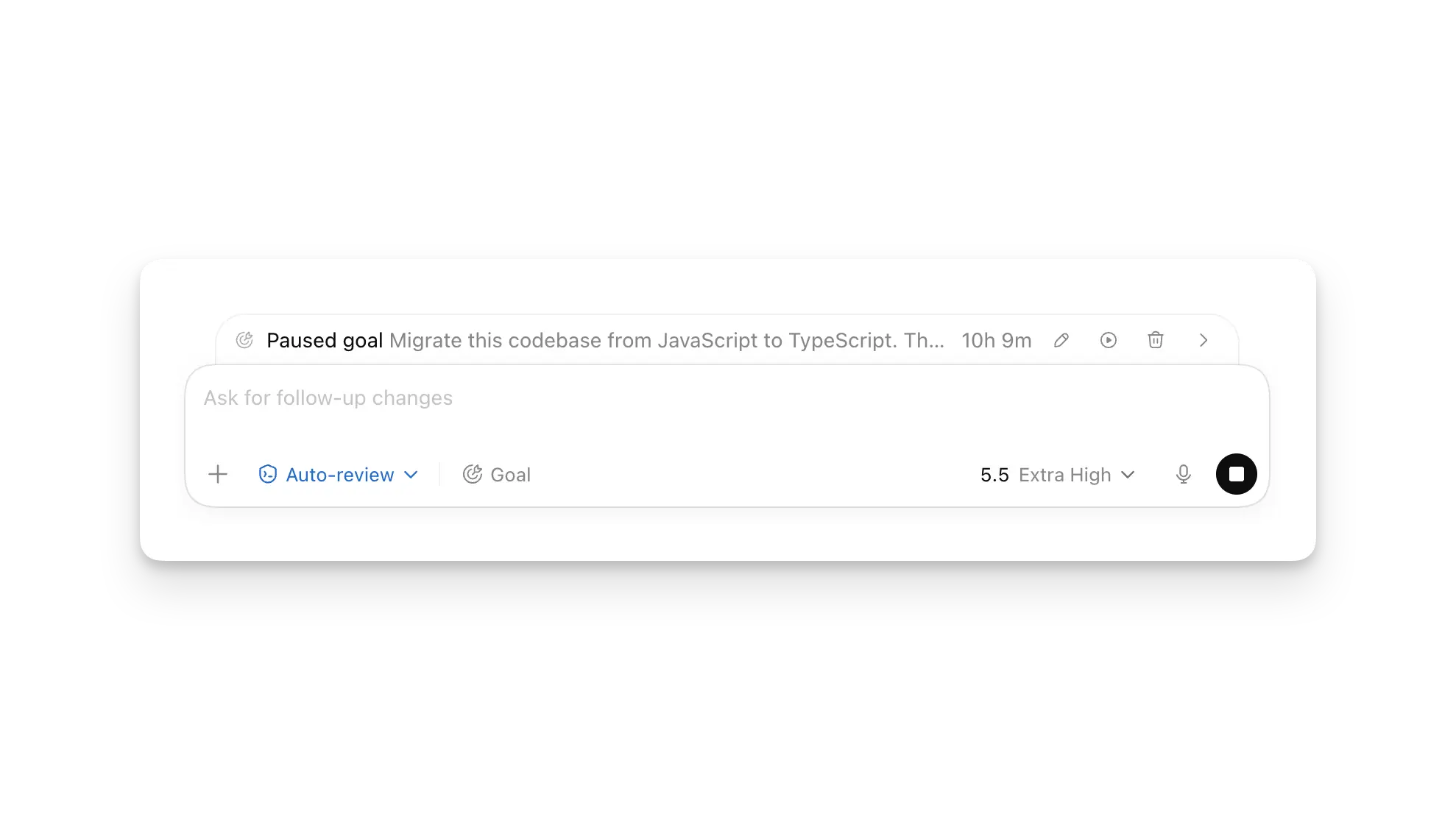
The bundle has four main pieces. Appshots lets a user attach the frontmost Mac app window directly to a Codex thread. Goal mode gives Codex a persistent objective and completion condition for longer tasks. In-app browser annotations and browser-use improvements make rendered web UI part of the feedback loop. Locked computer use lets Codex continue certain desktop-app work even after the user's Mac is locked, if the right conditions and approvals are in place.
This is not only a convenience release. For a coding agent to fit inside a real team's workflow, it needs three things. It must receive current context quickly. It must keep a long goal in view. And it must verify surfaces that are difficult to describe through the CLI alone, such as browser previews, desktop apps, simulators, admin panels, and modal dialogs. This Codex update aims at all three at once.
Appshots compresses context gathering
Appshots is a Codex app feature on macOS that attaches the active app window to a thread. OpenAI's Developers documentation says users can trigger an appshot with both Command keys or a configured custom shortcut. The captured appshot includes the visible window image and, when the app exposes it, visible text plus some off-screen text. Once attached, it behaves like a normal Codex attachment and is stored locally in the session files.
The interesting part is not that Codex can receive a screenshot. The interesting part is that "show the agent what I am looking at" becomes a first-class interaction. Until now, passing GUI state to a coding agent often meant describing the screen in prose, uploading a screenshot, copying logs, inspecting the DOM, or pasting a long error message. Appshots reduces that starting motion to one gesture.
That matters for API references, emails, calendar entries, design previews, settings screens, error dialogs, and undocumented SaaS interfaces. These are common development contexts, but they do not always live cleanly inside repository files. If a developer can say "look at this screen and fix the flow," more work can start from the actual state the developer sees.
There are limits. OpenAI's Appshots documentation says that for apps and websites such as Google Docs, Gmail, Google Sheets, and Google Slides, Codex receives the visible screenshot rather than the entire document or off-screen text. In those cases, a plugin or structured integration can be a better data path. Appshots is therefore not a replacement for real data access. It is a fast visual-context entry point.
Even with that boundary, the usage pattern changes. Design QA, local preview bugs, admin console configuration, visual regression checks, and desktop-app issues become easier to pull into the same thread where the code change happens. The agent can still misunderstand the screen, but the first-mile explanation cost falls sharply.
Goal mode turns a prompt into a work contract
Goal mode is the most important structural change in the release. OpenAI's Codex prompting documentation describes it as a persistent objective that Codex should keep in mind during longer work. When a user sets a goal with /goal, the goal becomes both the starting prompt and the completion condition. Codex uses it to decide what to do next and whether the task is finished.
That changes the default interaction with a coding agent. A normal prompt often asks for a single patch: fix this bug, add this component, update this test. A goal can describe a verified state: move this module to the new API, keep the public interface stable, remove explicit any, and make the existing test suite plus pnpm build pass. The work may span many steps, but the agent has a persistent yardstick.
OpenAI's docs also make the user side of the bargain clear. A good goal should include a concrete outcome, measurable target, and test criteria. "Make the code better" is a poor goal. "Reduce the home page time to interactive below one second and verify it with this benchmark" is much better. The longer an agent works, the more expensive vague instructions become.
This is where the coding-agent race has been moving. Claude Code, Codex, Google Antigravity, Cursor-style tools, and GitHub Copilot coding agent are all competing less on autocomplete alone and more on work continuity: repository exploration, test execution, PR edits, browser checks, and long context. Goal mode is OpenAI's explicit work-contract layer for that direction. For individual developers it is a feature. For teams, it changes how specs, review checkpoints, and completion criteria should be written.
Browser annotations change frontend feedback
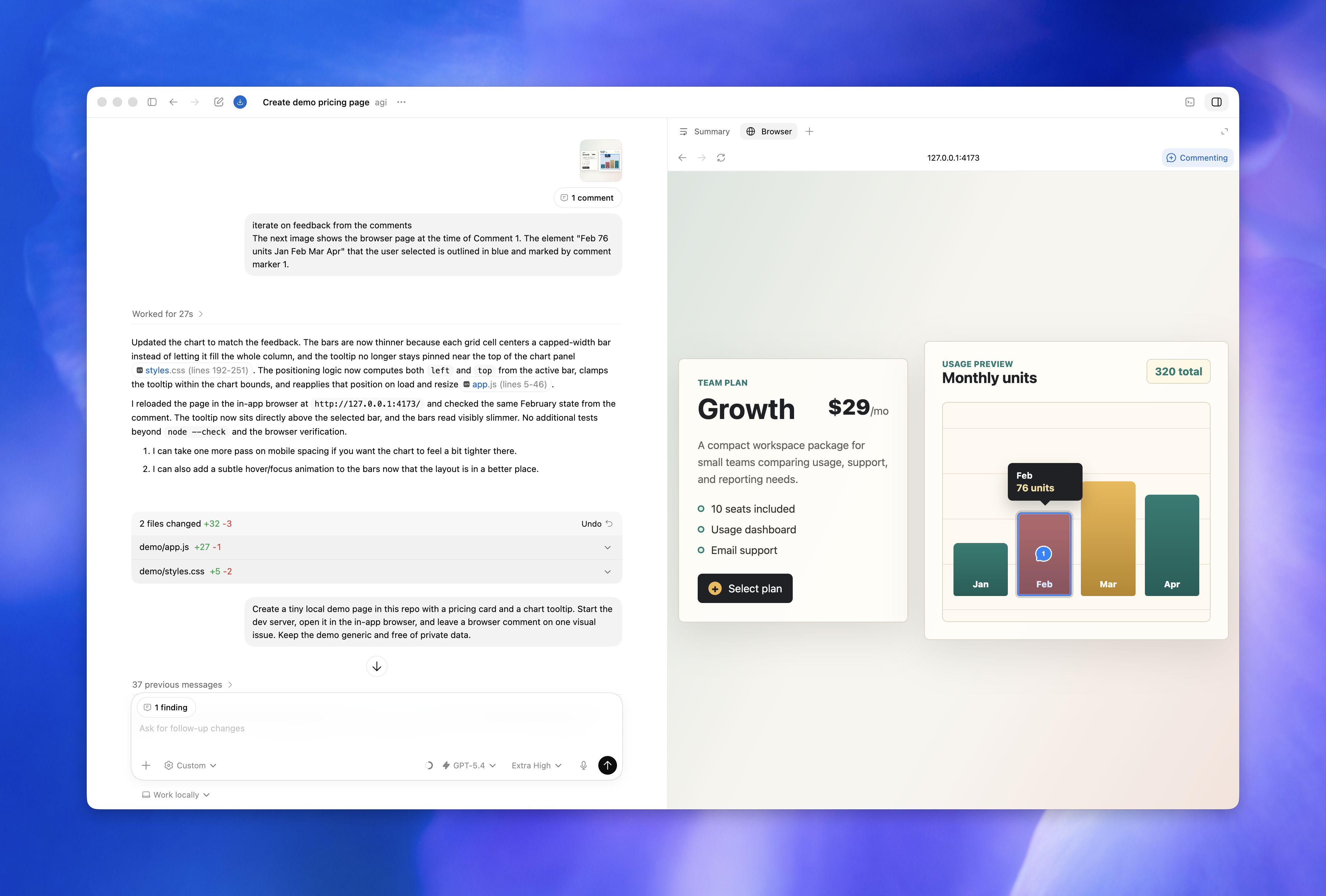
The in-app browser was already a key part of Codex. OpenAI Developers describes it as a shared view where Codex and the user can inspect a rendered web page inside a thread. Local development servers, file-backed previews, and public pages without login are the natural targets. The documentation is also explicit about its limits: if a task needs a signed-in browser profile, cookies, extensions, existing tabs, or an authenticated flow, the user should use a regular browser or the Codex Chrome extension instead.
The May 21 release notes mention in-app browser annotations and browser-use improvements together. The Enterprise/Edu notes list advanced annotation mode, faster asset extraction, read-only JavaScript context, tab grouping usability, less Chrome extension tab clutter, and reliability improvements. The ChatGPT release notes frame annotations as a way to give more precise styling feedback.
That is practical for frontend work. "The price badge on the third card is too low on mobile" is hard to convey with text alone. A screenshot with an arrow helps, but it still needs to be connected back to the app state and the code. A browser comment in the shared Codex view brings the visual feedback, the page state, and the work thread closer together.
The boundary matters as much as the capability. The in-app browser is not a full production browser. It is well suited to local previews and public pages, but not to payment flows, private SaaS dashboards, admin consoles, or workflows that depend on the user's profile. For those surfaces, the right tool is the Chrome extension or computer use. That separation is a security feature, not a nuisance. Teams need to know which pages an agent can inspect directly and which pages require stronger user approval.
Locked computer use is powerful because it is narrow
Locked computer use is the release's most provocative feature. OpenAI's Computer Use documentation says computer use lets Codex see and operate macOS GUI apps. It requires Screen Recording and Accessibility permissions. With approval, Codex can click, type, move through menus, and interact with the clipboard in allowed apps. The target use cases are desktop apps, iOS simulator flows, browser flows, settings changes, and GUI-only bugs that cannot be handled cleanly through CLI or structured APIs.
Locked computer use goes one step further. If a user starts a Codex task from a connected device and that task needs to continue using desktop apps, Codex can keep working after the Mac is locked. OpenAI says the feature installs an Apple authorization plug-in that participates in the macOS unlock flow. But the docs also stress what it is not: it is not a general remote unlock path. It applies only to a short window for an active trusted computer-use turn, and it does not let arbitrary apps or local processes unlock the computer.
The safeguards are concrete. During the temporary unlock, Codex covers all displays. If local keyboard or pointer input is detected, the Mac locks again and automatic unlock stops until the user unlocks manually. Automatic unlock is limited to the active computer-use turn, and the authorization window is short. The feature is powerful precisely because the product boundary is narrow.
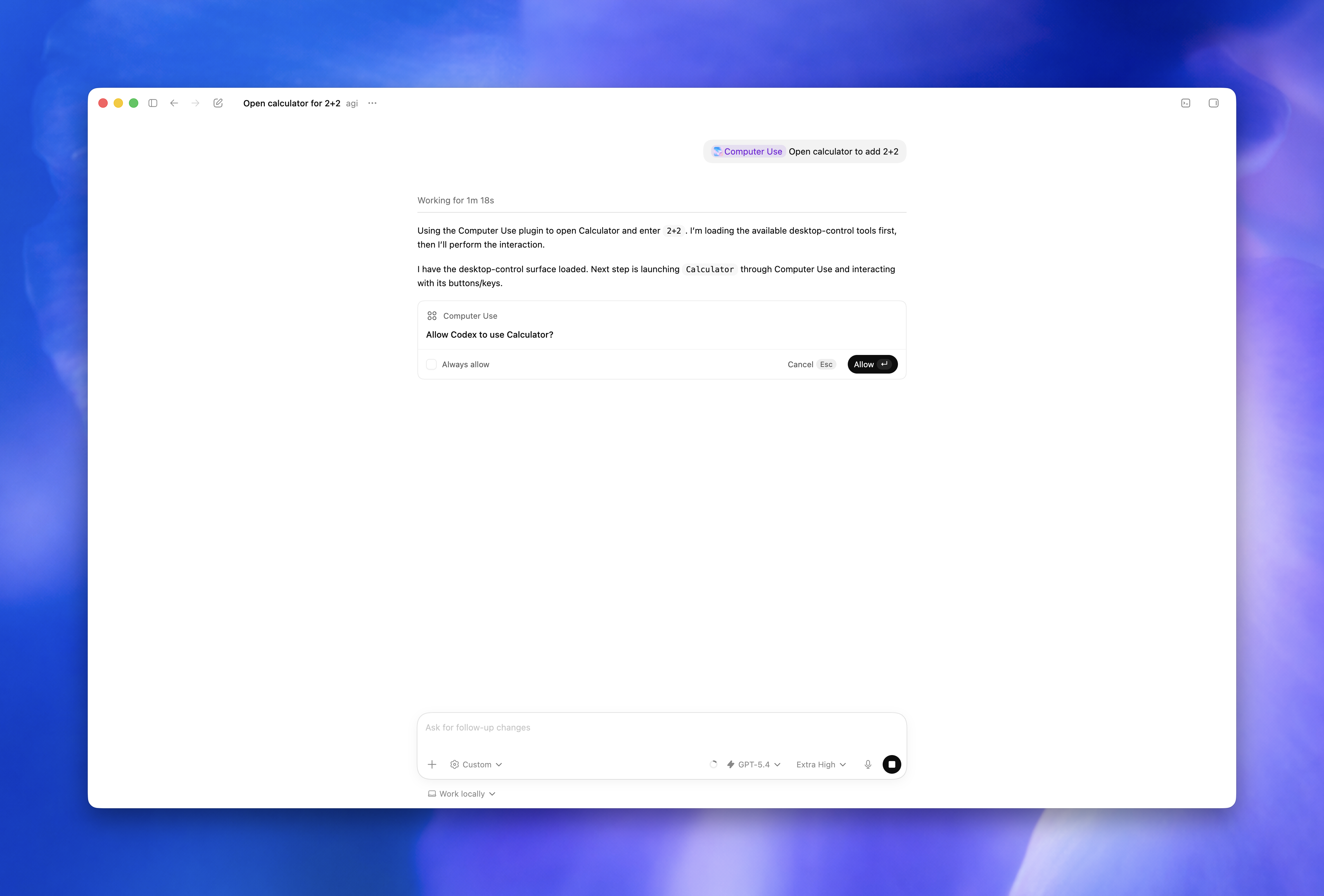
MacRumors covered the update from the user-facing angle: Codex can use Mac apps even when the Mac is locked. The article cited OpenAI Developers' X post saying a user could send Codex a task from a phone and let it operate apps even if the Mac screen was off or locked. That phrasing is memorable, but the product conditions are more complex. Computer Use plugin installation, Screen Recording and Accessibility permissions, per-app approval, region limits, admin policy, and sensitive-action approvals all matter.
The Enterprise/Edu release notes include one especially important control: administrators can disable the feature with a policy such as remote_computer_use = false. For an individual user, locked use looks like a way to keep work moving while away from the desk. For an organization, it creates a governance question. Which apps are allowed? Which regions are allowed? Which actions always require a human present? Where are the logs and approvals reviewed?
The management surface of coding agents is expanding
One less flashy but important part of the release is Enterprise admin analytics. OpenAI says the global admin console now includes Codex analytics for active users, credits and tokens, threads and turns, user leaderboards, plugin usage, accepted lines of code, model usage, and a console-aligned UI. That is a signal that Codex is not being positioned only as a personal productivity tool.
When teams adopt coding agents seriously, managers and platform teams have to watch at least three things. The first is cost. Goal mode and long-running agent work can consume more tokens and credits than short prompts. Some users on Reddit also reported higher token consumption when experimenting with Goal mode. Individual anecdotes do not prove a general trend, but they do fit the expected economics of longer agent loops.
The second is permission. Appshots can send screen content and text into a thread. The in-app browser must treat page content as untrusted context. Computer use may interact with signed-in browsers or desktop apps. Locked computer use extends automation beyond the moment the Mac is visibly unlocked. Each capability is useful, but without prompts, allow lists, region constraints, and admin policies, it becomes difficult to deploy responsibly.
The third is quality. A metric such as accepted lines of code is tempting, but it is not enough. Teams still need to know whether the code built successfully, whether tests were added or updated, whether rollback is easy, and whether security review happened. The more Goal mode helps agents keep moving, the larger the review unit can become. Good analytics should explain not only usage, but also the risk and output attached to that usage.
| Feature | Bottleneck it addresses | New control question |
|---|---|---|
| Appshots | Passes app screens, errors, and design states without long descriptions. | Should sensitive screens and exposed text enter thread context? |
| Goal mode | Keeps completion criteria alive across refactors, performance work, and repeated fixes. | If the goal is not testable, how large can cost and scope become? |
| In-app browser | Lets Codex inspect rendered web UI and respond to visual annotations. | Where is the line between unauthenticated preview work and signed-in browser work? |
| Locked computer use | Lets a remote-started GUI task continue after the Mac is locked. | Which app allow lists, region limits, approval logs, and admin-disable policies are required? |
The competition is shifting from IDE features to work operations
This update should not be read as a Codex-only event. Anthropic's Claude Code, Google Antigravity, Cursor, and GitHub Copilot coding agent are all moving from "suggest code" toward "take a task." The differences are in which work surface each product emphasizes. Some tools are strongest inside the IDE. Some are strongest in cloud tasks and PR review. Some are terminal-first. Codex is trying to connect Mac apps, browser previews, mobile remote access, Goal mode, and enterprise analytics into one operating loop.
The upside is clear. A developer can show another app, set a goal, inspect the browser result, leave the desk, and approve work from a phone. That is especially useful for frontend work, design systems, internal tools, QA automation, simulator workflows, and GUI bug reproduction. The agent is no longer only changing files. It is increasingly expected to inspect the visible result.
The risk comes from the same place. If an agent can see the screen and click apps, the user is delegating more authority. A signed-in browser action may be treated by a website as the user's own account action. An Appshot may include customer data or internal documents. A long Goal mode run can turn a small misunderstanding into a large diff. Convenience and control expand together.
So the core of the release is not simply "Codex can touch a locked Mac." The better question is: what permission model does a coding agent need if it is expected to keep working? OpenAI has written many limits into the documentation. The in-app browser is suited to unauthenticated pages. Computer use requires app-level approval. Locked use is not general remote unlock. Enterprise admins can disable remote computer use by policy. Those boundaries are part of the product.
What development teams should do with this
The immediate lesson for teams is less about trying every new feature and more about designing work well. If a team uses Goal mode, the goal should be testable. "Refactor this" is weak. "Move this module to the new API, keep the public behavior stable, and make the existing test suite plus pnpm build pass" is much stronger. Long tasks should start with review checkpoints, and agent-created diffs should be kept small enough to review.
If a team uses Appshots or Computer Use, it needs a screen-sharing policy for agents. Customer data, payment screens, production consoles, credential managers, and admin privilege surfaces should be closed by default unless the task requires them. OpenAI's Computer Use documentation also recommends keeping sensitive apps closed unless needed and requiring the user to be present for account, security, privacy, network, payment, and credential-related settings.
Browser verification is worth using more aggressively. Local development servers and public previews fit the Codex in-app browser well. Layout overflow, hover states, chart labels, mobile breakpoints, and annotation-driven styling fixes are exactly the kinds of issues tests often miss. But login-heavy flows, browser extensions, cookies, and existing profile state belong outside the in-app browser boundary.
For administrators, Codex analytics should not be treated only as a cost dashboard. Active users and tokens are the beginning. More important questions are which plugins are being used, which models drive cost, which teams produce many accepted lines but also many review failures, and where high-privilege features such as locked computer use are enabled. The point of agent governance is not to suppress usage. It is to make risky automation visible.
A small release note points to a larger direction
OpenAI's May 21 Codex update is not flashy in the way a major model launch is flashy. There is no benchmark headline and no simple "smarter by X percent" message. Instead, the release pulls real agent-work problems into the product surface: how to provide context, how to preserve a goal, how to inspect the screen, how far work can continue when the user steps away, and how an organization can see and constrain that work.
Those questions are likely to define the coding-agent market more than raw model scores alone. Model capability will keep improving, but team adoption depends on permissions, context, review, observability, cost, and rollback. Appshots and Goal mode are developer-experience features. Locked computer use and Enterprise analytics are governance features. The important signal is that they shipped in the same Codex release bundle.
Coding agents are no longer well described as the next step after autocomplete. They are becoming temporary workers inside a developer's environment. A worker needs a goal, a view of the work surface, permission at the right moments, and a record that the organization can inspect. "Works on a locked Mac" is therefore less a stunt than a boundary test. Codex's new boundary is a boundary of convenience, but also a boundary of control.
Sources
- OpenAI Help Center, ChatGPT Release Notes
- OpenAI Help Center, ChatGPT Enterprise & Edu Release Notes
- OpenAI Developers, Appshots
- OpenAI Developers, Codex Prompting and Goal mode
- OpenAI Developers, In-app browser
- OpenAI Developers, Computer Use
- MacRumors, OpenAI's Codex Can Now Use Your Mac Even When It's Locked
- Reddit r/codex, Codex Update - 5/21/2026
- Reddit r/CodexAutomation, Codex app 26.519 + Codex CLI 0.133.0