VS Code Copilot Sessions Add Remote Agents and Terminal Safety
GitHub Copilot’s May VS Code updates bundle Agents Window, remote sessions, BYOK controls, and terminal risk checks.
- What happened: GitHub published the May VS Code Copilot release bundle on June 3, 2026, covering
v1.120-v1.123.- The update includes Agents Window Stable preview, remote agents,
AHP, session sync, air-gapped BYOK, and terminal risk assessment.
- The update includes Agents Window Stable preview, remote agents,
- Why it matters: Copilot is moving from an in-editor chat pane toward a session operations surface for parallel agent work.
- Watch: Remote hosts and account-level sync make tunnel authentication, approval policy, audit logs, and sensitive terminal input part of the developer workflow.
- GitHub’s cloud-agent docs point to signed commits, session logs, hidden-character filtering, and human review before merge as mitigation layers.
GitHub published GitHub Copilot in Visual Studio Code, May releases on June 3, 2026. The changelog covers VS Code Copilot releases from v1.120 through v1.123, a batch of May and early-June updates that puts several agent features into the same product story. GitHub’s own framing is an "agent-first experience": Copilot is no longer only a chat box beside the editor, but a place where developers create, inspect, resume, and compare work sessions.
This arrives after a dense Copilot news cycle. On June 1, GitHub switched Copilot toward AI Credits. On June 2, GitHub expanded the Copilot SDK general availability story, Copilot app technical previews, Copilot CLI improvements, and MAI-Code-1-Flash availability. The VS Code release is different because it changes the surface developers touch every day. It decides how an agent session appears inside the IDE, where that session runs, which model path it uses, and how terminal authority is exposed to the user.
Agents Window enters Stable preview
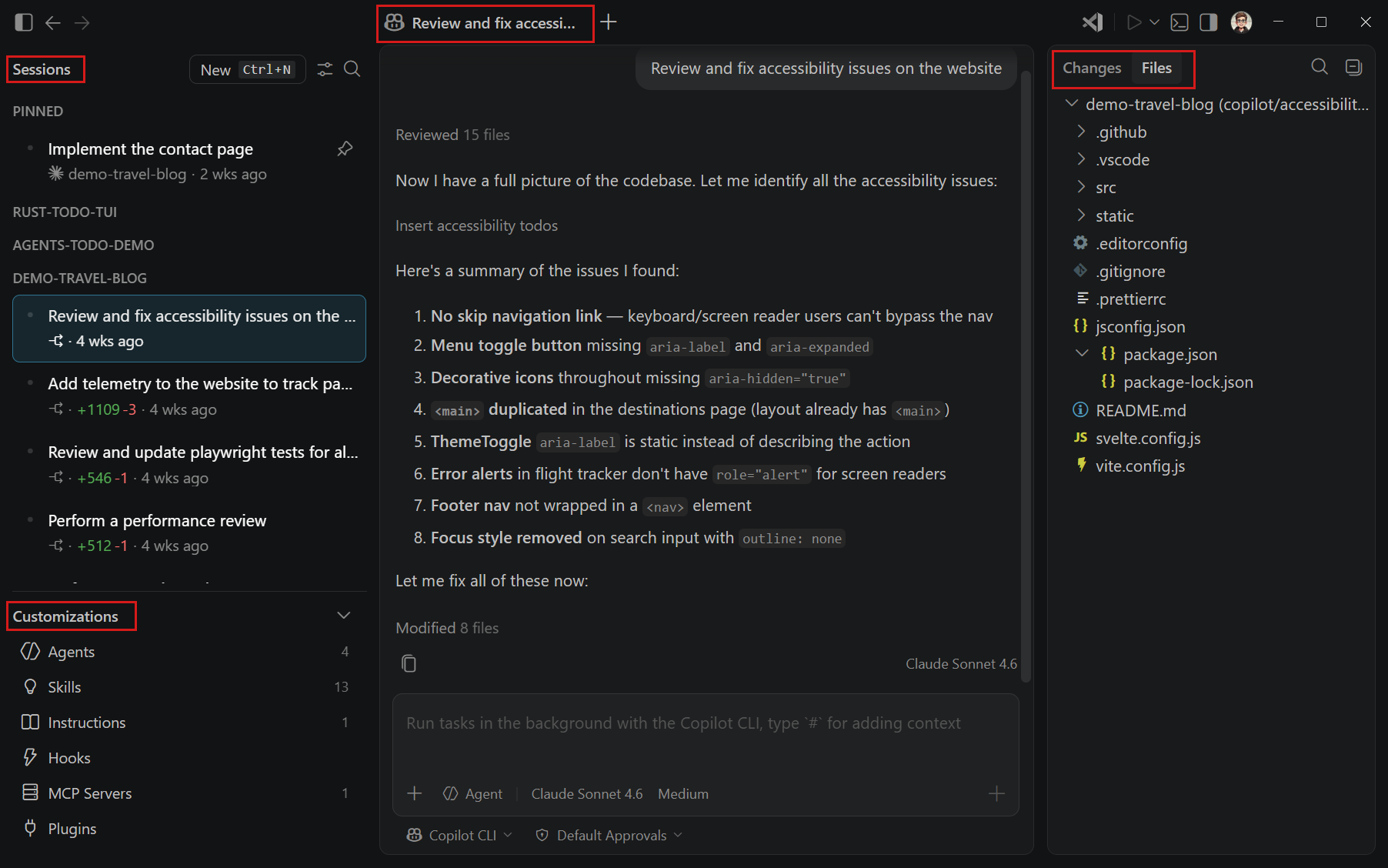
GitHub says Agents Window is now available as a preview in VS Code Stable. The VS Code documentation is more explicit about the product direction: Agents Window is a dedicated window for an agent-first workflow. A normal editor window is organized around files, tabs, and code-centric work in one workspace. Agents Window is organized around session lists, chat, change review, and customizations across multiple projects.
That makes it more than another sidebar. According to the VS Code docs, Agents Window and the main VS Code window share the same underlying agent sessions, settings, and keybindings. A session started from Copilot CLI, Copilot Cloud, or a Claude agent can be continued in Agents Window. A session started in Agents Window can also be resumed from the editor. Instead of opening a separate VS Code window for every project, the developer can look at a session list and inspect agent work by workspace.
The operational details in GitHub’s changelog are specific. Session preferences carry forward into new sessions. New sessions can pull the latest base branch before the agent starts editing. Agents Window refreshes Git state after operations such as commit or sync. Multiple sessions can be opened side by side for review. The /chronicle command can retrieve previous sessions or produce a standup report.
Those are not claims about a model writing better code. They address the first problems teams hit when coding agents become part of daily work: which branch the agent started from, which files changed, which build or test command ran in which session, where the failing log ended up, and where human feedback was attached. Agents Window treats that record as a work object, not only as chat transcript.
Remote agents move the session boundary
The developer workflow change with the largest blast radius is the combination of remote agents preview and Agent Host Protocol. GitHub describes remote agents as sessions that run over SSH or Dev Tunnels. If the client disconnects, the session can keep running on the remote machine. Agent Host Protocol, or AHP, is described as an open protocol investment for syncing agent session state across clients.
The VS Code docs give the execution path. Agents Window connects to a remote machine over SSH or a dev tunnel, then installs and starts the VS Code CLI automatically. A browser-based Agents Window is also available at https://insiders.vscode.dev/agents. In that browser flow, the browser is the lightweight client, while the actual agent session runs on the tunnel host. The docs say the session can reconnect when the host comes back online.
This is the kind of feature users have already been asking for. In a late-May r/GithubCopilot thread, a user asked whether a VS Code chat session could move from a Windows laptop to a Chromebook or Linux device. A reply marked from the GitHub Copilot Team pointed to Agent Host Protocol, the Agents app window, and vscode.dev/agents as the direction for that workflow. The thread was not large, but the request was clear: as coding agents run longer, "which device can I continue from?" becomes an IDE feature.
Here, a session is not just chat history. VS Code’s agent-session learning material says each session has its own context window, conversation history, and tool results. A local session is useful for interactive debugging. Copilot CLI can run multiple background sessions on the developer’s own machine. A cloud agent can work asynchronously in GitHub infrastructure, create pull requests, and push commits. Agents Window is an attempt to bring those execution locations into one review surface.
| Execution location | Best fit | Boundary to check |
|---|---|---|
| Local | Fast debugging and edits where a human stays in the loop | Workspace trust, terminal approval, sensitive file access |
| Copilot CLI | Parallel background work on the developer's own machine | Network permission, sandbox retries, output compression |
| Remote host | SSH, dev tunnels, and long-running sessions that need continuity | Tunnel authentication, auto-approval mode, host reachability |
| Copilot Cloud | Well-scoped asynchronous pull request work | Human review, signed commits, session logs, firewall policy |
BYOK becomes an operations choice
The second major axis in GitHub’s changelog is language models and BYOK, short for bring your own key. The release adds air-gapped BYOK, custom endpoint providers, provider-specific model pickers, token visibility, reasoning effort controls, and configurable utility models. For enterprise development environments, that is less about model taste than operational policy.
Air-gapped BYOK gives isolated environments a path to use an own-key model without GitHub authentication. The custom endpoint provider lets users add endpoints compatible with chat completions, responses, or messages through one provider flow. Token visibility shows real token usage for bring-your-own-key models inside the context window. Reasoning effort controls move quality, latency, and cost choices into the model picker.
Utility model selection is a smaller item with direct cost consequences. GitHub says teams can choose which model handles tasks such as title generation, summaries, rename suggestions, commit messages, and intent detection. Coding-agent cost is not only the main answer token stream. Session titles, diff summaries, commit messages, and intent detection are repeated throughout the workflow. BYOK token visibility and utility-model routing split those background costs into units an operator can inspect.
That connects to the June 1 Copilot AI Credits change. In that pricing model, token usage maps to credits at different rates by model. The VS Code update gives developers and administrators more controls inside that cost structure. A team can avoid sending every low-risk utility task to an expensive reasoning model, while still reserving stronger models for changes where reasoning quality matters.
Terminal safety has to be read with remote execution
The terminal-safety section of the changelog lists five items: verbose output compression, experimental command risk assessment, terminal-only handling for sensitive prompts, background command UX, and the VSCODE_AGENT environment variable. Command risk assessment adds an AI-generated risk level and short safety explanation to terminal confirmations. Terminal-only sensitive prompts keep passwords, passphrases, PINs, and verification codes out of the LLM context and ask the user to enter them directly in the terminal.
Each item can look small in isolation. Combined with remote agents, session sync, and browser-based Agents Window, the security meaning is larger. An agent may execute commands on a remote host while the user watches from a laptop or browser. In that setup, the product has to answer which machine will run the command, whether sensitive input entered the model context, and what permission is used when a networked command retries.
The VS Code documentation puts the warning in the remote-agent path itself. Browser-based Agents Window connects to a development machine through a dev tunnel. If that tunnel allows anonymous access, the docs warn that anyone who discovers the URL could access the machine and start agent sessions. If auto-approval mode is enabled, the attacker could trigger AI-assisted command execution with the user’s credentials. That warning appears in the same documentation as the convenience feature.
GitHub’s cloud-agent risk page draws similar boundaries. Copilot cloud agent can access code and sensitive information, and malicious or mistaken input can leak data. GitHub describes internet access limits as one mitigation. For prompt injection, the docs use hidden messages in issues or pull request comments as an example and say hidden characters such as HTML comments are filtered before content reaches the agent. Pull requests created by the agent should be reviewed and merged by a human. Commits are Copilot-authored and signed. Session logs and audit-log events are available for administrators.
That combination shows where GitHub is drawing the risk boundary. Model accuracy is only one part of the problem. Safety also depends on where the agent runs, which prompts it receives, which credentials and network paths are available, and whether commits and session logs remain visible in the review path. The terminal risk label in VS Code is the small approval moment users will see repeatedly inside that larger boundary.
The IDE is taking on more responsibility
VS Code has long been an editor. After Copilot Chat, it also became a surface for questions and code generation. Agents Window adds another role: session registry, review surface, remote client, and lightweight operations console. GitHub’s integrated-browser improvements fit the same pattern. Device emulation, viewport or selected-area screenshots, full-page capture, and favorite pages make UI reproduction easier to attach to chat context.
That puts VS Code on the same competitive line as Cursor, Windsurf, JetBrains AI Assistant, and Google Antigravity. The comparison is not only which model is bundled into the product. It is whether a tool can show several sessions at once, keep work running on a remote host, connect BYOK and internal endpoints, attach review diffs and task output to session context, and preserve audit logs and signed commits.
Teams evaluating the update have concrete checks to make. First, decide which session types to allow: local, Copilot CLI, Cloud, remote host, or third-party agent sessions. Second, if SSH or dev-tunnel sessions are allowed, review authentication and auto-approval policy together. Third, organizations using BYOK should split policy for main models and utility models instead of treating all agent work as one model route. Fourth, terminal command approval and sensitive-prompt handling should be tested against the team’s existing security rules.
The release is less about Copilot writing more code automatically and more about where agent work is recorded and reviewed. GitHub put session sync, AHP, remote agents, BYOK, and terminal safety in the same changelog. That bundle is the message. The next UI for AI coding agents is not just a prompt box. It is a work surface that exposes execution location, cost, authority, logs, and diff review together.