Android Skills teach agents the rules of app development
Android Studio I/O Edition brings Agent Skills and Android CLI into the mobile workflow, turning Android development into an agent-readable knowledge layer.

- What happened: Google used Android Studio I/O Edition to ship
Agent Skills, Android CLI updates, Firebase integration, and bring-your-own-model support into the Android developer toolchain.- The official Android skills repository had passed 5.3k stars at research time and packages platform guidance for tasks such as XML to Compose migration, edge-to-edge UI, and Navigation 3.
- Why it matters: The hard part of mobile coding agents is no longer just model capability. It is how current Android knowledge, IDE tools, and verification loops reach the agent while it works.
- Watch: The feature set mixes Canary builds and preview-era workflows, so teams should treat skills as versioned software artifacts with permissions, reviews, and build/test gates.
At first glance, Android Studio I/O Edition looks like a bundle of IDE upgrades timed to Google I/O 2026. Agent Mode gets skills. Firebase becomes available from inside the agent flow. Android CLI grows more useful. Gemma 4 can run as a local model. Performance tools get "fix with AI" style actions. The clearer headline is bigger than any one feature: Android developer tools are becoming a knowledge layer that agents can read, call, and execute against.
That matters because Android is a difficult environment for general-purpose coding agents. An app is not just Kotlin or Java. It is also Compose and XML migration, Gradle configuration, Android Studio indexing, emulators, Firebase, Play Console, permissions, large screens, R8, Perfetto, LeakCanary, App Quality Insights, and a long list of platform conventions that change faster than model training cutoffs. A model can be fluent in syntax and still produce a fragile Android app if it does not know the current platform path or the right diagnostic tool to call.
So the important part of this announcement is not simply that "AI is in Android Studio." It is that Google is starting to split Android development knowledge into SKILL.md files, CLI surfaces, IDE actions, and benchmarks that agents can consume.
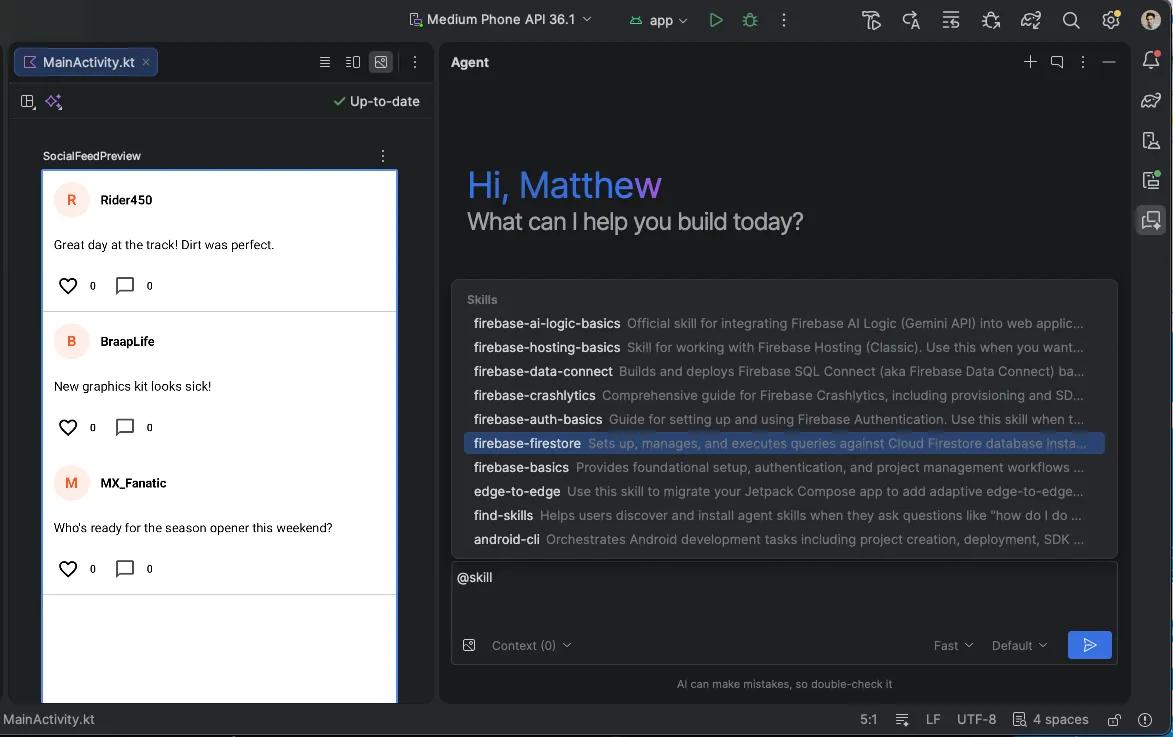
Skills are deployable artifacts, not prompt tips
Google describes Agent Skills as modular instruction sets that ground LLMs with specialized workflows and domain knowledge. The concept is familiar. Most coding agents now accept instructions, rules, memories, skills, or project guidance files. What stands out in the Android announcement is that these are not just personal prompt snippets. They are official knowledge bundles distributed by the platform vendor.
The Android skills documentation frames skills as AI-optimized instructions that help tools and agents understand Android development tasks. The examples are concrete: migrating XML to Compose, implementing edge-to-edge experiences, and setting up newer frameworks such as Navigation 3. Teams that have worked on real Android code will recognize why those examples matter. These are less like "generate a function" tasks and more like "change several files without breaking the current project structure, while following the latest recommended pattern."
Google says recent Android Studio Canary builds bundle key Android and Firebase agent skills. It also opened the official android/skills repository, making the same idea usable outside the IDE. The repository was created on March 16, 2026, and at research time showed 5,303 stars and 273 forks. Star counts do not prove quality, but they are a useful signal: Android developers are paying attention to official task knowledge for agents.
The key point is that a skill does not replace the model. It becomes a control surface above the model. The model still generates code and reasons about changes. The skill tells it which APIs to prefer, which patterns to avoid, which files to inspect, and which tools to use for verification. Coding-agent competition is widening from "who attached the smartest model" to "who supplies the most accurate working context."
Android CLI becomes an adapter for agents
The second important layer is Android CLI. Google says Android CLI helps developers build Android apps faster and more efficiently with the agent, LLM, and environment of their choice. It grounds agents with the Android Knowledge Base and Android skills, and, when paired with the latest Android Studio Quail Canary, lets agents use IDE capabilities such as file issue analysis and symbol declaration lookup.
That is more than a convenience update. Coding agents have already moved toward CLI-first workflows. Claude Code, Codex, Gemini CLI, Copilot CLI, Cursor Agent Mode, Antigravity, and similar tools all read repositories and execute commands in their own ways. The missing piece is platform-specific tool knowledge. In Android projects, a general agent can get pretty far with rg, shell scripts, and Gradle commands, but it will eventually hit limits. Android Studio already knows about symbol relationships, diagnostics, emulator state, performance traces, and project-specific context that plain shell commands do not expose as cleanly.
Android CLI is interesting because it tries not to lock that context to a single agent. Google does not only push Gemini inside Android Studio. The announcement uses the language of "any agent, LLM, and tool of your choice." Inside Android Studio, developers can choose remote models from Google, Anthropic, and OpenAI, or run local Gemma 4. Outside the IDE, Android CLI becomes the route for giving agents Android knowledge and Android-specific tooling.
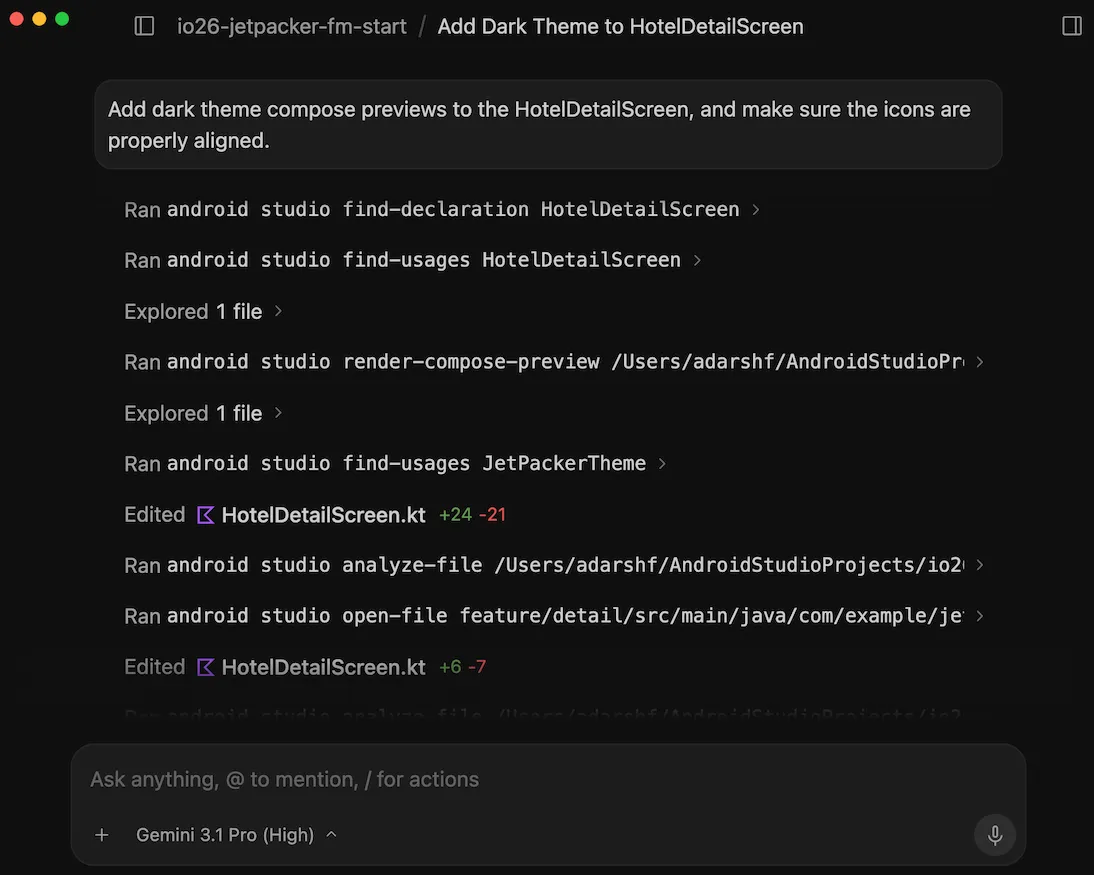
This is a practical compromise for both developers and the platform vendor. Developers do not want to abandon the coding agent they already use. Companies also have different model approvals, security policies, and cost profiles. Google, meanwhile, wants Android apps to reflect the current best practices and tool flows even when the code is being written by an external agent. Android CLI becomes a connection layer: choose your model, but pull Android rules and tools from the official channel.
| Layer | Google mechanism | What it means for agents |
|---|---|---|
| Knowledge | Android skills, Android Knowledge Base | Injects current platform guidance outside the model training window. |
| Tools | Android CLI, Android Studio Quail integration | Exposes Android diagnostics at a higher level than generic shell commands. |
| Execution | Agent Mode, parallel conversations, New Project Agent | Splits planning, generation, testing, and documentation into multiple agent sessions. |
| Verification | Android Bench, Android Performance Analyzer, LeakCanary, App Quality Insights | Feeds platform-specific quality signals back into the agent loop. |
Firebase and New Project Agent aim at complete workflows
Firebase integration in Android Studio Agent Mode is also worth reading closely. Google says Agent Mode can enable services such as Firebase Auth and Firestore, and that the agent can complete Firebase integration and backend service setup. New Project Agent is also evolving toward a multi-step execution plan and an autonomous generation loop that can fix build errors and configure dependencies across files.
The target is not code snippets. It is a workflow where a developer can ask for a new app, attach Firebase, account for large-screen layouts, test in an emulator, and push toward an internal testing track. The related Google AI Studio announcements point in the same direction: Android app generation, built-in Android Emulator preview, ADB over USB deployment, and Google Play internal test track upload. Android Studio brings that same "end-to-end app loop" closer to a professional IDE and a local project.
That integration is useful, but it also expands the risk surface. Once an agent configures Firebase projects, authentication, database rules, and Play Console testing tracks, permissions become a core design problem. "It builds" is not the same as "it is an operable app." Security rules, privacy handling, cost controls, deployment approval, and rollback paths still matter. The deeper the automation goes, the more explicit teams need to be about what an agent can do and what requires human review.
This is where skills become important again. A good skill should not only tell the agent to do more. It should tell the agent where to stop. For example, a Firebase skill can require tests and review before changing security rules, restrict Play activity to internal tracks, and prevent sensitive keys from being written into code. Official platform skills are an opportunity to standardize those safety rails, not only to accelerate generation.
Bring-your-own-model is a strategic choice
Android Studio's emphasis on bring-your-own-model support is another signal. Google is not only talking about Gemini. Android Studio can use Google, Anthropic, and OpenAI models, and developers can download and run Gemma 4 locally. The announcement also connects Google AI Pro or Ultra subscriptions to Gemini usage in Android Studio, with dedicated capacity and higher rate limits.
On the surface, this is just model choice. As platform strategy, it is more complex. Android developers already use many agent tools. Some teams prefer Claude-family models. Some use OpenAI Codex-style workflows. Some want local models for security or data-control reasons. If Google made Android Studio a Gemini-only agent environment, many developers would keep doing agentic Android work elsewhere. If Android Studio accepts multiple models, Google can keep Android's working surface even when the model provider changes.
That resembles the broader developer-tool market. Microsoft and GitHub have accepted multiple models inside Copilot. Cursor routes across model providers. Vercel and other AI-facing developer platforms increasingly emphasize provider-neutral workflows. In the agent era, it is hard to lock developers in with model exclusivity alone. The stronger leverage is knowledge, workflow, permissions, verification, and deployment.
Android Studio's bring-your-own-model move is defensive and offensive at the same time. Defensively, it reduces the chance that developers leave the IDE because they prefer another model. Offensively, it lets Google route Android work through Agent Skills, Android CLI, Android Bench, and performance tooling regardless of which model is selected. Model competition now sits on top of platform-tool competition.
Android Bench makes evaluation domain-specific
Google introduced Android Bench earlier in 2026, and this update mentions plans to add open-model evaluation and increase task difficulty. Android Bench is a benchmark and leaderboard for evaluating how well LLMs handle real-world Android development tasks. Google says it will include harder long-running tasks, including work that might take an Android engineer several days.
That direction shows why general coding benchmarks are no longer enough. SWE-bench-style evaluations matter, but Android's actual difficulty often lives in platform tools and ecosystem rules. Compose migration, Gradle dependencies, emulator testing, performance traces, and Play policy are different from a generic Python issue fix. Android Bench asks a narrower and more useful question: not "can this model code," but "can this model do Android work."
The pattern is likely to repeat across other platforms. iOS, Kubernetes, SAP, Salesforce, Unreal Engine, data platforms, and security operations tools could each develop their own skills and benchmarks. Model providers will keep improving general capability, but practical adoption will be judged inside specific domains. Android Bench is an early example of that domain-by-domain evaluation shift.
Benchmarks still need caution. Once a benchmark is public, models and agents optimize for it. Real app quality is not only test passage. Accessibility, battery life, network conditions, device form factors, maintenance, and Play policy changes all sit outside a simple score. Still, the fact that a platform vendor is building an evaluation loop for agents matters. Developer tools have to move from generation toward measurement and verification.
Teams now have a skill operations problem
For practitioners, the announcement is less a mandate to install the latest Android Studio Canary immediately and more a signal to prepare for skill operations. The Android skills documentation describes placing skill directories and SKILL.md files under .skills/ or .agent/skills/. Android CLI can run commands such as android skills list and android skills add --skill {skill-name} to discover, install, and update skills. The documentation also warns developers to rename customized skills so updates do not overwrite local changes.
That means skills are becoming part of the codebase. They become reviewable, versioned, and auditable. If an agent automatically activates a skill, one instruction file can shape a large code change. A poor skill can recommend stale APIs, violate a team's architecture rules, or skip verification. A well-maintained skill can give both new team members and agents the same working rules.
The operational questions are straightforward. Should the team use official Android skills as-is, or maintain derived skills with internal architecture rules? Should skill updates be automatic, or pinned and reviewed? Which actions require approval when Firebase or Play Console resources are involved? If local Gemma 4, Gemini, Claude, and OpenAI models are all available, which model is allowed for which class of work?
In that sense, skills are both a productivity tool and a supply chain. As NVIDIA Verified Agent Skills and Anthropic's broader MCP and SDK ecosystem have already suggested, instructions that agents execute are becoming important software artifacts. Android running an official skills repository is not just a convenience. It is the beginning of a responsibility boundary.
The new unit of Android work is the task loop
Android Studio I/O Edition is not a splashy new-model announcement, which makes it easy to underestimate. But as a developer-tool signal, it is sharp. Android work is moving from "open a file and edit code" toward a loop where an agent plans, reads platform skills, calls IDE tools, builds, measures, and returns through quality signals.
Google is not trying to keep that loop entirely inside Android Studio. Android CLI and the official skills repository let external agents consume Android knowledge. Bring-your-own-model support keeps model choice open. At the same time, Android Bench and IDE-integrated diagnostics let Google define the platform's verification surface. This is a strategy that steps around model competition and focuses on the interface agents need to build real apps.
The question for developers is no longer only which model they will use for Android work. It is what Android knowledge, permissions, and verification loop that model will have while it acts. That is why the word Skills belongs in the headline. In mobile development for agents, skills are not helper docs. They are a new way to distribute app-development rules outside the model itself.