Chrome gives coding agents modern web sense
Modern Web Guidance is Chrome's early preview agent skill for giving coding agents Baseline-aware web APIs, fallbacks, and evaluation context.

- What happened: The Chrome team released
Modern Web Guidanceas an early preview.- It is an agent skill and CLI that lets coding agents retrieve modern Web Platform guidance,
Baselinetargets, and fallback strategies while they work.
- It is an agent skill and CLI that lets coding agents retrieve modern Web Platform guidance,
- Key number: Google says early evaluations showed an average 37 percentage point improvement in modern best-practice compliance when guidance was used.
- Why it matters: Coding-agent competition is moving beyond model reasoning toward fresh domain context and evaluated knowledge packs.
- Watch: Chrome-centered guidance is useful, but teams still need their own browser-support policy, security constraints, and test coverage.
The Google Chrome team used Google I/O 2026 to introduce Modern Web Guidance as an early preview. At first glance, the name sounds like another set of web-development docs. The more interesting part is the intended reader. This is not primarily a tutorial for human developers. It is a package of guides that coding agents can search, retrieve, and load into context while they are writing code.
Chrome is targeting a familiar failure mode. AI coding agents often generate web code from the statistical center of older examples: extra client-side JavaScript, custom div-based widgets, absolute-positioned tooltips, manual focus traps, resize listeners, and workaround-heavy CSS. That does not only make the code less elegant. It can increase bundle size, weaken accessibility, miss newer browser-native behavior, and leave teams maintaining code that the platform can now handle more directly.
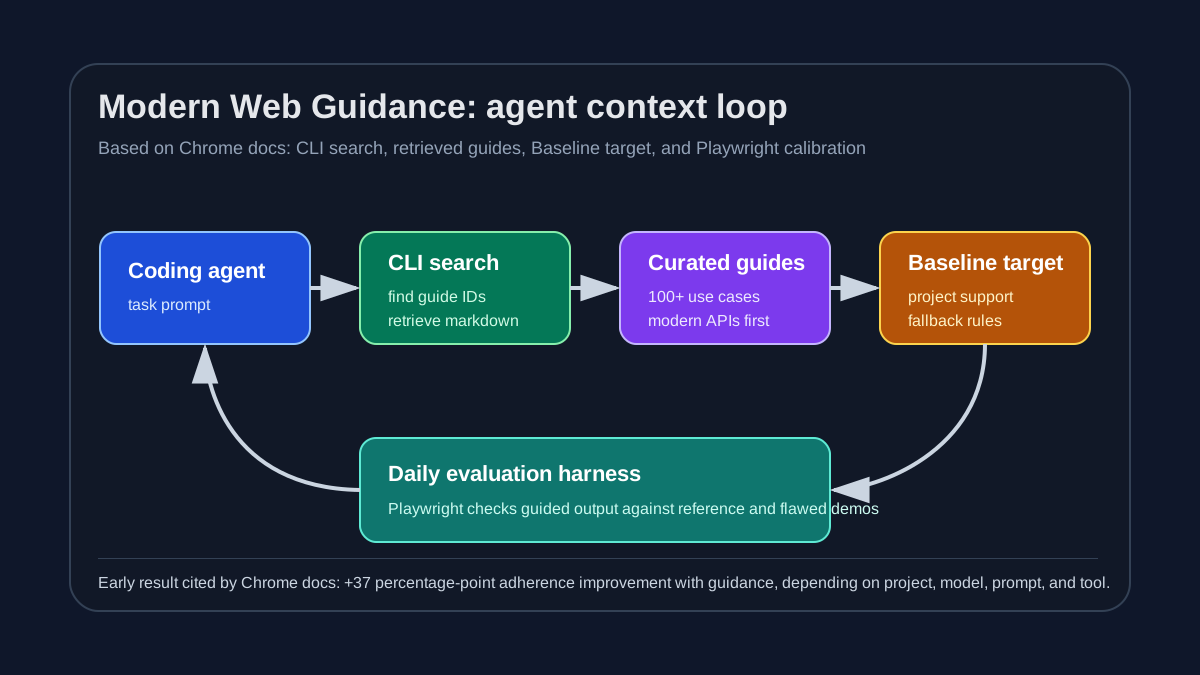
Modern Web Guidance reframes the problem. Instead of retraining a model so it permanently remembers every new Web Platform capability, the tool gives the agent narrow, task-specific context just before implementation. The official docs show a flow such as npx modern-web-guidance@latest search "animate a dialog modal backdrop" followed by retrieve to load a Markdown guide. The installable skill tells an agent when and how to call that CLI. In practice, the agent gets a fresh reference sheet for the concrete job in front of it.
Why old web patterns survive
Chrome's docs explain the need for Modern Web Guidance in three parts. AI coding agents tend to fall back to outdated solutions for modern web-development tasks. They may not know, or may misremember, recent Web Platform features. They also often answer without seeing the project's actual browser-support requirements, which pushes them toward one-size-fits-all code.
Frontend developers have seen these failures in smaller forms. Ask for a modal and an agent may build a custom overlay while missing <dialog>, native backdrop behavior, escape-key handling, and newer animation hooks. Ask for a tooltip and it may write brittle absolute positioning that fails near viewport edges instead of considering Popover and CSS Anchor Positioning. Ask for layout and it may add wrappers and JavaScript measurement where container queries or subgrid would be a better fit. Ask for form validation and it may miss selectors such as :user-invalid.
Humans do not memorize every new browser feature either. The difference is that a human developer usually knows the product's support matrix, accessibility bar, design-system constraints, incident history, and code-review norms. An agent starts without that background unless the project supplies it through AGENTS.md, rules files, skills, MCP resources, or documentation retrieval. Modern Web Guidance is Chrome turning that project-context pattern into a web-platform-level artifact.
More than 100 use cases and Baseline
The official docs say Modern Web Guidance covers more than 100 web-development use cases. The GitHub README lists 102 modern web features and 128 real-world developer use cases. The scope is broad: View Transitions, entry and exit animations, scrollbar styling, container queries, subgrid, oklch, text-wrap, line-height trimming, INP diagnostics, scheduler.yield, background task scheduling, image-loading priority, field-sizing: content, :user-invalid, dialogs, Popover, CSS Anchor Positioning, accessibility, passkeys, privacy, and built-in AI.
The more important design choice is its connection to Baseline. Baseline is a Web Platform DX signal for whether a feature is supported across major browser engines. Features can be limited, newly available, or widely available. Chrome's docs say teams can put a line such as "This project's Baseline target is Baseline 2024" in AGENTS.md or CLAUDE.md. If no target is provided, Modern Web Guidance defaults to Baseline Widely available.
That matters because "use the newest API" is not a safe instruction by itself. A public SaaS product with meaningful Safari and Firefox usage has a different risk profile from an internal Chromium-only tool. Some features can be progressively enhanced. Others need a fallback or a polyfill. Some should be avoided for a product's audience even if they are technically available. A Baseline target gives the agent a clearer way to decide whether a feature is appropriate, and whether it needs a fallback path.
| Axis | Context from Modern Web Guidance | How it reduces agent failures |
|---|---|---|
| Modern APIs | Dialog, Popover, Anchor Positioning, subgrid, passkeys, and more | Reduces unnecessary JavaScript-heavy workarounds. |
| Baseline | Project-specific browser-support target | Makes feature and fallback choices explicit. |
| Accessibility | Focus management, error announcements, and reduced motion | Narrows the gap between visible UI and assistive-technology behavior. |
| Performance | INP, scheduling, loading priority, and background work | Points agents toward measurable bottlenecks instead of cosmetic refactors. |
| Evaluation | Playwright-based daily evaluation and guide calibration | Treats guidance as tested knowledge, not just a prompt collection. |
What the 37 percentage point claim means
The headline number in the announcement is 37 percentage points. Chrome says that in early evaluations, agents using Modern Web Guidance showed an average 37 percentage point improvement in compliance with modern best practices. The docs also include the expected caveat: results vary by project requirements, model, prompt, and agentic coding tool.
That number should not be read as a product-quality guarantee. It does not mean installing the skill will make every web codebase 37% better. The more useful reading is that narrow, domain-specific context can materially change what even strong models produce at implementation time. A coding agent is not only a reasoning engine. It is also a context consumer. If the retrieved context is current, specific, and aligned with an evaluation harness, the generated code changes.
The evaluation setup is worth watching. Chrome describes an automated QA harness that calibrates each use-case guide. Playwright scripts test whether an implementation followed the guide's details. A correct reference demo is expected to pass, and a deliberately flawed implementation is expected to fail. The system then compares unguided control runs with guided experiment runs on a base application. Not every use case is fully calibrated yet, but the direction is clear: agent guidance is becoming an evaluated asset.
That is a different posture from a team maintaining a grab bag of prompt snippets. Many development teams already use project rules, coding standards, reusable skills, and documentation retrieval, but they often judge those rules by feel. Modern Web Guidance points toward a more disciplined loop: write guidance, run agents against realistic tasks, measure whether the guidance changes behavior, and keep the guides updated as the platform moves.
The install paths show the ecosystem shape
The setup flow also says something about the agent market. Chrome recommends npx modern-web-guidance@latest install, but the docs also cover Antigravity, Antigravity CLI, Gemini CLI, JetBrains WebStorm, GitHub CLI, npx skills, Claude Code, Copilot CLI, and Goose. The GitHub README emphasizes both the agent skill and the CLI.
That list reflects how development teams actually work in 2026. One engineer may use Claude Code, another may use Cursor, another may use Codex, Gemini CLI, or an IDE-native agent. If a team's web-platform policy lives only inside one editor extension, it becomes fragmented quickly. Modern Web Guidance is trying to package the same guide library so multiple agents can retrieve the same baseline of web knowledge.
This does not mean the format war is over. Agent-skill layouts, MCP support, plugin models, trust boundaries, and sandbox policies are still changing quickly. But the direction is important. Agent knowledge is moving from model-specific prompt text toward versioned, searchable, testable documentation bundles. For web development, those bundles need to combine Baseline, MDN-style compatibility data, Chrome guidance, framework docs, accessibility rules, and a company's own browser-support matrix.
Chrome is pairing context with runtime verification
Modern Web Guidance also fits into a wider Chrome strategy from Google I/O 2026. In the same period, Chrome pushed Chrome DevTools for agents, WebMCP, updates to Chrome AI assistance, and sessions around modern web capabilities. If Chrome DevTools for agents is about letting agents inspect a running browser, Modern Web Guidance is about what implementation knowledge an agent should use before it writes the code.
The two layers are complementary. Modern Web Guidance can nudge an agent toward <dialog>, ::backdrop, Popover, @starting-style, transition-behavior, or a Baseline-appropriate fallback. Chrome DevTools for agents can then inspect the page's console, network behavior, accessibility tree, and performance signals. One layer shapes the plan; the other checks the running result.
Add WebMCP to that picture and the strategy becomes larger. Websites can expose structured tools to browser agents. Agents can retrieve modern implementation guidance. DevTools can validate runtime behavior. Google is positioning Chrome as more than a rendering engine. It is becoming a development, execution, and verification surface for the agent era. That is useful for builders, but it also increases the tooling gravity around Chrome.
What teams should decide before adopting it
The practical takeaway is not simply "install the skill everywhere." The stronger takeaway is that teams need to define what web policy their agents should follow.
First, write down the browser-support target. A private dashboard that supports only current Chrome should not receive the same instruction as a customer-facing product that supports Safari, Firefox, and Chromium-based browsers. Baseline gives teams a shared vocabulary, but it does not replace product-specific risk decisions.
Second, define fallback policy. Chrome's docs say guidance can recommend progressive enhancement and conditional polyfills when a feature is not widely available. That is a start, not a full product policy. A visual enhancement may degrade gracefully. A checkout, authentication, or accessibility-critical interaction may need a robust alternate implementation. Agents need to know which category they are working in.
Third, connect guidance to tests. Using <dialog> or Popover does not automatically prove accessibility or compatibility. Teams still need keyboard navigation checks, focus behavior, screen-reader announcement coverage, reduced-motion handling, responsive layout tests, and browser-specific validation. The useful version of Modern Web Guidance is not a substitute for Playwright, Cypress, or manual QA. It is a way to make the code generated before those checks less outdated.
Fourth, balance Chrome guidance with non-Chrome sources. The README says Modern Web Guidance is supported by the Chrome team, Microsoft Edge team, and the web developer community. That is meaningful. Still, products with serious Firefox and Safari requirements should also watch MDN browser compatibility data, WebKit release notes, caniuse, and their own analytics. Baseline is a strong common language, not an automatic answer for every product.
Documentation is becoming agent infrastructure
The larger shift is that documentation now has a new consumer. Traditional web docs were searched and read by people. In agent workflows, documentation becomes a searchable skill, a CLI retrieval target, an MCP resource, or a rule inside AGENTS.md. The agent finds the relevant guide, places it into context, writes the code, and then runs tests or browser inspection.
That changes how documentation should be written. Long conceptual pages still matter, but agents benefit from narrow, executable use-case guides. Browser support, fallback requirements, accessibility notes, performance caveats, and security constraints need to be structured enough for retrieval and evaluation. Chrome's Playwright calibration points to that future: documentation should be measured by whether it changes implementation behavior, not only whether it is accurate when read by a human.
For developers, the question is whether "build this with modern web APIs" is specific enough for an agent. Usually it is not. The agent may know the names of new APIs but still miss when to use them, when not to use them, where fallbacks are required, and what the product's accessibility and support bar actually is. Modern Web Guidance is one attempt to fill that gap with current, evaluated context.
That makes this announcement less like a normal web guide release and more like agent infrastructure news. Even in a world where models write more code, good code still depends on good context and good evaluation. Chrome has started packaging modern web knowledge in a form agents can consume. The early 37 percentage point result suggests that the packaging can matter. The next competition will not only be who ships the strongest model. It will also be who can give agents the freshest, most reliable, product-aware context at the right moment.