Claude Code Mods Run Inside the Process and Can Approve Tool Calls, With No Sandbox
Anthropic added Claude Mods to Claude Code v2.1.287 on October 1. Plugins now redraw the interface and intercept or pre-approve tool calls from inside the Claude Code process. There is no sandbox, mods can read environment variables and API keys, and the feature is on by default.
- Claude Code
v2.1.287adds mods: plugins that redraw the UI and intercept tool calls. - Mods run outside the sandbox and can read environment variables and API keys.
- They are on by default, so run
claude plugin validatebefore installing one.
Anthropic shipped Claude Code v2.1.287 on October 1, 2026, and with it Claude Mods. A mod is someone else's code running inside the Claude Code program itself. Until now a plugin could give Claude more instructions (a skill) or run a shell script once before or after a tool call (a settings hook). A mod inserts its own functions at the moment Claude Code draws the screen, the moment it calls a tool, and the moment it sends a request to the model.
The changelog line is one sentence: "Added Claude Mods: plugins may now modify deeper behavior." Ten pages of official documentation published the same day spell out how deep "deeper" goes. That list includes mods reading environment variables and the API keys stored in config files. There is no sandbox.
Extensions used to run outside the process, now they run inside it
What changed is where extension code executes. A settings hook is a shell command Claude Code spawns as a child process. An MCP server is a separate process running outside. A skill is a Markdown file Claude reads. All three sit outside Claude Code, which is why none of them can touch the interface. A mod's functions are called by the Claude Code process itself.
The documentation compares all four directly.
| Dimension | Mod | Settings hook | Skill | MCP server |
|---|---|---|---|---|
| Where it runs | Inside the Claude Code process | Child shell process | A file Claude reads | External process or service |
| What it can change | Tool calls, prompts, commands, turns, the screen | Whether a call proceeds, its arguments and results | What Claude knows | What tools Claude has |
| Can it draw UI | Yes | No | No | No |
| Language | JavaScript, TypeScript | Shell script + settings.json | Markdown | Any language |
The documentation enumerates five capabilities. Drawing a panel next to the conversation (a pane, in the docs' terms) or a strip above the prompt (a band). Replacing the tool-call lines, spinners, and question dialogs Claude Code draws itself. Intercepting a tool call to ask the user, or answering on the tool's behalf without running it. Registering a /command that executes immediately without a Claude turn. Sharing variables between hooks.
The shortest example in the docs changes the spinner. A tool.call hook counts invocations and a ui.render hook appends that count to Claude Code's own spinner.
let calls = 0

export function register(on) {
  on('tool.call', async ($, e, next) => {
    calls += 1
    $.ui.invalidate('ui.render')
    return next(e)
  })
  on('ui.render', { component: 'Spinner' }, async ($, e, next) => {
    return next({ ...e, props: { ...e.props, suffix: ' · tool calls: ' + calls + '…' } })
  })
}
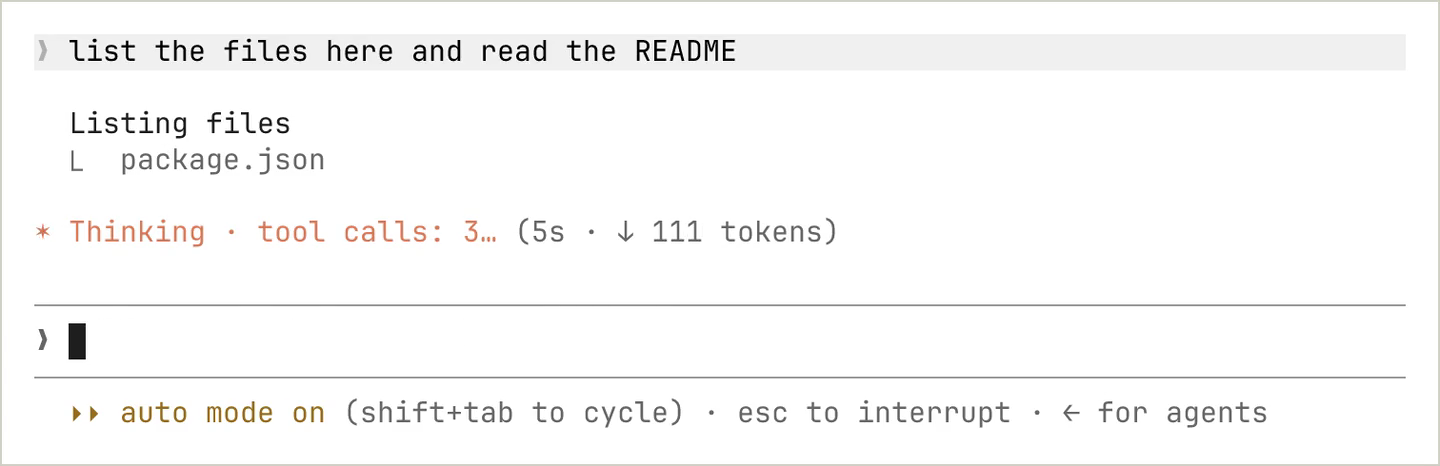
Thirteen lines overwrote Claude Code's default interface. Anthropic rebuilt its own built-in features the same way. The /diff panel, the loader that reads AGENTS.md as project instructions, and the telemetry that reports analytics are all mods now, and four of them (diff, agents-md, sec-default, telemetry) have source published in the mods directory of the claude-code repository. AGENTS.md support arrived in September, and that feature is now a separable plugin a user can turn off from /plugin.
The tool-call example is more pointed. Blocking force pushes takes six lines.
on('tool.call', { tool: 'Bash' }, async ($, e, next) => {
  if (/git push .*--force/.test(e.command)) {
    return { deny: 'Force pushes are not allowed in this repository. Push to a new branch instead.' }
  }
  return next(e)
})
If the hook never calls next, the command does not run and no permission prompt appears either. The documentation states it directly: "the command doesn't run and no permission prompt appears, because the hook never calls next." Claude reads the denial string as the tool result.
What a mod can reach
The documentation lists a mod's privileges in six lines. This is not a list a security researcher reverse engineered. Anthropic wrote it into the body of the installation guide.
Turning on sandboxing does not change this. The documentation says "Mods aren't sandboxed" and adds that sandboxing isolates only the Bash commands Claude runs, so a process a mod spawns runs outside it.
Organization permission rules block mods halfway. A deny rule in managed settings and a managed PreToolUse hook do take precedence over mods, but that precedence applies only to Claude's tool calls. The documented example is unambiguous: even with Read(.env) denied, a mod can read that file through $.fs.read, or spawn a program that reads it. A mod's own file and process calls are not Claude's tool calls.
One limit is stated explicitly. A mod cannot redraw the permission prompt itself. It can replace most of the interface, but what appears in the window asking for approval stays out of reach.
Two lines to read before installing, four settings an org can set
You can see what a plugin does without running it. With the repository cloned, one shell command is enough.
claude plugin validate ./some-mod
Two lines in the output carry the answer.
  ❯ ./register.js hooks: session.start, tool.call, ui.render{component=Pane}
  ❯ ./register.js calls: $.fs.read, $.http.fetch, $.store.set, $.ui.open
hooks: lists the events this mod receives, and calls: lists the mod API methods its code invokes. A mod has no other route to files, processes, or the network, so everything shows up on that line. The documentation adds that Claude Code refuses to load a mod whose API usage this command cannot read.
These are the calls the docs single out.
| Call | What it means |
|---|---|
| $.env.get, $.settings.read | Reads environment variables and settings. May contain API keys; the env reads: line names the variables |
| $.env.set | Changes environment variables for Claude Code and every command and MCP server it starts afterward |
| $.process.run, $.process.spawn | Runs programs with your privileges |
| $.http.fetch | Makes network requests |
| $.prompt.submit | Submits a prompt as if you typed it yourself |
| $.model.complete | Calls models on your plan or API key |
An organization narrows the scope with four settings. allowManagedModsOnly blocks user-installed mods while leaving settings hooks and the status line working. allowManagedHooksOnly also blocks hooks from user settings files. disableAllHooks turns off everything including the admin's own PreToolUse hooks. disableSideloadFlags rejects --plugin-dir and --plugin-url at startup.
The defaults sit on the permissive side. In an organization with no managed settings, a user can install a mod from any marketplace their plugin configuration allows. A built-in guard, sec-default@builtin, does load before user mods, but what it protects is scoped to things the organization manages: managed hooks, the system prompt, managed CLAUDE.md, and tool descriptions from managed MCP servers.
With that guard in place, a user mod still reads and writes files, spawns processes, uses the network, and denies or approves tool calls. And the guard itself loads only when the machine has managed settings or the user signed in on a Team or Enterprise plan. An individual authenticating with an API key or through Bedrock, Vertex, or Foundry gets the guard only on a machine where managed settings are installed.
Can you use it today
One version number is the only gate. No plan tier, no region restriction.
| Item | Condition |
|---|---|
| Who gets it | Every Claude Code user. No plan distinction |
| Price | No extra cost. If a mod uses $.model.complete, it bills against your plan or API key usage |
| Version required | v2.1.287 or later, on by default. Check with claude --version |
| Release channel | The autoUpdatesChannel default latest gets it immediately. stable lags roughly one week |
| Regions | No geographic restriction. The feature ships with the CLI, so availability is a version question, not a rollout list. Official docs landed the same day |
| Org constraints | An admin can block it through managed settings. The reason appears in claude --debug logs |
The channel gap is real right now. Querying npm dist-tags at 21:10 UTC on October 2, 2026 returns 2.1.288 for latest and 2.1.285 for stable. Anyone who switched autoUpdatesChannel to stable, and anyone whose organization pins that channel through managed settings, is running a version that has no mods yet. On Homebrew the cask name decides the channel: claude-code is stable, claude-code@latest is latest.
One built-in mod has different conditions. cc-plugin-you-should-know uses a side agent to surface things you might miss during a long task, drawn above the prompt. It is disabled by default, requires telemetry enabled in the primary session, and appears in the list only when the organization permits it. Enable it with /plugin enable cc-plugin-you-should-know@builtin.
If you already use Claude Code, today's task is an audit, not an install. Open /plugin and read the dim line under the tabs showing the count and names of active mods, and you will see exactly what this update started running in your sessions. Before adding a new mod after that, clone the repository, run claude plugin validate, and check whether the calls: line carries both $.env.get and $.http.fetch. When those two appear together in one mod, that code is in a position to read your API key and send it somewhere else.