Microsoft MXC previews agent isolation for Windows and Copilot CLI
Microsoft used Build 2026 to frame Windows as an AI agent runtime with MXC, Windows 365 for Agents, Agent 365 identity, and Aion local models.

- What happened: Microsoft announced MXC, Windows 365 for Agents, Agent 365 identity integration, and Aion local models at Build 2026.
- MXC is an early preview SDK for declaring file, network, and UI access policies, then mapping agent execution to sandbox backends.
- Why it matters: GitHub Copilot CLI has adopted fast process isolation, and Windows is tying agent execution to identity, Cloud PCs, and enterprise policy surfaces.
- Watch: The MXC GitHub README says current profiles should not be treated as a security boundary.
- Microsoft’s Build blog says Windows 365 for Agents is generally available in Agent 365, while a Microsoft Learn page last updated on May 1, 2026 still describes it as public preview.
Microsoft’s June 2, 2026 Windows Developer Blog post for Build 2026 recast Windows as a platform for building and running AI agents. The announcement covered Coreutils for Windows, WSL containers, Intelligent Terminal, Windows Development Skills, and Windows 365 Developer configuration. For AI builders, the more consequential pieces are Microsoft Execution Containers, or MXC, Windows 365 for Agents, Agent 365 identity, and Aion 1.0 local models. Microsoft is trying to answer two operational questions that coding agents now force into the open: where does the agent run, and who is accountable for what it does?
The Build post puts execution location ahead of benchmark scores or a new frontier model name. Microsoft describes MXC as a cross-platform, policy-driven execution layer where developers declare file, network, and UI access and have those policies enforced at runtime. In the same post, Microsoft says GitHub Copilot CLI has adopted fast process isolation. It also describes session isolation that separates agent execution from the user desktop, clipboard, UI, and input devices. Those details matter because coding agents are no longer just chat surfaces. They run terminal commands, open browsers, rewrite files, install packages, and sometimes touch production-adjacent systems.
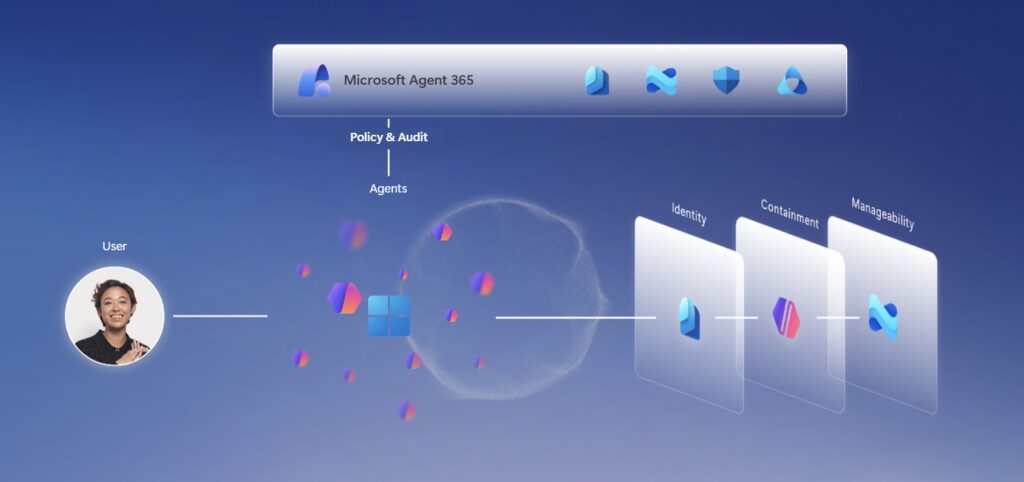
The MXC GitHub repository is more precise, and more cautious, than the launch blog. Its README describes MXC as a sandboxed code execution system for untrusted code, model output, plugins, and tools across Windows, Linux, and macOS. The backend list includes ProcessContainer, Windows Sandbox, LXC, Bubblewrap, macOS Seatbelt, MicroVM, Hyperlight, IsolationSession, and WSLC. The SDK connects a JSON schema and TypeScript API to platform-specific sandbox backends. In practical terms, Microsoft is not presenting one sandbox product. It is trying to put multiple isolation levels behind a common policy model.
The repository warning should not be skipped. MXC is labeled an early preview, and the README warns that some policies generated by the current SDK may be too permissive. It also says current MXC profiles should not be treated as a security boundary. That caveat changes how teams should read the announcement. Microsoft is positioning Windows as a trusted agent platform, but the public MXC repository is not yet a production-grade security control. The useful interpretation is narrower: MXC previews the policy language and backend strategy Microsoft wants developers to test before treating agent execution as ordinary process execution.
Developers can still inspect concrete details today. The MXC README identifies 0.6.0-alpha as the stable schema to choose for new code, documents Windows 11 24H2 or later, Linux on x64 and ARM64, and macOS on ARM64 and x64, and lists default and experimental backends. Windows defaults to processcontainer, Linux maps to bubblewrap, and macOS maps to seatbelt. Experimental backends include windows_sandbox, wslc, microvm, isolation_session, and hyperlight. That backend spread tells a lot about the strategy: Microsoft wants the developer to describe intended authority once, then let the runtime select an isolation mechanism that fits the platform and risk level.
This structure exists because agent permissions no longer fit inside the old IDE extension mental model. Claude Code, Codex, Copilot CLI, Cursor, Windsurf, and similar tools can read repositories, run shell commands, invoke test runners, fetch dependencies, and call network services. Failure can mean more than an incorrect answer. It can mean a bad file rewrite, a leaked credential, a clipboard read, a spoofed UI action, or a connection to an internal system the agent should never reach. Microsoft’s decision to mention network, filesystem, and UI policy together reflects the actual blast radius of modern coding agents.
Windows 365 for Agents approaches the same problem from a different direction. Instead of only isolating a local process, it gives agents a Cloud PC execution environment for multi-step workflows that involve apps, browsers, input, files, and UI navigation. The Build blog says Windows 365 for Agents is now generally available inside Agent 365. Microsoft Learn describes it as Agent 365’s execution layer for work that cannot be handled only through APIs or connectors.
There is a status wrinkle worth preserving. The Build blog was published on June 2, 2026 and says Windows 365 for Agents is generally available within Agent 365. A Microsoft Learn page titled “Windows 365 for Agents in Agent 365,” last updated on May 1, 2026, still labels it public preview. Those two documents may simply reflect different publication dates, but enterprise teams should verify tenant availability, regional rollout, licensing, and product terms before designing around GA assumptions. This is why the Korean article did not put a GA claim in the headline, and the English localization should keep the same caution.
Agent identity is the enterprise part of the story. Microsoft says Windows can attribute agent activity to a local ID or to an Entra-backed cloud-provisioned identity, making it possible to distinguish people from agents. Entra, Intune, Defender, and Purview then become part of runtime protection, policy management, and audit. The security question is no longer only “is the model safe?” It is also “which identity opened this file, which network did it reach, which UI action did it perform, and how will incident responders reconstruct the session?”
That identity layer connects directly to GitHub Copilot CLI. Microsoft’s Windows post says fast process isolation has been adopted by Copilot CLI. GitHub’s Copilot sandbox documentation explains why this is becoming necessary: as Copilot runs tools, executes commands, and modifies files on the user’s behalf, it needs isolation, portability, and policy control. Inside the Microsoft and GitHub ecosystem, “the agent edits code” is becoming a statement about execution platforms, sandbox policy, identity, audit, and cost, not just model capability.
Intelligent Terminal puts the same idea in the developer’s daily interface. Microsoft’s Intelligent Terminal 0.1 announcement describes a Windows Terminal-based experience with an agent pane. Through ACP, the Agent Communication Protocol, command failure context can be passed to the agent pane. If no agent is installed, GitHub Copilot can serve as the starting point. The preview flow is straightforward: a shell command fails, the terminal captures relevant context, the agent proposes a fix, and the developer chooses what to run. The product is early, but it shows how shell context is moving from “copy the error into chat” into a structured agent surface.
Aion 1.0 adds the local model angle. Microsoft announced Aion 1.0 Instruct and Aion 1.0 Plan. Aion 1.0 Instruct starts in the Edge Insider channel as a preview, with open weights planned for Hugging Face in July 2026. Aion 1.0 Plan is described as a 14B-parameter, 32K-context reasoning and tool-calling model. Microsoft says it can run as a Windows inbox component on capable devices and handle intent interpretation, tool invocation, file management, and sub-agent orchestration locally.
The cost argument is explicit. Microsoft’s Windows blog says agentic workflows require continuous compute and can raise cloud costs. Its proposed answer is tiered execution: use frontier models for frontier problems, and use local models for lower-complexity work. The GitHub Copilot CLI /fleet example points in the same direction: a primary cloud agent creates a plan, evaluates task complexity, and delegates some subtasks to a local model. The details are still product-direction more than mature operating procedure, but the architecture is clear. Agent runtime is splitting into cloud planners, local workers, and isolated execution environments.
For engineering teams, the immediate work is not to adopt every Microsoft preview. It is to classify agent authority. File access, network access, shell execution, UI control, clipboard access, and identity should be listed separately in every coding-agent rollout document. A local sandbox and a Cloud PC session should not be treated as the same risk class. An automation that has no agent identity and no audit trail should stay out of production workflows until the organization has a defensible exception process.
| Question | Why it matters for agents | Microsoft surface to inspect |
|---|---|---|
| What can the agent read or write? | Repository changes, temporary files, credentials, and generated artifacts need separate policy treatment. | MXC filesystem policy and sandbox backend selection |
| Can it reach the network? | Package installs, API calls, telemetry, and internal host access are different risk categories. | MXC network policy, Copilot sandbox controls, enterprise proxy policy |
| Can it use a desktop or app UI? | UI automation can cross boundaries that ordinary API permissions never expose. | Windows 365 for Agents and session isolation |
| Who gets attributed? | Incident response and compliance depend on separating human activity from agent activity. | Agent 365 identity, Entra, Intune, Defender, and Purview |
The MXC warning raises the bar rather than lowering it. “Do not treat current MXC profiles as a security boundary” is not a reason to ignore execution policy. It is a reason to separate preview SDK experiments from operational controls. A team can still use the preview to model which paths should be read-only, which temporary directories can be written, which commands need outbound network access, and which workflows require a Cloud PC instead of local execution. That exercise is valuable even before MXC itself is production-ready.
Microsoft is not alone in this market. Vercel Sandbox, E2B, Modal sandboxes, and GitHub cloud sandboxes all tackle the problem of running agent-generated code in isolated environments. Microsoft’s difference is the bundle: Windows desktop, Intune, Entra, Cloud PCs, Copilot CLI, and Agent 365. For companies with large Windows fleets, this may become a procurement and governance question before it becomes a developer tooling preference. The buyer may ask less about model leaderboard scores and more about policy propagation, audit logs, tenant controls, and support boundaries.
Community reaction was still limited immediately after the Build announcement. The research note for the Korean post did not find deep Hacker News or GeekNews discussion specifically about MXC at publication time. Reddit threads around Agent 365 raised more operational questions: licensing, agent version deployment, and how identities appear in management consoles. That reaction fits the maturity of the product category. Agent execution infrastructure is not judged by a demo alone. It is judged by tenant setup, policy rollout, false positives, developer friction, and how well audit data survives an incident.
For developers outside the Microsoft stack, the announcement still supplies a useful checklist. Start with one internal repository. Mark which paths an agent may read, which paths it may write, and which directories must be off limits. Separate tasks that need outbound package or API access from tasks that can run offline. Put legacy UI automation candidates in a different bucket from API-only workflows. Decide whether local sandboxing, a Cloud PC, or an existing backend workflow is the right execution location for each bucket. Once that table exists, MXC, Copilot sandboxes, Vercel Sandbox, E2B, and similar tools become easier to compare.
The strongest practical sentence in Microsoft’s announcement is not “Windows is an agent platform.” It is the combination of identity attribution, desktop and clipboard isolation, Cloud PC execution, local model delegation, and policy-managed access to files, networks, and UI. If that combination matures, the center of agent adoption moves from model names to authority, execution location, auditability, and cost predictability. MXC is early, but it gives developers a public preview of the policy language that future Windows agent infrastructure may expect them to speak.