Copilot App Preview Expands as GitHub Moves Agents Into Canvases
GitHub expanded the Copilot app technical preview to paid users, while canvases move agent work into reviewable plans, PRs, terminals, and browser sessions.
- What happened: GitHub expanded the Copilot app technical preview on June 2, 2026.
- Existing Copilot Pro, Pro+, Business, and Enterprise users can now download the Windows, macOS, and Linux app, while Free users and non-subscribers remain on a waitlist.
- New surface:
canvasesturn plans, PRs, browsers, terminals, deployment state, and checklists into shared work objects for humans and agents. - Builder impact: Copilot's competition is shifting from code suggestions toward session isolation, review surfaces, automation, and audit trails.
- GitHub's cloud-agent docs put human review, firewalls, hidden-character filtering, signed commits, and session logs in the mitigation layer.
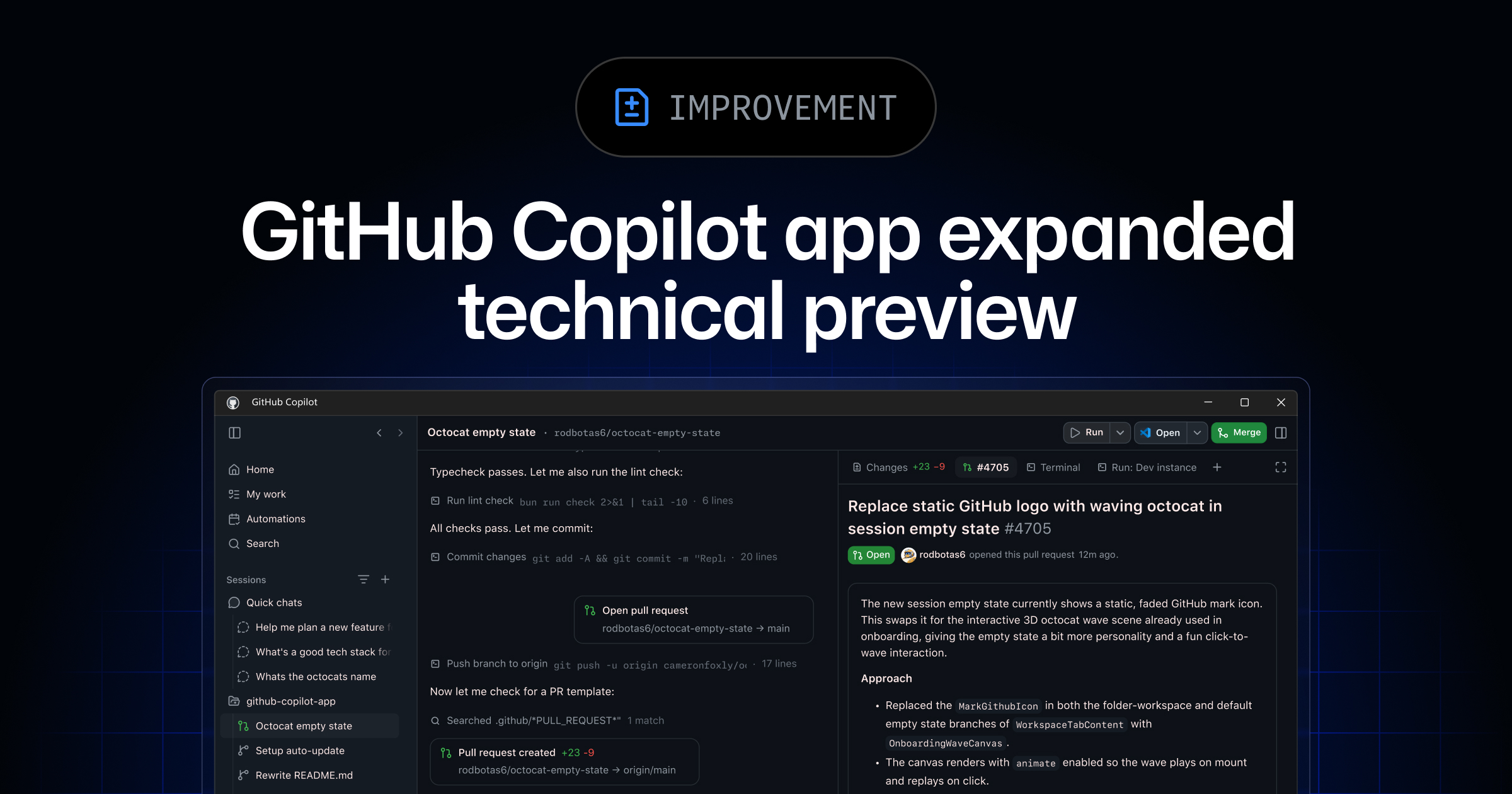
GitHub expanded the GitHub Copilot app technical preview on June 2, 2026, as part of its Microsoft Build 2026 developer tooling announcements. Existing Copilot Pro, Pro+, Business, and Enterprise users can now access the Copilot desktop app for Windows, macOS, and Linux. Copilot Free users and people without a Copilot subscription remain on the waitlist. The visible product is a desktop app, but the deeper move is GitHub pulling coding-agent work out of a chat-only interface and into reviewable work surfaces.
The GitHub Blog describes the Copilot app as an "agent-native desktop experience." Work can start from an issue, pull request, prompt, or prior session. The My work view shows active sessions, issues, pull requests, and background automation across connected repositories. Each session runs in a separate git worktree and branch, and the developer can inspect the plan and diff, verify output in an integrated terminal and browser, then create or continue a pull request. Copilot is widening from code suggestion into a control surface for multiple agent tasks.
Copilot has already had a dense release week. On June 1, usage-based billing and Actions-minutes consumption for Copilot code review began. On June 2, GitHub announced Copilot SDK general availability and a refreshed Copilot CLI. On June 3, the VS Code Copilot May releases grouped Agents Window, remote agents, BYOK, and terminal risk assessment. This article focuses on the app and canvases because the central question is not model quality. It is where long-running agent state is stored, reviewed, corrected, and audited.
Copilot App Wants to Be the Cockpit for Agent Work
GitHub Docs define the Copilot app as a desktop application for agent-driven development. The app combines parallel workstreams, GitHub integration, and pull-request lifecycle management in one place. A developer can choose an issue or start from an empty workspace, select a session mode such as Interactive, Plan, or Autopilot, and set the model and reasoning effort for that session. When work is ready, the same app can create a pull request, leave review comments, inspect CI status, and continue toward merge.
The important noun in that product description is session. GitHub is not treating the agent as a single chat answer. It is treating each unit of work as something with a branch, a worktree, a plan, a diff, and verification history. The GitHub Blog uses a scenario where one developer investigates a production bug, implements a backlog issue, and handles review feedback at the same time. In that world, a longer transcript is not enough. The developer needs to know which session owns which branch, what state each task is in, and what still needs human judgment.
GitHub's platform numbers explain why this matters to the company. The announcement says GitHub commits have nearly doubled year over year to more than 1.4 billion per month, while GitHub Actions usage exceeds 2 billion minutes per week. Those numbers do not prove that the Copilot app is good. They do show that GitHub views agentic development as a platform-load problem across repositories, pull requests, CI, APIs, and governance. If agents create more branches and pull requests, review, CI, and audit records become core product surfaces rather than afterthoughts.
Canvases Are Shared Work Surfaces Next to Chat
The new term in this announcement is canvases. GitHub's changelog describes canvases as bidirectional work surfaces for humans and agents. An agent can update a canvas while working. A person can modify, reorder, approve, or redirect work on the same surface. GitHub lists plans, pull requests, browser sessions, terminals, release checklists, migration boards, incidents, spreadsheets, dashboards, cloud consoles, and workflow state as possible work objects.
The canvas extension documentation makes the idea more concrete. A canvas extension can define an interactive artifact such as a plan, triage board, browser session, release checklist, dashboard, incident, or spreadsheet. In an agentic kanban canvas, for example, a person can move cards with UI controls while the agent calls capabilities such as get_board, add_card, and move_card. The same board state moves between human button clicks and agent tool calls.
The installation model also matters. Team-shared canvases can live under .github/extensions in a repository, while personal canvases can live under ~/.copilot/extensions. A typical extension includes package.json for metadata and dependencies, extension.mjs for canvas behavior and capabilities, and optionally a JSON artifact for persisted state. This makes canvases more than decoration around a chat message. They can become repository-scoped workflow extensions that teams review and version.
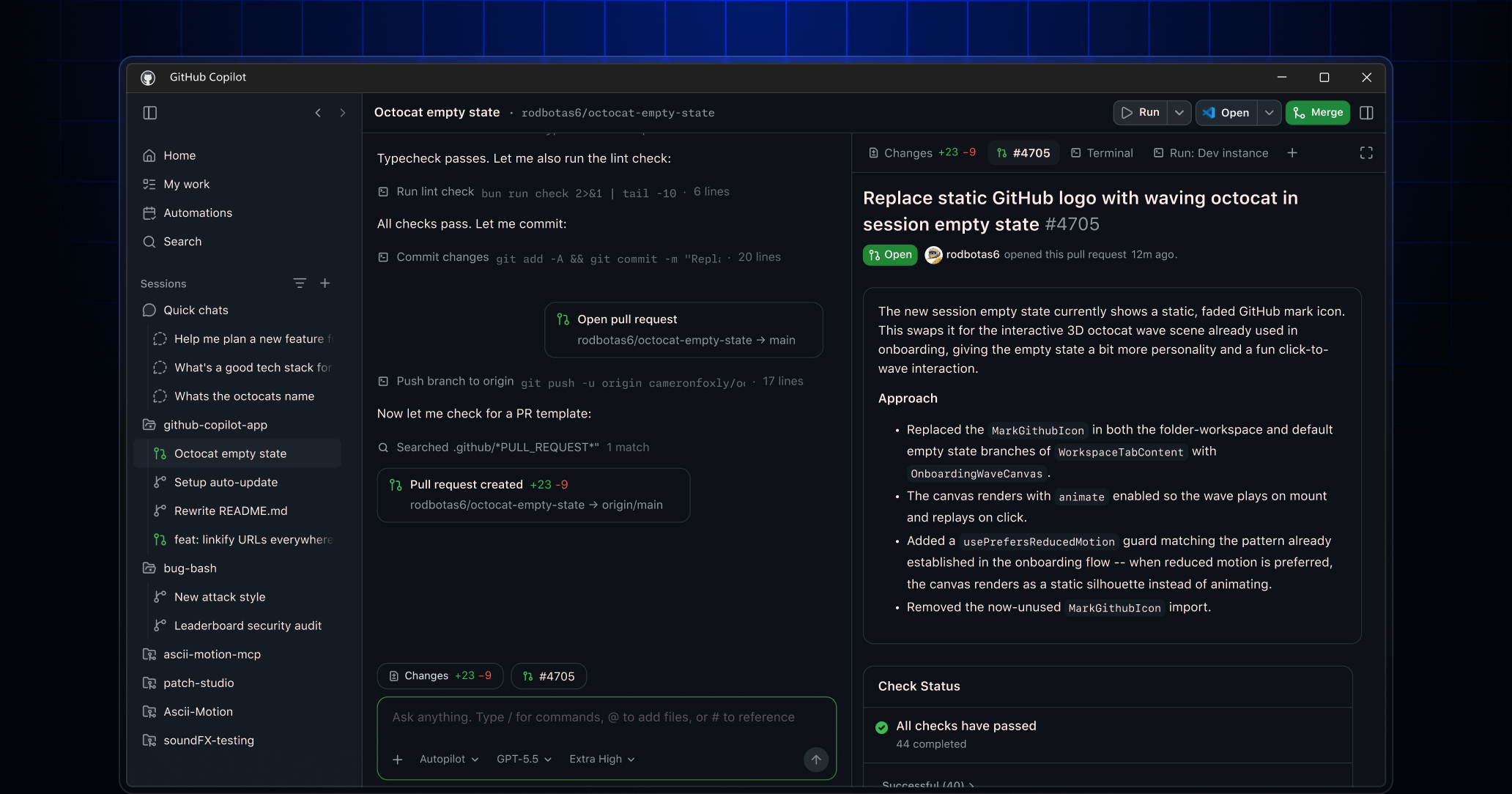
The problem canvases address is less "what was the agent thinking?" and more "what is the current state of this work object?" A long transcript mixes plans, logs, failures, requests, approvals, and summaries in chronological order. A canvas extracts the plan, pull request, checklist, browser session, or terminal state into a separate object. The user can approve or rearrange items through the UI instead of restating everything in a prompt, and the agent can continue from the updated state.
Cloud Sessions Put Review Boundaries First
The Copilot app announcement does not stand alone. The same GitHub Blog post groups the app with local and cloud sandboxes, Agent Merge, cloud automations, Memory++ and /chronicle, and partner-built agent apps. A local sandbox limits access to the user's machine, file system, network, and system capabilities. A cloud sandbox is a fully isolated ephemeral Linux environment hosted by GitHub. GitHub says organizations can set policy, and users can resume a cloud session from another device.
That architecture gives developers convenience, but it also exposes the review boundary. GitHub Docs on cloud-agent risks say the agent creates draft pull requests that still require human review and merge. The Copilot cloud agent cannot mark its own pull request ready for review, approve it, or merge it. By default, workflow runs do not execute before human approval. The point is to let a user delegate work without bypassing branch protection and required review.
GitHub also documents sensitive-data and prompt-injection risks. The cloud agent can access code and secrets-adjacent information, and mistakes or malicious inputs can leak data. GitHub lists internet-access controls as one mitigation. It also warns that hidden messages in issues or pull-request comments can act as prompt injections, and says hidden characters such as HTML comments are filtered before being passed to the agent.
Audit trails are now a product feature. GitHub Docs say Copilot cloud-agent commits are authored by Copilot, show the requesting developer as co-author, and appear as signed commits. Administrators can inspect session logs and audit-log events, and agent-authored commit messages include links to the relevant session log. GitHub is not ending the story with "AI wrote this." It is trying to preserve who requested the work, which session produced the commit, and what happened during execution.
| Product surface | Object humans inspect | Boundary to check |
|---|---|---|
| Copilot app | session, issue, PR, automation | session mode, model, reasoning effort, branch isolation |
| Canvas | plan, PR, checklist, browser, terminal state | human approval points and agent-callable capability scope |
| Cloud sandbox | remote session, draft PR, session log | firewall, workflow approval, signed commits, audit log |
| Automation | scheduled task, event-triggered task | tool allowlist, untrusted event handling, owner attribution |
CLI and App Share the Same Work Record
GitHub announced the Copilot CLI refresh on the same day as the app expansion. The CLI changelog includes general availability for rubber duck and voice input, prompt scheduling inside /experimental, a new terminal interface, and tabs for issues, pull requests, and gists. The broader announcement says sessions started in Copilot CLI appear in the Copilot app's My work view, and cloud sessions launched with copilot --cloud can move into the app UI.
That connection shows GitHub does not want Copilot work trapped inside one interface. A developer can begin in the terminal, monitor or continue the session in the desktop app, and resume cloud work from another device. /chronicle is described as a way to query previous Copilot agent session data. That may sound minor, but long agent work often fails on memory of prior decisions. "What did the last session decide?" becomes an operational question, not a conversational nicety.
The CLI announcement also shows why preview labels matter. GitHub added a June 3, 2026 editor's note clarifying that prompt scheduling was not generally available and is instead part of /experimental. The same caution applies to the Copilot app and canvases. GitHub Docs mark them as a technical preview and subject to change. Teams evaluating the direction should separate GitHub's product trajectory from the current preview's limits.
The Competitive Unit Is the Reviewable Work Object
The Copilot app is not competing only with chat assistants. It sits in the same field as Cursor, Windsurf, JetBrains AI Assistant, Google Antigravity, VS Code Agents Window, and other surfaces where developers launch and review agent work. In that field, the model name is one variable. More practical questions are whether sessions run in isolated branches, whether failed logs and diffs remain inspectable, whether pull-request review and CI stay in the loop, and whether remote execution can be audited after the task ends.
GitHub's advantage is that it owns the code host. Issues, pull requests, Actions, branch protection, audit logs, signed commits, and organization policy already live inside GitHub. Copilot app and canvases use those existing objects as the raw material for an agent interface. The weakness follows from the same fact. Real teams also run Jira, Linear, Slack, cloud consoles, internal deployment dashboards, observability tools, and incident systems. GitHub still has to show how naturally those work objects can be attached to canvases.
Partner-built agent apps are part of GitHub's answer. The GitHub Blog mentions LaunchDarkly, Bright, Amplitude, Sonar, Endor Labs, Octopus Deploy, Packfiles, PagerDuty, and Miro. If agents move beyond fixing issues into feature flags, observability, security scanning, deployment, and incident response, each product's state and approval actions have to become visible. A canvas is GitHub's candidate interface for making that external state inspectable by humans and actionable by agents.
What Teams Should Check Now
The first check is user eligibility. Copilot Pro, Pro+, Business, and Enterprise users can access the technical preview, but Business and Enterprise deployments require the organization or enterprise to enable preview features and Copilot CLI. Free users remain on the waitlist. Because the app touches repositories, issues, pull requests, and potentially internal files, org policy matters more than individual curiosity.
The second check is session mode and approval policy. Interactive, Plan, and Autopilot should not be treated as the same risk category. A Plan-mode task where a person approves execution is different from a long Autopilot session. Once canvases enter the workflow, approvals can attach to work objects such as checklists, pull-request states, terminal actions, and deployment states rather than to a single chat response.
The third check is the network boundary around cloud sandboxes and automation. GitHub presents internet-access limits and firewall customization as mitigations for the cloud agent. Automation can run on a schedule or event without immediate human intervention, and untrusted user events can enter the prompt path. GitHub Docs list tool allowlists and default ignoring of untrusted events as mitigations. Teams should write down which tools an automation may call before they let it run unattended.
The fourth check is where canvas extensions live. A canvas in .github/extensions becomes part of the repository's team workflow. A canvas in ~/.copilot/extensions is a personal workbench. PR triage boards, release checklists, and incident dashboards usually need repository scope because they encode shared process. A personal planner or temporary markdown canvas may fit user scope.
This announcement is too narrow if read as "GitHub shipped another desktop app." GitHub is connecting the Copilot app, canvases, cloud and local sandboxes, Agent Merge, CLI sessions, automation, and audit logs into one system. The developer question is moving from "how well can AI write code?" to "where do I inspect the work, where do I approve it, and what record remains afterward?" Copilot canvases are GitHub's first concrete UI answer.