Snowflake CoCo expands into a coding agent that reads catalogs and RBAC
Snowflake expanded CoCo into Desktop, CLI, SDK, and Claude Code surfaces. The contest is now about data-aware coding agents with governance context.
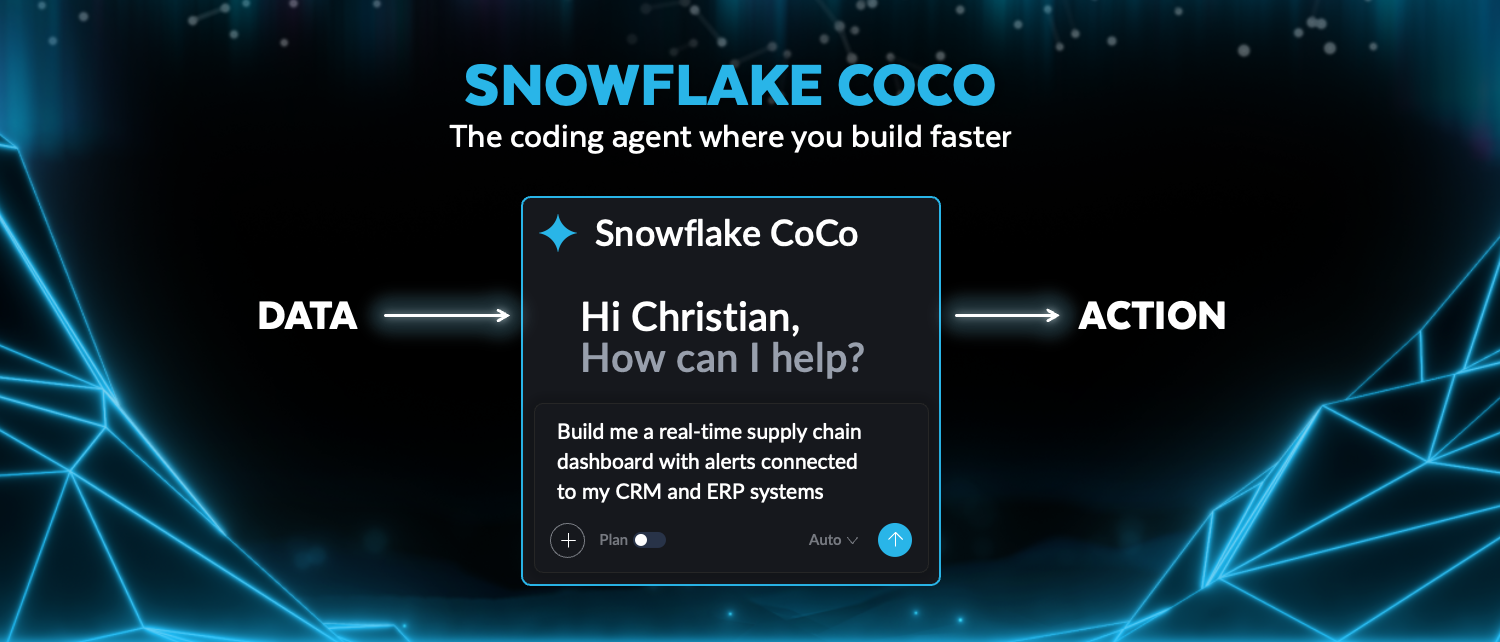
- What happened: Snowflake announced new
CoCocapabilities and Datastream at Snowflake Summit 26 on June 2, 2026.- CoCo is the new name for Cortex Code, now stretching across Desktop, CLI, Snowsight, VS Code, Excel, Claude Code, SDK, and MCP surfaces.
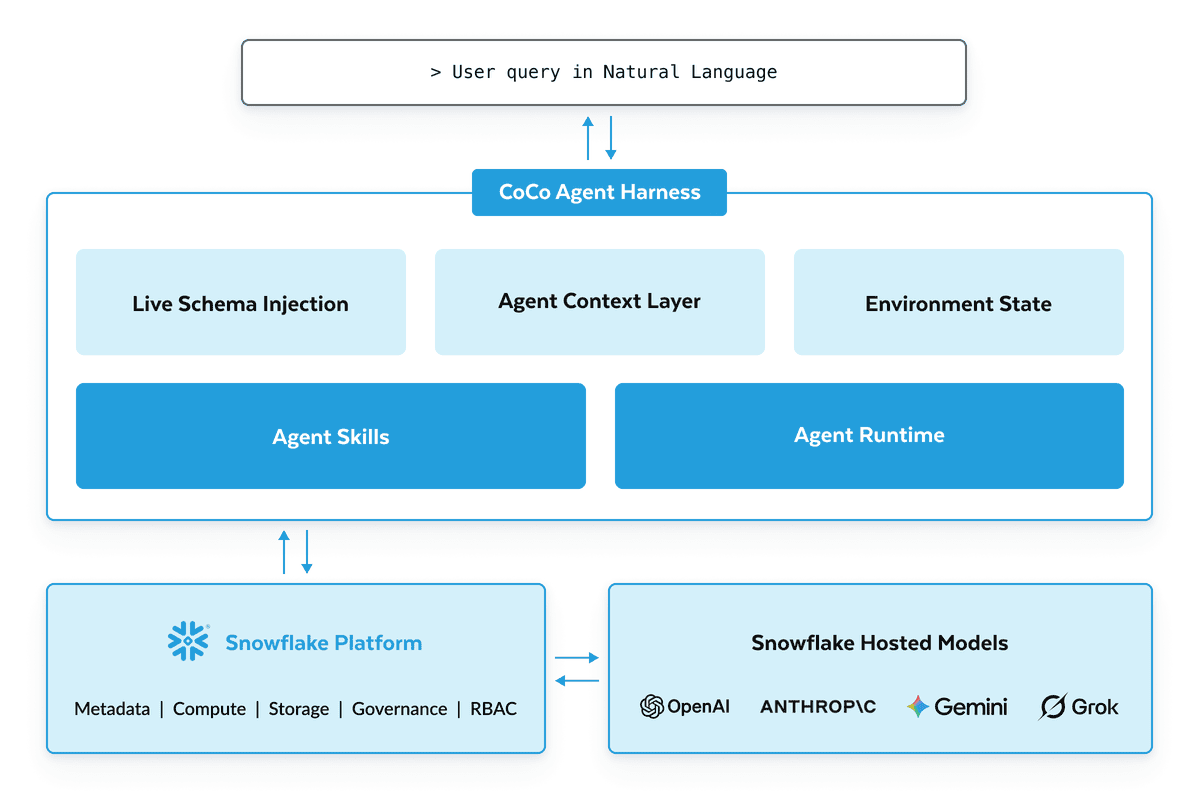
- Why it matters: CoCo is not only an IDE agent. Snowflake is positioning it as a data-native agent that reads catalog, lineage, RBAC, compute, and pipeline dependencies.
- Developer impact: The comparison point moves from model choice toward permission boundaries, SQL execution, audit logs, and data freshness.
- The Agent SDK ties files, shell commands, code edits, SQL, MCP, hooks, and approvals into the same Python or TypeScript agent loop.
Snowflake announced new CoCo capabilities and Snowflake Datastream at Snowflake Summit 26 on June 2, 2026. CoCo is the renamed Cortex Code product. Snowflake describes it as a data-native AI coding agent for building data engineering work, analytics, ML pipelines, applications, and agents. The visible product news is a spread of apps and extensions, but the more useful developer signal is that CoCo works with Snowflake catalog, lineage, RBAC policies, compute, and pipeline dependencies rather than only repository files.
CoCo now reaches across several work surfaces inside and outside Snowflake. The Snowflake announcement names a native desktop app, mobile app experience, Slackbot, VS Code Extension, Microsoft Excel Extension, and Claude Code plugin. The same product arc includes Cloud Agents that continue Snowsight-started work in the cloud, Automations for recurring and event-driven workflows, and an Agent SDK for Python and TypeScript. That list makes CoCo look less like a SQL autocomplete feature and more like Snowflake's attempt to run an agent loop on top of the enterprise data platform.
Recent AI coding tool announcements have centered on repository and IDE surfaces: GitHub Copilot, Claude Code, Cursor, Windsurf, and Google Antigravity. Snowflake enters the same coding-agent contest from a different starting point. A general coding agent usually operates around a repository, issue, terminal, browser, pull request, and CI system. CoCo's core objects are warehouses, tables, notebooks, dbt projects, Airflow jobs, SQL queries, RBAC rules, lineage, and streaming data. For data teams, the bottleneck is often not only "write the code"; it is also "which table can this role read, which lineage will change, and under what authority will the query run?"
Why Cortex Code became CoCo
Snowflake's product FAQ says CoCo is the same product as Cortex Code, with the functionality and architecture preserved. The rename reflects a broader Snowflake framing for AI-powered development. The same page places CoCo beside Snowflake CoWork as part of an agentic control plane. In that framing, CoCo is the build-side agent, while CoWork is closer to work analysis and personal agent experiences.
The practical question is how Snowflake defines "coding." The product page says CoCo can create data pipelines, analytics, ML models, apps, and AI agents through natural-language conversations. Its examples include dbt, Apache Airflow, Postgres, Spark, and AWS Glue. That is wider than a SQL worksheet assistant or a BI copilot. Snowflake wants CoCo to handle the surrounding delivery path for a data stack, not only generate Snowflake SQL.
Snowflake's claimed advantage is context. The product page says CoCo can read catalog, lineage, and RBAC policies so that generated code refers to real objects and permissions. It also names semantic catalog search, data diffing, and sandboxed runtimes as Snowflake-specialized tooling. A general coding agent reads files and runs shell commands. CoCo uses the platform metadata and permission model as working material.
The execution surface is the strategy
CoCo's execution surface now has four main paths. The first is Desktop. Snowflake describes CoCo Desktop as a governed surface for building across the data stack. The second is CLI. The product page publishes install commands for Mac, Linux, and Windows, and describes the CLI as a terminal-native AI coding agent that connects a local development environment to the Snowflake data stack.
The third path is Snowsight. CoCo in Snowsight is a persistent coding agent inside Snowflake Workspaces, Notebooks, and other Snowsight UI workflows. That puts the agent where data teams already write worksheets and notebooks. The fourth path is existing tools. Snowflake names VS Code, Excel, Claude Code, Agent Client Protocol, and support for more than 30 editors. Instead of waiting for developers to open a Snowflake-only UI, Snowflake wants CoCo callable from the tools those teams already use.
| Surface | Snowflake description | Boundary teams should verify |
|---|---|---|
| Desktop | Native IDE for building the data stack | Local file access, sandbox behavior, and account linkage |
| CLI | Terminal-native AI coding agent | CI use, shell permissions, and Snowflake connection scope |
| Snowsight | Persistent agent inside worksheets and notebooks | Role, warehouse, query history, and audit trail |
| Extensions | VS Code, Excel, Claude Code, and ACP integrations | How IDE context combines with warehouse privileges |
This expansion answers a different question than GitHub Copilot's deeper integration with issues, pull requests, Actions, and branch protections. GitHub creates an agent workbench inside the code host. Snowflake creates one inside the data cloud. Both products move beyond "AI writes code" and attach work state, permissions, and execution history to platform objects. The difference is that GitHub's native objects are repositories and pull requests, while Snowflake's are tables, warehouses, queries, policies, and lineage.
Cloud Agents and Automations change approval boundaries
Snowflake says Cloud Agents can continue in the cloud after a user starts work in Snowsight. The laptop session does not need to stay open while the agent keeps working and returns results later. That is convenient, but operational teams will first ask about approval lines and audit logs. If an agent continues a long data-pipeline change, validation run, notebook generation, or app deployment in the cloud, the questions are who started it, which role it used, what changed, and where the record lands.
Automations raises the same issue. Snowflake says Automations can run recurring and event-driven workflows while using Snowflake RBAC and audit trails. When validation, monitoring, or operational repair moves into an agent workflow, policy becomes more important than prompt wording. A daily automation that checks a Kafka stream and fixes schema drift may be useful, but it also needs ALTER privileges, warehouse cost limits, failure notifications, and rollback rules.
Snowflake's mention of a secured local sandbox fits the same pattern. A local coding agent can touch files and shell commands. A data agent can add warehouse queries and table mutations. Local sandboxing, Cloud Agents, Snowsight roles, and audit trails may appear as separate product features, but they all answer one control question: where can the agent execute, and what is it allowed to change?
The Agent SDK brings CoCo into applications
Snowflake's Cortex Code Agent SDK documentation is marked preview. The docs say developers can build agentic AI applications in Python and TypeScript using the same tools and agent loop that power Cortex Code. The built-in tools include file read, write, edit, shell command, code search, and SQL execution. A team does not have to build its own tool execution layer before an agent can work with local files and Snowflake SQL in the same loop.
The SDK examples call an agent through a query function and receive streaming messages. TypeScript uses the cortex-code-agent-sdk package, while Python uses cortex_code_agent_sdk. The prerequisites include Cortex Code CLI, a Snowflake CLI connection, and Node.js 18 or later or Python 3.10 or later. Connections come through ~/.snowflake/connections.toml or an existing Snowflake CLI configuration. That architecture keeps CoCo tied to Snowflake account identity and CLI configuration instead of making it a detached SaaS chatbot.
The feature list resembles a general agent framework: multi-turn sessions, continuing a previous session, forking a session, MCP servers, hooks, structured output, and session control. Hook events include PreToolUse, PostToolUse, Stop, and UserPromptSubmit. Session options include max turns, effort, abort controller, environment variables, additional directories, plugins, system prompt, and setting sources. Snowflake is extending CoCo as both a product UI and a developer-embedded SDK.
The implementation question is not only how powerful the SDK is. It is the approval model. The docs include separate areas for approvals and user input. Once an agent can execute SQL, edit files, and run shell commands, enterprise applications need a clear distinction between tools that are allowed automatically and tools that require a human approval. In a data warehouse, SELECT, INSERT, CREATE TABLE, ALTER TASK, and external access integration calls carry different risks.
Datastream targets the freshness problem
Snowflake also announced Datastream at the same event. Datastream is a Kafka-compatible managed streaming service that lets existing Kafka applications and streaming systems send data directly into Snowflake. Snowflake says the service reduces separate brokers, connectors, and streaming infrastructure, while streamed data inherits Snowflake governance, access controls, masking, and lineage.
CoCo and Datastream belong in the same announcement because agents lose usefulness when their inputs are stale. An AI app or agent that reads only old batch tables will not follow live operational state. Snowflake presented Datastream as the real-time data engine and CoCo as the AI coding agent that builds applications and pipelines on top of it. The developer story is a prompt-built real-time pipeline whose data lands inside Snowflake tables and governance.
The operational details still need account-by-account validation. Kafka compatibility may or may not remove much connector work for a given system. Masking and lineage after stream ingestion need to be tested against real pipelines. High-volume streaming also changes warehouse cost assumptions. The product direction is still clear: Snowflake wants agents, fresh data, and governed execution to live in one platform boundary.
Customer examples point back to the data foundation
Snowflake's announcement names Fanatics, Thomson Reuters, and WHOOP as CoCo examples. Fanatics describes reducing pipeline and data modeling work from days to hours. Thomson Reuters says it has more than 37,500 governed tables and 350 data sources on Snowflake as a single source of truth, then uses CoCo for legacy modernization, AI pipeline scaling, and insight delivery in days instead of weeks. WHOOP describes rolling CoCo out beyond the data team and across the organization.
The condition behind those examples matters more than the speed claim. CoCo becomes stronger when the data already sits inside Snowflake governance. Catalogs need to be useful, roles need to be well scoped, and lineage and table dependencies need to carry meaning. If object names, ownership, masking policies, dbt projects, and Airflow DAGs are already messy, an agent can amplify that disorder faster than a human team can review it.
CRN covered CoCo and CoWork as parts of Snowflake's partner-ecosystem expansion at Summit 2026. TechTarget described Snowflake's move from Data Cloud toward an Agentic AI Platform. Those are interpretations rather than primary product facts, but they match the product shape. Snowflake does not want to remain only a warehouse vendor. It wants to be the control plane where enterprise AI applications and agents execute against governed data.
The buying question is permissions and lineage
CoCo can look disadvantaged if it is compared directly with GitHub Copilot, Claude Code, or Cursor on ordinary coding-agent criteria. General coding agents race on language coverage, IDE polish, repository understanding, pull-request workflow, and model performance. CoCo should be evaluated differently. It assumes a Snowflake account, warehouses, Snowflake CLI connection, roles, SQL execution, and catalog metadata. It is not primarily the agent a developer opens to fix a React component. It is the agent that changes a governed data stack.
That changes procurement and adoption questions. Asking only "which model does it use?" is not enough. Snowflake's product page mentions model choices such as Claude Opus 4.7, Claude Sonnet 4.7, and GPT 5.4, but the higher-impact question for a data agent is tool boundary. Teams need to know which databases and schemas the agent can see, when write operations are blocked, how query costs are capped, and how prompts, SQL, and file diffs appear in audit records. They also need to know which third-party systems an MCP server can reach.
Databricks and Microsoft Fabric compete on the same axis. Databricks has Unity Catalog and lakehouse context. Microsoft can combine Fabric, Purview, GitHub Copilot, and Rayfin-style agent surfaces. Snowflake's advantage is its Snowflake-native governance model and the amount of customer data already inside its platform. All three vendors are moving agents closer to the data. The differentiator will be how reliably each platform converts existing permission models into agent actions.
Questions teams should ask now
The first question is where CoCo will be used. Desktop, CLI, Snowsight, VS Code, Excel, and Claude Code plugin all carry the CoCo name, but their risk boundaries differ. Generating SQL inside Snowsight under a limited role is not the same adoption step as letting a local CLI edit repository files, run shell commands, and execute SQL. A proof of concept should start with a read-only role, a small dbt project, and an isolated warehouse.
The second question is approval policy by tool type. File read, code edit, shell, SELECT, CREATE TABLE, INSERT, task scheduling, and external MCP calls are not one uniform "agent action." If a team uses the SDK or Automations, it should document which actions are allowlisted and which need human approval. Snowflake can provide RBAC and audit trails, but the role granted to an agent is still an organizational decision.
The third question is metadata quality. CoCo's differentiator is that it understands catalog, lineage, and RBAC. That claim weakens when the catalog is stale or lineage is broken. Table owners, masking policies, dbt model descriptions, Airflow dependencies, and freshness service-level expectations need to be usable before an agent can make safe proposals.
The fourth question is cost separation when CoCo and Datastream are evaluated together. Streaming ingestion, warehouse compute, agent token consumption, SDK calls, and automation runtime are different cost lines. Snowflake's product FAQ says CoCo is billed by token consumption and includes trial credits. A successful data-pipeline automation can increase execution frequency and query cost, so cost controls belong in the proof of concept instead of after rollout.
Snowflake's CoCo announcement is not just another AI coding tool release. It shows a data platform pulling the agent runtime inside its own governed environment. Once a coding agent reads catalog, RBAC, lineage, SQL execution, and streaming freshness, the evaluation table changes. Model scores and IDE UX still matter, but warehouse permissions, lineage trust, audit trails, real-time data, and approval policy become just as visible. Snowflake is using CoCo to rewrite that comparison table from the data team's side.