Step Functions adds AgentCore harness calls as approvable agent steps
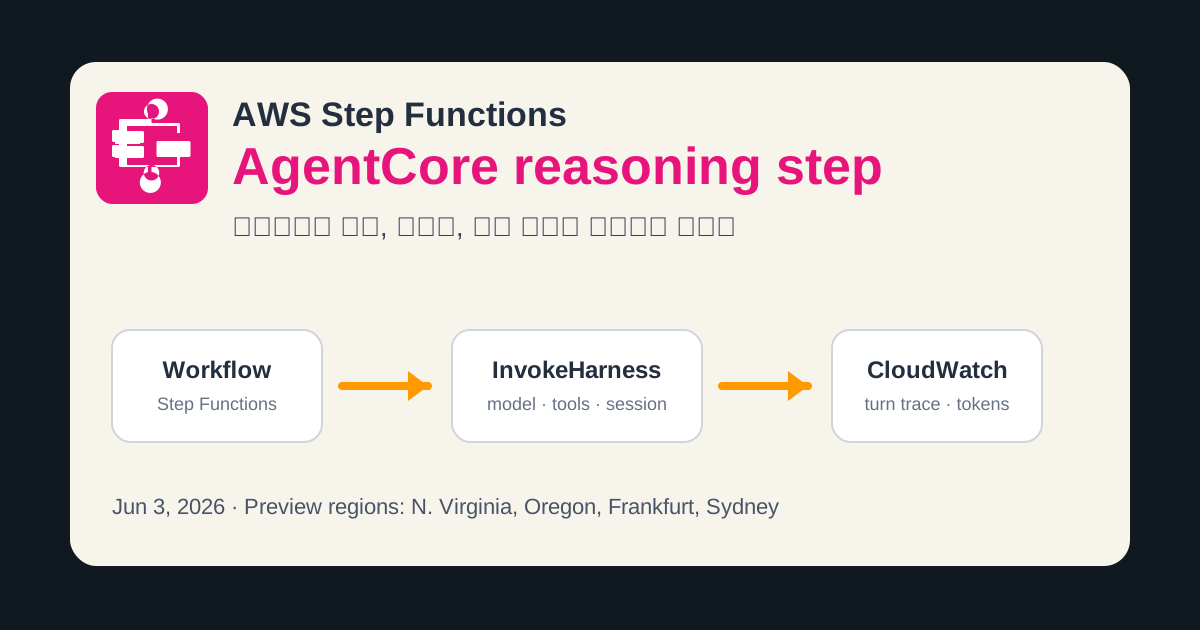
AWS added an optimized Step Functions integration for AgentCore harness calls, turning agent reasoning into a workflow Task with approval, retry, trace, and token controls.
- What happened: AWS added an optimized
Step Functionsintegration that invokes an AgentCore harness.- The June 3, 2026 release is available in the AgentCore harness preview regions: N. Virginia, Oregon, Frankfurt, and Sydney.
- Operational change: Agent reasoning can now sit inside a workflow
Taskstate with approval, branching, retries, parallel execution, and execution history around it. - Watch: Step Functions returns the final assistant message, while tool use and reasoning blocks are not included in the output content.
- The docs also cap
InvokeHarnessTask execution at 15 minutes, and warn that a harness may continue running until its own timeout after the Task times out.
- The docs also cap
AWS added an AgentCore-powered agentic reasoning step to Step Functions on June 3, 2026. The announcement is short, but it answers a production question AI teams keep running into: when an agent runs inside a business process, who retries it, who approves risky actions, and where do teams inspect cost, duration, and reasoning traces after the run?
The new integration targets the managed harness in Amazon Bedrock AgentCore. AWS describes the harness as a managed runtime that orchestrates model inference, tool use, and multi-turn conversation. On the Step Functions side, developers call that harness through a Task state resource named arn:aws:states:::bedrockagentcore:invokeHarness. Workflow Studio exposes an AgentCore InvokeHarness state, lets teams create a new harness and execution role through Quick Create, or lets them attach an existing harness ARN.
Step Functions already coordinates distributed applications, ETL jobs, microservices, and incident response procedures as visual workflows. The AWS Step Functions product page highlights more than 220 AWS service integrations, built-in error handling, parallel processing, and human-in-the-loop controls. Once an AgentCore harness becomes a Task state, the agent is no longer only a chatbot surface or standalone service. It becomes a step in an existing operational workflow.
That placement has a direct consequence for enterprise AI teams. Many agent demos end when the model calls a tool and returns an answer. Real operating procedures continue after that point. A document classification agent may return a low-confidence label that needs human review. An invoice extraction agent may change a cost center and require approval. Two specialist agents may run in parallel before a workflow chooses one result. A failed tool call may need a bounded retry policy. This Step Functions integration moves those decisions out of the prompt and into the workflow definition.
| Item | March SDK integration | June optimized integration |
|---|---|---|
| Announcement date | March 26, 2026 | June 3, 2026 |
| Scope | 28 service integrations and more than 1,100 API actions | Dedicated Task state for AgentCore harness invocation |
| Developer surface | AWS SDK service integration | AgentCore InvokeHarness in Workflow Studio |
| Operational focus | Agent runtime calls, Map state parallelism, provisioning workflows | Agent input/output, token usage, duration, and CloudWatch turn traces |
AWS gives document classification and unstructured form element extraction as examples. Their plainness is part of the point. Agentic reasoning does not have to mean a fully autonomous robot. In production, an agent can classify an incoming document, extract fields from a non-standard form, return confidence and rationale, and hand the result to the next workflow step. The team operating that system needs execution conditions, failure handling, and auditability more than a richer chat transcript.
The Step Functions documentation is explicit about the optimized integration's limits. The only supported integration pattern is Request Response. The AgentCore Task state does not support .sync for long-running job completion, and it does not support callback task tokens for directly waiting on an external approval signal. Teams can still combine AgentCore calls with other Step Functions states and approval patterns across the broader workflow. The AgentCore invocation is the reasoning step; approvals, branching, and retries can live in the surrounding control logic.
The response shape also affects architecture. AWS says the response is transformed into Converse-shaped JSON and returns only the final assistant message. Earlier turns from a multi-turn conversation are discarded from the response, and tool use plus reasoning blocks are not included in Output.Message.Content. Token usage is still aggregated across all messages as InputTokens, OutputTokens, and TotalTokens, and latency appears in Metrics.LatencyMs. If a product needs to store which tool an agent called and why, the application payload alone is not enough. CloudWatch traces and separate artifact storage have to be part of the design.
The 15-minute limit is another operational detail that should not be treated as a footnote. The Step Functions docs say an InvokeHarness Task state can run for a maximum of 900 seconds. Even if a workflow definition sets a longer TimeoutSeconds, the Task state still has the 15-minute ceiling. The sharper warning is about stop and timeout behavior: if the Task state times out or the execution is stopped, the harness may continue running until it reaches its own timeout. Teams estimating cost need to align workflow timeout and harness timeout deliberately.
That warning addresses a common agent operations failure mode. The workflow visible to an operator can fail while model inference and tool loops continue in the background, leaving token cost or side effects behind. If a harness has browser or code interpreter tools attached, it may still be querying external systems or writing files after the Step Functions side has timed out. AWS specifically recommends keeping the harness timeout at or below 15 minutes to avoid unexpected costs.
The permission model splits responsibility across two roles. The Step Functions execution role needs permission to invoke a specific harness ARN. The IAM example in the documentation scopes bedrock-agentcore:InvokeHarness and bedrock-agentcore:InvokeAgentRuntime to a harness resource. Tool permissions for gateway, browser, code interpreter, and similar capabilities belong to the harness execution role instead. In organizations where workflow authors and agent platform operators are separate teams, that boundary becomes part of the approval model.
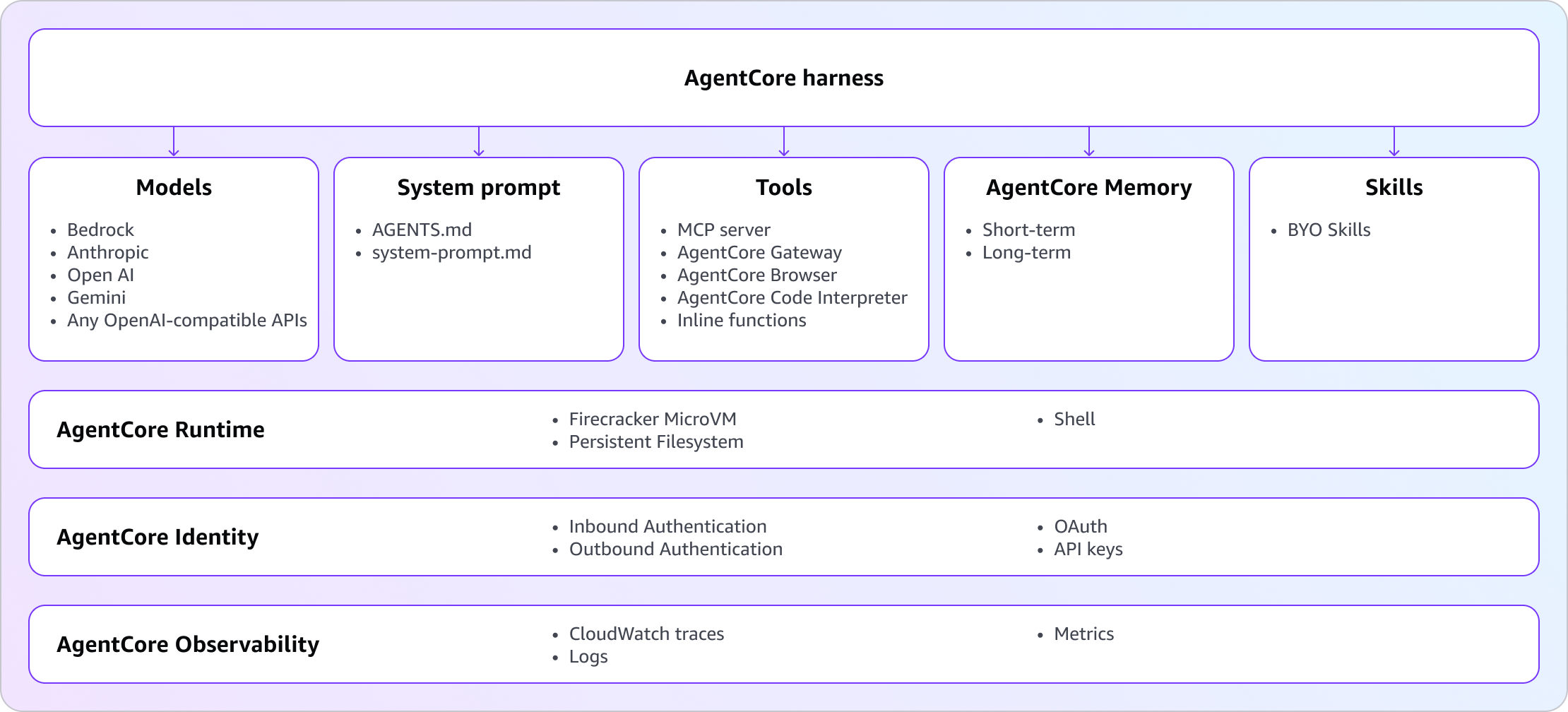
AgentCore harness itself is a broader execution environment than a model endpoint. The harness documentation places model, system prompt, tools, memory, and skills beneath the harness. Runtime, identity, and observability sit underneath those pieces. Harness sessions are stateful, and they can run inside isolated microVMs with filesystem and shell access. The docs also describe short-term and long-term memory, files that can persist across sessions, and model support across Bedrock, OpenAI, Google Gemini, and OpenAI-compatible APIs.
Step Functions places that harness at a specific point in a business process. In a contract review workflow, OCR can run first, then InvokeHarness can summarize clause risk, and a risk score above a threshold can route the case to human approval. In a customer support workflow, an order-status agent can run before a refund branch checks whether additional authorization is required. In a data pipeline, a Map state can process batches of documents in parallel, and only failed items can enter a retry policy.
Per-invocation overrides make the integration more useful in real systems. A team can reuse the same harness while changing model, system prompt, tools, timeout, and maximum iterations for a particular workflow context. The Step Functions examples place SystemPrompt, Model, MaxIterations, and TimeoutSeconds in the Task state. A browser tool example passes agentcore_browser in the Tools array. That makes it possible to vary model and tool access by workflow input, customer tier, or data sensitivity without creating a separate agent service for every case.
RuntimeSessionId looks like a small field, but it is central to state management in multi-step workflows. Passing the same session ID across multiple invocations continues the conversation. A workflow can read a document, generate a clarification question, wait for a human answer, and then call the same harness session for a final decision. Creating a new session ID for each invocation keeps each agent step independent. Audit requirements and privacy retention policy decide which option is safer.
The pricing note in the announcement is brief. AWS says there is no additional charge for the harness integration itself. Standard Step Functions workflow execution pricing applies, and Bedrock model inference plus AgentCore resource charges still apply. A cost estimate cannot stop at state transitions. Agent loop iterations, tool calls, CloudWatch trace volume, memory, browser, and other AgentCore capabilities can all add cost around the workflow execution.
Workflow Studio is the most visible developer-experience piece in the release. AWS says developers can reuse an existing harness or create a new one directly from Workflow Studio. That removes some deployment wiring between "build the agent" and "attach it to the workflow." In production, the convenience does not replace governance. Teams still need to inspect the execution role created by Quick Create, scope which workflow can call which harness ARN, and separate dev, staging, and production session memory.
CloudWatch is the release's observability clue. The Step Functions execution details view shows a CloudWatch link next to the agent step. The documentation says that link opens a turn-by-turn reasoning view that includes tool use. The application output contains the final assistant message, while operators inspect detailed traces in CloudWatch. That separates product logs from operational traces, and security teams need to define retention and access controls for those traces.
The update makes AgentCore's role inside AWS clearer. AgentCore is not just a model API wrapper. It combines runtime, memory, identity, gateway, browser, code interpreter, and observability as an agent execution substrate. Step Functions sits outside that substrate and handles sequencing, branching, approval, and retry. AWS is choosing a shape where the agent is a reasoning step and the workflow engine controls the business process, rather than letting a prompt decide every branch.
Temporal and Durable Functions have long handled retries, timeouts, compensation, and human workflows. LangGraph and LangSmith are strong in agent graphs and traces. Durable workflow tools such as Vercel Workflow are also moving toward long-running and resumable agent work. AWS' advantage is that Step Functions already lives inside AWS IAM, CloudWatch, service integrations, approval patterns, and enterprise account boundaries. For teams that want agent runtime inside an AWS account, procurement and security review may be shorter.
Teams that use tools outside AWS still have lock-in and trace portability questions to answer. The AgentCore harness is based on Strands Agents, and AWS says model providers can be swapped. But the Step Functions Task state, CloudWatch trace, harness execution role, and AgentCore Browser ARN remain attached to the AWS operational plane. Teams already running agent graphs in LangGraph or CrewAI need to decide which pieces belong in AgentCore harness and which should stay in their current orchestrator.
The best developer reading of this announcement is not that agents became smarter. The change is where agent execution now sits. AWS placed the reasoning step inside Step Functions, a long-standing workflow primitive. That means the agent step can be described in operational language: approval, retry, branch, execution history, token usage, and CloudWatch trace. Enterprise agent platforms will be judged less by model names and more by how safely they connect agent actions to business processes and audit controls.
Sources: