Spotify Opens Coding Agent Session Manager Xirp, macOS Only and Account Required
Spotify opened its coding agent session manager Xirp to public beta on August 10. The Mac app came out of 36,000+ internal sessions and splits Claude Code, Codex, and Gemini runs across Git worktrees.
- Spotify opened Xirp, the session manager it ran 36,000+ internal agent sessions through.
- It splits Claude Code, Codex, and Gemini sessions across separate
git worktreecheckouts. - The beta is macOS only and requires a Spotify account.
Anyone who has run three or five coding agents at once knows the same set of chores. You open that many terminal windows, you clone the repo or hand-roll a git worktree so two agents do not edit the same file, and you keep track of which window was doing what from memory. Xirp, which Spotify opened to public beta on August 10, 2026, is a Mac app that does those chores for you.
The announcement is titled "What we've learned scaling AI coding agents at Spotify" and is written by Spotify's Tyson Singer. It reads as an internal operations report rather than a product launch. Spotify says it has already put more than 36,000 coding agent sessions through Xirp internally.
Xirp is not a model and not an agent. It is a management layer that sits on top of the Claude Code, Codex, and Gemini CLIs you have already installed. Login and configuration for each agent still happen in that agent's own CLI. Xirp only creates sessions, isolates them, and lists them.
One session, one checkout
Xirp works with two objects. A session is one terminal running a coding agent inside a project. Close the Xirp window and the session keeps running. A worktree is a separate Git checkout and branch handed to that session alone. Because each session gets its own working directory, several agents can edit the same repository at once without overwriting each other's files.
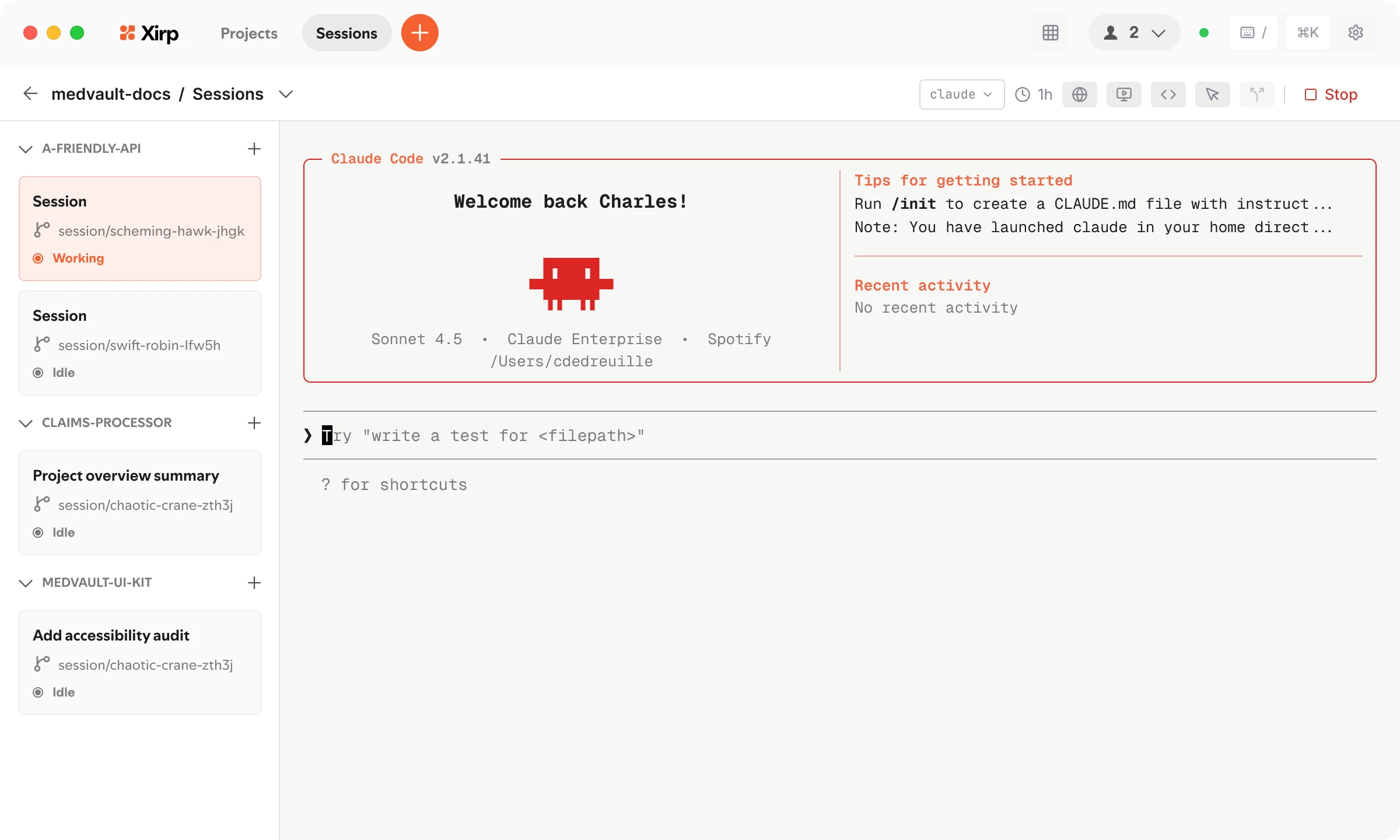
That list on the left is effectively the whole product. Three projects, sessions nested underneath, and every session carrying a branch name like session/scheming-hawk-jhgk plus a Working or Idle status. Until now that information lived in terminal tab titles and in your head.
Sessions and worktrees are tracked separately. Per the official docs, closing a session does not delete its worktree, and the reverse holds too. A branch an agent left half-finished is still there to open and inspect later.
At install time Xirp detects the coding agent CLIs on the Mac and asks you to pick a default. Each new session asks which agent to use and whether to work in the main checkout or cut a fresh worktree. Spotify says one developer can run 50 or more sessions concurrently.
PRs went up, and so did rework
The most useful part of the announcement is not the product description. It is the three failure modes Spotify says it hit internally. This is first-party reporting on what broke when agents scaled to an organization, worth reading even if you have no plans to install Xirp.
"Context accumulated in one session but was needed in another." Institutional knowledge
scattered into individual CLAUDE.md files, personal MCP setups, and private
prompts.
"Agents in one session would expend cycles rediscovering what another session had already resolved."
"PRs increased, but so did rework, inconsistency, and wasted tokens."
The third is the concrete one. Adding agents reliably raises the PR count, and Spotify's own account is that the extra PRs did not convert cleanly into output. Where the 409,000 agent command approvals we covered earlier measured what leaks at the approval prompt, Spotify's report covers the step before it: what leaks when you add sessions.
The usage figures do not line up across sources. The official blog says "thousands of engineers"; a social post quoted the same day says "1,300+". Both are Spotify's own numbers with no independent verification. Only the 36,000-session figure appears directly in the announcement.
What it takes to run it today
Anyone can request beta access, but four conditions apply, and if you are not on a Mac there is currently no path in at all.
| Item | What the sources confirm |
|---|---|
| Who can apply | Individual developers included. Portal integration is optional, so you can use it on local projects with no organizational contract |
| Plans and pricing | No price published for Xirp itself. The product page advertises free use plus a Portal free trial. Agent subscriptions remain your own cost |
| Regional availability | No country restriction appears in the docs, FAQ, or product page. No sentence names supported regions either, so treat this as unconfirmed rather than cleared |
| Requirements | A Mac (Windows and Linux unsupported during the beta), a Spotify Technology account, a beta request, and at least one of Claude Code, Codex, or Gemini CLI already installed and authenticated |
The FAQ states macOS only and lists Windows and Linux as unsupported. The first launch screen then asks for a Spotify Technology account. You can create one on the spot, but needing a new account to use a coding tool at all was the single most common complaint after launch.
Where your code goes is answered in two separate FAQ sentences. Registering a project or connecting to Portal uploads no local files, and the code stays on your Mac. On the way out, though, when session records are pushed to Portal, Xirp does not scrub or redact credentials, personal data, or sensitive content before upload. The docs tell you to review what you are sending yourself.
The app is free because Portal is the product
On its own, Xirp is closer to a worktree launcher. The value the announcement leans on comes from the Portal integration. Portal is Spotify's commercial developer portal built on Backstage, holding the service catalog, dependencies, and ownership data. Connect Xirp to it and agents start a session already carrying that context, and finished sessions land back in Portal as records.
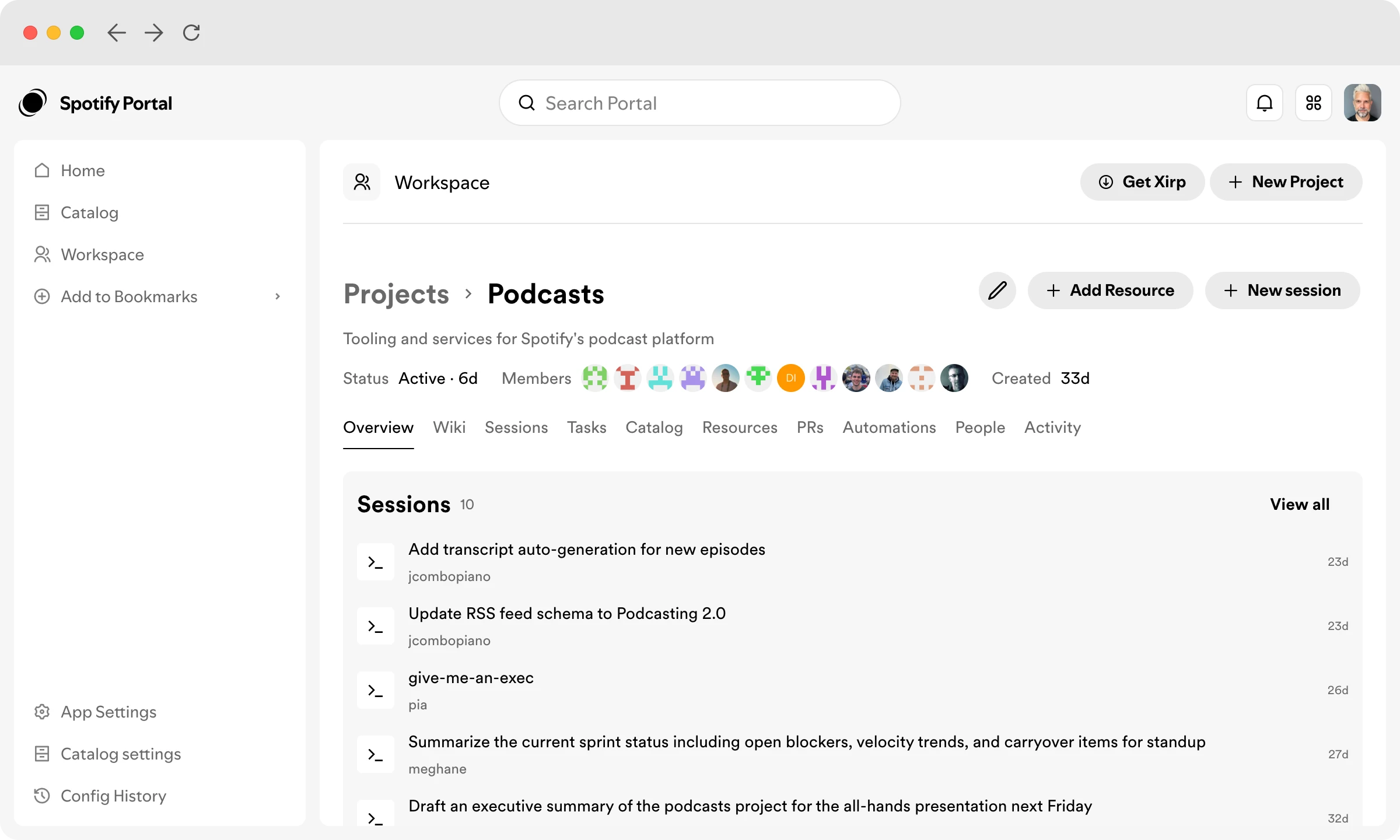
Individual and organizational interests diverge inside that structure. To one developer, Xirp is a terminal manager. To an organization, it is a record system logging who ran which agent on what, per project. Spotify is giving away the first and selling the second.
The open source question has no answer yet either. Spotify open-sourced Backstage in 2020 and handed it to the CNCF, so several people asked right after launch whether Xirp would follow. There is no repository and no license, and Spotify has not responded. Cost drew concern too: the easier parallel execution gets, the faster an API budget drains. For a tool built to run 50 sessions at once, that is a fair objection.
If you are on a Mac running Claude Code or Codex and already hand-building git worktree branches for parallel work, requesting the beta, registering a single repository, and moving one routine branch task into an Xirp session will settle it. The thing to check is not the interface but one question: with nothing uploaded to Portal, is worktree management genuinely less work than doing it by hand? If there is no gain there, the product is for organizations that already run an internal catalog, and there is nothing in it for an individual today. On Windows or Linux there is no option at all until the supported platforms expand.