ChatGPT Lockdown Mode turns off agent web access for prompt injection defense
OpenAI expanded Lockdown Mode to all logged-in ChatGPT users, limiting web, agent, and file-download paths that can turn prompt injection into data exfiltration.
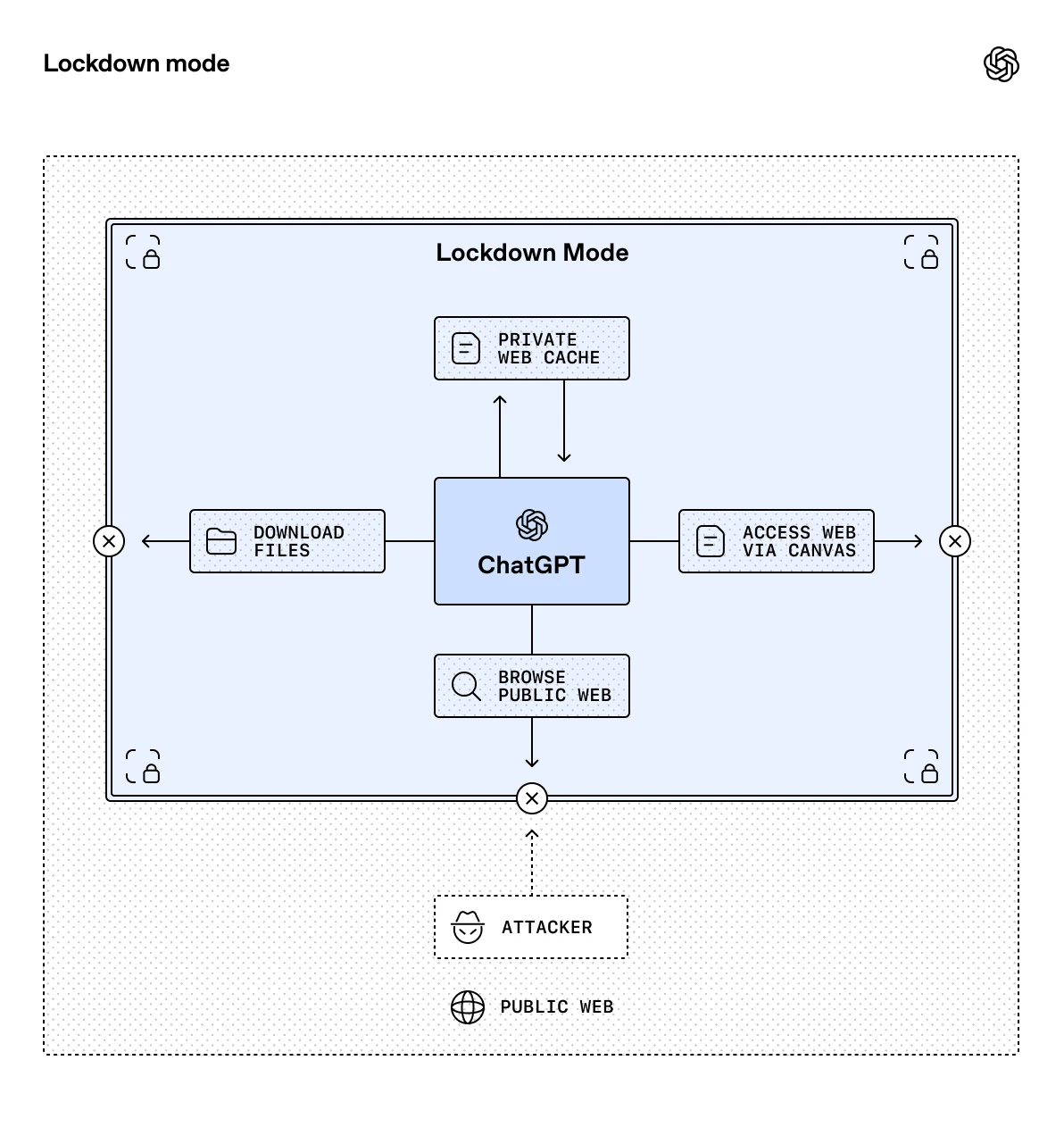
- What happened: OpenAI expanded
Lockdown Modeto all logged-in ChatGPT users, account types, and workspaces.- As of the June 4, 2026 ChatGPT Release Notes and product-blog update, individual users can enable it from Settings > Security.
- What gets limited: Live web browsing, Deep Research, Agent Mode, Canvas networking, file downloads, and some web-derived image support are restricted or disabled.
- Security model: The feature does not make prompt injection disappear; it reduces the outbound paths that can turn a malicious instruction into data exfiltration.
- OpenAI says the mode does not change
Codex network access, memory, file uploads, conversation sharing, or training-data settings.
- OpenAI says the mode does not change
- Builder impact: AI-agent deployments now need a visible control plane for web access, app actions, connector scope, and audit evidence.
OpenAI has widened ChatGPT's Lockdown Mode from enterprise deployments to individual users. The June 4, 2026 entry in the ChatGPT Release Notes says the feature is now available across all logged-in users, account types, and workspaces. Individuals can turn it on from Settings > Security, while workspace administrators can use role-based access controls to configure member access.
The update is quieter than a model launch, but it lands closer to the day-to-day risk surface for developers and security teams using AI agents. When Lockdown Mode is enabled, ChatGPT limits or disables live web browsing, Deep Research, Agent Mode, file downloads, Canvas networking, and some web-derived image support. OpenAI describes the purpose as reducing "data exfiltration risk" from prompt injection attacks.
Prompt injection happens when a model reads malicious instructions embedded in a webpage, search result, uploaded file, or connected-app document. A page can tell the assistant to ignore prior instructions, reveal private context, or send secrets to an external URL. A careful model should refuse, but the problem gets harder once the same assistant can browse, download files, call apps, run long tasks, or act as an agent. OpenAI's answer here is not simply to make the model more cautious. It is to remove some of the channels that let a compromised instruction leave the conversation.
From February enterprise launch to June broad rollout
OpenAI first introduced Lockdown Mode in a February 13, 2026 product post alongside Elevated Risk labels. At launch, the target audience was ChatGPT Enterprise, ChatGPT Edu, ChatGPT for Healthcare, and ChatGPT for Teachers. The June 4 update expands the feature to personal ChatGPT accounts and self-serve ChatGPT Business accounts.
OpenAI's February explanation tied the risk to web access and connected apps. AI systems were taking on more complex tasks, especially across web content and app data, so prompt injection could move from a bad answer to an unauthorized action or data leak. That framing matches where ChatGPT has been heading: the product is no longer only a chat box. It now includes files, connectors, Deep Research, Agent Mode, Codex, Canvas, and other execution surfaces.
The expansion shows that OpenAI no longer treats prompt injection as a niche enterprise-security problem. A personal ChatGPT account can still contain sensitive documents, job-search material, private financial notes, source snippets, and connected-service context. Self-serve business workspaces can hold customer and internal data without the governance layer of a large enterprise rollout. As soon as private data and untrusted web content meet inside the same assistant, the boundary becomes operational rather than theoretical.
What turns off and what stays on
OpenAI's Lockdown Mode Help Center article is specific about the tradeoff. Live web browsing is limited to cached content, and search results may be limited, stale, or unavailable. Deep Research and Agent Mode are disabled. The mode blocks approvals that allow Canvas-generated code to access the network. ChatGPT's own file downloads for data analysis are blocked, although user-uploaded files remain usable.
| Area | What changes in Lockdown Mode | Developer or admin impact |
|---|---|---|
| Live web browsing | Limited mainly to cached content | The product favors cutting exfiltration paths over checking the freshest web state |
| Deep Research | Disabled | Research tasks that combine sensitive documents and public web sources need separation |
| Agent Mode | Disabled | Teams choose review-oriented conversations instead of long-running automation |
| File downloads | ChatGPT cannot download external files for analysis | User uploads still work, but external collection automation is reduced |
| Codex network access | Not affected by Lockdown Mode | Codex requires its own allowlist, approval, and risk-label review |
The exceptions are as important as the disabled features. OpenAI says Lockdown Mode does not change memory, file uploads, conversation sharing, or whether chats may be used to improve models. This is not a universal privacy switch. It is a security mode focused on external network paths and connected-service behavior. Data retention, training settings, file libraries, and shared links still require separate policy decisions.
Codex is also separate. The Help Center says Lockdown Mode does not affect network access in Codex. That matters for developer teams because ChatGPT's security toggle will not automatically stop a coding agent from reading package registries, browsing documentation, hitting test servers, or reaching domains allowed by its own configuration. Codex network access, domain allowlists, HTTP methods, logs, and approval policies have to be reviewed on their own.
Prompt injection defense is shifting from model judgment to capability limits
OpenAI is careful about what Lockdown Mode does not solve. The Help Center says prompt injection can still appear in cached web content or uploaded files and can still influence a response's behavior or accuracy. The feature is closer to "make exfiltration harder if the model is fooled" than "make the model impossible to fool."
That distinction matters in AI security. A model-based filter has to read an instruction, classify it as malicious, and refuse it. Attackers try to exploit exactly that reasoning path. Network restrictions, file-download blocks, write-action limits, and domain allowlists can operate regardless of what text the model just read. OpenAI used the phrase "deterministically disables" in the February post because the product is applying a hard capability limit rather than asking the model to police itself.
Simon Willison read the design through his "lethal trifecta" framing in a June 5, 2026 link post. The risk rises when an LLM system has access to private data, exposure to untrusted content, and a way to send data back out. Lockdown Mode targets the third condition by cutting exfiltration vectors.
Willison's reaction combined approval and warning. He highlighted the deterministic mechanism because it does not depend on another AI judgment call. He also pointed out the implication: if users need this mode for stronger protection, the default ChatGPT configuration should not be assumed to provide robust exfiltration defense for every sensitive workflow. Security teams should map work by risk level instead of treating one assistant default as safe for all tasks.
Apps, MCPs, and connectors are not all disabled automatically
For administrators, the apps, MCPs, and connectors section of OpenAI's Help Center deserves a closer read. In personal accounts and self-serve ChatGPT Business accounts, connectors that use synced data may remain allowed, while live connector access and connector write actions are blocked. Some connected experiences, including Finances in ChatGPT and shopping-agent experiences, are unavailable in Lockdown Mode.
Managed workspaces are more nuanced. OpenAI says apps, MCPs, and connectors are controlled by workspace settings and role-based access controls. Lockdown Mode does not automatically disable every app. Admins still need to inspect member roles, app assignments, read and write actions, and source-system permissions. App access does not bypass the connected source system's permission model, but source-system data can still become prompt-injection material if the assistant can read it alongside untrusted content.
That gives enterprise teams both a useful tool and a warning against oversimplifying it. A single mode can reduce risky paths, but it does not replace RBAC, connector review, or app-action governance. Write actions deserve special attention because they can become exfiltration sinks. If an assistant can write a comment, update a shared record, or create a document in a place other people can see, malicious content can try to make that action carry private data outward.
Codex gets Elevated Risk labels instead
OpenAI's February post introduced Elevated Risk labels alongside Lockdown Mode. One example was Codex's Agent internet access setting. The screenshot showed a domain allowlist, additional allowed domains, allowed HTTP methods, and a warning that internet access increases security risk. The label makes the tradeoff visible: a coding agent is more useful when it can fetch docs and packages, but that same network path can leak repository context or internal data.
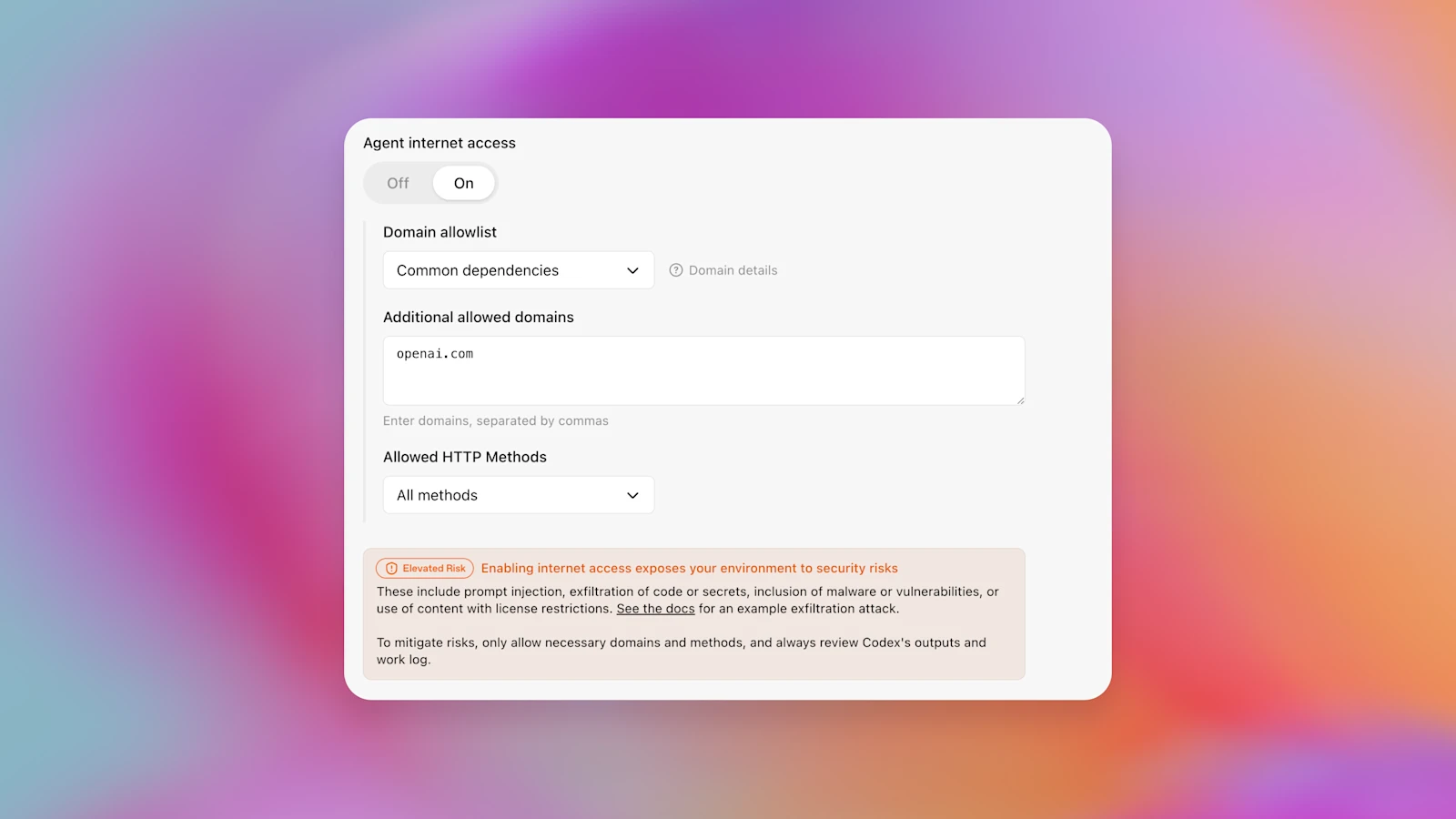
For developers, this image may be more operational than the ChatGPT toggle. Coding agents sit closer to the file system, shell, dependency manager, browser, issue tracker, and CI output than a general chatbot does. Prompt injection can arrive through a README, docs page, issue comment, package-install output, test fixture, or generated webpage. If network access is open at the same time, teams have to consider whether repository secrets, internal paths, logs, or customer-like fixtures could leave the environment.
OpenAI's decision to keep Codex network access separate from ChatGPT Lockdown Mode is understandable. Software work often needs network access for documentation, package installation, API references, browser testing, and dependency resolution. The product cannot simply turn everything off without breaking common development tasks. Instead, OpenAI is pushing the decision into an explicit risk surface with labels, allowlists, and method controls. The responsibility then shifts to the organization: which domains are allowed, whether POST requests are needed, how logs are reviewed, and who approves exceptions.
The same release notes also retire models
The June 4 Release Notes included more than Lockdown Mode. OpenAI also said GPT-4.5 would be retired from ChatGPT on June 27, 2026, and OpenAI o3 would be retired from ChatGPT on August 26, 2026. Those dates represent 30-day and 90-day sunset windows, respectively. This article centers on the security mode, but ChatGPT users received two kinds of product change in the same update: a new way to restrict high-risk capabilities and a cleanup of older model choices.
Those changes look unrelated at the policy level, but they meet in the product experience. ChatGPT is accumulating more web, app, file, and agent functions while OpenAI simplifies model options and adds labels or controls around higher-risk features. Some users want Agent Mode and live browsing by default. Others need those capabilities off while they handle sensitive documents. Some users prefer a legacy model's writing style or reasoning behavior. OpenAI is reducing model surface area while adding explicit control surface for security-sensitive actions.
Community reaction around the June 4 notes appeared louder around o3 and GPT-4.5 retirement than around Lockdown Mode. That is typical for security controls: users notice lost model choices immediately, while risk-reduction settings often stay quiet until a breach, audit, or internal policy rollout forces attention. For organizations, the quiet toggle may end up mattering more than the model sunset because it changes how teams decide which ChatGPT workflows are allowed.
What teams should check now
The first check is workflow separation. If a user puts customer data, internal finance records, unpublished code, acquisition material, or legal documents into ChatGPT, that work should not casually share the same assistant configuration as web research or agent automation. OpenAI's Settings > Security path gives individual users a manual switch, but manual switching is easy to forget. In a workspace, role-based access controls are a better fit for groups that routinely handle sensitive material.
The second check is the connector and app-action inventory. OpenAI says managed workspaces do not automatically lose every app, MCP, or connector under Lockdown Mode. Admins should list which apps have read access, which can write, and where written output becomes visible. Ticket comments, CRM records, shared documents, project-management updates, and finance notes can all become outbound channels if an injected instruction causes the assistant to write sensitive data somewhere external or broadly visible.
The third check is Codex. OpenAI explicitly separates ChatGPT Lockdown Mode from Codex network access. Development teams should review domain allowlists, HTTP methods, package-registry access, browser access, local test-server exposure, and agent logs. If an agent runs for a long period without a human watching every network call, logs and approval boundaries become part of the security perimeter.
The fourth check is security training language. "Do not paste secrets into AI" is too weak for real workflows because teams often need to combine private context with public references. A more useful rule is to avoid combining private data, untrusted content, and an exfiltration vector in the same task. Lockdown Mode is a mainstream product implementation of that rule: it does not remove every risk, but it gives users and admins a switch that narrows the third leg of the problem.
Turning features off is now part of AI product design
AI product competition is usually described through more capable models, longer context windows, richer tool use, faster coding agents, or more autonomous workflows. Lockdown Mode moves in the opposite direction. It makes the assistant do less in specific situations. For enterprises and developer teams, that may be exactly what makes stronger AI tools deployable. Without a way to disable Agent Mode, Deep Research, networked Canvas code, and downloads, a powerful assistant can become too broad for sensitive work.
OpenAI's rollout also makes prompt injection look less like a prompt-engineering problem and more like a systems-design problem. The model cannot fully trust every token it reads. That means network access, files, app actions, connectors, RBAC, risk labels, and audit logs need to be designed together. The fact that Lockdown Mode is now available to ordinary ChatGPT users indicates that this risk has moved out of security research and into product operations.
The question for AI builders is practical: what can the agent send out, and where? Which domains can it reach? Which files can it download? Which connected apps can it write to? Can an admin see those permissions at the moment of use? If the answer is buried or unavailable, the risk is not only the model's quality. It is the missing control plane around the model. Lockdown Mode may look like a small ChatGPT toggle, but it points to a larger product requirement: AI tools need visible ways to add capability, remove capability, and leave evidence for why each mode was allowed.