ChatGPT Sites preview makes internal app deployment a Codex workflow
OpenAI introduced ChatGPT Sites in preview for Business and Enterprise workspaces, turning Codex outputs into shared internal apps with new governance questions.
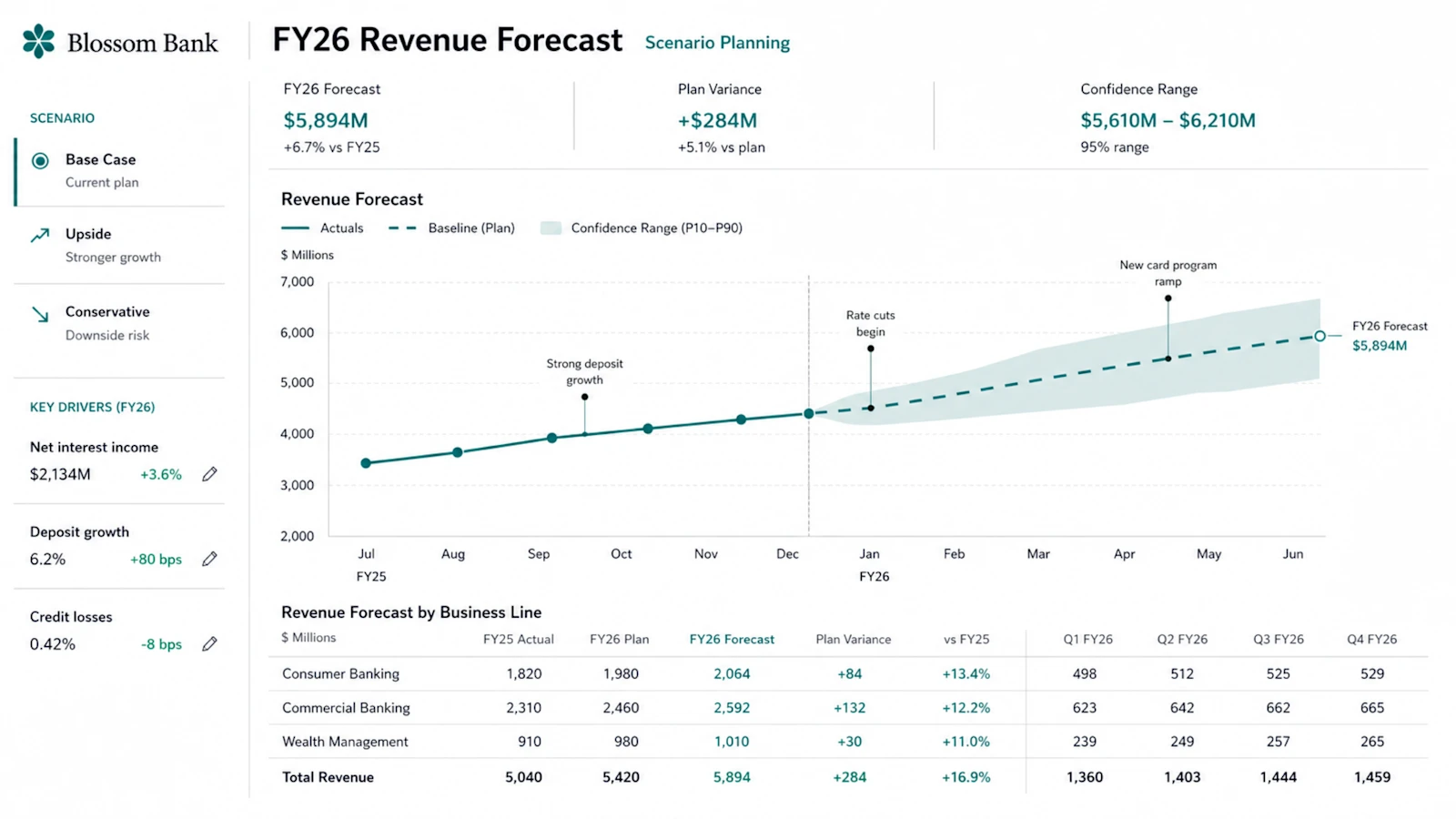
- What happened: OpenAI introduced a ChatGPT Sites preview on June 2, 2026 as part of a broader Codex update.
- Codex can turn prompts, analysis, plans, and files into workspace-hosted web apps such as dashboards, planners, review spaces, and project boards.
- Access model: OpenAI's Help Center says Sites is enabled by default for eligible Business workspaces, while Enterprise workspaces get it through an Early Access toggle.
- Builder impact: Sites can reduce the queue for small internal tools, but teams need rules for permissions, review, audit, retirement, and beta-service risk.
- OpenAI's Sites Terms classify the feature as a Beta Service and allow OpenAI to remove, unpublish, or disable sites under stated policy conditions.
OpenAI's June 2, 2026 Codex update, Codex for every role, tool, and workflow, bundled several product moves into one announcement: role-specific plugins, annotations, a reported 5 million weekly Codex users, and the claim that about 20% of users are now non-developers. The quietest item may be the one with the most operational weight. Sites changes the output surface. Codex is no longer only producing code, documents, analysis, or plans. It can produce a web app that lives behind a workspace URL and can be shared with colleagues.
OpenAI describes ChatGPT Sites as a preview for Business and Enterprise customers. The product examples are not developer-first examples. Codex can build a dashboard, planner, review workspace, project board, gallery, or lightweight tool. OpenAI specifically mentions a customer review page, a financial scenario planner, and a product launch hub. Those examples sit closer to sales, finance, product operations, and internal coordination than to a conventional software backlog.
The access rules in OpenAI's Help Center are more concrete than the product post. ChatGPT Sites is available as a Codex plugin in eligible Business and Enterprise workspaces. Business workspaces have Sites enabled by default. Enterprise workspaces get it through an Early Access toggle. Admins can turn the feature on or off under Workspace settings > Permissions & Roles, and they can disable existing sites under Workspace settings > Sites.
ChatGPT Sites deployment boundary
Codex turns customer reviews, finance planners, launch hubs, and other workspace tasks into small web apps.
Sites are shared through workspace URLs and accessed by invited workspace members.
Admins and owners manage the Sites toggle, default access, and disabling of existing sites.
That structure matters because the boundary is deployment, not only creation. Many AI work tools already generate documents, spreadsheets, slides, scripts, and snippets. Sites turns an artifact into a URL that other people can open, bookmark, discuss in meetings, and use as an operating surface. A URL gives the output a different social life inside a company. It can stop being one person's draft and become a small internal app that other workers repeatedly consult.
OpenAI's customer review example makes the shift visible. A user can ask Codex to create a site for a specific customer review, with relevant product updates, open questions, usage trends, and next steps. That sounds like a sales document, but it also resembles a miniature CRM-adjacent dashboard. Before the sales team files a request for a formal Salesforce dashboard, it may now assemble a temporary account review app through Codex.
The financial scenario planner example creates a different risk profile. OpenAI says Codex can create a site from a financial model so users can compare assumptions side by side. In a traditional workflow, the meeting material may be split across spreadsheet tabs, a PDF, and a slide deck. A Sites workflow can put assumptions, charts, comments, and comparisons into one shared app. That can make review faster. It can also spread an unapproved formula, outdated data, or a misleading sensitivity model through a URL that feels more authoritative than a draft spreadsheet.
The product launch hub example is even more organizational. Launch materials, messaging, milestones, owners, and decisions can become a living hub that Codex keeps updating. Product, legal, security, sales, and support may all refer to the same page. At that point, teams need answers to questions that a simple document rarely forces: who last changed the site, which source backed the change, when the page became official, and when it should stop being used.
This is the next step after OpenAI's separate Codex knowledge-work report. That report focused on adoption metrics: more than 5 million weekly users, more than 6x growth since the February desktop launch, and knowledge workers making up about 20% of Codex users. Sites takes the non-developer story from artifact generation into app deployment. A report can be corrected or discarded. An app can be visited repeatedly, used in decisions, connected to internal data, and treated as part of a workflow.
The first governance issue is authentication and sharing. OpenAI says Sites uses Sign in with ChatGPT access and can be shared with workspace users after creation. That is not the same as publishing to the open internet, but it is not a complete safety boundary. A workspace can include multiple departments, seniority levels, customer accounts, legal contexts, and project teams. A site available to every member and a site limited to a specific group are different operational objects.
The second issue is administrator visibility. The Help Center says admins and owners have default access to all Sites created by members. That is useful for audit and response, but it should also be part of user education. A temporary analysis site is not a private notebook if it sits inside a managed Business or Enterprise workspace. Even an experiment belongs to the organization's governance surface once it is created as a Site.
The third issue is disabling. OpenAI's documentation says existing sites can be disabled from Workspace settings > Sites. This looks like a small admin feature, but it is central to operating an internal app surface. A finance planner with wrong data, a customer page owned by a departed employee, a launch hub that expired after release, or a project board shared too broadly needs a fast retirement path. In Business workspaces where Sites is enabled by default, the daily question becomes who monitors the Sites list and which criteria trigger disabling.
The fourth issue is terms and reliability. OpenAI's ChatGPT Sites Terms classify ChatGPT Sites as a Beta Service. The terms say users can remove or unpublish a site, and that OpenAI can delete, remove, unpublish, or disable sites if it determines that a site violates the agreement or may cause harm. For builders, the practical reading is straightforward: do not promote a preview feature directly into a mission-critical operating system without a separate validation path and fallback record.
Usage limits are part of the same planning exercise. The Help Center says Codex usage counts toward plan-specific agentic usage limits, and that Codex, ChatGPT for Excel, and Workspace Agents usage are counted as agentic usage. A Site may look like a small app, but its creation, revision, analysis, annotation, and continued updates consume the same broader pool. Once teams start creating departmental Sites, cost conversations may shift from "who uses ChatGPT heavily" to "which internal apps keep being regenerated or maintained by agents."
OpenAI's role-specific plugins make this more consequential. The product post says six role-specific plugins span 62 apps and 110 skills. The data analysis plugin mentions Snowflake, Databricks Genie, Hex, and Tableau. The sales plugin mentions Salesforce, HubSpot, Slack, Outreach, Clay, Rox, and Actively. If those plugins feed context into Sites, a small app may consolidate information from BI, CRM, messaging, and document systems into one screen. Each source system may have its own permission model; a generated site can recombine those boundaries.
That is why the old shadow IT problem returns in a faster form. The previous version was a department buying SaaS without central review or building a business process in spreadsheets and no-code tools. Sites shortens the loop. A user can prompt Codex for a customer review app, revise charts and copy through annotations, then share a URL with the team. The benefit is real: fewer small requests for engineering. The failure mode is equally concrete: shadow apps accumulate without source labels, owners, expiration dates, review status, or change history.
Blocking the feature outright is not an adequate answer for every organization. Many small internal tools are poor fits for a formal software roadmap. One-off customer reviews, launch preparation pages, workshop materials, assumption comparisons, training hubs, and project status boards often need quick assembly and short lifetimes. Documents alone can be too static, while a full application project can be too slow. Sites is well matched to that middle layer if the company treats it as provisional and governed.
The risky categories are also clear. Customer-data writes, payment approval, HR evaluation, final legal review, financial disclosure, production deployment, and regulated submissions should not become preview-service Sites without stronger controls. A team may still use Sites for drafts, comparison views, or preparation material, but the final record and approval system should remain outside the generated app. The distinction between "Codex made a useful site" and "this is the official system of record" needs to be written down before adoption spreads.
Admins can start with four policies. First, define which roles may create Sites and whether Business default enablement should remain on. Second, require every site to have a name, owner, department, expiration date, and data-source note. Third, require review before sharing any Site that contains customer, finance, legal, security, or employee data. Fourth, disable sites after inactivity, owner departure, project completion, or an access-scope mistake. OpenAI's toggles are controls, not a full operating model.
Developers should watch the Sites inventory as a product signal. If sales repeatedly creates account review pages, finance repeatedly creates scenario planners, and product repeatedly creates launch hubs, those repeated Sites are not random artifacts. They are working prototypes of internal apps that may deserve formalization. The engineering team can use that signal to decide which workflows need a durable system, an approved template, a governed internal API, or a stricter data pipeline.
Security teams should inspect sharing scope, not only prompts and output text. Internal URLs are safer than public pages, but few companies have data that is appropriate for every employee. The risk grows when plugins connect Sites to CRM, BI, collaboration, and design tools. Information that was originally separated by source-system permissions may be summarized into a single generated page. Auditing that recombination is harder than checking whether a user pasted a secret into a prompt.
The competitive context is broader than the coding assistant market. Microsoft 365 Copilot ties agent work to Word, Excel, PowerPoint, SharePoint, Teams, and admin governance. Google Workspace Gemini sits inside Docs, Sheets, Drive, and Apps Script-adjacent workflows. Replit, Lovable, Base44, Wix, Vercel, and similar tools already compete in the "prompt to app" market. OpenAI's angle is to keep ChatGPT workspace identity, Codex, plugins, annotations, and internal sharing inside one account boundary.
OpenAI's named Sites partner ecosystem points in the same direction. The product post references Vercel, Wix, Base44, Replit, Lovable, Figma, Webflow, and Emergent as part of the broader Sites ecosystem discussion. Today the preview centers on internal workspace sharing. If partner integrations make the path from internal experiment to external customer-facing app smoother, the line between temporary internal Sites and production experiences will become harder to govern. Companies should decide review and ownership rules before that boundary moves.
Public discussion was still limited as of June 3, 2026. The Korean research note did not find a large independent Hacker News or GeekNews thread focused specifically on ChatGPT Sites. Techmeme-linked summaries picked up the broader OpenAI Codex expansion and the introduction of shareable interactive Sites, but the first wave is still mostly official product copy and documentation. That makes the Help Center and Sites Terms more important than social reaction for now.
Reading Sites as "OpenAI launched a no-code app builder" is too narrow. The larger change is that deployment authority moves closer to the person doing the work. A worker can create a small app, share it with colleagues, and keep asking Codex to update it. Developers then move from being the team that implements every small request to the team that decides which generated apps are allowed, which ones need guardrails, and which ones should graduate into official systems.
For ChatGPT Business and Enterprise administrators, the starting point is not the demo. It is the settings page. Business workspaces may already have Sites enabled by default. Enterprise teams can gate it through Early Access, but a pilot should include admin access expectations, disabling procedures, data-source labeling, expiration rules, and a distinction between draft Sites and official systems. ChatGPT Sites is useful precisely because it can create internal apps quickly. That same speed is the reason governance has to arrive before the workspace fills with small, ownerless apps.
The developer question is no longer only "who built this app?" It is "what data does this app read, who can see it, when does it expire, and when does it become a maintained system?" ChatGPT Sites pushes Codex one step beyond coding assistance and into the workspace app surface. The next bottleneck is less likely to be model capability than access control, ownership, cost limits, review records, and lifecycle management.