DGX Station for Windows puts trillion-parameter AI on the enterprise desk
NVIDIA introduced DGX Station for Windows with GB300, 784GB coherent memory, and dual boot for enterprise AI agent workstations.
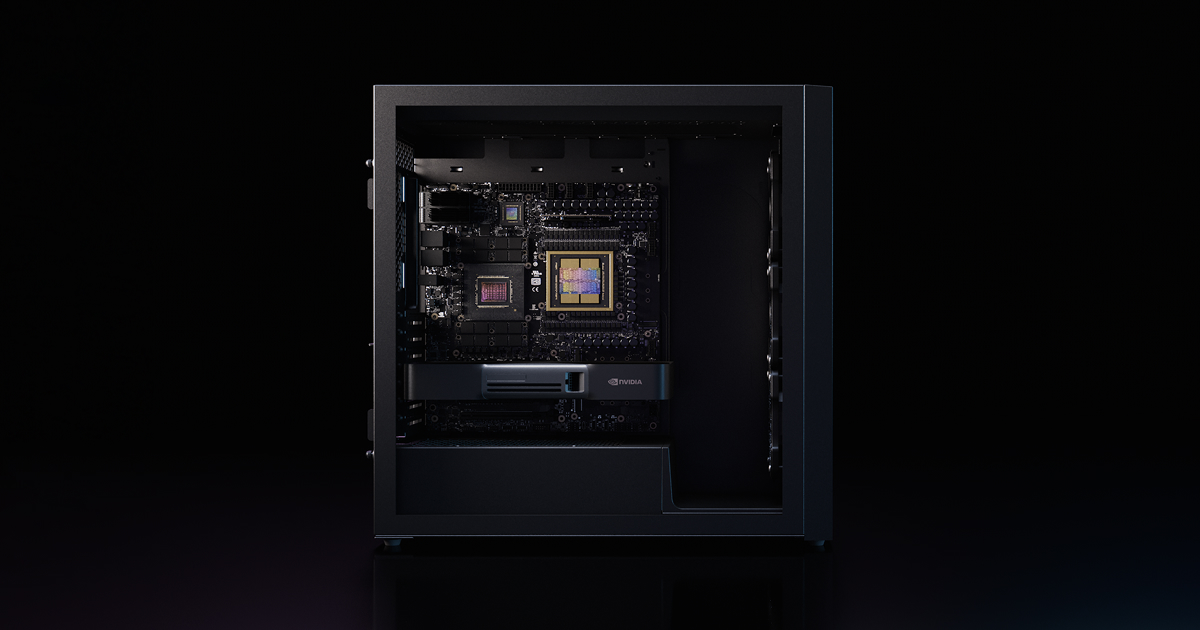
- What happened: NVIDIA announced DGX Station for Windows on June 1, 2026.
- The system pairs
GB300 Grace Blackwell Ultra, up to 784GB coherent memory, and dual boot across Windows 11 and DGX OS.
- The system pairs
- Why it matters: Windows PCs are moving from thin clients for AI agents toward local execution surfaces for large models.
- Developer impact: Teams can compare trillion-parameter experiments and private agent prototypes between cloud GPUs and deskside systems.
- The real purchase criteria are data location, driver stability, IT management, power, noise, and depreciation, not only FLOPS.
- Watch: Pricing, final system configurations, Windows on Arm compatibility, and enterprise security controls still need production proof.
NVIDIA brought the AI workstation story back to the Windows desk. On June 1, 2026, the company announced DGX Station for Windows, a deskside system it describes as a trillion-parameter AI supercomputer. The published configuration centers on the NVIDIA GB300 Grace Blackwell Ultra Desktop Superchip, up to 784GB of coherent memory, and a dual-boot setup that moves between Windows 11 and NVIDIA DGX OS.
This is easy to misread as one more powerful workstation. The timing says more. One day earlier, on May 31, NVIDIA and Microsoft announced RTX Spark for Windows PCs built around personal AI agents. RTX Spark targets the notebook and compact-desktop layer. DGX Station for Windows sits above it as the enterprise desk tier: a machine for companies that want sensitive code, data, model experiments, and agent evaluation closer to the user than a remote GPU queue.

The upper tier of the Windows AI PC
Microsoft's Windows Experience Blog framed RTX Spark with Windows on Arm, Windows ML, TensorRT, PyTorch, llama.cpp, Hugging Face, Unsloth, and Kohya in the same developer stack. That list is not only about running AI apps on Windows. It describes a local-agent path where models read files, generate images or video, call tools, and operate inside the Windows application ecosystem.
DGX Station for Windows pushes that idea into a larger enterprise machine. NVIDIA's product page puts Windows 11 and DGX OS dual boot near the front of the pitch. A user can stay inside the Windows application and management environment, then move to DGX OS for NVIDIA's AI software stack when the workload needs it. That matters because enterprise AI development does not always start on a Linux server. Data scientists move between Excel, Power BI, CAD, Adobe tools, internal Windows applications, VS Code, Git, Docker, Python, and model runtimes.
The system partners also reveal the intended buyer. NVIDIA names Lenovo, Dell Technologies, HP, and BOXX as system makers for DGX Station for Windows. That is an enterprise channel, not a parts-list workstation. If a company is going to put a deskside AI machine into a lab or engineering group, procurement, warranty, deployment, and local support matter almost as much as raw accelerator specs.
| Tier | Representative system | Key numbers | Developer question |
|---|---|---|---|
| Personal AI PC | RTX Spark notebooks and compact desktops | Up to 128GB unified memory, 120B LLM target | Are local agents and app compatibility good enough? |
| Enterprise desk | DGX Station for Windows | 784GB coherent memory, trillion-parameter model target | Is it worth keeping sensitive data and large model experiments in-house? |
| Cloud GPU | H100, B200, or GB200 instances and managed GPU clouds | Elastic quota, hourly billing, remote runtime | Can the team absorb queue latency, data movement, and cost variance? |
What 784GB coherent memory changes
The first number to notice in DGX Station for Windows is 784GB of coherent memory. AI workstation competition is no longer explained by GPU FLOPS alone. Local LLM and agent workloads also need memory for model weights, KV cache, long context, retrieval indexes, tool output, image and video tensors, evaluation data, and fine-tuning batches. A 24GB or 32GB VRAM machine can be useful for 7B, 14B, and some quantized 70B models. It runs out of room quickly when larger models, longer context, and multimodal work arrive together.
NVIDIA presents the GB300 Grace Blackwell Ultra Desktop Superchip as the answer to that pressure. Grace CPU and Blackwell GPU are connected through NVLink-C2C, and the system exposes a coherent memory space across CPU and GPU. The announcement leads with a trillion-parameter model claim, but the practical value is not only loading one giant model for a demo. Enterprise teams also need to keep model variants, adapters, retrieval caches, evaluation sets, and agent traces close enough to iterate.
A security team gives one concrete example. If company policy blocks internal repositories from being uploaded to an external coding agent, a tiny local model may not be enough. Testing an agent against real repositories, internal documents, build logs, test results, and binary artifacts needs more memory and a stable runtime. A machine like DGX Station is less a device for a single inference run and more a local platform for repeated agent experiments and evaluation.
Media, CAD, simulation, and robotics teams have a similar reason to care. They are not only running text LLMs. They work with 3D assets, image and video generation, digital twins, synthetic data, and physical AI pipelines. NVIDIA and Microsoft put creators, gamers, and developers into the RTX Spark framing because those workloads already overlap. DGX Station for Windows moves the same overlap into enterprise labs and engineering desks.
Dual boot is a buying condition
Windows 11 and DGX OS dual boot may look like a small line in the spec sheet. For enterprise adoption it is closer to a buying condition. AI developers may prefer Linux. Corporate IT already has Windows endpoint management, device inventory, identity, endpoint detection, data-loss prevention, remote support, and user training. A pure Windows environment can be painful for CUDA, containers, model serving, and distributed training stacks. A separate Linux server creates its own management boundary.
Dual boot tries to make that conflict a product feature. Windows keeps internal applications, Office, design tools, enterprise identity, and endpoint policy in place. DGX OS gives developers a more direct path to NVIDIA AI Enterprise, CUDA, container-based model workflows, DGX Cloud connections, and NGC software. Developers may see OS switching as friction. Buyers may see it as a way to avoid managing a completely separate Linux machine for every high-end AI workstation request.
The design does not erase every workflow problem. Agent systems are stateful. Files opened in Windows, WSL or container state, Linux-side model caches, company network authentication, and endpoint policies may not move cleanly across an OS boundary. Many enterprises would rather have shared workflows with clear policy and data boundaries than a literal reboot between modes. NVIDIA and Microsoft still need to prove how well the management layer works after these systems leave the announcement page.
Where it competes with cloud GPUs
DGX Station for Windows should not be described as a cloud GPU replacement. Large-scale training, burst workloads, shared queues, global deployment, and managed-service integration still favor the cloud. Buying the machine removes some quota anxiety but adds power, cooling, physical security, hardware failure, depreciation, and local support. An AI supercomputer under a desk sounds dramatic. In production, it becomes an asset tag, a helpdesk object, and a line in a depreciation schedule.
There are still clear cases for deskside systems. The first is data movement. Healthcare, manufacturing, semiconductor, financial, and public-sector teams often face slow or restricted processes for moving raw data and design files to cloud GPUs. The second is iteration latency. Small fine-tunes, adapter comparisons, retrieval-index rebuilds, and local agent evaluations can happen many times per day; cloud queue time and data synchronization can become the bottleneck. The third is budget predictability. A capital purchase depreciated over three years can fit some organizations better than a variable monthly GPU bill.
The opposite case is just as clear. If a team already uses cloud development environments, hosted CI, managed vector databases, and model APIs, a DGX Station can become a local island. Agent products rarely end at inference. They need browser automation, external APIs, databases, queues, secret vaults, audit logs, and deployment pipelines. If those surrounding systems are in the cloud, a local supercomputer solves only one part of the execution path.
RTX Spark and DGX Station belong together
NVIDIA and Microsoft announced RTX Spark and DGX Station for Windows one day apart. The pairing looks deliberate. One is the personal or prosumer PC tier. The other is the enterprise desk tier. Both make the same claim: Windows should become a serious execution surface for AI agents rather than only the place where a user types into a cloud assistant.
The difference is scale. RTX Spark talks about up to 128GB of unified memory and a 120B LLM target. DGX Station talks about 784GB of coherent memory and trillion-parameter models. Together they create a product ladder from a local AI PC to a deskside enterprise AI supercomputer.
Apple Silicon is the obvious comparison point. Mac Studio and MacBook Pro systems already attract developers with large unified memory, quiet local inference, MLX, llama.cpp, and a strong laptop-to-desktop workflow. NVIDIA's response is CUDA, TensorRT, RTX graphics, Windows application compatibility, and OEM enterprise channels. The competitive question is moving from "can a model run locally?" to "which agent harness, IDE, media tool, security agent, driver stack, and management system breaks less during real work?"
Microsoft also has a clear incentive. As cloud assistants become stronger, the Windows PC risks becoming a thin client. Local agents, Windows ML, RTX Spark, and DGX Station for Windows argue for the PC as an execution machine again. In that version of Windows, the device is not just a prompt box. It is where models and agents use files, applications, GPUs, NPUs, identity, and security primitives together.
What development teams should check
The first check is the actual workload trace. A team needs to know why its agent is slow. If inference is the bottleneck, memory and local GPU capacity can help. If repository checkout, browser automation, vector search, external APIs, or CI feedback dominate runtime, 784GB of memory will not change the critical path.
The second check is the data boundary. The strongest reason to buy local AI hardware is often not speed but control. Internal code, customer data, CAD files, security logs, and experimental results may be difficult or impossible to send to an external GPU environment. In that case, a deskside AI system becomes a practical option. If the data already lives in a cloud warehouse or object store, pulling it back to a local machine can create another bottleneck.
The third check is operations. Windows drivers, DGX OS, CUDA toolkits, container runtimes, antivirus, endpoint detection, disk encryption, identity providers, remote desktop, backups, internal proxies, and package registries all have to fit together. The term AI supercomputer is useful marketing. Daily developer productivity often depends on patch cadence, driver updates, account permissions, and whether the system can reach the private package registry.
The fourth check is cost. Cloud GPUs are expensive, but unused instances can be stopped. A DGX Station starts consuming capital, space, electricity, maintenance attention, and depreciation as soon as it is purchased. A serious comparison should include data movement, security review time, queue waits, developer idle time, model-download delays, and the cost of rerunning failed experiments, not only hourly GPU prices versus purchase price.
The next benchmark for agent hardware
DGX Station for Windows expands the top end of the phrase AI PC. In 2024, AI PC usually meant NPU TOPS and a Copilot key. In 2026, NVIDIA and Microsoft are talking about local models, CUDA, Windows ML, agent runtimes, coherent memory, and enterprise endpoint management in the same device category. The PC is being repositioned as developer infrastructure.
That repositioning reaches directly into the AI agent market. When agents mostly generate answers, a cloud API is convenient. When agents run code, read files, operate internal applications, execute simulations, and evaluate sensitive data, execution location becomes part of the product design. Where does the agent run? Who controls it? Which logs are retained? How are failed actions rolled back or investigated? DGX Station for Windows is NVIDIA and Microsoft's enterprise-desk answer to those questions.
The success criteria are concrete. Pricing has to make sense. Windows and DGX OS workflows cannot feel disconnected. Enterprise IT has to manage the systems without creating a special-case fleet. The announcement has the large numbers: trillion-parameter models, 784GB of memory, and GB300. The remaining test is whether the machine reduces developer wait time, lowers security review friction, and accelerates repeated agent experiments enough to beat a cloud GPU workflow.
NVIDIA's message is not that local AI is a hobby for running a small chatbot. It is that local AI can become enterprise infrastructure. Microsoft wants that infrastructure to keep Windows as the operating surface. DGX Station for Windows is the largest deskside machine where those two strategies meet.