The 4GB Gemini Nano debate, when the browser became a model distributor
Chrome's Gemini Nano download debate shows that on-device AI now needs product design around consent, storage, updates, and fallback UX.
- What happened: Chrome's
Gemini Nanoon-device model download turned into a 4GB controversy.- Chrome's own docs describe downloads through built-in AI API calls, some
availability()cases, scam detection, and model lifecycle management.
- Chrome's own docs describe downloads through built-in AI API calls, some
- Why it matters: Even local AI that avoids server upload still consumes user storage, network, battery, and trust.
- Builder impact: The Prompt API can give web apps a local LLM, but it also pulls download state, fallback design, and disclosure into product responsibility.
- Watch: Reducing this to "every Chrome install silently got 4GB" overstates the case. Trigger conditions and policy need to be separated.
In early May 2026, a small explosion started around Chrome. Security researchers and users noticed an OptGuideOnDeviceModel directory and a weights.bin file inside Chrome profiles, then connected those files to Google's on-device Gemini Nano model. Some coverage described the file as a roughly 4GB local AI model. The complaint was easy to understand: if a user does not remember choosing to install an AI model, why is a browser placing several gigabytes of model data on the device?
Seen narrowly, this looks like another "Chrome added an AI feature" story. For developers and AI product teams, it is more important than that. The browser is moving beyond a web runtime and becoming a model runtime, model manager, and model distribution channel. When a user opens a web app and clicks a button, the response may come not from a server API but from a model managed by the local browser. That is attractive. It can keep sensitive text off remote servers, reduce latency, and lower API cost. But models are much larger than code bundles. Download, update, deletion, storage, network cost, and disclosure all become part of the product experience.
Google's Chrome built-in AI documentation makes the direction explicit. Chrome can provide and manage foundation models and expert models, including Gemini Nano. Websites and web apps can use APIs backed by those browser-managed models for AI tasks. Prompt API, Summarizer, Writer, Rewriter, Proofreader, and Translator sit on the surface of that shift.
The real debate is not whether local AI can work. It can. The harder question is what costs a browser may place on a user's device in order to make local AI available.
What Chrome's docs say about downloads
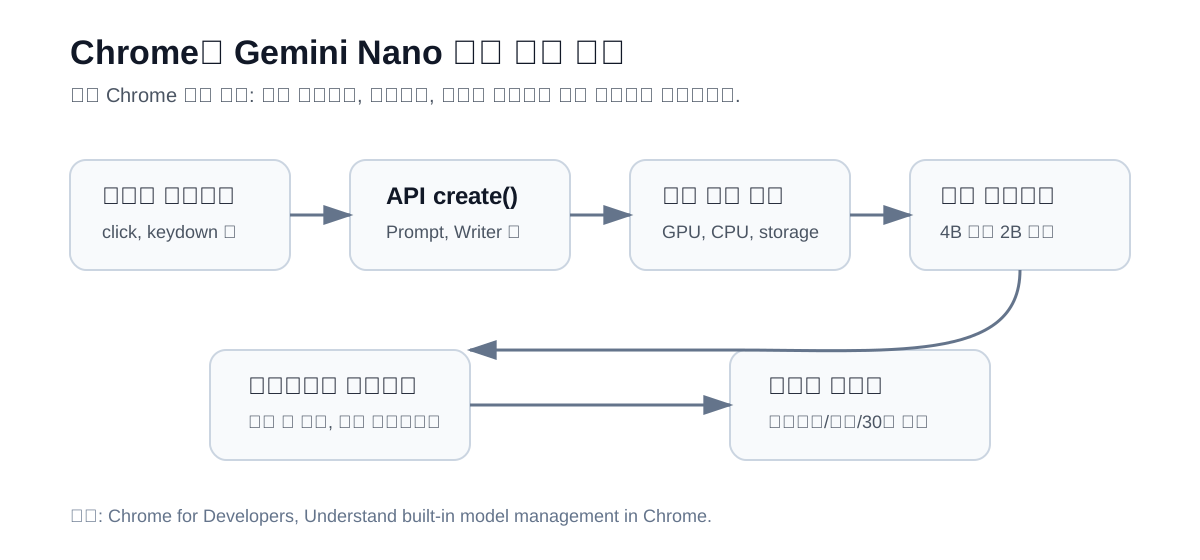
The first step is separating the viral framing from the documented mechanics. Google's built-in model management documentation says Gemini Nano's initial download is triggered by a built-in AI API *.create() call. For example, if a call such as Summarizer.create() needs Gemini Nano, Chrome checks the device conditions and then downloads the model. Read in isolation, that suggests the model is not fetched before a user actually uses a web feature that needs it.
The same documentation also describes an important exception. In some situations, an availability() call can trigger a download. The docs specifically mention the moment after a fresh user profile starts and the case where Gemini Nano based scam detection is enabled. So the accurate story is not simply "downloads only happen when a developer creates a session." Browser security features, API availability checks, profile state, and model management policy can all sit in the path.
That gap is the center of the controversy. Developer documentation explains API flows. Users see a large file on disk. If the management layer between those two views is not visible enough, users can reasonably feel that the browser installed something without a clear interaction.
The get started documentation also lists concrete device requirements. Prompt API, Summarizer, Writer, Rewriter, and Proofreader work on Windows 10/11, macOS 13 or newer, Linux, and some ChromeOS environments. Chrome for Android, Chrome for iOS, and non-Chromebook Plus ChromeOS devices do not yet support the Gemini Nano backed APIs. Chrome requires at least 22GB of free space on the volume that contains the Chrome profile. GPU paths require more than 4GB of VRAM, while a CPU path needs 16GB of RAM and at least four CPU cores. Initial download also requires an unmetered connection.
The 22GB number is not the model file size. It is the free-space threshold that allows model use. Actual model size can vary by update and device conditions, and Chrome points users to chrome://on-device-internals to inspect current install state and size. That matters because the 4GB number became a strong symbol of the controversy, but it should not be treated as a fixed universal model size in Chrome's design.
Why on-device AI still created distrust
The irony is that Gemini Nano's basic justification is close to privacy. A local model can avoid sending text to a server for every AI task. The Prompt API demo site says Chrome's Gemini Nano runs on the device and does not send data to an external server. For a web app, that is compelling. Summarization, rewriting, review cleanup, language detection, translation, and local extensions can be handled without server-side inference cost.
But privacy is not only about server transmission. Placing a large model on the user's device is also a consent issue. Storage is a user resource. Network bandwidth is a user resource. Laptop battery and heat are part of the user's experience. Enterprise environments add another layer: administrators need to know which model was downloaded, which features call it, and whether policies and logs can control that behavior.
Chrome's docs already contain this tension. The built-in AI best practices include guidance to tell users when a model download is happening. That advice is aimed at web developers, but the same principle applies to the platform itself. A user who clicks a summarize button and sees "downloading a local AI model now" is having a different experience from a user who discovers a 4GB file days later while cleaning disk space.
This is also a developer problem. Built-in AI APIs remove the need to distribute a model directly, but they do not remove product responsibility. Instead, the browser's model state, download state, and availability state become part of the user flow. The reason availability() can return states such as "downloadable", "downloading", "available", and "unavailable" is that the product has to deal with more than the click on a "summarize" button. It has to answer whether the model can be downloaded, whether user activation exists, whether storage is sufficient, whether the language is supported, and whether the download is complete.
4B, 2B, and the browser as model router
One of the most interesting parts of Chrome's model management documentation is model selection. Chrome estimates GPU performance by running a representative shader, then chooses a larger Gemini Nano variant, a smaller variant, or CPU inference fallback. The docs cite 4B parameters as an example of the larger variant and 2B parameters as an example of the smaller one. This is not just a download system. It is a local model routing layer inside the browser.
AI app developers have usually made these decisions on the server side. Easy requests go to a smaller model. Harder or more sensitive requests go to a larger model. Cost-sensitive requests go to cheaper models, and quality-sensitive requests go to more expensive ones. Chrome built-in AI moves part of that routing into the client platform. Two users can call the same API and receive different local model variants, or no support at all.
That creates a new test matrix for web apps. On-device AI can look almost free from a per-request cost perspective, but quality and availability vary by device. GPU, RAM, storage, network state, Chrome version, region, and language support can all matter. Without a fallback plan, one user may see a fast and private AI feature while another sees a permanently disabled control.
Hybrid strategies become necessary. Chrome's docs also discuss a hybrid prompt flow with Firebase AI Logic. The direction is clear: when a local model is not available or not capable enough, a product may fall back to a cloud model. But that fallback has to respect user expectations. A product should not promise "this runs on your device" and then silently send content to a server when the local path fails. Local processing and cloud fallback need distinct permission and disclosure.
Updates are even more sensitive
Downloads are only the first part of the lifecycle. Updates are harder. Chrome's model management documentation says Gemini Nano updates are distributed regularly and checked when Chrome starts. Supplementary resources are checked daily. While a new model downloads, Chrome keeps using the previous model, then hot-swaps after the download finishes. That design reduces downtime.
The same docs also say model updates are full downloads, not partial patches. Model weights can differ enough between versions that computing and applying deltas may be slower than replacing the model. From the browser's point of view, a full replacement can be the simpler and more reliable update strategy. From the user's point of view, it invites another question: if there is already an AI model on the machine, why is the browser downloading another large file?
Deletion policy raises the same trust issue. Chrome says it can automatically remove the model when free space drops below certain thresholds, when enterprise policy disables the feature, or when a user does not meet conditions for 30 days. After deletion, docs say Chrome does not automatically redownload the model unless a new trigger such as a *.create() call appears. But user reports can still feel like "I deleted it and it came back" if a later browser or web-app action satisfies the download conditions again.
The key point is not only which side is technically right. If a user deletes a model and the browser later downloads it again, that user may not feel they had a meaningful veto. AI model downloads are perceived differently from ordinary cache files. Cache is an old cost of the web. LLM weights look like a product decision.
What developers should learn
Treating this as a Google PR problem would miss the larger lesson. Operating systems, browsers, IDEs, messengers, document editors, and database clients are all moving toward local or hybrid AI models. Model files will become part of application behavior. Model updates may be separated from application updates. Policy may move from feature-level control to model-execution control.
First, an AI feature is not just a server call. It is resource placement. Server AI can send user data outside the device. Local AI uses user storage and compute. Both require explanation. Product copy that says "more private AI" is not enough. Users need to know how much may be downloaded, when the download happens, how to stop it, and which features use the model.
Second, web apps using built-in AI APIs should make download state a first-class UX state. If the model is missing when the user clicks, installation may begin at that moment. A plain spinner is not enough when the model can be gigabytes, the network must be unmetered, and storage conditions can fail. A good flow says what is being prepared, that the feature runs locally, and whether a cloud fallback is available.
Third, organizations should treat the browser as AI infrastructure. Browser management used to center on extensions, cookies, DLP, update channels, and authentication policy. Built-in models, Prompt API, GeminiSettings, enterprise policy, and local inference permissions now enter the same space. Security teams cannot stop at "data does not leave the device." They still need to understand what inputs the local model processes, which web apps receive outputs, and what logs remain.
Fourth, standardization matters. Chrome says the built-in AI APIs are being proposed through the W3C Web Incubator Community Group. If every browser exposes local AI differently, developers will have to build Chrome-only features, maintain their own WebGPU or Transformers.js runtime, or fall back to server models. For local AI to become a real web capability, the standardization debate has to cover not only API shape but also consent, download visibility, state reporting, deletion, and policy control.
Avoid both hype and dismissal
This story was easy to frame in a provocative way. "Chrome silently installed a 4GB AI model" captures the user distrust well. At the same time, it can blur the technical conditions. Chrome's docs say initial download is triggered by built-in AI API create() calls and that unsupported devices do not receive the model. Gemini Nano is also not a blanket deployment path for all mobile Chrome users. It would be inaccurate to say every user received the same 4GB file at the same time.
But "it is documented, so there is no issue" is also too weak. Users do not read product documentation before using a browser. Discovering a large model file in the file system can be uncomfortable, especially in a product as widely used as Chrome. For a browser at that scale, defaults become policy. The user contract covers not only the moment an AI feature is turned on, but also what the browser places on the device to prepare that feature.
The conclusion is not "delete Chrome." The more durable change is the browser's role. It is no longer only a window for HTML, CSS, and JavaScript. It is becoming an AI runtime that selects, downloads, updates, and removes models. For developers, that opens a real opportunity: web apps can offer local summarization and writing assistance without server inference cost. For users, it introduces a new burden around storage, network, consent, and control.
The Gemini Nano debate is not a failure of on-device AI. It is a sign that on-device AI has entered real distribution. In a research demo, "it runs locally" can be enough. In a platform feature, "when is it downloaded, where is it stored, how is it removed, and who explains it?" has equal weight. What Chrome surfaced this time is not primarily a model-quality problem. It is the UX of model distribution. Once AI moves inside the browser, the browser inherits some of the responsibility of an app store.