Copilot Studio Now Clicks Apps Without APIs
Microsoft Copilot Studio computer use GA moves UI automation agents from demos into enterprise deployment, audit, and governance.
- What happened: Microsoft moved Copilot Studio
computer useto general availability.- Agents can operate web and desktop apps that lack APIs by using the screen, mouse, keyboard, and vision models.
- Why it matters: UI automation competition is shifting from RPA scripts toward auditable execution agents.
- Enterprise impact: Key Vault, Purview, Dataverse, and Cloud PC pools may matter more in procurement than the model alone.
- The real risk boundary is not whether an agent can click like a person, but how credentials, human checkpoints, and session replay are governed.
Microsoft has moved computer-using agents in Copilot Studio to general availability. Read quickly, the announcement can sound like another agent feature in a crowded release cycle. The more important signal is narrower and more practical. A long-standing blind spot in enterprise automation, web and desktop apps with no usable API, is moving from experimental demos into deployable workflow infrastructure.
Microsoft's official GA announcement was published on May 13, 2026. It says computer use is now generally available in Microsoft Copilot Studio and is expanding across all commercial geographies in Microsoft Power Platform. On May 26, 2026, the Copilot Studio monthly update bundled computer-using agents with a redesigned workflows experience, Work IQ extensibility, and real-time voice experiences.
The key word is GA. In preview or a stage demo, it is enough to show an agent opening a browser, reading a screen, and pressing a button. In enterprise automation, the next set of questions is more important. Who stores the credential? Who can replay a failed run? Where must a human approve the action? Which apps are out of bounds? Are the screen, click, and run logs retained as audit evidence? Microsoft is packaging this GA release as a product answer to those operational questions.
Microsoft Learn's release plan describes computer use as a Copilot Studio capability for interacting with systems that have graphical user interfaces. That means clicking buttons, selecting menu items, and entering information in websites or desktop applications. A user describes the task in natural language, and the agent executes it on a configured computer using a virtual mouse and keyboard. Microsoft positions this for repetitive work such as data entry, invoice processing, and data extraction when APIs are missing.
That definition looks close to RPA, and it should. The difference Microsoft emphasizes is not selectors but vision and reasoning. Traditional RPA is strong when the DOM, coordinates, and workflow rules remain stable. Once screens change or branching logic grows, maintenance cost rises quickly. Computer-using agents are meant to reduce some of that brittleness by looking at the screen and deciding the next action. Microsoft frames this as automation that does not have to wait for a legacy system to expose an API.
That does not mean RPA is over. Microsoft's more realistic message is that different layers still fit different jobs. If a process has stable steps and documented APIs, connectors, Power Automate flows, and conventional RPA may be better choices. Computer use fits the long tail: interfaces that change, systems without APIs, and tasks where people still mix judgment with repeated screen work. It is not a replacement for all automation. It is an execution layer for areas that were previously considered too awkward to automate well.
Microsoft's February 2026 computer-using agents update makes the GA direction clearer. That post introduced model choice including OpenAI Computer-Using Agent and Anthropic Claude Sonnet 4.5, built-in credentials, Azure Key Vault, session replay, action logs, Purview integration, Dataverse logging, and Windows 365 Cloud PC pools. The model names are interesting. The operating features are the real enterprise story.
Together, those pieces show where Microsoft is aiming. This is not a personal agent running once in a user's own browser. It is a fleet that administrators can control, security teams can inspect, compliance teams can preserve, and operations teams can capacity-plan. Copilot Studio computer use does not compete only with Anthropic's Computer Use API or Google's browser-control demos. It also competes for the enterprise automation budget that today goes to UiPath, Automation Anywhere, Power Automate Desktop, ServiceNow, Salesforce, SAP, and internal workflow platforms.
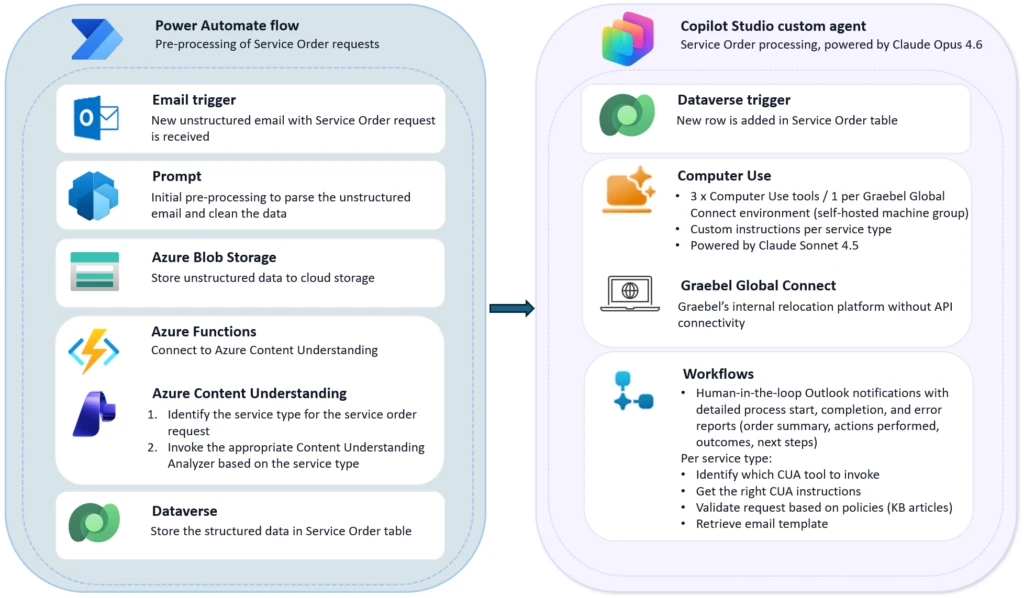
The Graebel case in Microsoft's May update shows the position well. Graebel is a global talent mobility company with about 1,500 employees that processes relocation service orders for multinational companies. According to Microsoft, many requests arrive as free-form emails with attachments and exception conditions. Humans had to read the request, interpret it, and enter the data into Graebel's proprietary Global Connect platform. The challenge was that Global Connect did not support API-based integration, and earlier RPA attempts struggled with the variability of human email.
Graebel's Service Order Agent uses computer use at that gap. At the front of the workflow, Azure Content Understanding structures key data from emails and attached documents. The request is then validated against business rules and compliance requirements. After that, the agent directly operates the Global Connect interface, enters the data, and completes the transaction. Microsoft says the agent is live today and designed to scale across more than 30 relocation service categories.
That case matters without exaggeration. Real enterprise systems are full of important screens that do not have good APIs. Supplier portals, old ERP screens, internal approval tools, insurance and logistics systems, finance operations systems, and regional regulatory portals all fit this pattern. Rebuilding every one of those systems around new APIs is expensive, and sometimes impossible if a vendor does not move. Computer use is an attempt to turn those old surfaces into work surfaces for agents.
The tradeoff is risk. An API is a structured contract. It is relatively clear which endpoint receives which schema, which permission changes which value, and how errors are returned. UI operation is less stable. A button label may change. A popup may appear. The screen order may shift. The same word may mean something different in two panels. An agent can misread that context. The central risk in computer use is therefore not only whether the model is smart. It is whether the system stops, records, and escalates fast enough when the run goes wrong.
| Review area | Microsoft feature | Operations question |
|---|---|---|
| Credentials | Built-in credentials, Azure Key Vault | Are least privilege and rotation defined per agent? |
| Audit | Session replay, action logs, Purview, Dataverse | Can clicks, coordinates, screens, and exceptions be reconstructed? |
| Control | Allow lists, DLP, environment isolation | Are permitted and blocked apps clearly separated? |
| Execution surface | Browser, desktop apps, Windows 365 Cloud PC pool | How will long runs and capacity spikes be handled? |
Session replay and action logs are especially important because they move computer use from demo territory into enterprise territory. Microsoft mentions action type, coordinates, timestamps, context, run summary, duration, action counts, and human escalation counts. The direction is clear: preserve what the agent saw, which button it pressed, and how the work unfolded. In finance, healthcare, manufacturing, and public-sector workflows, automation rarely reaches production without that kind of evidence.
Human-in-the-loop checkpoints serve the same purpose. If the agent reaches a low-confidence state, encounters an exception, or hits a business decision that requires human approval, it must stop. If that design is loose, AI automation becomes fast incident generation rather than fast processing. If checkpoints are well placed, humans can intervene at the judgment points without manually performing every click. The efficiency gain depends on that boundary.
Windows 365 Cloud PC pools are less glamorous but equally important. UI automation needs an execution surface. A computer has to run the browser and desktop applications. That computer has to be patched, isolated, authenticated, and scaled out. Microsoft describes Cloud PC pools as managed cloud-hosted machines for computer use runs. This is infrastructure below the model layer, but in enterprise automation it often becomes the bottleneck.
For developers, the interesting twist is that Copilot Studio is a low-code product. The feature is not arriving first as a pure API platform. It sits inside the maker experience of Power Platform and Copilot Studio, where automation teams, business analysts, and operations teams can build agent execution paths. Developer teams still matter, but their role shifts toward deeper system integration, Dataverse modeling, custom connectors, governance, monitoring, and exception handling. The agent does not remove engineering responsibility. It widens the automation surface and changes where the engineering boundary sits.
Microsoft Learn's What's new in Copilot Studio page points in the same direction. Recent entries include agent evaluation, REST API-based evaluation automation in preview, custom metrics, A2A protocol support, Work IQ tools, model selection, Prompt Builder updates, and a Visual Studio Code extension. Computer use is not an isolated feature. It is being placed inside an agent lifecycle that includes evaluation, orchestration, governance, and developer workflow.
This also fits the broader agent platform race. Google is pulling execution environments into API products with Gemini API Managed Agents. Anthropic is expanding the systems Claude can touch through Claude Code, MCP, its Stainless acquisition, and enterprise connectors. OpenAI is pushing Codex, the Agents SDK, sandboxed work, and remote task flows. Microsoft's version starts from Microsoft 365, Power Platform, Windows 365, Purview, Entra, and Dataverse. Instead of centering only on model competition, it asks whether agents can run on top of the control planes enterprises already use.
Some secondary analyses frame Microsoft's GA move against Anthropic and Google's computer-use efforts and highlight production readiness. That comparison is useful, but it should be read carefully. It does not mean Microsoft has solved every computer-use problem first. The product boundary is Copilot Studio. Conditions include Power Platform commercial geography coverage, sovereign cloud exclusions, licensing and credit cost, generative orchestration requirements, supported app surfaces, and data handling when external models are used. GA is not proof that implementation risk is gone. It is a baseline that makes procurement and operations review possible.
Community discussion reflects that reality. In user spaces such as r/copilotstudio, the questions are often less about whether computer use can click a button and more about agent status, premium feature markings, Agent Builder controls, and existing agent reliability. That is not cynicism. It is an operational signal. Enterprise agents usually get blocked by licensing, admin policy, tenant settings, migration paths, and support boundaries before they get blocked by an impressive demo. Microsoft is strong in those layers, but those layers also add complexity.
For organizations already deep in Microsoft 365, Power Platform, Entra, Purview, and Teams, this news is practical. Starting small inside Copilot Studio may be faster than adopting a separate agent runtime. Candidate workflows might include checking supplier portals and entering results into an ERP, turning emailed requests into internal system records, or collecting data from a regulatory site and transferring it into an internal form.
The first project should still be narrow. Workflows that directly move money, modify large volumes of customer data, or are hard to reverse are poor first targets. Better candidates have relatively stable screens, clear human review points, reversible outcomes, and enough historical records to test against. If an agent operates the UI, testing must also happen at the UI level. A recorded happy path is not enough. Popups, error messages, expired sessions, slow loading, missing permissions, and duplicate entries all need coverage.
Another design question is how to rank APIs against computer use. If an API exists, the API is usually the better option. It offers a structured contract, more stable error handling, lower cost, easier testing, and cleaner permission separation. Computer use is the option for missing or incomplete APIs. A good architecture is not "make the agent click everything." It is closer to "structure what can be structured through APIs and workflows, then hand only the UI-only segment to computer use." The Graebel example follows that pattern by combining email understanding, business-rule validation, and a UI execution step.
The larger meaning is that the definition of an agent keeps expanding. A chatbot answers. A tool-calling agent invokes APIs. A coding agent manipulates files and terminals. A computer-using agent treats the same screen a human worker used as its operating surface. At that point, an agent is no longer just a model call. It becomes an operating unit that carries permissions, business rules, execution infrastructure, and audit logs.
That is why Copilot Studio computer use GA may matter longer than a flashier model announcement. If agents can operate applications without APIs, the automation backlog gets larger. The responsibility for bad clicks gets larger too. Microsoft's answer is less about a smarter model and more about an execution layer that bundles credentials, audit, governance, and Cloud PCs. The agent era is moving from answer quality toward work evidence and control.