Chrome Enterprise MCP turns browser security policy into agent tools
Google released a Chrome Enterprise Premium MCP server that exposes DLP rules, connector policy, browser telemetry, and activity logs to AI agents.
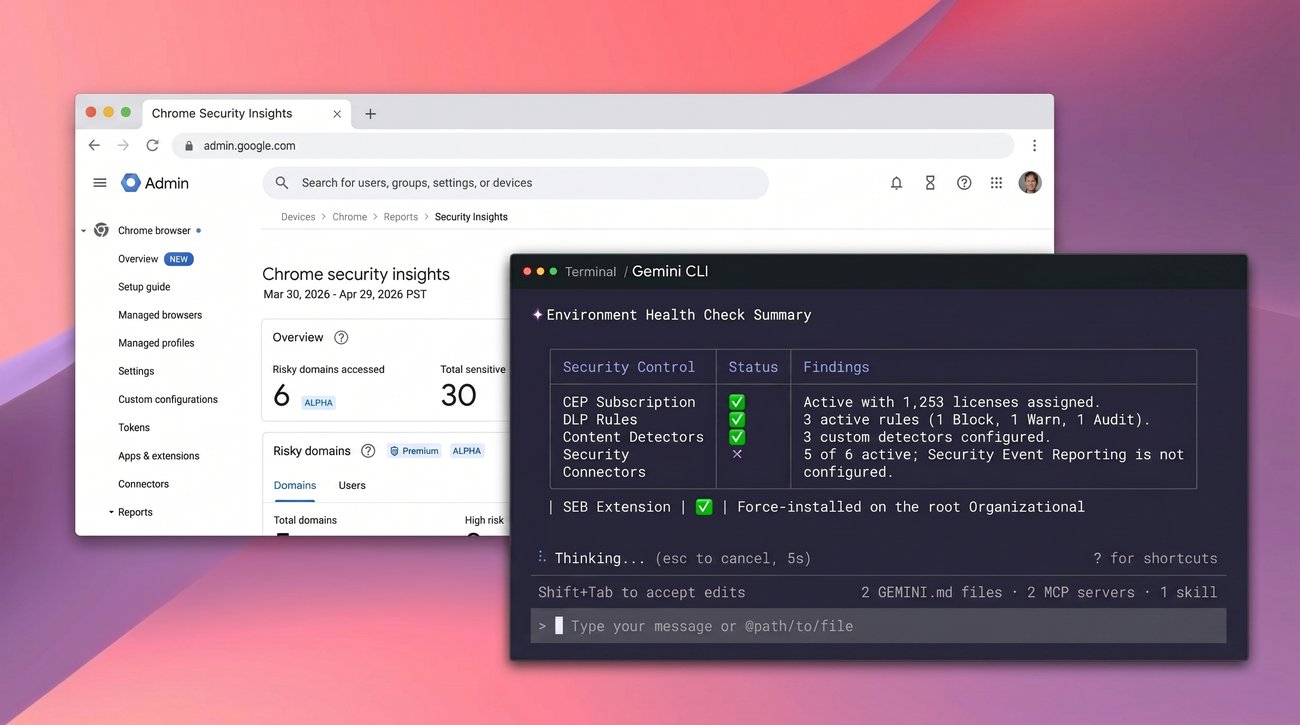
- What happened: Google released an open-source MCP server for
Chrome Enterprise Premium.- DLP rules, connector policy, browser telemetry, extension policy, license state, and Chrome activity logs become callable tools for MCP-compatible clients.
- Why it matters: MCP is moving beyond coding assistants into the read and write paths of a browser security operations console.
- Prompts such as
cep:health,cep:optimize, andcep:expertpackage administrator workflows into agent-facing commands.
- Prompts such as
- Risk surface: The README classifies the server as an administrator-level interface and warns about prompt injection and tenant-wide changes.
- Watch: Google describes the repository as a reference implementation, not an officially supported Google product.
Google published a Chrome Enterprise Premium MCP server on May 28, 2026. The announcement frames the release as a way for AI agents to help with security management. The actual product boundary is sharper: DLP rules, content detectors, connector policies, browser telemetry, license status, and Chrome activity logs can now be invoked from an MCP-compatible client.
This is not a Chrome extension or a small DevTools feature. The google/chrome-enterprise-premium-mcp README calls the server an "administrator-level interface." A connected MCP client can create or delete a DLP rule, change connector policy, force-install an extension across managed Chrome browsers, or enable Google Cloud APIs. MCP is no longer only a convenience layer for developer tools. In this implementation, it becomes a front door to security operations authority.
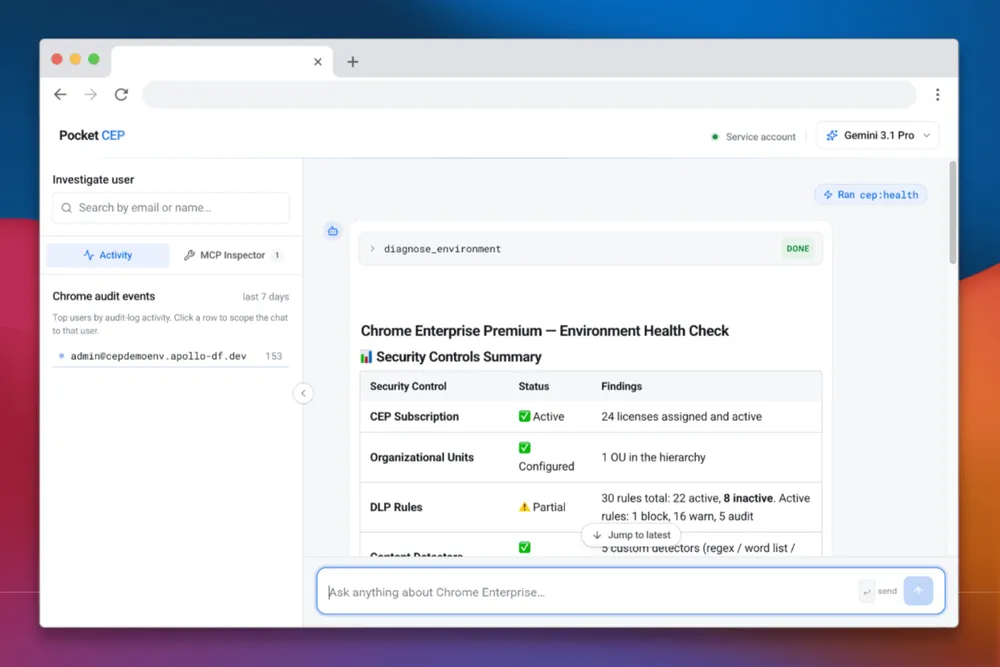
Chrome Enterprise already manages enrollment, reporting, DLP, connectors, and Safe Browsing at organizational scope. Google's announcement says large organizations often turn security posture review or cross-organizational-unit DLP rollout into dozens of manual Admin console steps. Because the Admin console sits on top of APIs, Google is exposing some of those repeated operations to an agent that can plan and call APIs from a natural-language request.
The announcement gives three examples. First, /cep:health reviews organization structure, subscription status, connectors, and browser distribution. Second, when an administrator asks for a DLP rule that blocks credit card number exfiltration, the agent handles CEL, or Common Expression Language, syntax and validation details. Third, when a sales team repeatedly receives security warnings while pasting into a CRM, the agent can call get_chrome_activity_log and list_dlp_rules together to identify which rule fired.
The GitHub README fills in the implementation surface. The server exposes Chrome Enterprise Premium DLP rules, content detectors, connector policies, browser telemetry, and license management as MCP tools. Its built-in prompts are cep:health, cep:optimize, and cep:expert. The tools are grouped around discovery, licensing, DLP, connectors, extensions, security, and built-in knowledge search.
| Area | What the MCP tools handle | Operational impact |
|---|---|---|
| Discovery | Customer ID, organizational units, browser versions, and managed profiles | The agent can map browser deployment state and organizational scope before acting. |
| DLP | DLP rule and detector listing, creation, and deletion | Policy experiments get faster, but a bad rule can create organization-wide friction. |
| Connectors | Chrome Enterprise connector status and enablement | Admin console repetition drops, but change approval becomes a separate control requirement. |
| Extensions | SEB extension checks and force-install policy | A browser fleet-wide command becomes an agent tool. |
| Security | Chrome activity logs and required API checks or enablement | Investigation and remediation can happen inside the same conversation. |
The installation path resembles other MCP servers. The README tells administrators to run npx @google/chrome-enterprise-premium-mcp auth login once for OAuth, then let an MCP client launch the server as a child process over stdio transport. The Gemini configuration example runs npx -y @google/chrome-enterprise-premium-mcp@latest and passes GCP_STDIO=true. The same shape can work with MCP clients such as Claude Code, VS Code, and Gemini CLI.
The permission requirements are not light. The server needs Node.js 18 or later, Google Workspace, a Chrome Enterprise Premium license, and a Google Cloud project. The Workspace principal must be a Super Admin or a delegated admin with Chrome Management and DLP permissions. The README warns that Google Cloud IAM alone is not enough; without the corresponding Workspace role in Admin Console, the API calls can fail with 403 Permission Denied.
The OAuth scopes deserve an explicit review before any pilot. chrome.management.policy reads and writes connector policy and extension install policy. chrome.management.reports.readonly and chrome.management.profiles.readonly support browser version counts and managed profile lookup. admin.reports.audit.readonly reads Chrome activity logs. cloud-identity.policies is tied to DLP rule and detector CRUD. When an MCP client receives this set of scopes, the security review should start from the fact that the client is now adjacent to organization-wide browser policy.
Google says an administrator can describe a desired outcome in plain language and let the agent call the appropriate APIs. A request such as "enable the reporting connector for the whole organization" reduces manual console clicks. The same sentence also defines the risk. If an agent can execute a whole-org change, then preview, human approval, audit events, and rollback instructions are not nice-to-have product polish. They are part of the security model.
The README's warning section is the most consequential part of the release. It says an attacker may hide instructions in email, documents, scraped pages, or ticket bodies, and that those instructions can hijack a connected MCP client through indirect prompt injection. It then calls out mutating tools, the create_*, update_*, delete_*, and enable_* families, because those commands can have tenant-wide security impact.
That warning is not specific to Chrome Enterprise. When an MCP server is only a search tool, prompt injection can produce a wrong answer or leak retrieved data. When an MCP server can change security policy, the failure mode becomes an operational state change. A ticket body could contain a hidden instruction that nudges an agent to weaken a DLP rule. If the MCP client accepts the tool call, the incident is not "the AI gave bad advice." It is "an administrator-capable tool was invoked."
Google is not presenting the system as full automation. The announcement says the agent provides suggestions and does not replace professional security auditing. It also says DLP rules should be reviewed and enabled by a person in Admin Console to avoid accidental data loss. That sentence is both product caution and architecture guidance. Read tools and write tools may live in the same MCP server, but write tools need a separate approval boundary.
The direction becomes clearer when paired with Chrome DevTools for agents 1.0. Google announced that stable release on Chrome for Developers on May 19, 2026. Coding agents can run Lighthouse audits, use device emulation, change geolocation, throttle CPU and network, debug Chrome extensions, validate WebMCP tools, and inspect heap snapshots for memory leaks. On the developer side, the agent gets to observe the live browser. On the enterprise side, the agent gets to operate on browser fleet policy.
Together, the two Chrome releases point to a browser that is not only a user interface. It is becoming agent infrastructure. A frontend team can make Lighthouse and memory snapshots part of an agent quality gate. A security team can put activity logs and DLP review into an agent investigation loop. Inside the Chrome ecosystem, development, validation, and operations authority are being connected through MCP-shaped interfaces.
For enterprises, the first practical question is tool segmentation. list_dlp_rules and create_dlp_rule sit in the same DLP domain, but they do not carry the same risk. get_chrome_activity_log and enable_chrome_enterprise_connectors both sound like security operations, but one reads data and the other changes environment state. If the MCP client UI does not surface that distinction at approval time, the administrator has to infer it from a natural-language sentence.
The second question is the lifetime of service accounts and admin accounts. The README requires Workspace admin roles and trusted OAuth app setup. If a team tests the server with a personal experimental admin account, the prompt history, token file, local machine state, and MCP client configuration all become part of the attack surface. A safer pilot starts with least-privilege delegated admin rights, a test organizational unit, a read-only tool subset, and explicit approval for mutating tools.
The third question is logging. Chrome activity logs are useful for investigation, but MCP conversations and tool results can combine user information, org structure, DLP conditions, and extension policy. Google's announcement uses noisy alert investigation as a core example. Before adopting that workflow, a security team needs to decide where the conversation is stored, who can read it, and what form of the transcript belongs in an incident ticket.
The competitive context is broader than Chrome. Microsoft Security Copilot already pushes a conversational interface for security operations, and SIEM and SOAR products have long handled alert triage and playbook automation. Google's move is narrower and more concrete: it opens a browser security management surface as an MCP reference implementation. Other enterprise product teams now have a clear question to answer: should their admin console APIs become MCP tools, and which of those tools are safe to expose to agents?
MCP governance vendors should read the release as a product requirement. Platforms such as Boomi, MuleSoft, and GitHub have been positioning registries, agent fabrics, and tool catalogs around MCP discovery. As administrator-capable servers appear, a registry cannot be only a list of available tools. It needs to show whether a server is read-only, whether it can mutate tenant-wide policy, which OAuth scopes it requests, and whether it documents prompt-injection defenses.
The release has clear limits. Google says the GitHub repository is a reference implementation that customers can explore and adapt, not an officially supported Google product. The announcement also requires a Chrome Enterprise Premium subscription and setup work. This is not a one-click Admin console feature for every Workspace tenant. It is an early implementation for teams that already understand MCP, Chrome Enterprise APIs, Workspace roles, and OAuth trust.
Even with those limits, the direction is hard to ignore. Recent MCP news has centered on coding agents, code search, internal documents, and financial order entry. Chrome Enterprise Premium MCP pulls DLP rules, activity logs, extension installs, and browser security policy into the same standard. The first question in an AI agent adoption review should not be "can we connect this MCP server?" It should be "which tools can change the organization, and who approves those calls?"
For engineering and security teams, the immediate work is not to copy the demo. If MCP clients are already in use, inventory internal tools as read, suggest, write, and tenant-wide write. Teams evaluating Chrome Enterprise Premium MCP should start with read-heavy prompts such as cep:health. The create_* and enable_* tools need a separate approval layer. Google's release is less a promise that agents will manage browser security for you than a concrete bill for designing agent permissions like product features.