Microsoft MXC Preview Is an OS Sandbox for Windows AI Agents
Microsoft introduced the early preview of MXC SDK at Build 2026 to isolate AI-agent code, tools, and plugins through Windows and WSL policy.
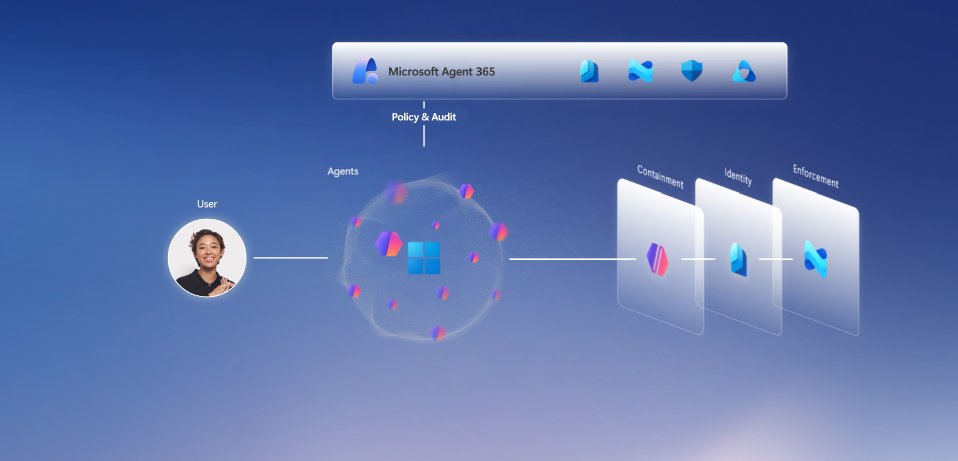
- What happened: Microsoft introduced the early preview of
Microsoft Execution ContainersSDK at Build 2026.- MXC is a policy-driven execution layer for code, tools, and plugins produced or invoked by agents on Windows and WSL.
- Builder impact: Local coding-agent permissions can move from the whole user session toward explicit filesystem, network, UI, and backend policies.
- Operating layer: Agent 365, Defender, Entra, Intune, and Purview connect local-agent discovery, policy, audit, and data protection.
- Windows 365 for Agents is now generally available for running agents inside Intune-managed Cloud PCs.
- Watch: The public
microsoft/mxcrepository warns that current MXC profiles should not be treated as a security boundary.
Microsoft introduced the early preview of Microsoft Execution Containers, or MXC SDK, at Build 2026 on June 2, 2026. The Windows Developer Blog announcement starts from a practical agent problem: agents can read files, call services, change environments, and chain actions quickly. The security question is moving from "should this app be installed?" to "with which authority should this agent run the code it just generated?"
MXC sits in a different place from the louder Build 2026 AI announcements. Work IQ API, Foundry Hosted Agents, Scout, and Copilot SDK describe what agents know, where they run, and how developers integrate them. MXC asks what boundary the operating system can enforce when an agent executes commands on a user's device or inside WSL. Runtime containment, not benchmark quality, is the center of the announcement.
Microsoft describes MXC as a cross-platform, policy-driven execution layer for Windows and WSL. Developers define the constraints required by an agent app or tool execution, and Windows applies those constraints at runtime. The announcement says MXC provides an abstraction over low-level isolation details. Instead of forcing every agent developer to assemble AppContainer, Windows Sandbox, WSL, micro-VMs, or other primitives by hand, Microsoft is trying to put the policy model in front.
The Microsoft Security Blog frames the same release through the enterprise control plane. It says MXC SDK applies containment and policy through OS isolation technologies such as process isolation and session isolation. Agent 365 SDK, Windows 365 for Agents, Defender, Entra, Intune, and Purview then sit around that runtime layer. MXC is less a standalone sandbox library than part of Microsoft's attempt to bring local agents into enterprise governance.
The public microsoft/mxc README is more direct. It defines MXC as a sandboxed code-execution system for running untrusted code, model output, plugins, and tools across Windows, Linux, and macOS. The listed backends range from ProcessContainer, Windows Sandbox, LXC, Bubblewrap, Seatbelt, and WSLC to MicroVM, Hyperlight, and IsolationSession. The design acknowledges that "agent isolation" is not one weight class. A quick local process boundary and a heavier VM-style boundary serve different workloads.
| Isolation option | Scope confirmed in announcements and repository | Question for development teams |
|---|---|---|
| ProcessContainer | Presented as the default backend on Windows 11 24H2 and later. | How narrowly can a local coding agent's file and process authority be reduced? |
| IsolationSession | An experimental backend with Insider Preview build requirements. | How far are desktop, clipboard, input-device, and UI-spoofing boundaries separated? |
| WSLC and Linux containers | A path for bringing the containment model to WSL and Linux-first toolchains. | How should Python, Node, and ML package ecosystems run under Windows-managed policy? |
| MicroVM and Hyperlight | Experimental backends aimed at stronger boundaries for sensitive data or external code execution. | How do teams balance density, startup latency, EDR visibility, and snapshot cost? |
| Windows 365 for Agents | A generally available option for running agents inside Intune-managed Cloud PCs. | How do teams trade local-device isolation for cloud-instance cost and audit paths? |
The most important line in that table is not a product choice. It is the README warning. The repository says the code is an early preview and that the underlying sandbox may change. It also warns that some generated policies are known to be too permissive and that current MXC profiles should not be considered a security boundary. Any security write-up that omits that warning can make MXC sound more production-ready than Microsoft currently claims.
That warning does not make the release irrelevant. It locates MXC precisely. Microsoft wants an agent runtime policy plane inside Windows, but the public repository is still in a developer-feedback phase. Enterprise security teams should not conclude that local agents are now safe. They do have a concrete object to inspect: which permissions the OS can express, which backend fits which risk class, and how those decisions connect to Microsoft 365 governance.
For developers, the failure cases MXC targets are familiar. A coding agent opens a shell to run tests and reads the whole home directory. A package install opens outbound network access. A browser automation tool reaches the clipboard or local credential store. A model-generated script deletes files through a broader glob than intended. Until now, teams have mixed prompts, repository sandboxes, Docker, VMs, lower-privilege accounts, and CI runners to reduce those risks. MXC tries to pull the problem down into Windows and WSL execution policy.
User request and agent plan
MXC policy: filesystem, network, UI, timeout, and backend choice
Code execution
Tool call
Plugin action
Agent 365, Defender, Intune, and Purview observe and enforce policy
The Windows Developer Blog calls this structure a "composable sandbox." The same policy model and SDK can map to different isolation constructs depending on workload requirements. Microsoft also says a coding agent and an enterprise data-processing agent do not require the same boundary. Agent isolation is not an on/off switch. The backend and policy should change with the data being read, the source of the executed code, network requirements, and whether the agent can touch the user interface.
The Agent 365 integration is the larger event for endpoint management. Microsoft Security Blog says Agent 365 Agent Registry uses Defender, Entra, and Intune to expose unmanaged local agents. The registry covers more than 20 local agent types, including coding agents, AI desktop applications, and local and remote MCP servers. The Purview announcement points in the same direction for sensitive data: it names coding agents such as Claude Code, GitHub Copilot, OpenAI Codex, and OpenClaw, and describes runtime DLP that can act at the prompt stage.
In that model, agents stop being merely "tools installed by developers." They become inventory, identity, DLP, audit, and endpoint-policy subjects. Local agent binaries, MCP servers, shell commands, and file access move into the management plane. Developers may find that uncomfortable. But if Codex, Claude Code, Copilot CLI, OpenClaw, and related tools operate near real repositories and production credentials, security teams will ask for detection and enforcement rights.
Microsoft's partner list shows the intended surface. The Windows announcement mentions Hermes, Manus, NVIDIA, OpenAI, and OpenClaw. OpenClaw is described as a Windows companion app that can configure nodes and gateways or connect to an existing claw. NVIDIA is bringing MXC-based OpenShell to Windows. OpenAI's David Wiesen said the company is exploring patterns that combine Codex capabilities with the MXC execution environment so teams can move from intent to reliable execution while preserving enterprise security and control.
The Codex mention is more than logo placement. A coding agent is not just a model response. It edits files, runs shell commands, installs dependencies, executes tests, and can prepare a pull request. As a productivity metric, that is attractive. As a permission metric, it is an automated actor borrowing the user's session. If MXC matures, "Codex runs tests in my repository" can become a more precise policy sentence: Codex reads this directory as read-only, writes only to this temporary path, and runs tests with outbound network access blocked.
Windows 365 for Agents is a different axis from local containment. Microsoft says the feature is now generally available and runs agents inside Intune-managed Cloud PCs. The design moves an agent workflow away from the user's device and into a separate Cloud PC, so failures can be bounded to a disposable cloud instance. Organizations in finance, legal, healthcare, or other regulated sectors may evaluate that model before letting agents operate directly on sensitive endpoints.
Cloud PC isolation is not a full answer. If an agent inside the cloud instance calls an external SaaS API, sends email, opens a pull request, or changes a ticket, the side effect exists outside the instance. Isolation can reduce filesystem damage, but it does not reverse a mistaken business action. MXC and Agent 365 still need to be paired with tool approval, action logs, rollback, idempotency, and scoped secrets. A cleanly disposable runtime does not automatically compensate for an API call already made.
Microsoft's same-day Windows developer announcement also included Aion 1.0 Instruct and Aion 1.0 Plan. Aion 1.0 Plan is described as a 14B-parameter, 32K-context reasoning and tool-calling model that will be available as part of Windows on capable devices. That model is not the same product as MXC, but it explains the direction. As local agentic capability becomes part of Windows, OS-level execution policy becomes more necessary.
Viewed competitively, Microsoft is joining three layers at once. The first is managed runtime, with Foundry Hosted Agents and Windows 365 for Agents. The second is Windows and WSL containment through MXC. The third is governance through Agent 365, Defender, Entra, Intune, and Purview. OpenAI, Anthropic, Google, AWS, and others also talk about agent runtimes and sandboxes. Microsoft's differentiator is the ability to connect Windows endpoints and Microsoft 365 tenant management in one operating model.
Enterprise development teams should not start by treating MXC as a production security boundary. They should first classify agent tasks by risk. Code search and document summarization are close to read-only. Test execution needs limited write paths. Dependency installation needs network policy. Deployment, customer-data changes, and finance or HR actions create external side effects. MXC's backend menu only becomes useful when teams have that task taxonomy.
The second practical job is local-tool inventory. Microsoft Security Blog explicitly includes local and remote MCP servers in Agent 365 Registry's scope. A team that does not know which MCP servers are running on laptops, devcontainers, or CI runners cannot write a reliable policy. filesystem, browser, github, database, cloud, and email tools need separate categories, and each agent needs a minimum-permission list. Without that list, any sandbox will drift toward broad exceptions.
The third job is observability. The MXC README says the project provides debug logging and Event Tracing for Windows. Enterprise teams need to know where those events go, what Agent 365 and Purview audit records contain, and how failed policy decisions appear in developer workflows. Agents can hide a failed action and try another path. Postmortems require the prompt, tool, path, network target, backend, and denied policy decision, not just a generic "blocked" event.
Developer experience is the fourth constraint. Agent isolation will fail if it only satisfies security teams. If every test run triggers a permission prompt, if package installs break unpredictably, or if path mapping between Windows and WSL keeps changing, developers will find shortcuts. MXC needs policy templates, repository-level permission declarations, local dry runs, readable failure logs, and exception requests that fit inside IDE and CLI workflows. Microsoft has VS Code, Copilot, Windows, and Intune in the same portfolio, so it has a plausible route to that UX.
Public community reaction is still shallow. I did not find a large Hacker News thread focused on MXC itself in the research pass. Reddit posts and security coverage mostly summarize the move as Microsoft adding an OS-level sandbox for AI agents. CSO Online reads MXC as a runtime-containment offering tied to Agent 365, Defender, Entra, Intune, and Purview. That reading is useful, but it should be paired with the GitHub repository's early-preview warning.
The release also has clear limits. MXC does not eliminate prompt injection. It does not solve tool-description poisoning, MCP server supply-chain risk, credential leakage, memory poisoning, or the problem of an agent invoking a legitimate tool for the wrong reason. If current profiles are not yet a security boundary, security teams should treat MXC as a candidate layer in defense in depth, not as a single control that makes local agents safe.
Even with those caveats, Microsoft has made the agent-security discussion more concrete. "Can we trust this agent?" is too broad. MXC asks narrower questions that can be tested. Which directories can this agent read? Which paths can it write? Can outbound network access be blocked? Can clipboard and UI access be separated? How is a long-running session started, observed, and stopped? Those answers are required before local agents can sit comfortably on enterprise machines.
Placed next to devlery's recent Build 2026 coverage, the role of MXC is clear. Work IQ is about how agents read organizational context. Foundry Hosted Agents is about hosted agent runtime, tracing, and evaluation. Scout shows an always-on personal work agent. MDASH uses agent swarms for security validation. MXC is the execution boundary needed when those capabilities move close to endpoints and user sessions. It is less spectacular than a demo, but real deployments often fail security review at exactly this layer.
The conclusion is simple. Windows is trying to become not just a screen where AI agents run, but the policy enforcer that limits what agents can do. The public MXC repository is early preview software, and Microsoft says current profiles should not be treated as a security boundary. The immediate work for teams is classification, not blind adoption: split agent workflows into read, write, network, UI, secret, and external-action categories, then map each category to the sandbox backend and audit trail it requires. Without that table, agent permissions will keep borrowing the whole user account.