Agent 365 goes GA and prices agent governance at $15 per user
Microsoft Agent 365 is now generally available, turning AI agents into governed inventory across Entra, Defender, Purview, and Microsoft 365 admin.
- What happened: Microsoft made
Agent 365generally available on May 1, 2026.- The standalone price is $15 per user per month, and Agent 365 is included in
Microsoft 365 E7.
- The standalone price is $15 per user per month, and Agent 365 is included in
- Why it matters: AI agents are becoming governed assets with inventory, owners, policy, risk signals, and lifecycle controls.
- Watch: Bedrock and Google Cloud sync, Shadow AI controls, and runtime blocking include preview pieces or June 2026 preview timing.
- Engineering teams should treat agent owners, tool permissions, data access, and telemetry as deployment requirements.
Microsoft made Agent 365 generally available on May 1, 2026. The product is not another model, chat surface, or agent builder. It is a control plane for discovering, registering, observing, securing, and governing AI agents inside an organization. The standalone price is $15 per user per month. Microsoft 365 E7, announced as a broader Frontier Suite at $99 per user per month, includes Agent 365 alongside Copilot, Microsoft 365 E5, Entra Suite, Defender, Intune, and Purview.
That makes the launch quieter than a frontier-model release, but more directly connected to enterprise AI operating costs. Agents already live across Copilot Studio, Microsoft Foundry, SaaS products, internal automations, local CLIs, browser extensions, and workstation tools. Agent 365 pulls those distributed actors into Microsoft 365 admin center surfaces such as Registry, Requests, Settings, Tools, and Shadow AI. Building an agent and making that agent an operable organizational asset are becoming two different jobs.
Microsoft's March announcement gave a useful scale signal. The company said tens of millions of agents appeared in Agent 365 Registry during two months of preview customer use. Inside Microsoft, more than 500,000 agents had been observed, generating more than 65,000 responses per day for employees over the previous 28 days. The relevant question is not only how many agents exist. It is who owns them, where they run, which data they touch, which tools they call, and which security system records the evidence.
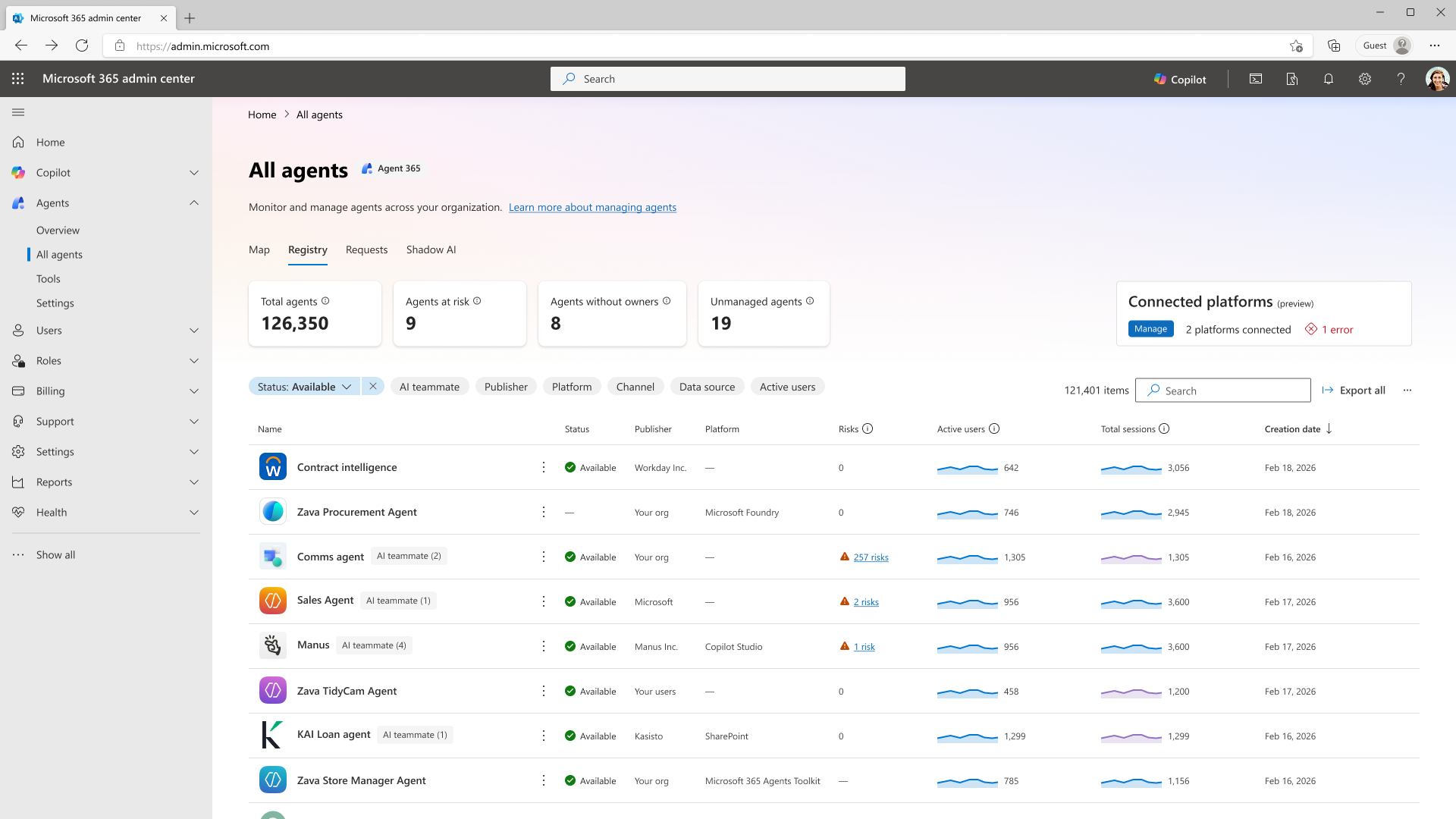
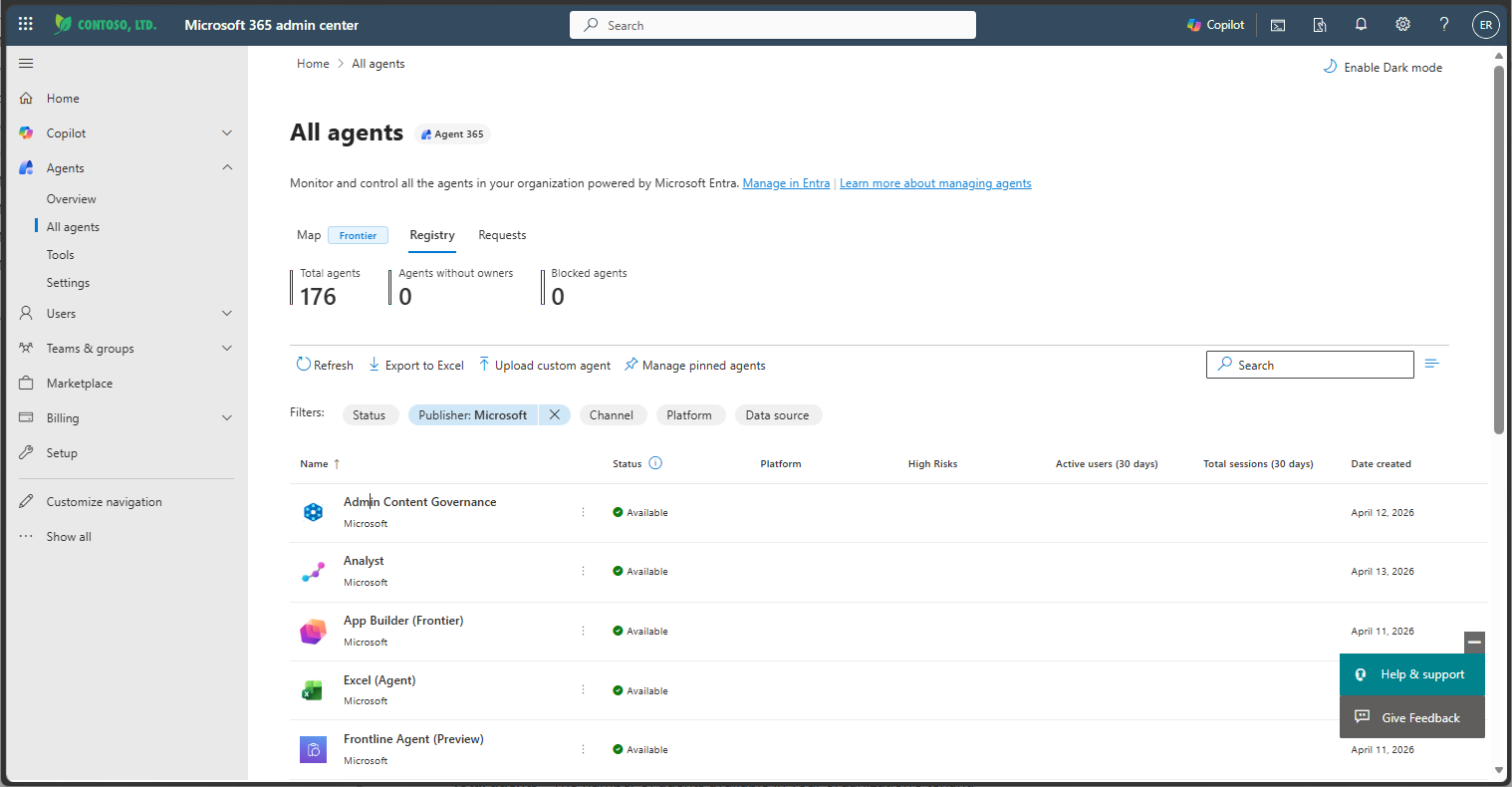
Agent 365 opens with an inventory screen, not a flashy builder. Microsoft Learn's Agent Registry documentation describes a central list with filters, export, agent upload, pinned agents, and ownerless agent handling. The filters show the product direction: status, publisher type, channel, platform, and data source. Whether an agent appears in Teams, Outlook, or Copilot, whether it is internal or a partner agent, and whether it uses embedded knowledge or a fine-tuned model become administrative columns.
For developers, the deployment unit changes. The old first question was whether the agent completed the task. In an Agent 365 environment, the next questions are whether the agent appears in the registry, whether it has an owner, who can install it, which security template applies, and whether it was synchronized from an external platform. Teams wiring GitHub Actions, Slack bots, MCP servers, internal agent runners, or desktop tools into business workflows should expect administrator approval and lifecycle management to sit beside feature completion.
Microsoft widened the GA story beyond its own products. The announcement includes public preview registry sync through AWS Bedrock and Google Cloud connections, with Microsoft describing the feature as a way to understand cloud agents' models, resource access, and execution locations. Partner SaaS agents are also part of the pitch. Genspark, Zensai, Egnyte, Zendesk, Kasisto, Kore, and n8n are named as agents that can be observed, governed, and secured through Agent 365. Microsoft is not claiming to own every agent runtime. It is trying to make the Microsoft 365 security stack the management plane above them.
Local agents are included too. The GA post says Entra network controls can extend not only to Copilot Studio agents but also to agents running on user endpoint devices, including examples such as OpenClaw. Microsoft says these controls are meant to identify unauthorized AI use, restrict connections to approved web destinations, filter risky file movement, and block prompt-driven attacks before they trigger harmful actions. A local CLI agent reading files and reaching the web from a developer laptop is no longer just a personal productivity tool in this model. It is part of the enterprise attack surface.
| Managed surface | What Agent 365 sees | Engineering impact |
|---|---|---|
| Microsoft 365 agents | Copilot, Teams, Outlook, SharePoint channels, and publisher metadata | Admin publishing, user scope, and pinned-agent policy become release checks |
| External cloud agents | AWS Bedrock and Google Cloud registry sync in public preview | Agent inventory moves from cloud-specific consoles toward tenant-level governance |
| Local agents | Endpoint device signals, Entra network controls, and risky file movement | CLI agents on developer machines become policy targets for network and file access |
| Shadow AI | Unmanaged agents, managed devices, and monitor or block actions | Unapproved agent tools become security operations findings |
This architecture treats agents more like virtual workers than like isolated scripts. Microsoft's product page splits responsibility across Defender, Entra, Purview, and Microsoft 365 administration. Defender administrators inspect agent security posture and threat protection. Entra administrators protect agent identity and access to apps, resources, the internet, and other agents. Purview administrators protect and govern data that agents use and create. Microsoft 365 administrators handle inventory, onboarding, security policy templates, and analytics. The organizational language used for employees and apps is extending to agents.
The price should be read through that lens. The $15 monthly standalone SKU is not charged per agent. It is a per-user license. Microsoft recommends licensing users who use, own, manage, or sponsor Agent 365-managed agents. For organizations where agent counts can grow quickly, that can look more predictable than per-agent pricing. For teams with many experiments and only a small user base, procurement will have to define who counts as the managed or sponsoring user.
E7 is the larger packaging move. Microsoft presents E7 as a bundle of Copilot, Agent 365, Microsoft 365 E5, Entra Suite, Defender, Intune, and Purview. Enterprises are not only buying agent governance. They are buying an AI and security bundle. That affects tool selection. A company already committed to Microsoft 365 security may find Agent 365 a natural extension. A Google Workspace or AWS-centered organization has to justify adopting Microsoft's management plane specifically for agent registry and governance.
The Microsoft Learn getting-started guide shows which tasks Microsoft wants to turn into standard operating procedure. Administrators review inventory under Agents > All agents > Registry, approve or reject agent requests under Requests, find ownerless agents and reassign ownership, connect external platforms through registry sync, inspect relationships with Agent map, and configure allowed agent types, sharing, templates, and user access. Agent management rules cover bulk operations such as agent installation and ownerless-agent reassignment.
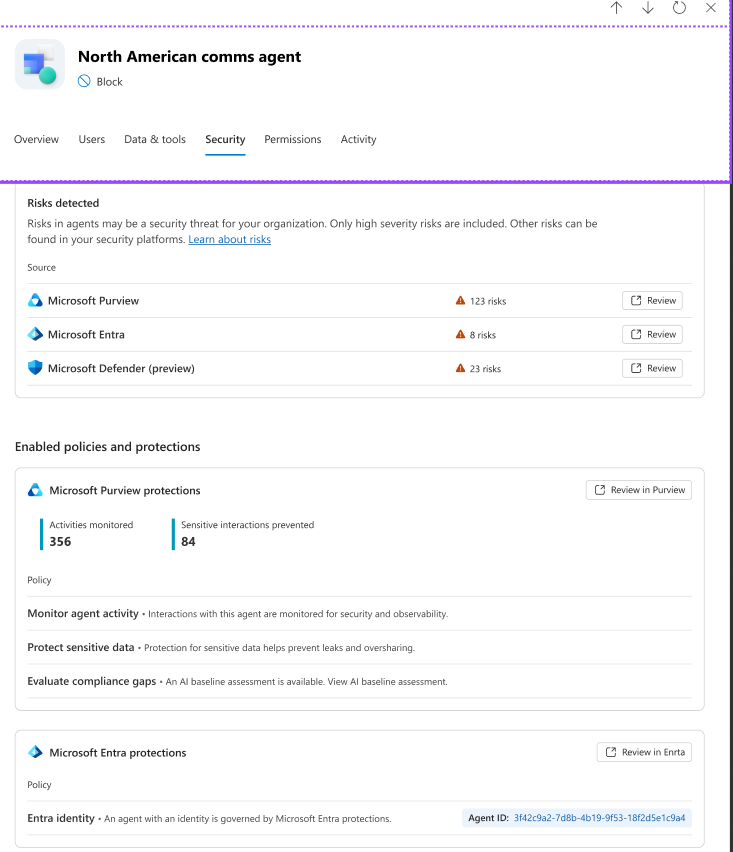
Security templates create the working boundary between engineering and security teams. The guide describes applying a security template when publishing an agent, with controls such as Conditional Access policy, access packages, and custom security attribute values grouped inside the template. A deployable agent therefore is not only a manifest and a prompt. It has exposure rules, app and data access, and security attributes attached before release.
The Tools section is equally revealing. The guide tells administrators to review agent tools such as Teams, Outlook Mail, SharePoint, OneDrive, and Calendar, filter them by status, type, and publisher, and block or unblock access when needed. Teams using MCP, function calling, or internal tool routers will recognize the issue. Agent risk often expands through tools rather than through the text response itself. Agent 365 brings that tool-permission bundle into the Microsoft 365 administrator's list.
Shadow AI is the most operational phrase in the announcement. Microsoft's adoption guide describes Agents > Shadow AI as the place to see unmanaged AI agents in a tenant, check which agents are running on managed devices, and apply monitor or block policies. Not every related control is GA today. The May 1 post says context mapping, policy-based controls, runtime blocking, and alerts through Intune and Defender are planned for public preview in June 2026. The direction is still clear: an unapproved agent CLI or local app is treated as an organizational AI risk, not a harmless side utility.
Community reaction has been more practical than loud. In a small Reddit r/AIGuild thread, one user said they had been waiting for Shadow AI discovery and expected the question "what is running where?" to become urgent as multiple agents spread across laptops, CLIs, and SaaS tools. The same discussion raised questions that buyers should ask before adoption: whether agent identity and authorization are modeled as independent principals or as user-delegated execution, and how MCP connections and tool-execution telemetry are collected.
Microsoft 365 discussions leaned toward pricing and packaging. E7 at $99 per user per month, Agent 365 standalone at $15, and the relationship to an existing E5 plus Copilot stack were the immediate concerns. That reaction fits the product. Agent 365 is not a developer-only SDK. It is a license that IT, security, procurement, and compliance teams will evaluate together. As agent counts rise, organizations will need to separate the question of which framework builds agents from the question of which control plane governs them.
The competitive set is not a single product. AWS and Google are growing their own agent builders and cloud AI platforms. Security startups are focusing on MCP gateways, agent observability, and endpoint governance. Products such as Endor Labs AURI emphasize coding-agent behavior and workstation or cloud activity. Cloudflare, Wiz, CASB, SIEM, and endpoint-security vendors are all pulling agent traffic and prompt-injection risk into their domains. Microsoft's advantage is the installed base of Microsoft 365 tenants, Entra, Defender, Purview, and Intune. It can attach agent governance to administrative language many enterprises already use.
Engineering teams can start with five checks. First, create an internal catalog that separates Microsoft agents, internally built agents, external SaaS agents, and local CLIs. Second, assign an owner and sponsor to each agent; an ownerless agent is an operating risk, not only a metadata gap. Third, split tool permissions into read, write, external network, and sensitive-data access. Fourth, document each agent's cloud model and data sources at the level registry filters would need. Fifth, decide which logs and telemetry flow into security systems before the agent reaches production users.
Agent 365 GA is not a story about smarter agents. It is a story about agents becoming countable, ownable, governable, billable objects inside an organization. Developers cannot stop at a convincing agent demo. The agent has to be legible to administrators, blockable by security teams, priced by procurement, and explainable when compliance asks for evidence.
Seen that way, the $15 price tag is not a small SKU detail. It marks the moment Microsoft asks enterprises to treat unmanaged automation as a paid governance problem. Whether a company chooses Agent 365 or another control plane, the next production agent should come with sharper answers. Who owns it? Where does it run? Which tools does it call? Which data does it read and write? Who can shut it down? Microsoft is moving those questions into the Microsoft 365 admin center.