AWS Nova Act Service Card defines the limits of browser agents
AWS documented Nova Act limits for browser agents, including 100 sequential steps, 30-minute sessions, prompt injection boundaries, and IAM resources.

- What happened: AWS published the Amazon Nova Act AI Service Card and user documentation that define how its browser agent should be used and constrained.
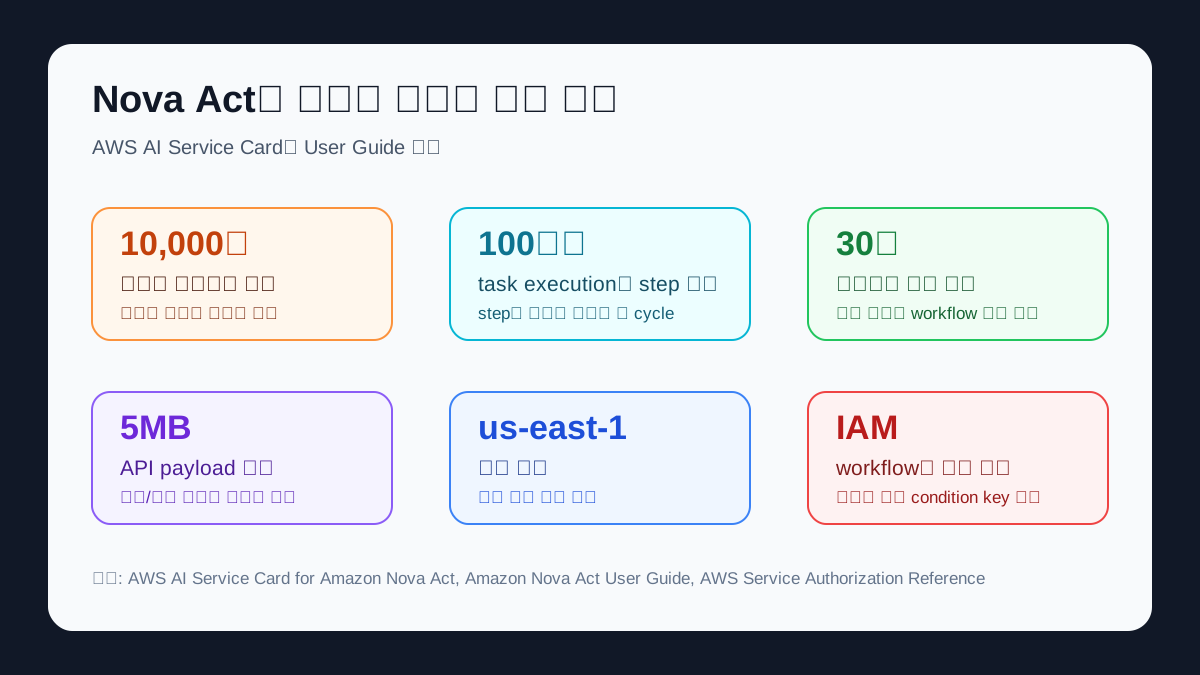
- The official limits include roughly 10,000 characters per prompt, 100 sequential steps per task execution, a 30-minute browser session, and an API payload under 5MB.
- Developer impact: Nova Act reads UI screenshots and prompts, generates browser actions through a
ReActloop, and has the SDK execute those actions through Playwright. - Security boundary: AWS does not claim complete prompt injection protection. It recommends domain allowlists, minimal tool registration, and restricted
file://access. - Watch: IAM now exposes
workflow-definitionandworkflow-runresources for Nova Act, but the service has no dedicated condition keys.
AWS has published an Amazon Nova Act AI Service Card that turns browser agents from a demo category into something closer to an operations document. The card applies to Amazon Nova Act, the AWS service made available on December 2, 2025. AWS describes Nova Act as an agentic system that accepts natural language instructions and performs browser-based UI workflows such as form filling, search and extraction, shopping and booking, and quality assurance testing.
The document is worth reading because its most concrete details are not model scores. AWS states that Nova Act has a maximum of 100 sequential steps per task execution, a 30-minute browser session, a prompt limit of roughly 10,000 characters, and an API payload limit under 5MB. Teams that treat browser agents as "a model that clicks websites" miss the deployment questions these numbers force. A production owner has to decide which domains the agent may visit, how many actions it may take before stopping, whether uploads and local file access are allowed, and who reviews a run when it leaves the happy path.
 .
.
Amazon introduced Nova Act alongside Nova 2 and Nova Forge on December 2, 2025, and said Nova Act reached 90% reliability on early customers' browser-based UI automation workflows. The Service Card gives that claim a more operational shape. AWS defines success criteria as completion of the natural language command, no error requiring manual intervention, and compliance with safety, fairness, and reliability requirements. Even when two teams cite the same 90% reliability figure, the underlying success labels can depend on each team's dataset and human judgment.
The What is Amazon Nova Act? page describes the product in developer terms. Nova Act is an AWS service for building and managing fleets of reliable AI agents that automate production UI workflows. The starting point is the nova.amazon.com/act playground. Development and debugging happen through an IDE extension, while deployment and monitoring move into the AWS Management Console. The guide also says workflows can mix Python code with natural language instructions.
AWS breaks the product into deployment units rather than leaving everything under the broad word "agent." An act() call sends a natural language task to the Nova Act model. A step is one model cycle of observing the page and taking an action, and steps run sequentially. A session is a browser instance or API client instance. A workflow is an end-to-end task composed of multiple act() statements and Python code. A workflow run is the execution record with a begin time, end time, and result. These terms map directly to logging, permission, and ownership decisions.
The architecture section also makes Nova Act look less like a plain text model call and more like a browser automation stack. The SDK sends the current UI screenshot and the user prompt to the Nova Act service. A multimodal LLM processes the visual context and instruction together. The service then uses a ReAct framework to generate reasoning steps and browser actions. Each step output goes through guardrail validation before returning to the SDK, and the SDK turns those instructions into concrete browser actions with Playwright. The user sees a browser agent pressing buttons; the operator has to reason about screenshot capture, model reasoning, guardrail validation, Playwright execution, and audit logs.
The limits AWS documents are not just weaknesses. They are design boundaries. A 100-step ceiling says a procurement workflow, travel booking task, or internal admin operation should not run indefinitely in one agent loop. A 30-minute browser session pushes long work toward workflow decomposition and checkpoints rather than one sprawling run. The 5MB payload limit matters when teams attach previews for PDF extraction, payment processing, or external tools. The 10,000-character prompt ceiling also limits the common habit of trying to stuff every internal rule into one prompt.
The security section is more direct. AWS says browser-use agents can be vulnerable to prompt injection attacks because they use visual understanding of web pages. It also says it cannot guarantee that every prompt injection attack will be deflected. That sentence sets a practical responsibility boundary for browser-agent deployments. The model provider is not absorbing the whole risk. The customer still has to design allowlists, blocklists, tool registries, file access, and human oversight around each workflow.
AWS gives three concrete recommendations. First, use the SDK or natural language instructions to create domain allowlists and blocklists. The documentation example tells a workflow to terminate and raise an error if navigation leaves example.company.com. Second, register only the tools that a workflow needs, especially for upload and download capabilities. The Service Card says file uploads are blocked by default in SDK configuration. Third, keep file:// path access blocked by default and enable it only for workflows that need it.
These controls are harder for browser agents than they are for ordinary API integrations because the web page is part of the model input. In a conventional integration, schemas and endpoints are relatively stable. A Nova Act-style browser agent sees page text, modals, ads, error pages, external links, and file upload components as possible inputs for action. Security review cannot stop at a prompt template. It needs a target domain list, navigation stop conditions, tool permissions, failure escalation, CloudWatch metrics, and CloudTrail activity.
The Service Card also calls out high-risk workflows. For customer workflows that can affect consequential decisions, including health care and finance, AWS says teams should evaluate potential risk and add human oversight, testing, and use-case-specific safeguards. One example is a benefits provider automating health benefits applications. The inputs include employee data, eligibility criteria, and a portal URL. The outputs include completed applications, error logs, and escalation flags. AWS classifies incorrect submissions in that kind of workflow as high-impact errors.
Language and customization constraints affect deployment choices too. Nova Act is currently optimized for English-language commands. Teams automating Korean internal operations, multilingual customer portals, or regional admin screens need to test how well English-command assumptions fit their labels, error messages, and customer data. Customers also cannot fine-tune the Nova Act base model directly. For a specialized ERP, insurance portal, or internal admin screen, the practical levers are prompt design, workflow decomposition, tool restrictions, and evaluation sets, not direct model training.
The IAM surface is another detail to check before treating Nova Act as just another automation library. The AWS Service Authorization Reference lists the service prefix as nova-act and includes actions such as CreateAct, CreateSession, CreateWorkflowDefinition, and CreateWorkflowRun. The same table includes execution and termination actions such as InvokeActStep and DeleteWorkflowRun. Resource types include workflow-definition and workflow-run, with ARNs that contain the workflow definition name and workflow run ID. The reference also says Nova Act has no service-specific condition keys, so fine-grained policy design has to combine global context keys with resource design.
The document gives AI teams a useful starting point for evaluation. The Service Card says no single evaluation dataset is sufficient. AWS mentions human-generated datasets, synthetic datasets, human review, proprietary web interaction datasets, and manual red teaming. For browser agents, the label "success" changes by workflow. E-commerce checkout depends on product selection and cart management. A content-management workflow depends on data entry and formatting. A benefits application depends on eligibility logic and escalation. Teams should define their own critical paths and failure costs before leaning on a generic benchmark.
Community response to this specific Service Card is still limited. The Korean research note for this article did not find a major Hacker News or GeekNews thread centered on the card itself. Related Reddit discussions around AI agents and governance have focused on responsibility, audit trails, and the EU AI Act when browser agents perform payment, form submission, HR, or finance tasks. Nova Act's documentation gives an AWS-shaped answer: the service provides guardrails, but the workflow owner defines success criteria and oversight.
Compared with competing systems, Nova Act's differentiator is the AWS operations surface more than the model name. OpenAI Computer Use, Anthropic computer use, and Google Antigravity all point toward browser or computer control. Nova Act's documentation ties that capability to IAM actions, workflow runs, CloudWatch, CloudTrail, and encrypted S3 log storage. That can be a reason for AWS customers to evaluate it. It can also be a constraint for teams whose browser automation spans many SaaS products, desktop workflows, or data residency requirements outside the initial AWS runtime.
Pricing still needs separate confirmation from the current Amazon Nova pricing page. Browser agents do not have a cost profile made only of model tokens. A production workflow can include browser session time, workflow runs, external tools, log storage, retries, and human escalation. The 30-minute session and 100-step limit may become useful cost-tracking units as much as product quotas. Before attaching an agent to production work, teams should measure average step count, retry rate, escalation rate, and failed-run recovery time by workflow.
The initial deployment scope is narrow. The user guide says Nova Act is supported in US East (N. Virginia). Organizations in regulated industries or with data residency requirements should read that line before any architecture work. Browser automation can move more than a text prompt. UI screenshots, structured data, error logs, and interaction metadata may all be part of the run. The Service Card's privacy section says AWS does not use inputs and outputs generated through the managed service to train or improve Nova Act, but each customer still has to align the service with its own data classification and retention policies.
Nova Act's documentation captures where browser agents are going in 2026. The ability to click through a website is no longer the interesting part by itself. The harder work is turning that behavior into a production workflow with IAM resources, audit logs, human oversight, prompt injection mitigation, and defined stop conditions. AWS wrote those requirements as numbers and responsibility statements rather than as a model demo.
That is why the 100-step limit is not a small footnote. It is a number that defines how far a browser agent may move inside a work system before the workflow has to stop, split, or escalate. The same applies to 30-minute sessions, 5MB payloads, English-command optimization, no customer fine-tuning of the base model, and no service-specific condition keys. Once an agent directly manipulates a production UI, boundary conditions belong in the deployment document before the model leaderboard does.