Agents Need PCs Too, and Windows 365 Defines the Isolation Layer
Windows 365 for Agents isolates AI agent execution inside Cloud PCs and pairs with Agent 365 governance.

- What happened: Microsoft put the public preview expansion of
Windows 365 for Agentsback in the spotlight.- In its May 21, 2026 security update, Microsoft described Agent 365 as the governance layer and Windows 365 for Agents as the place where agents actually run.
- Core pattern: An agent checks out a managed Cloud PC, performs the task, then the session is reset.
- Why builders should care: The bottleneck in agent operations is moving from model calls to
identity, sandboxing, audit logs, and policy. - Watch: The public preview is currently limited to the United States, and real cost and operating complexity still need customer validation.
Microsoft is moving toward a world where agents get their own "PCs." In this case, the PC is not a human user's laptop. It is a Cloud PC governed by Microsoft Entra ID, Intune policies, Defender signals, and Purview audit scope. In its May 21, 2026 Microsoft Security update, Microsoft said Windows 365 for Agents is expanding in public preview and sits alongside Microsoft Agent 365 as the pair responsible for running and controlling enterprise agents.
The interesting part is not just the Windows 365 brand. It is the division of labor. Agent 365 is the governance plane that defines what an agent can do. Windows 365 for Agents is the execution plane that defines where the agent does the work. Microsoft frames the two together as a way to run and govern agents in a consistent, secure environment. Put more directly, Microsoft wants to pull enterprise agents away from unmanaged laptops, ad hoc browser sessions, developer machines, temporary containers, and borrowed human credentials, then place them inside the same management model enterprises already use for Microsoft 365.
Most recent AI agent discussion has centered on model quality, tool calling, coding ability, and browser automation. Real deployments, however, quickly reach drier questions. Which identity does the agent use to sign in? If it downloads a file, who is accountable? Do cookies and temporary files remain after the session ends? Which logs does the security team inspect? When a specific agent connects to SaaS tools or cloud resources, can the organization see that permission path as a graph? Windows 365 for Agents is aimed at exactly this layer.
Agent 365 Handles Permission, Windows 365 Handles Place
Microsoft's May 1 Agent 365 announcement makes the governance problem explicit. The product is meant to discover agents inside and outside the organization, register them, distinguish whether they act on behalf of a user or under their own authority, and apply policy. Microsoft describes locally installed agents and developer-built SaaS or cloud agents as a source of "shadow AI" because they often operate outside traditional management systems.
In that context, Windows 365 for Agents is not just another Agent 365 feature. It is the isolated workplace where an agent performs its tasks. Microsoft says Agent 365 provides the control plane for observability, governance, and security, while Windows 365 for Agents provides a secure managed environment where agents can work. Agents interact with applications inside a policy-controlled environment and inherit the identity, security, and management controls applied to employees.
That separation matters. Many agent platforms express "what an agent can do" as a prompt, a list of tools, or a set of API tokens. But actual work happens across browsers, desktop apps, documents, internal web apps, SSO flows, downloads folders, temporary caches, and network destinations. If a team has permission policy but not a managed execution surface, audit and enforcement arrive late. If it has an isolated execution environment but weak organizational identity and policy, the agent is safe only inside an empty box. Microsoft is separating the products because both sides are required.
A Cloud PC That Gets Checked Out and Reset
Microsoft Learn describes Windows 365 for Agents as a new class of Cloud PC for agent use. An enterprise creates Cloud PC provisioning policies for agents and configures pools for teams or workloads. When an agent needs to perform a task, it checks out a Cloud PC from the pool. When the work is done, the agent checks it back in and the resource returns to the pool.
The phrase "Cloud PC" may sound old-fashioned beside model APIs and agent runtimes, but it has a concrete meaning for agents. Some tasks need only browser automation. Others need legacy Windows desktop apps. Others require an internal portal, Office documents, SSO, and a browser at the same time. Containers and headless browsers are not enough to cover the full enterprise work surface. Windows 365 for Agents tries to package a Windows desktop, Linux-based computer-use flows, Microsoft 365 apps, Intune management, and Entra authentication as one execution unit.
User request and organization policy: Agent 365 records the agent, authority, sponsor, and task scope
Cloud PC pool checkout: Entra ID, Conditional Access, and Intune policy establish the session
Agent task execution: app, web, and file access are audited through Defender and Purview signals
Check-in and reset: session state is discarded and the Cloud PC returns to the pool
The secure-by-design documentation compresses this Cloud PC model into three words: pooled, stateless, and programmatic. It is dynamically assigned from a shared pool per task, leaves no state after the session, and is accessed by programmatic agent workloads rather than interactive human users. That combination is especially relevant for agent operations. Agents can repeat similar tasks quickly, move across many SaaS apps and files, and expand the blast radius of a mistake faster than a person would.
Identity Comes Before the Device
The more important design choice is that Windows 365 for Agents prioritizes permissions attached to the session and agent identity over permissions attached to a device. Microsoft Learn says each agent uses a dedicated Microsoft Entra agent user identity separate from a human user. Agent 365 manages the lifecycle and audit trail for that identity, and the agent authenticates into the Cloud PC session through token-based flows. Microsoft also emphasizes that agents do not reuse or impersonate human credentials.
That structure removes some ambiguity that appears when agents enter real workflows. Imagine a sales operations agent that moves across CRM records, SharePoint files, email, and a browser. In older automation models, service accounts, delegated permissions, user sessions, and RPA bot accounts can blur together. Later, audit teams must reconstruct who requested the work, which agent performed it, which identity it used, and what it touched. Microsoft's goal is to let that chain be inspected across Agent 365, Entra sign-in logs, Defender, and Purview.
This also creates direct requirements for developers building enterprise agents. Hiding API keys and trimming the tool list will not be enough. Each agent needs its own identity. Each session should establish authentication again. The environment should reset after the task. The system should explain which user's request led which agent to access which resource. "Good agent UX" and "good security operating model" are increasingly the same design problem.
Local Coding Agents Enter the Audit Boundary
One of the most striking parts of the Agent 365 announcement is local agent discovery. Microsoft said it will use Defender and Intune to discover and manage local AI agents running on Windows devices. The starting point is OpenClaw, with expansion planned to widely used agents such as GitHub Copilot CLI and Claude Code.
That is a meaningful signal for the coding agent market. Many coding agents currently run under a developer's local authority. They read repositories, edit files, run tests, and execute terminal commands. For developers, that feels natural. For security teams, it is a difficult surface. It is hard to know which MCP servers the agent attached, which cloud credentials it can reach, which network destinations it contacted, and whether it read sensitive files.
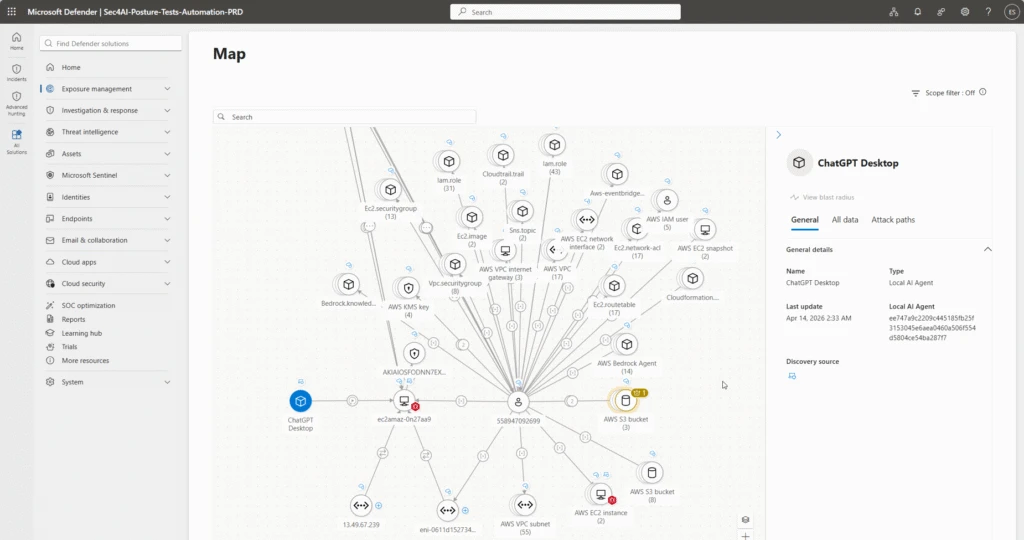
Microsoft said that starting in June 2026, Defender will provide a relationship map for each agent showing the execution device, configured MCP servers, connected identities, and reachable cloud resources. If this works with enough accuracy and low enough false-positive noise, the enterprise debate around coding agents shifts. The question becomes less "do developers like it?" and more "can the organization see the agent behavior graph?" That could put pressure on Anthropic, OpenAI, GitHub, Cursor, and other developer tool companies to expose stronger enterprise controls.
The Preview Is Still a Constraint
It would be too strong to treat Windows 365 for Agents as the universal execution standard already. Microsoft Learn says the public preview is available only in the United States. Preview features can change before general availability. Cost model, pool sizing, session startup latency, application compatibility, browser automation stability, log retention policy, and partner-agent integration quality still need to be tested in real customer environments.
Complexity is another variable. For enterprises already deep in Entra, Intune, Defender, Purview, and Microsoft 365 administration, Windows 365 for Agents may look like a natural extension. For organizations built around multicloud infrastructure and open-source agent frameworks, it may feel like a heavy procurement and management layer. Agent sandboxes are clearly needed, but not every sandbox has to be a Cloud PC.
For example, agents focused on code execution, package installation, tests, and web lookup may fit better in lighter container-style sandboxes. Agents that need browsers, desktop apps, internal SSO, Office documents, and legacy business applications may benefit more from Cloud PCs. Microsoft is aiming at the second category. Its argument is that "compute for AI agents" should not only mean GPU inference or serverless functions. It can also mean a managed desktop that safely manipulates the enterprise work surface.
The Next Axis of Agent Infrastructure
Windows 365 for Agents is not a flashy model launch. There is no new benchmark score and no consumer chatbot feature to try immediately. But it exposes the layer agents need once they start doing real work. Execution environments must be isolated. Identity must be separate from humans. Work must be auditable. Sessions must reset. At the same time, agents still need to operate real apps, web pages, documents, and cloud resources.
Platforms that satisfy those requirements may become part of the buying criteria for enterprise agents. The smarter model companies make their agents, the more enterprises will demand execution controls. The faster developers connect local agents and MCP servers, the more security teams will ask which tool is moving under which authority. Microsoft is answering with existing enterprise assets: Windows 365 and Agent 365.
That is why the core of this news is not simply "agents run on Cloud PCs." The larger shift is that the place where an agent runs is becoming a product category of its own. The period when an agent could be described only by a model, prompt, and tool list was short. Now teams need to inspect the workspace the agent checked out, the identity bound to that workspace, the applicable policies, the network boundary, the logs, and the reset procedure. Saying that agents need PCs too really means agents need accountable places inside an organization.