WebMCP turns browser agents from clickers into tool callers
Chrome’s WebMCP proposal lets web pages expose structured tools to browser agents instead of forcing them to infer and click UI controls.
- What happened: Chrome published
WebMCPdocumentation, proposing a way for web pages to expose structured tools to AI agents.- Local development is available behind a Chrome flag, and a Chrome 149 origin trial is planned.
- Why it matters: Browser agents could call site-declared
toolfunctions with schemas instead of guessing which button to click. - Watch: WebMCP is still a standards proposal, assumes an open tab and visible UI, and is not a replacement for headless MCP servers.
Chrome’s new WebMCP documentation points to a quiet but important shift in the browser-agent race. The idea is simple: a website should not only tell an AI agent, “There is a button here, look at the page and figure out what to press.” It should also be able to say, “This page exposes tools such as checkout, filter_results, and submit_application, and their inputs and outputs follow these schemas.”
That is interesting not just because WebMCP borrows the language of MCP and brings it into the browser. It is interesting because it targets one of the weakest parts of today’s web agents. Browser agents look at the screen, read the DOM, infer the meaning of buttons and fields, then click and type like a person. Chrome’s documentation calls this actuation. The approach is broadly deployable because it reuses user-facing UI, but every step depends on the model interpreting an interface designed for humans. On checkout pages, booking flows, support consoles, admin settings, and other stateful screens where mistakes are expensive, that uncertainty becomes a product risk.
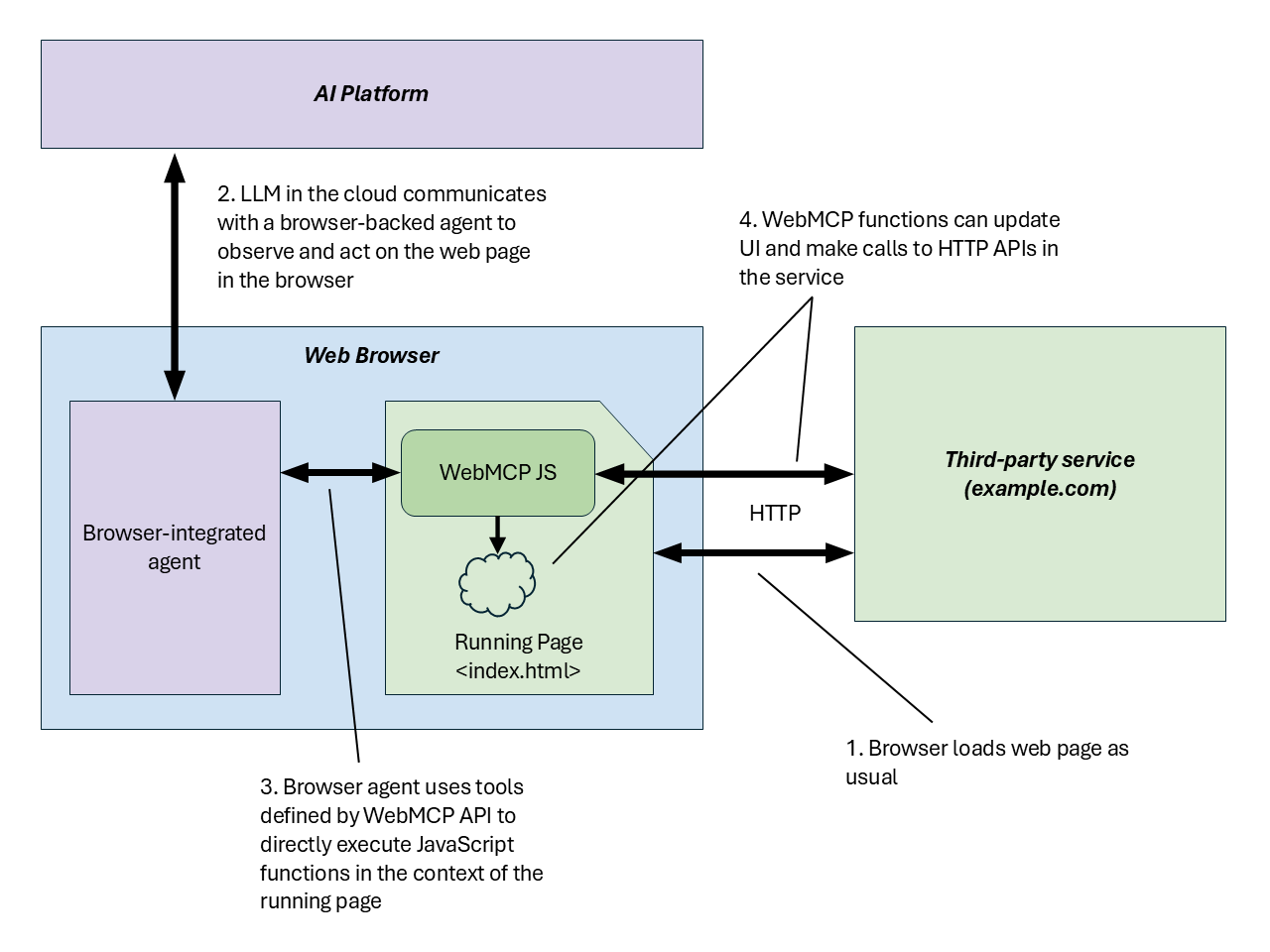
WebMCP tries to address the bottleneck through a different layer. Instead of asking for smarter visual recognition alone, it asks the web app to expose an agent-facing tool surface. A page can register callable functions through JavaScript and annotate HTML forms so a browser or in-browser agent can discover and invoke them. Google’s I/O 2026 developer keynote recap described WebMCP as a structured-tools proposal for making browser-based AI agents faster, more reliable, and more precise.
The problem WebMCP wants to change
The default behavior of many browser agents today is close to imitating a human user. If a traveler says, “Find flights that arrive next Friday evening and return Saturday afternoon,” the agent has to open a date picker, fill fields, apply filters, and read the results. If the date picker is complex, accessible names are missing, a modal appears, or the page state changes at the wrong time, the failure rate rises.
WebMCP starts from a different premise. If the site already has internal functions such as searchFlights, pickDateRange, and applyFilters, the agent should not have to wander through the UI to rediscover those capabilities. The web page can register them as tools and describe their input and output shapes with JSON Schema. The user still sees the same web page, and the result of the tool call still appears inside the application’s UI.
| Approach | Execution surface | Strength | Constraint |
|---|---|---|---|
| Screen actuation | Browser UI | Works on existing sites without explicit integration | The model keeps inferring button meaning, state, and errors |
| Backend MCP | Server or external tool runtime | Strong fit for headless automation and service-to-service integration | Can drift away from web UI state, authentication, and user review loops |
| WebMCP | JavaScript and UI in the open web page | Calls structured tools inside the page the user is viewing | Requires browser context, and standardization is still in progress |
The key phrase is “inside the page the user is viewing.” The WebMCP explainer does not frame this as a way for fully autonomous agents to secretly operate websites in the background. Its center of gravity is human-in-the-loop work. The user is looking at a page, the agent handles part of the repetitive flow, and the app keeps its existing UI and state. Sensitive actions such as payments or reservations can still include confirmation dialogs when the user needs to review the outcome.
When a web page starts looking like an MCP server
The WebMCP explainer compares a web page to an MCP server whose tools are implemented by client-side script rather than a backend process. That comparison is the core of this news. MCP connected models to capabilities outside the model through tool servers. WebMCP asks whether a web page itself can provide tools to the agent.
The architecture resembles backend MCP, but it is not the same thing. In backend MCP, an agent platform talks directly to a server. If UI is needed, it has to be attached separately. Authentication and session state must also be designed for the server integration. In WebMCP, the open browser tab is central. The user’s logged-in state, selected product, shopping cart, partially filled form, and client-side app state remain in place.
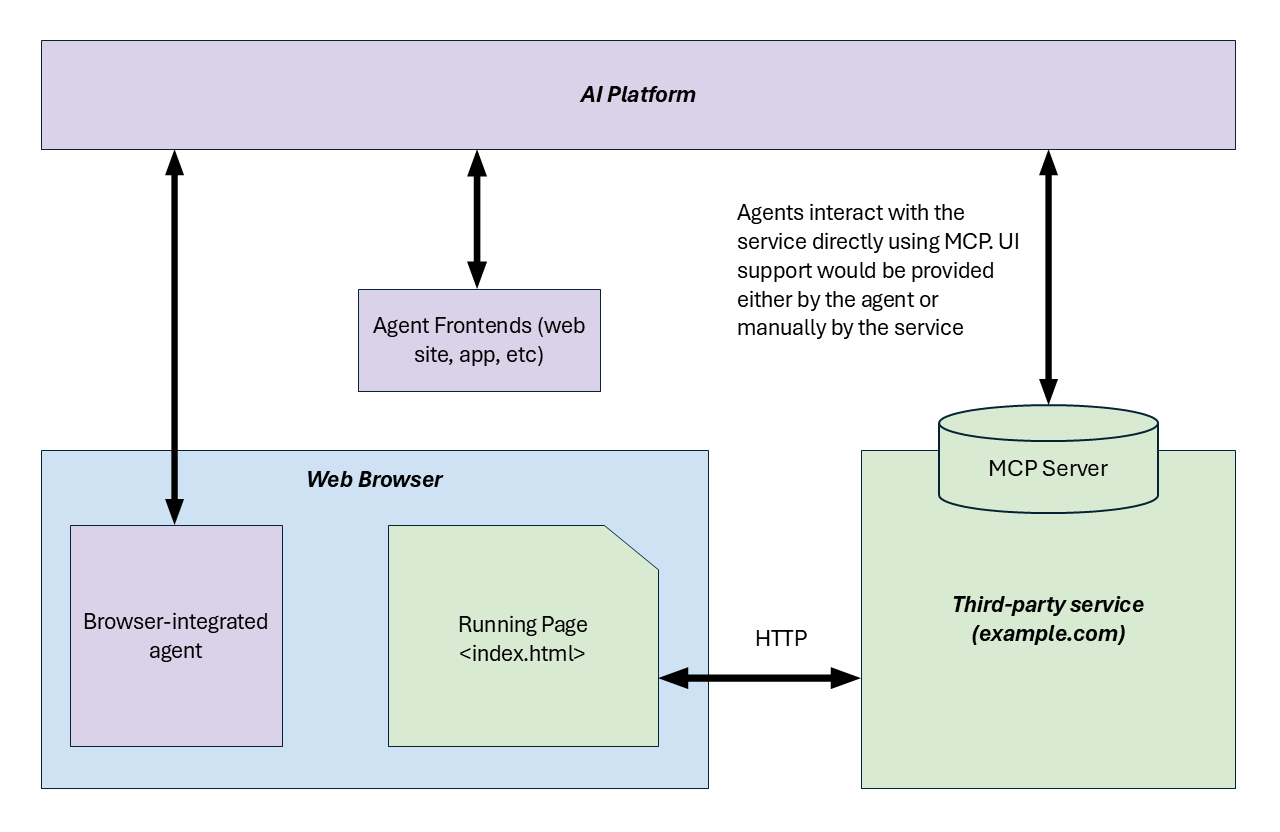
That difference matters for developer experience. Web app teams already keep a lot of product logic and UI state in the frontend. Rebuilding that behavior as a separate Python or Node MCP server is not a trivial port. It means revisiting authentication, permissions, errors, rate limits, confirmation flows, and UI synchronization. WebMCP is aimed at that gap. If an app can reuse existing JavaScript and HTML structure to add an agent path gradually, “supporting AI agents” starts to look less like a separate platform-integration project and more like a web-feature improvement.
The concrete shape in Chrome’s proposal
Chrome’s documentation describes WebMCP around three main concepts. The first is discovery. When a page registers tools such as checkout or filter_results, an agent can discover which actions are available on the current page. The second is JSON Schema. The page can specify the shape of inputs and outputs so the model is less likely to guess field meaning or invent arbitrary values. The third is state. The page can share real-time state so the agent understands which resources and actions are available right now.
The API comes in two forms. The imperative API defines tools in JavaScript. That fits complex app state, asynchronous work, and custom validation. The declarative API points toward annotating standard HTML forms as tools. For forms, applications, bookings, support workflows, and other screens that already have structured inputs, this could lower the cost of adding agent support.
The user opens a page and gives an agent a goal
The page registers available tool calls through discovery
JSON Schema and state constrain inputs, outputs, and context
Tool results appear inside the application UI
Chrome’s documentation also includes a permission model. WebMCP tools are controlled by the tools Permissions Policy. The default is self, which allows registration in the top-level page and same-origin contexts while disabling it in cross-origin iframes. An iframe has to declare allow="tools" to enable the capability. The feature is still experimental, but the permission boundary is already part of the design conversation.
The current availability is also clear. Chrome says WebMCP is available for local development behind a Chrome flag and is planned for a Chrome 149 origin trial. That means this is not a production web standard available to all users today. It is at the stage where developers can experiment and provide feedback. Chrome also points to an inspector extension that can show tools registered through navigator.modelContext, validate JSON Schema, and test whether a natural-language prompt maps to the expected tool call.
Why Google is pushing this layer now
The announcement fits into a broader Google I/O 2026 developer story. Google discussed Antigravity 2.0, Managed Agents in the Gemini API, Google AI Studio integrations, Chrome DevTools for agents, Modern Web Guidance, Android CLI, and skills in the same general wave. They all point in the same direction: smarter models alone are not enough to make agent products reliable. Agents also need execution environments, tools, permissions, evaluation paths, UI validation, and developer guidance.
WebMCP is the web-platform response to that pressure. As browsers become agent execution surfaces, websites face two choices. They can leave agents to interpret screens. Or they can expose meaningful action units directly to agents. Chrome is betting that the second path can become a web API.
This also has strategic value for Google. If browser-native agents such as Gemini in Chrome are going to operate the web reliably, per-site scraping and click automation will not be enough. Google needs an ecosystem where web developers register tools, browsers expose them in a neutral way, and agents call them according to schemas. Chrome’s framing that any browser with agentic capabilities could implement and benefit from the API is important in that context.
New questions for web developers
If WebMCP becomes real, web app developers will have to design a new API surface. Until now, API design mostly meant backend REST, GraphQL, internal RPC, or public SDKs. WebMCP is different: it is an agent-facing API that lives inside the user interface. That makes it more complicated than naming a function cleanly.
The first question is which actions should become tools. Turning every button into a tool is not good design. The better starting points are complex forms, repetitive entry, filtering, diagnostics, booking flows, support processes, and other places where structured interaction gives the agent a real advantage.
The second question is schema quality. Field names, descriptions, enums, defaults, and error messages become part of the product language the model uses. An internal function name that people never saw before can become agent-facing product copy. A good WebMCP tool is not just a function with valid types. It needs descriptions and constraints that help an agent make safer decisions.
The third question is confirmation and undo. The WebMCP explainer emphasizes collaborative scenarios between a user and an agent. If an agent changes a design, adjusts travel filters, fills a support form, or prepares a submission, the user needs to review and cancel when appropriate. A tool call can succeed technically while still leaving the user in an unintended state. The product has to absorb that risk.
The fourth question is security. A policy such as allow="tools" is only a starting point. Real products still have to decide which users can call which tools, how agent-initiated actions appear in audit logs, which sensitive tools require explicit confirmation, and whether cross-origin embeds should be allowed to expose tools. Payments, personal-data changes, account deletion, and permission updates do not become safe just because WebMCP exists.
Replacement for MCP, or a companion layer?
The name makes it tempting to read WebMCP as “MCP for the web,” but the current documents make it look more like a companion layer than a replacement. The WebMCP explainer explicitly excludes headless browsing, fully autonomous agent workflows, and replacement of existing backend integrations from its non-goals. For server-to-server tool calls, long-running background tasks, unseen automation, and cross-service data pipelines, backend MCP and other protocols remain the better fit.
WebMCP is strongest where the web UI and its state are central. Picture a user looking at a shopping page while an agent cleans up filters and the user makes the final decision. Or a support agent console where an AI opens the right form and fills some fields, while the human operator checks before submitting. The point is not to throw away the app’s existing user experience. It is to let an agent participate in that experience with fewer fragile clicks.
There is also an “agent accessibility” angle here. Just as web pages provide semantic structure and accessibility information for screen readers, WebMCP suggests providing higher-level action units and schemas for agents. Agents and assistive technologies are not the same category, but the technical problem overlaps: a complex visual UI has to be translated into higher-level meaning.
The open standards work
The biggest variable is adoption. Chrome’s documentation and the GitHub explainer are meaningful primary sources, but WebMCP is not a finished web standard. A Chrome flag and origin trial are the beginning of an experiment, not a promise that every browser and every agent platform will follow. Safari, Firefox, independent browsers, extension-based agents, OpenAI, Anthropic, and other AI platforms may respond in different ways.
The second variable is tool quality. For WebMCP to work, web developers have to build tools that agents can actually use. If schemas are thin, error messages are vague, or the UI state and tool state drift apart, the result may not be better than click automation. A standard API does not guarantee good product design.
The third variable is user trust. Showing tool calls inside a UI helps, but users still need to understand what the agent did. “The agent applied a filter” and “the agent changed account settings” carry very different stakes. WebMCP tool design has to be discussed together with audit logs, undo flows, confirmation prompts, and permissions.
What this news really means
WebMCP is not a production feature that every web app needs to ship immediately. But it is a strong signal about where AI-era web development may go. Historically, websites were built primarily for people and search crawlers. Browser agents may become another important consumer of the web. Unlike crawlers, they do not just read a page. They try to act inside it, and they will benefit from structured action units supplied by the site itself.
The main story, then, is not “Chrome added another API.” It is “web pages are being asked what they should promise to agents.” Not just clickable buttons, but callable tools. Not free-form DOM interpretation, but inputs with schemas. Not hidden backend automation, but collaboration inside the browser tab the user can see.
MCP created a connection layer between models and server-side tools. WebMCP tries to create a connection layer where browser tabs and web apps explain themselves to agents. It is still a proposal, still Chrome-led, and still full of security and UX questions. But the direction is clear: browser agents are moving from merely seeing the web toward hearing what the web can do. The first serious test will be the Chrome 149 origin trial and the developer feedback that follows.