Google Workspace AI control center brings agent access into Admin console
Google Workspace introduced AI control center, making Gemini and agent access to business data a new Admin console governance surface.
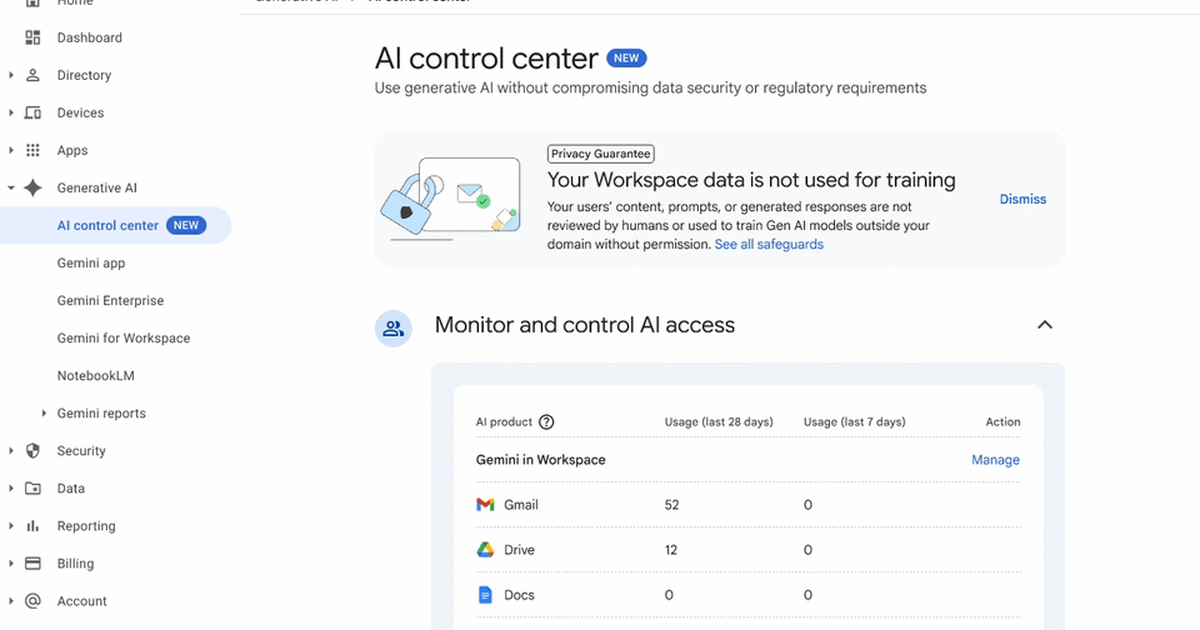
- What happened: Google Workspace added
AI control centerto Admin console.- Admins get one place to review AI usage and access settings across Gmail, Drive, Docs, Sheets, Slides, Meet, Calendar, Chat, and the Gemini app.
- Why it matters: The enterprise agent race is moving from model quality alone to who governs access to work data.
- Context: In the same week, ServiceNow pushed AI Control Tower kill-switch language while Cisco moved to buy Astrix for agentic identity security.
- Watch: Google's first version looks more like a visibility and admin entry point than a complete real-time control plane, and some settings are still marked
Coming soon.
Google Workspace introduced AI control center on May 4, 2026. The name sounds like another administrator dashboard, but the signal is larger than a new Gemini setting. Google is pulling generative AI and agent access to Workspace data into a dedicated governance surface inside Admin console.
That matters because AI inside Workspace is no longer just a writing helper. Gemini can read context from Gmail, refer to Drive files, work across Calendar and Chat, and sit beside Docs, Sheets, Slides, and Meet. As Workspace Studio and agentic solutions expand, administrators inherit new questions: which data can an AI action read, who allowed that action, which policy applies, and what can auditors reconstruct after the fact?
AI control center is Google's first answer inside the Workspace control plane. The product update does not claim to solve every enterprise agent risk. It does, however, make a clear platform bet: as agents move closer to everyday business data, Admin console becomes part of the AI product.
What Google Actually Shipped
According to Google's announcement, AI control center is built into Admin console under Generative AI > AI control center. There is no separate opt-in step for the control surface itself. Google says it is available to Enterprise Standard and Enterprise Plus customers, across both Rapid Release and Scheduled Release domains.
The first version revolves around four areas. Admins can monitor and control AI access. They can manage security settings for individual AI products such as Gemini in Meet. They can work with existing Workspace controls such as classification labels, trust rules, and data protection rules in the AI context. They can also review privacy, abuse, and compliance standards from the same entry point.
The initial app scope is familiar to any Workspace administrator: Gmail, Drive, Docs, Sheets, Slides, Meet, Calendar, Chat, and the Gemini app. The phrasing in Google's post is important. The control center is for generative AI and agent actions to Workspace data. The object being governed is no longer only a human user opening a document or sending an email. It is also an AI system reading work context and acting on top of it.
| Layer | Google Workspace surface | Admin question |
|---|---|---|
| Usage surface | Gmail, Drive, Docs, Sheets, Slides, Meet, Calendar, Chat | Where is AI being used across everyday work apps? |
| Access control | Gemini and agentic solutions accessing Workspace data | Which data becomes input for AI actions? |
| Security foundation | Classification labels, trust rules, data protection rules | Do existing data protection policies still apply when AI is involved? |
| Audit and compliance | Secure by Design, domain data training commitments, abuse and privacy standards | Can the organization explain the system to regulators and internal auditors? |
Why Workspace Makes This Sensitive
AI governance is now a standard enterprise software phrase, but Workspace is not a narrow application surface. A coding agent mostly touches repositories, development environments, CI systems, and issue trackers. A CRM agent mainly touches customer records and sales workflows. Workspace is the base layer of knowledge work. It contains email, draft contracts, meeting notes, spreadsheets, policy documents, customer proposals, calendars, and chat history.
That data is also governed by messy permission models. A Drive file can involve personal ownership, shared drives, external sharing, link visibility, security labels, and DLP rules. When a person opens a file directly, existing Workspace policy can answer much of the access question. When an AI system combines context across apps and produces an answer, administrators need a different level of observability.
They need to know which path the AI used to read the file, whether sensitive information was pulled into a response, whether the answer only referenced data the user could see, and which identity is recorded when an agent acts. These are not edge cases. They are the normal questions that appear when an assistant is allowed to become useful.
Google's "single pane of glass" framing fits that problem. Enterprises do not only need a toggle that turns AI features on or off. They need to see how AI access rights intersect with the existing data security model. In finance, healthcare, public-sector, legal, HR, and large enterprise environments, the buying question is not simply whether Gemini is convenient. It is whether the organization can explain what Gemini can read, what it can do, and what evidence remains.
Agent Governance Arrived In A Cluster
Google's announcement was not an isolated update. In the same week, ServiceNow announced an expansion of AI Control Tower. ServiceNow's pillars were Discover, Observe, Govern, Secure, and Measure. The company described 30 new enterprise integrations across AWS, Google Cloud, Microsoft Azure, SAP, Oracle, and Workday, runtime observability through Traceloop, and permission analysis through Veza's access graph.
The sharpest phrase in ServiceNow's messaging was the kill switch. ServiceNow said AI Control Tower can detect when an agent moves beyond its script or exceeds permissions, then stop it in real time. The Register described a Knowledge 2026 demo in which a hidden prompt injection against a pricing agent was detected, blast radius was analyzed through a Veza access graph, and the compromised agent was shut down.
Cisco is aiming at the same problem from the identity side. On May 4, Cisco announced its intent to acquire Astrix Security. Astrix focuses on AI agents and non-human identity: API keys, service accounts, OAuth tokens, and other credentials that already run modern software systems. When AI agents begin using those credentials to execute work, identity governance becomes agent governance.
Cisco said Astrix would be integrated with Cisco Identity Intelligence, Secure Access, and Duo to strengthen agent discovery, permission management, lifecycle handling, and threat detection.
Seen together, the pattern is clear. Model companies are building agents that can perform longer tasks. SaaS platforms control the work surfaces those agents want to use. Security vendors are treating agents and non-human identities as a new attack surface. Google Workspace AI control center sits at the most everyday and sensitive part of that map: access to work data.
Google's Advantage Is The Data Surface
Google starts from a different place than ServiceNow or Cisco. ServiceNow begins with workflows, CMDB, IT, HR, and customer operations. Cisco begins with identity, network, and security visibility. Google Workspace begins with the documents and communications where people actually spend the day.
That starting point matters for adoption. A governance tool can be technically strong but still miss the moment where users create risk. Employees write customer emails in Gmail, share agreements in Drive, capture meetings in Meet, analyze data in Sheets, and coordinate work in Chat. If AI enters those flows, the Workspace administrator is naturally pulled into the front line of AI governance.
The limitation is also clear. Google's first announcement reads more like an early entry point for AI access and security settings inside Workspace than a finished cross-enterprise control plane. The post says some settings may appear as Coming soon. It would be too strong to read this as a system that immediately blocks every agent action in real time, calculates blast radius across all external SaaS systems, or replaces specialist AI security tooling.
The practical meaning is narrower and still important. Google is repositioning the Workspace data protection model for the agent era. The control plane for email, files, meetings, chat, and collaborative documents is being asked to govern AI behavior, not only user behavior.
What Builders Should Notice
For developers and AI product teams, this might look like an admin-console story. It is more than that. Enterprise buyers are going to ask agent vendors increasingly concrete questions. Which document stores does the agent read? Does it inherit user permissions or use a service account? Which OAuth scopes are required? Can administrators see usage history? Can data access be exported for audit? What happens when an employee leaves or changes teams?
If your agent connects to Workspace data, these questions become product requirements. An app that asks for broad Drive scopes, reads files on behalf of a shared integration identity, or provides weak audit trails may become harder to approve. An app that supports least privilege, clear data boundaries, admin visibility, usage export, and respect for labels or DLP rules will be easier to defend inside a procurement and security review.
This is the core paradox of useful agents. Their value comes from access. An email agent that cannot read mail, a document agent that cannot see files, and a scheduling agent that cannot understand calendar context are limited by design. But every extra permission expands the risk profile. The enterprise AI market is therefore shifting toward a more operational question: can the organization tolerate the permissions that make the agent useful?
Google's move is also a reminder that platform controls will shape the agent ecosystem. If Admin console becomes the place where Workspace customers inspect and constrain AI access, third-party agent developers will need to fit into that governance story. The winning products will not only answer accurately. They will make security teams comfortable enough to let them near the data that matters.
Admin Experience Becomes Part Of The AI Product
The first wave of SaaS AI features was mostly user-facing. The pitch was simple: summarize this document, write this email, clean up this meeting transcript, generate this slide. In enterprise AI, the administrator experience is becoming equally central. Buyers need to know which AI features are enabled, which data sources are connected, whether policy violations occurred, what the cost and ROI look like, and whether a risky automation can be stopped.
Google Workspace AI control center shows that shift through a Workspace lens. It does not mean Google has solved every agent-governance problem. It does mean that once Gemini and agentic solutions operate on business data, Admin console becomes part of the AI operating layer.
The next competition will not be decided only by who adds the largest number of AI features. It will also be decided by who connects AI behavior most naturally to existing business data, permissions, security policies, and audit systems. Google has Workspace. ServiceNow has workflow and CMDB. Cisco has identity and network visibility. Each company is turning its already-installed control point into a platform advantage for the agent era.
For teams building with AI agents, the lesson is direct. Treat access, identity, logging, and policy inheritance as part of the feature, not as post-launch compliance work. The product that can explain its data boundary clearly will have an advantage over the product that only demonstrates a clever workflow.