Google Pics Turns Prompt Roulette Into an Editing Canvas
Google Pics brings Nano Banana image generation into Workspace with object-level, text-level, and collaborative precision editing.
- What happened: Google introduced
Google Pics, an AI image generation and editing tool for Workspace.- As of the May 19, 2026 announcement, access starts with limited Trusted Testers and expands this summer to Google AI Pro/Ultra and Workspace business customer previews.
- The shift: The product centers on
precision editing, changing objects, text, and specific regions instead of regenerating the whole image. - Why it matters: Nano Banana-style image models are moving from standalone creation tools into Slides, Drive, and shared work surfaces.
- Watch: Availability, brand controls, permissions, usage limits, and content policy will decide how useful Pics is inside real teams.
Google I/O 2026 produced enough announcements that Google Pics can easily get buried under Gemini 3.5 Flash, Spark, Antigravity, and Search agents. For product teams, marketing teams, and developers building AI features into work software, however, this announcement is worth a closer look. Google is not just launching another image generator. It is putting a generative image model inside the collaborative surface of Workspace.
The core claim is not "make a better image in one shot." In its Workspace announcement, Google framed AI image generation as something that can feel like rolling dice. You may get close to the image you want, but a small correction often means rewriting the prompt. When the model regenerates the image, the parts you liked may change too. Designers and marketers know this bottleneck well. The first image is rarely the end of the work. The revision loop is where time disappears.
Google Pics targets that loop. It lets users create from a blank canvas, edit existing photos, select objects inside an image, move or resize them, transform specific objects, and edit or translate text embedded in the image. More importantly, Google says this will not remain isolated inside a separate experiment. Pics is meant to connect with Workspace apps, starting with image editing flows across Slides and Drive.
Editing Is the Bigger Market
The first phase of AI image competition was mostly about generation quality. Give the model a text prompt and receive a poster, character, product photo, logo-like graphic, background image, or social visual. Model quality improved quickly. Many tools can now produce a plausible first result.
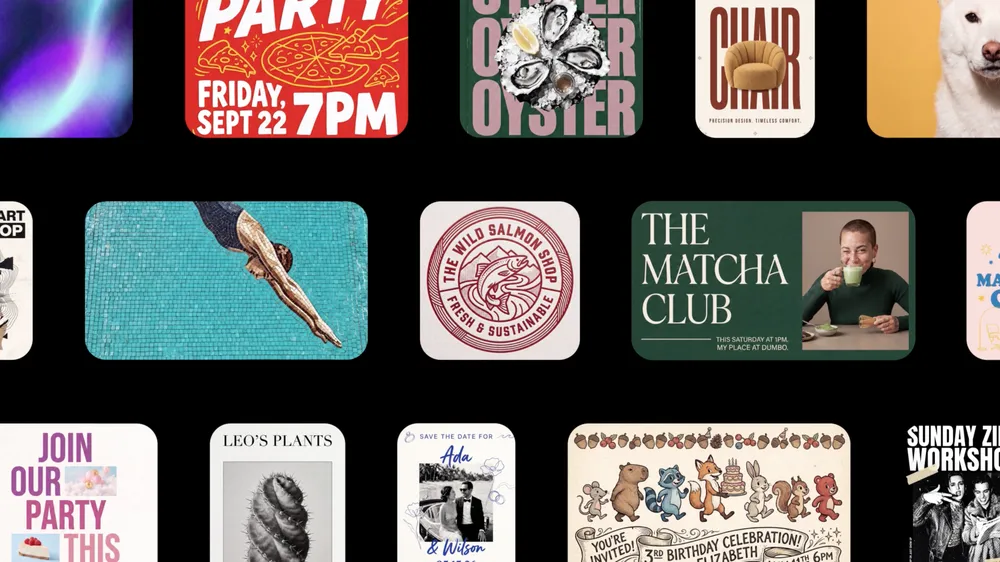
Work images are messier than that. An event poster may have the right visual style but the wrong time. A product banner may look good but miss the brand color. An invitation may have attractive typography but need localization. A social image may have the right composition except for a logo that needs to move into the upper-right corner. Existing image generators have struggled with these small changes. Even when the instruction says "only change this part," the model often reconstructs the whole scene and disturbs the parts that were already correct.
The object segmentation in Google Pics goes directly at that problem. Users can pick an element inside an image, move it, resize it, or swap it for something else. Google's examples include changing the color of a sweater or turning a dog into a cat. Those examples sound simple, but the product message is larger: the image is no longer treated only as a flat pile of pixels. It becomes a set of editable objects.
The shift is even clearer with text. AI image models have long been weak at rendering text. Recent models are better at signs, posters, and cards, but editing text after generation is still fragile. Google says Pics can edit text inside an image, translate it into another language, and preserve the original design and font style. If that works reliably, it changes practical workflows for ad creative, campaign assets, and slide graphics.
Nano Banana Matters Less Than Placement
Google says Pics is powered by its latest Nano Banana model. Some coverage describes this as Nano Banana 2. The Nano Banana family was already associated with image generation and editing across Gemini and Google Photos contexts. For Pics, the more important question is not the model name. It is where the model is being placed.
An image model inside the Gemini app is mostly a personal creation surface. The user writes a prompt, saves a result, and maybe shares it. The same model inside Workspace becomes part of business output: a campaign asset in Drive, an event graphic in Slides, a team-edited canvas, or a visual generated under a company's account and policy controls. The model moves from "make something interesting" toward an organization's content production line.
That distribution surface is hard to ignore. Canva has a strong design product. Adobe has professional creative tools and Firefly. Microsoft has Designer and the Copilot ecosystem. Google has a different channel: Workspace. Users already spend their day in Gmail, Docs, Slides, and Drive. If Pics enters that flow, image creation and editing can become part of the document workflow without requiring a separate design tool.
Google also says Pics will provide a shareable canvas so multiple users can work on the same image. That line is small, but it matters. AI image generation is moving from a private prompt box to a team surface. Images rarely end with one person. A marketer creates the draft, a designer adjusts it, sales changes copy for a customer, and legal or brand reviewers sign off. If Pics behaves like Workspace collaboration, AI image generation becomes a review-and-approval workflow, not just a generate button.
The Canva Collision Is Real
TechCrunch read Google Pics as a sign that Google is entering the AI design tools market more directly. That interpretation is natural. Pics is aimed at social graphics, invitations, marketing assets, mockups, cards, and event posters. Those are Canva's strong areas. Google's own examples include event flyers, social media content, and digital illustration edits.
Still, "Google replaces Canva" is too simple at this stage. Canva's strength is not only image generation. It includes templates, brand kits, team permissions, approvals, print and publishing flows, asset management, and product design tuned for educators, small businesses, and marketing teams. Pics has not yet proven that it replaces that whole system.
The sharper question is where AI image editing starts. Does the user open a design tool first and then call AI? Or does the user build a deck in Slides and call an image model at the moment a visual needs to change? That distinction matters. Many business users do not want to learn a full design tool. They want to fix an image inside the document or presentation they are already making. Google is aiming at that moment.
Canva and Adobe can remain the starting point for dedicated content work. Google Pics can become the starting point for repeated visual tasks inside everyday work documents. A sales team might change a proposal cover for each account. HR might create internal event images. A founder might refine graphics inside an investor deck. A teacher might adapt visuals for class material. These users may not be professional designers, but they produce visual assets constantly.
What AI Product Teams Should Notice
Pics does not look like a developer tool, but it carries useful product lessons for teams building AI software. First, generative UX does not end at the prompt box. Users inspect the result, select part of it, revise it, undo changes, and share it. At that point, the "editable object model" and the persistent canvas can matter as much as the model API.
Second, AI features become more valuable when they live inside existing work surfaces. Pics is interesting not only because of Nano Banana, but because of Slides and Drive integration. Teams building their own AI products should ask the same question. Where does the user already work? Is there a strong enough reason to open a new app, or should the model be available inside documents, CRMs, issue trackers, design systems, or dashboards?
Third, collaboration and permissions matter as much as model capability. Image generation can look like individual creativity, but inside a company the hard questions are different. Who generated this? Who edited it? Which version was approved? What source data entered the model? Which admins can restrict use? A Workspace business customer preview implies account settings, organization policies, and auditability, not only prettier image output.
These are the questions AI image tools repeatedly face inside enterprises. Can customer data appear in marketing assets? Can an internal product screenshot be uploaded? How should copyright, trademark, and brand risks be handled? What happens with real-person editing and sensitive content? How can brand-inconsistent assets be stopped before they spread? Pics does not answer every question, but it moves those questions into the Workspace layer.
Text Editing Is Not a Minor Feature
The most practical part of the Google Pics announcement may be text editing and translation. Text inside images is central to marketing materials. Dates, discounts, product names, locations, calls to action, and localized copy all live there. A model can make a beautiful poster, but it is not usable if "SEPT 22" is wrong, a product name is misspelled, or localized copy breaks the design.
Google says Pics can edit or translate image text while preserving the original design and font style. If this becomes dependable, multilingual marketing workflows change. Today, teams often need to find the source design file, open the text layer, match font and line breaks, and adjust layout for each language. If an image model can handle part of that process directly, smaller teams can create localized campaign assets much faster.
There is also risk. Teams still need to verify that text is correct, translation has not changed the meaning, and legal or pricing details are not wrong. Text generated inside images has become readable enough for demos, but business use requires more than "close enough." One wrong number, date, or product name can matter. Tools like Pics need review and approval flows as much as generation quality.
It Is Still a Limited Test
Availability should be read carefully. According to Google's Workspace announcement, Pics started with limited Trusted Testers on May 19, 2026. This summer, Google plans to expand access to Google AI Pro and Ultra subscribers and to Workspace business customer previews. The product FAQ says broader availability is coming in the next few months for Workspace Business Standard and above customers, as well as Google AI Pro and Ultra subscribers.
That means this is not yet a tool every Workspace user can open today. Google points early access through Workspace Experiments and Gemini Alpha feature settings for business customers. Teams considering adoption still need to confirm account type, admin controls, regional availability, and usage limits.
Model policy is another variable. Nano Banana-style image models can be powerful for generation and editing, but real people, copyrighted styles, brand logos, political content, and sensitive subjects will inevitably trigger policy boundaries. Pics inside Workspace may need more conservative defaults than consumer experimentation. Enterprise customers often value predictable controls more than maximum creative freedom.
Image UX After the Prompt
Google Pics points to the next interface for AI image work. The first interface was the text prompt. The second added reference images, styles, masks, inpainting, and outpainting. The third is the collaborative canvas. Users select part of an image, give a targeted instruction, edit text directly, hand work to teammates, and reuse the asset inside documents.
This resembles the evolution of AI coding tools. At first, developers asked a model for code. Then models edited files. Now agents move between issues, tests, browsers, deployments, and reviews. Image generation is following a similar pattern. First it made images. Now it is turning results into editable workspaces with collaboration, review, and business app integration layered on top.
That means the real competitor for Pics is not only a specific image model. It is the user's workflow. If the user is already making a presentation in Slides, Pics has to make image editing happen there. If the user is already running a brand campaign in Canva, Pics has to give a reason to leave Canva's templates and brand kit. If the user is doing professional work in Adobe tools, Pics has to compete on precision and file compatibility.
What Teams Should Check Now
Teams adopting or building business AI image tools should take three checks from the Pics announcement.
First, define the editing unit. Users do not always want to regenerate an entire image. They need addressable units such as object, text, background, color, region, and style. If the product design stops at prompt input, it will run into friction during revision.
Second, design collaboration early. It should be clear who creates the draft, who edits it, who approves it, and which version is final. Google's mention of a shareable canvas points in that direction. Image generation looks like a solo activity, but in business it becomes a collaborative artifact.
Third, connect to existing tools. Pics emphasizes Slides and Drive. That shows AI functionality moving inward from standalone apps into the surfaces where work already happens. Teams building their own AI features should decide where that surface is: CRM, docs, dashboards, design systems, CMS, or something else.
Google Pics is still in a limited test. It is too early to call it a Canva or Adobe replacement. But the direction is clear. The competition in image generation is shifting from "how good is the first image?" to "how precisely can this image be edited, reviewed, and reused inside work?"
Prompts still matter. But prompts alone do not finish the job. The question Google Pics raises is simple: is an AI-generated image a final output, or is it a collaborative object that keeps changing? Nano Banana inside Workspace is a bet on the second answer.