From one prompt to Play testing, Android app generation gets a new gate
Google AI Studio now connects prompt-based Android app creation to Kotlin, an emulator, ADB, and Play internal testing.
- What happened: Google AI Studio opened a flow for creating and testing native Android apps from a prompt.
- Google announced it on
2026-05-19, tying Kotlin, Jetpack Compose, a browser emulator, ADB install, and Play testing into one workspace.
- Google announced it on
- Core shift: The app builder is moving beyond web prototypes and up to the edge of Google Play Internal Test Track.
- With a connected Play developer account, AI Studio can create the app record, package the bundle, and upload it for internal testing.
- Developer impact: Android's first-mile cost drops, but maintainability, store quality, security, and permission review become more important.
- Watch: Google's stated early focus is personal utilities, simple social apps, hardware experiments, and AI-powered experiences.
Google AI Studio's new Android app generation feature can look like another "AI builds an app for you" announcement. The more important question is where the prompt now connects. On May 19, 2026, during Google I/O 2026, Google said AI Studio can generate native Android apps in the browser, run them in an Android Emulator, install them on a physical device through ADB, and send them to Google Play's Internal Test Track.
That is not just another web app generator. It is closer to a platform owner pulling an AI app builder into the official mobile development pipeline. Most prompt-to-app tools have been strongest at web screens, simple storage, and shareable deployment URLs. Android, by contrast, comes with SDK setup, Android Studio configuration, Gradle builds, emulators, device connections, app bundles, and Play Console test tracks. Google is moving a surprising amount of that first-mile work into AI Studio's build tab.
The official Android Developers Blog is direct about the flow. A user picks Android app building in AI Studio, describes the app, and receives a Kotlin-based Android app. Google says the generated code uses Jetpack Compose patterns. Jetpack Compose is Android's recommended UI toolkit, so this is not framed as a webview wrapper factory. The pitch is that native Android form and tooling now sit inside the same AI Studio surface where developers already experiment with Gemini APIs.
How the app builder skips SDK setup
Anyone who has started Android development knows the first project can feel heavier than the idea itself. You install Android Studio, download SDKs and emulator images, wait for Gradle sync, configure device permissions, and make ADB behave. That setup cost is especially high for beginners. It also interrupts experienced developers when they only want to test a small product idea on an actual phone.
AI Studio's approach moves much of that cost into the browser and Google's hosted workflow. According to Google's announcement, users can create the app without installing local software or managing a local Android SDK. They can preview the app through an embedded Android Emulator, then install it on a USB-connected Android device through integrated ADB. ADB, the Android Debug Bridge, is the standard tool developers use to communicate with Android devices, install apps, and inspect logs.
This may look like an implementation detail, but it matters from a product standpoint. AI app builders earn trust when the generated result can be touched quickly. Web app builders have had a natural advantage because a URL is enough to show the result. Mobile app generation has a different first question: does it run on my phone? Google's emulator and ADB integration are answers to that question. Before model quality can matter, the user needs a short loop for running the app, changing it, and installing it again.
Why Play internal testing matters
The most interesting part of the announcement is Google Play Internal Test Track. Google's documentation says that after connecting a Google Play developer account, AI Studio can create the app record, package the app bundle, and upload it to the internal testing track in Google Play Developer Console. Google also describes a flow where the app becomes installable within minutes and can receive automatic updates during development.
That means AI Studio is aiming beyond code generation and toward the pre-release validation pipeline. The hard part of app development is not only creating the first screen. A team must know whether the app runs on real devices, whether someone else can install it, whether internal testers can provide feedback, and whether the produced bundle matches Play Console expectations. If Google can compress those steps, the time from idea to first user test becomes shorter.
The same move creates a tension. Lowering the barrier helps personal utilities, internal tools, event apps, learning projects, and quick hardware experiments. It can also increase the volume of low-quality, repetitive, or badly permissioned apps entering the store ecosystem. Google's stated early use cases are telling: personal utilities, simple social apps, hardware-enabled experiences, and AI-powered experiences. That framing sounds less like "ship anything straight to production" and more like "lower the threshold for first experiments and internal tests."
| Step | Traditional first Android flow | New AI Studio flow |
|---|---|---|
| Start | Set up Android Studio, SDKs, and Gradle | Describe the app in the browser build tab |
| Code | Choose a template, then write Kotlin and Compose manually | Generate Kotlin with Jetpack Compose patterns |
| Validate | Run a local emulator or a physical device | Use the browser emulator and integrated ADB install |
| Test release | Create the app record and upload the bundle in Play Console | Upload to Internal Test Track from AI Studio |
| Expand | Move separately into GitHub, CI, and Android Studio | Download ZIP, export to GitHub, or hand off to Android Studio |
Why native Android is the point
"AI builds apps" is no longer a surprising phrase. Replit, Lovable, Bolt, v0, and similar tools have made natural-language web app creation familiar. That is why Google's emphasis on native Android deserves attention.
First, mobile apps have a different permission model and different user expectations from browser apps. Google points to offline support, persistent background services, GPS, Bluetooth, NFC, and other hardware sensor integrations. Many phone experiences are deeper than responsive web screens. Camera capture, location, notifications, wearables, foldables, and background work fit more naturally when the app connects directly to the Android SDK.
Second, Android is a domain Google can connect end to end. The model layer is Gemini. The app generation surface is AI Studio. The professional development environments are Android Studio and Antigravity. The UI toolkit is Jetpack Compose. The test release path is Google Play Console. Google's I/O 2026 developer highlights put Antigravity 2.0, Gemini API Managed Agents, the AI Studio mobile app, Workspace integrations, and Android support into the same developer story. The message is less about a single model release and more about whether a prompt can reach real work and pre-release distribution.
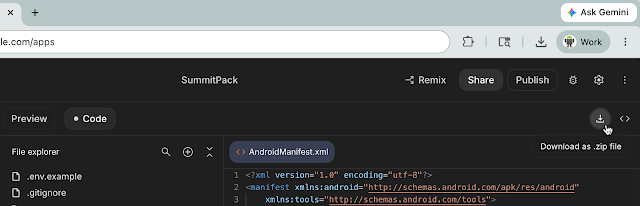
Third, Google can absorb some app-generation quality issues into platform tools and guidelines. The company also mentions Gemini in Android Studio, Android CLI, and Antigravity. When an AI Studio app grows more complex, developers can download it as a ZIP, export it to GitHub, or continue in Android Studio and their preferred agentic IDE. Without that handoff, AI app builders often stop at demo toys. With a credible handoff, the boundary between prototype and professional development becomes less abrupt.
What improves for developers, and what remains
This announcement does not mean Android developers are suddenly unnecessary. It points to a split between the front and back of the work. The front of the work, turning an idea into an installable app that can be tested on a device, gets faster. Product managers, designers, founders, and operations teams may be able to draft small utility or workflow apps themselves. Developers become less like the people who create an empty project and more like the people who judge the generated structure, check permissions and data flow, and turn the result into maintainable software.
Google's example categories support that reading. Personal utilities and simple social apps are good small experiments. Hardware-enabled experiences are useful for quickly validating camera, GPS, accelerometer, Bluetooth, or other mobile-specific behavior. AI-powered experiences connect directly to trying Gemini API features inside a mobile app. These are closer to idea validation and internal testing than to large-scale commercial apps from scratch.
The remaining work is harder, not easier. Someone still has to review whether the generated Kotlin and Compose code follows the team's architecture standards. Someone has to ask whether the app requests too much permission, how it handles location and camera data, what happens offline, and whether the generated UI meets accessibility expectations. Putting an app on a Play test track is not the end of deployment. It is the beginning of validation. Real users have different devices, languages, network states, and permission settings. Those failures still need human observation and engineering judgment.
Cost and model selection are another variable. In the r/androiddev discussion around Google I/O updates, some developers worried about Gemini 3.5 Flash pricing and the cost of repeated AI use. For AI Studio's Android generation to become a practical workflow, generation quality will not be enough. Iteration cost, failed-build retries, long-session budgets, and quota control all matter. The broader coding-agent market is already arguing about pricing and usage limits for the same reason. The practical cost is not whether an app can be generated once. It is how many loops it takes before the app is good.
The community temperature
This announcement has not yet looked as loud on Hacker News as the broader Google Antigravity debate. When checked on May 22, 2026, the HN front page was more visibly occupied by criticism around Google's Antigravity, Runtime's sandboxed coding agent launch, and local video indexing. That suggests developer attention has moved beyond "AI can make an app" toward harder questions about runtime boundaries, pricing, permissions, lock-in, and reliability.
The r/androiddev thread around Google I/O Android developer updates was more directly relevant. Some developers worried that the value of learning and investing in native Android development could be weakened. Others pushed back, arguing that there is no reason to stay in older Java and XML workflows. Complaints about cost, tool complexity, and platform control appeared alongside curiosity. The mixed temperature is natural. The threshold AI Studio lowers is an opportunity for newcomers, but it can also feel like commoditization of the first tasks existing developers used to own.
GeekNews lists around the same period showed adjacent topics such as AI coding evaluation, agent-native terminals, and the move from Gemini CLI toward Antigravity, but not a major discussion of AI Studio Android generation itself. For a Korean developer news audience, the useful framing is not another I/O feature list. It is that the first mobile app testing loop is starting to move into AI Studio.
Google's real advantage is plumbing
AI Studio's Android support is hard to explain through the Gemini model alone. The advantage is plumbing. Google owns Android SDKs, Jetpack Compose, Android Emulator, ADB, Google Play Console, Android Studio, Firebase, and the Gemini API surface. A competing AI app builder may deliver a smoother prompt experience, but it is much harder to connect into Android's pre-release testing pipeline at the same depth.
That makes this announcement a sign of how Google sees the AI app-generation market. It is not only conversational code generation. It is platform workflow. Google's Keyword blog says AI Studio conversations, project files, and secrets can move into Antigravity. On mobile, AI Studio can be the entry point, Android Studio or Antigravity can take over complex work, and Play Console can close the testing loop. A single company being able to design that whole path is Google's structural advantage.
The same structural advantage raises lock-in questions. Users need to see how standard the exported Gradle project is, how naturally a GitHub export works with other IDEs and CI systems, and how tightly generated code depends on Google services. The announcement points to ZIP download, GitHub export, and Android Studio handoff, but a good handoff is not only a button. It is the quality of project structure, dependencies, generated tests, and the ability to keep working outside the original AI surface.
What it means now
Google AI Studio's Android update does not automate the end of Android development. It redraws the start. There used to be a gap between "I have an app idea" and "I have a first Android app running on a device." Google is trying to fill that gap with AI Studio in the browser, an emulator, ADB, and Play internal testing.
The questions for developers and AI teams are practical. How much does this reduce idea validation time? Is the generated Kotlin and Compose project healthy enough to become a real codebase? Who reviews permissions, security, privacy, accessibility, and store quality? Is repeated generation and testing predictable within a team's budget?
The AI app-builder race is no longer only about attractive demo screens. The competitive question is how continuously a prompt can move into an app bundle, device install, internal test, and professional IDE handoff. Google AI Studio's Android support is a signal that this race has moved beyond web prototypes and up to the official pre-release layer of a mobile platform.