Android Inside AI Studio, and the App Bottleneck Moves to the Browser
Google AI Studio now reaches Android app generation and Play testing paths, moving the AI app bottleneck from prompting to verification.

- What happened: Google expanded AI Studio into Android app generation, GitHub export, and Android Studio handoff paths.
- The Android Developers Blog also described APK download and upload flows into the Play Console internal testing track.
- Why it matters:
vibe codingis moving beyond web prototypes and into mobile platform validation loops. - Watch: Maintainable code, policy review, device testing, and release accountability remain harder bottlenecks than demo speed.
The loudest announcements at Google I/O 2026 still orbit models and agents. Gemini 3.5, search agents, Managed Agents, and Antigravity CLI naturally take the front row. But the changes that last longest for builders often start somewhere quieter: in the tool where a project begins. That is why Google's expansion of Google AI Studio deserves a closer look.
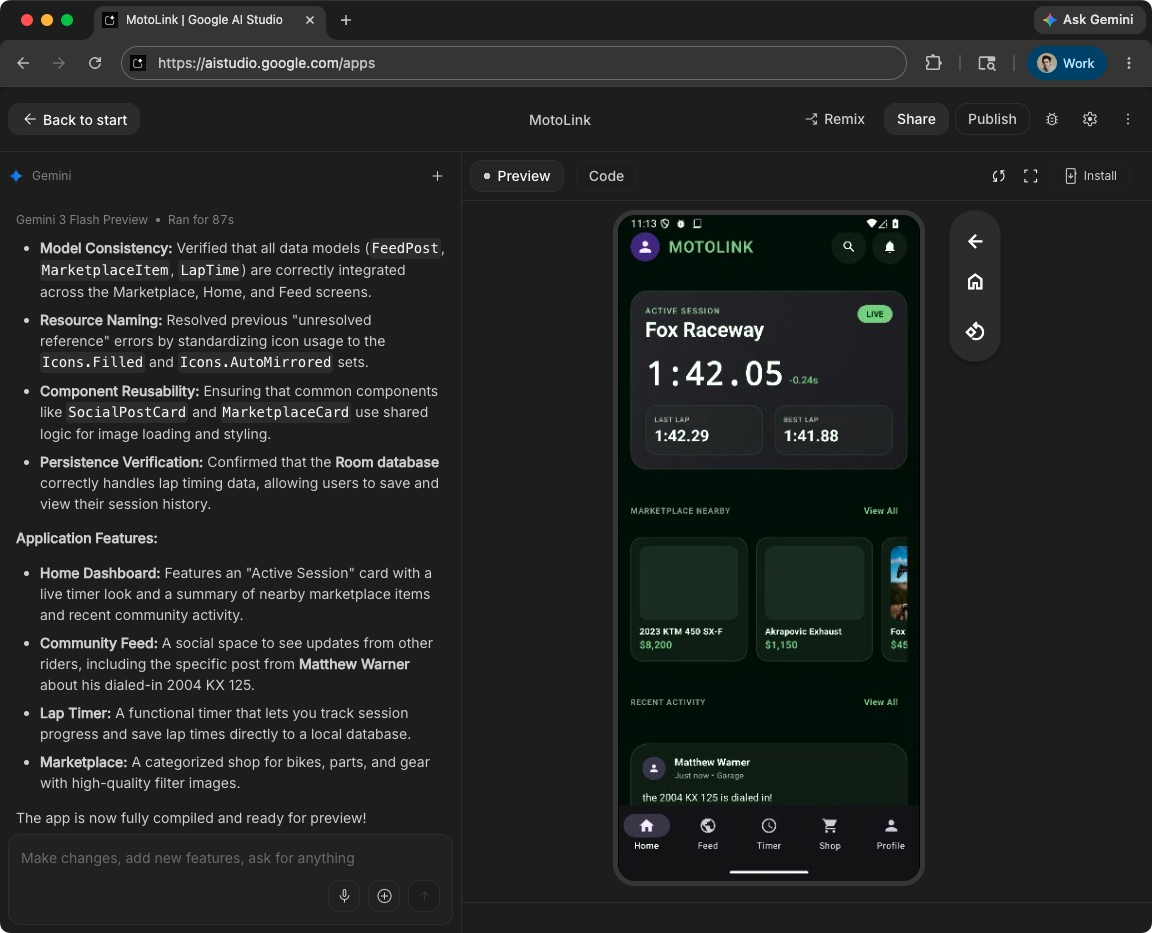
AI Studio is no longer just a browser console for trying the Gemini API. Google now describes it as a place where ideas become apps, bundling Build UI, Build apps, Agent-to-Agent protocol support, and native Android app generation into one developer surface. The Android Developers Blog goes one step further. It says developers can create Android apps from a simple prompt, download an APK and run it on a physical device, or export the code to GitHub and open it in Android Studio. It even points to a path for uploading the result to the Google Play Console internal testing track.
The important part is not the old claim that "AI can build apps." Web app tools already generate interfaces, write code, and open deployment previews from prompts. The more interesting shift is that Google is starting to connect AI-generated apps to Android's real validation path. An idea that starts in the browser can move into APKs, Android Studio, and Play testing tracks. The responsibility after the prompt is becoming visible on the product surface.
AI Studio Is Changing Jobs
Google AI Studio used to feel closest to a fast Gemini API workbench. Developers picked a model, wrote prompts, attached multimodal input, and inspected API code. That was useful, but it was not the whole path from idea to product. It was a model experimentation surface more than an application workflow.
At I/O, Google is trying to reposition it. The Google Keyword announcement frames AI Studio as a space for "building with Gemini." Build UI creates interactive interfaces from text prompts or images. Build apps turns ideas into application-shaped prototypes. Those features sit beside Agent-to-Agent protocol support, Managed Agents, Firebase Studio, and Gemini CLI. The placement matters. Google wants developers to move past the phase of merely calling model APIs and into a workflow where agents, apps, backends, and deployment all sit closer together.
The Android announcement makes the intent clearer. Google says AI Studio can generate native Android apps from a prompt and produce an APK that runs on a device. It also includes exporting the code to GitHub so the project can continue in Android Studio. Up to that point, the story still sounds like prototype generation. But once Play Console internal testing is mentioned, the story changes. The generated first version is no longer just a demo. It is being moved toward the same policy, signing, quality, device compatibility, and feedback loops that shape real mobile software.
| Surface | Role in this announcement | Question for builders |
|---|---|---|
| Google AI Studio | Generates UI and Android app drafts from prompts | Is the draft code structured enough to change? |
| GitHub export | Moves generated output into repository-based development | Is it consistent enough for review, tests, and CI? |
| Android Studio | Connects Agent Mode and Gemini to the existing IDE workflow | How well can the IDE agent repair generated code? |
| Play internal testing | Moves AI-generated apps into a pre-release validation loop | Who owns policy, privacy, quality, and device compatibility? |
Why Android Matters
There are already many tools for generating web apps. Lovable, Bolt, Replit, and the v0 family of tools made it normal to turn a prompt into screens and simple CRUD applications. In that market, Google saying "we can build apps too" would not be enough. Android changes the shape of the story.
Mobile apps carry thicker constraints than web previews. Screen sizes, permissions, battery impact, network state, store policy, signing, internal testing, release tracks, and device-specific behavior all matter. An AI-generated app that shows a plausible first screen is very different from an app that behaves reliably on real phones. Putting Android app generation inside AI Studio means Google is pulling generative development tools toward the heavier stage of platform validation.
This is where Google has assets that most competing tools do not. Android Studio, Gradle, Play Console, Firebase, Gemini API, Google Cloud, and Google Play policy all sit inside the same company. The quality of the generator matters, but the path that generated apps follow into testing and release may matter more. Google is one of the few companies that can connect the full path.
That does not mean mobile development is suddenly automated. The opposite is more likely. If prompt-built apps multiply, teams will have more code to review, more permission requests to audit, more privacy behavior to explain, and more test coverage to own. "App creation got easier" does not mean "release responsibility got easier." AI Studio's Android path is interesting because of this tension. Generation speeds up in the browser, while accountability returns to the older mobile checklist.
Where It Meets Android Studio Agent Mode
In the same Android Developers Blog post, Google introduced Agent Mode in the Android Studio Narwhal Feature Drop. Agent Mode is aimed at helping Gemini perform multi-step development work. Google also mentions Journeys, app quality insights, Firebase Crashlytics, Compose preview generation, and Gemini in Android Studio. Put together, the message is that AI Studio is the starting point, while Android Studio is where the generated app gets repaired, refined, and made shippable.
The first structure of a prompt-generated app matters. If the file layout is messy, later edits become expensive. If state management is wrong, even small features can break context. For AI Studio's Android generation to matter in real work, the output has to continue naturally inside Android Studio. It must open, build, test, and remain understandable enough for agents to modify. That is why Google keeps mentioning AI Studio, GitHub export, and Android Studio in the same breath.
The developer role also shifts. Previously, a mobile developer often began with an empty project, designed the structure, built the first screen, and then layered in features. Now the first task may be receiving an AI-generated draft and bringing it into alignment with platform rules and product requirements. Developers read generated code for intent, fix data flow, check permissions and error states, and set the quality bar before release. The amount of typing may fall, but the work of tracing code provenance and validation points may grow.
AI Studio: prompt and app draft
GitHub export: reviewable repository
Android Studio: Agent Mode and quality fixes
Play internal testing: device and policy validation
Firebase Studio Is Part of the Same Arc
AI Studio's app generation story is not separate from Firebase Studio. Google is positioning Firebase Studio as a cloud development environment, while AI Studio stands at the front of model/API experimentation and app drafting. Most mobile apps do not stay useful for long without a backend. Authentication, storage, push, analytics, remote config, and crash reporting tend to follow. From Google's perspective, the strongest integration strategy is to move an app that starts in AI Studio into Firebase and Android Studio with as little friction as possible.
That also changes the competitive axis for developer tools. The question is no longer only which AI makes a prettier UI. The more durable question is whether the generated app can keep moving through data, auth, tests, deployment, observability, and incident response. If the coding tool market moved from editor autocomplete to task-level agents, the next battlefield is the operational loop around generated software.
Google already owns many of the pieces. But owning the pieces is different from earning developer trust. Builders still need to see whether AI Studio's Android apps have good code structure, maintainable Compose and Gradle configuration, safe Firebase defaults, adequate tests, and clear permission explanations. The announcement shows direction. Quality will be proven only when developers try the path on real projects.
Expected Community Reaction
There is not yet a large independent discussion focused only on this feature. Google I/O included too many AI announcements, and AI Studio's Android generation sits somewhere between a demo and a product update. Still, the likely developer reaction is predictable. Fast prototyping is attractive. Teams with little Android experience may use it to check ideas on real devices sooner. Designers, PMs, and backend developers could also create the first mobile shape of an idea without waiting for a blank project to be set up.
The doubts are just as predictable. AI-generated mobile apps do not escape security, privacy, permissions, accessibility, offline behavior, or store policy. Problems that are easy to miss in a web demo appear quickly before mobile distribution. If app generation gets too easy, app stores may also face more shallow, similar, low-quality submissions. For the Play ecosystem, verification speed may become more important than generation speed.
That balance matters. It is too early to say AI Studio replaces Android developers. It is more reasonable to say AI Studio could become one of the first screens in Android development. In the idea-validation and internal-testing phase, it can already change behavior. Starting with a prompt before opening an empty project, then handing the result to Android Studio for repair, is a natural workflow.
What Teams Should Check First
AI teams and mobile teams should evaluate three points. First, check whether generated code is reviewable inside a repository. A result that looks good in AI Studio but cannot enter a team's style, review, and test system remains a toy. GitHub export matters because it puts the generated app into the place where engineering teams already argue about quality.
Second, test how smooth the repair loop is with Android Studio Agent Mode. When the generated app opens in the IDE, it should have few build errors, and Gemini should understand enough project context to help add features and fix bugs. The value of an AI generation tool is not only in the first draft. It shows up in the second and third change, because real products are never created in one pass.
Third, map the responsibilities that remain on the way to the Play testing track. Internal testing is not production release, but it does start the real packaging, signing, device testing, and policy-review path. Once an AI-generated app is uploaded for internal testing, the team has to explain permissions, data handling, error behavior, and user experience. Google's announcement does not remove those responsibilities. It makes teams face them earlier.
The News Is the Validation Path
At first glance, Android app generation in Google AI Studio looks like another vibe-coding feature. The real news is not that apps can be made faster. It is that AI-generated apps are being routed into Android's actual development path. When a browser prompt leads to GitHub, Android Studio, and the Play internal testing track, AI development tools cross from demo screens into product accountability.
That shift does not erase developers. It moves their verification role earlier. The key question is no longer whether AI can create the first screen. It is whether a team can turn that first screen into trusted code, tests, policy compliance, and release flow. Google is lining up Android, Firebase, Gemini, and Play to answer that question.
Android inside AI Studio is therefore more than a small feature addition. It is a sign that the first step of mobile app creation is moving outside the IDE and into an AI tool in the browser. Whether that move works will depend less on generation speed than on the strength of the validation path that comes after generation.