MCP Comes to the Phone, and Local Agents Get a New Runtime Boundary
Google AI Edge Gallery now combines Gemma 4 on-device agents with MCP, local notifications, and persistent sessions.
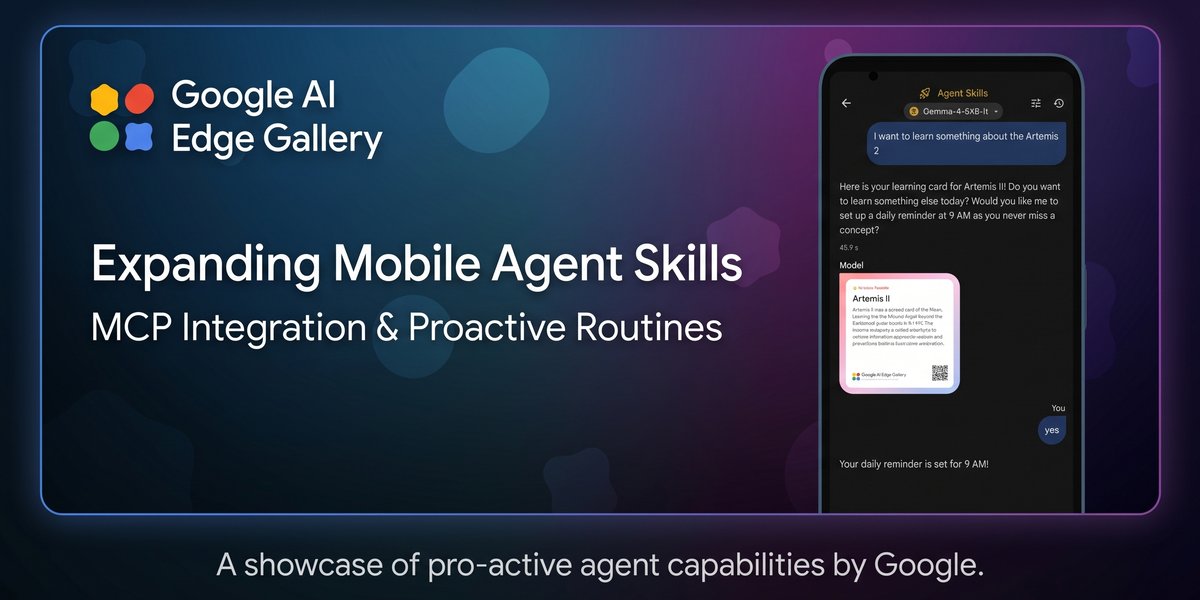
- What happened: Google AI Edge Gallery added
MCP, local notifications, and persistent chat history.- The MCP path starts as an experimental Android feature, with the iOS update planned for later.
- Architecture: Gemma 4 handles reasoning and tool choice on the phone, while MCP servers fetch or act on real data.
- Performance: Google says LiteRT-LM fast prefill can restore context at 3,000+ tokens/sec on modern phone GPUs.
- Watch: The official GitHub docs call out
4k-10kcontext windows, short tool descriptions, and Gemma-4-E4B as the recommended model.
Google announced a Google AI Edge Gallery update on May 19, 2026. At first glance, it looks like a feature drop for a showcase app: MCP support, notification reminders, and chat history that can be resumed later. Taken together, though, those pieces make the direction of on-device AI much clearer. The small model inside a phone is no longer just an offline chatbot. It is becoming an experimental agent runtime that can call external tools, bring the user back at a scheduled time, and restore previous session context.
Google AI Edge Gallery is an app for running Gemma and other open models directly on Android and iOS devices. Last month, Google introduced a way to deploy agentic workflows on mobile devices with Gemma 4. This update adds connectivity and continuity on top of that base. The announcement bundles three changes. First, the Android app now has experimental support for MCP over Streamable HTTP. Second, local notification reminders let a user reopen a routine at a specific time. Third, persistent chat history uses the LiteRT-LM backend's fast prefill path to restore prior context.
The important story is not simply that MCP has reached another app. MCP has already spread quickly through desktop coding agents, IDEs, cloud agents, and browser tools. The difference here is where execution happens. Reasoning and tool selection happen on the phone. Real actions such as calendar lookup, map queries, or web fetches can be delegated to external MCP servers. In other words, the mobile local model keeps the privacy and latency advantages of on-device reasoning, while borrowing networked tools only when it needs them.
Local Models Do Not Know the World by Themselves
The appeal of an on-device LLM is easy to understand. Inputs do not necessarily have to leave the device. Small tasks can feel immediate. Some features can keep working even when the network is weak. For mobile apps, experiences such as summarizing text without a server round trip, organizing photos and notes, or helping with repeat personal routines are compelling. This is why announcements around LiteRT-LM, Gemma 4 MTP, and local WebGPU inference keep showing up. Once models are small enough and runtimes are fast enough, some AI features can move from a cloud API into the user's own device.
But local models also have a structural weakness. By themselves, they do not know current external state. To read a user's calendar, the model needs a calendar tool. To estimate nearby restaurants or travel time, it needs a maps tool. To summarize a URL, it needs a web fetch tool. Large server models have usually solved this by combining bigger context windows, mature tool calling, and cloud-side authentication flows. A small model inside a phone cannot simply absorb all of that.
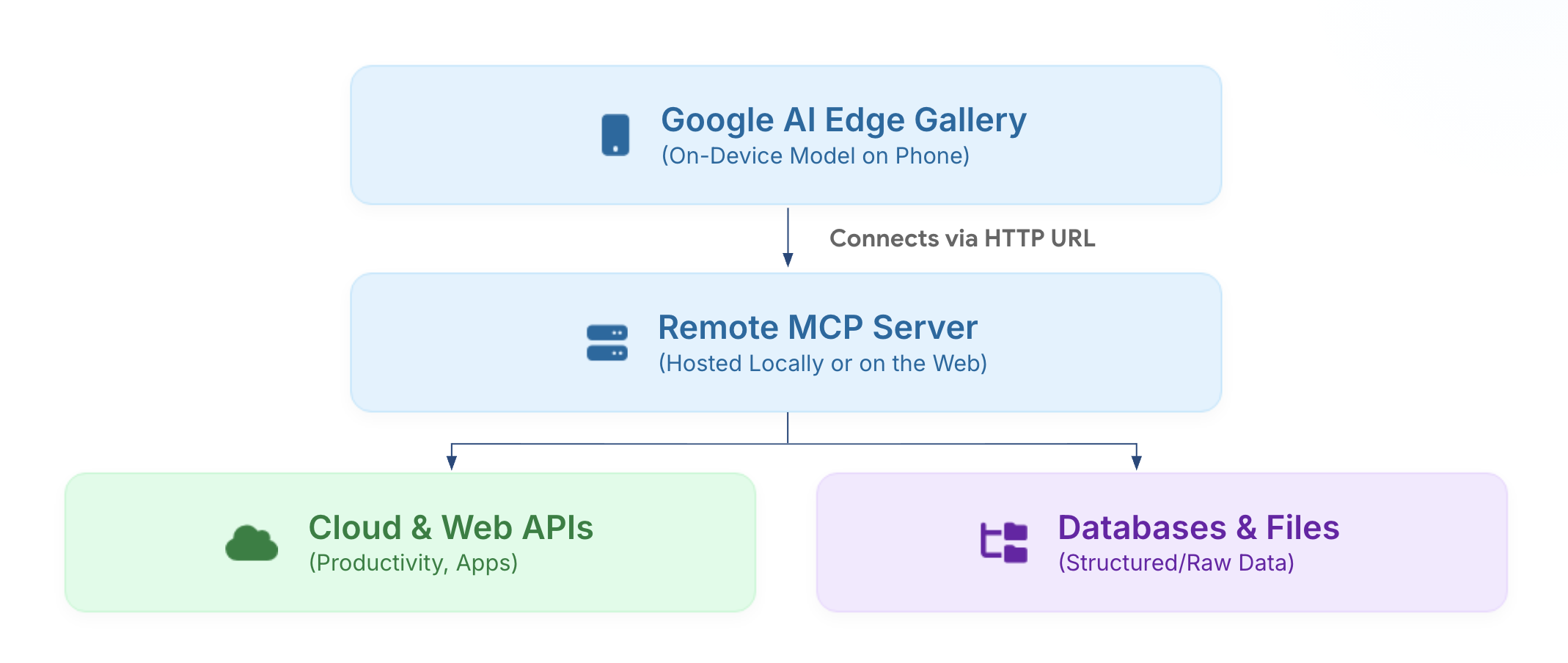
Google's answer in this update is MCP. The announcement says AI Edge Gallery supports the open source Model Context Protocol through Streamable HTTP in the Android app. When a user registers a valid MCP URL, the app dynamically loads tool definitions and resource schemas into the on-device model's system prompt. When the user asks a question, Gemma 4 decides on the phone which tool is needed and generates the tool call. The actual request runs on the MCP server. That server could be a home computer, a secured cloud endpoint, or a managed API surface.
This design acknowledges both the strength and the weakness of local AI. It keeps the model's decision process on the device, but separates the route to the outside world into standardized tool servers. For developers, that is the interesting compromise. Fully offline AI is often too narrow. Fully cloud-hosted AI brings cost, data movement, and network dependency. AI Edge Gallery's MCP integration shows the middle pattern on a mobile device: local reasoning, remote tool execution.
What Changes When MCP Moves From Desktop to Mobile
It is easy to misread this if we only think about desktop MCP. In tools such as Claude Code, Codex, or Gemini CLI, MCP servers often run on the same machine over stdio. They connect to local files, GitHub, databases, browsers, and terminals. Because the AI client and the MCP server live inside the same development environment, installation and permissions are relatively straightforward. A phone app is different. A mobile app cannot just keep a stdio MCP server running beside it. It needs a network-accessible endpoint.
The official GitHub documentation describes this difference in very practical terms. Most open source MCP servers assume stdio transport, but that does not map directly onto a mobile app. The example wraps mcp-server-fetch with supergateway, exposes it through Streamable HTTP, and, if needed, uses Cloudflare Quick Tunnels to create a reachable HTTPS URL before registering the app's /mcp endpoint.
# Install the fetch MCP server, then expose it through Streamable HTTP.
python3 -m venv venv
source venv/bin/activate
pip install mcp-server-fetch
npx -y supergateway --stdio 'mcp-server-fetch' --outputTransport streamableHttp
That example looks simple, but it captures the reality of mobile agents. For a model on a phone to make a tool call, the tool server has to become a network surface the phone can reach. Internal data systems, personal computers, home servers, cloud APIs, and tools such as Google Maps MCP can all become endpoints with very different security profiles. Authentication changes too. The GitHub docs note that cloud MCP servers are exposed as public endpoints and therefore require explicit authorization. In the Maps Grounding Lite example, the app passes an X-Goog-Api-Key header directly. The docs also say the full OAuth flow is still in progress.
For builders, the question does not end at "can it connect?" It quickly becomes: which MCP tools should be enabled, how short should tool descriptions be, when should the user approve each call, which tools are safe to always allow, where are API keys stored, and how can an MCP authorization state be revoked if the phone is lost? This is also why Google positions AI Edge Gallery as a gallery and playground rather than as a finished assistant product. It is less a polished answer than a place to test the problems mobile agent apps will run into.
Smaller Context Windows Change Tool Design
Google's announcement recommends keeping MCP tool descriptions short and returning bite-sized snippets because on-device models have smaller context windows than large server models. The GitHub docs are more concrete. They say AI Edge Gallery models operate in tighter 4k-10k token contexts, while many official MCP servers assume desktop applications with 32k to 200k+ tokens.
That difference is not cosmetic. With a strong desktop model, developers can often include generous tool schemas and return long documents or JSON payloads without immediately breaking the experience. A mobile local model has less room. If a tool schema is long, the system prompt can consume most of the context. If returned data is long, the user's actual request and previous conversation are pushed out. A standard protocol does not mean every tool surface fits every model in the same way.
That means mobile MCP apps are likely to need different design rules than desktop MCP apps. Enable fewer tools. Write shorter descriptions. Return summarized results. Activate only the tools needed for the task the user is doing right now. The GitHub docs make the same recommendation: enable only the tools required for a specific task. Model compatibility is another constraint. The docs say Gemma-4-E4B is the most reliable option for tool calling, while smaller models can struggle with schema parsing.
This is the most practical part of the update. On-device AI is not summarized by the sentence "privacy is better." Smaller context windows, mobile GPU numerical behavior, battery, heat, network endpoints, credential storage, and permission UX all become product design constraints. Shrinking a server-side LLM into a phone does not automatically recreate the same agent experience. Mobile agents need mobile-shaped tool surfaces.
| Area | Desktop MCP | Mobile On-Device MCP |
|---|---|---|
| Transport | Usually stdio or a local process | Requires a Streamable HTTP endpoint |
| Context | Many tools assume 32k-200k+ tokens | Tool schemas must fit inside 4k-10k tokens |
| Approval | Often tied to developer environment permissions and CLI settings | Per-call prompts and always-allow controls become core UX |
| Strengths | Stronger models, broader tools, and larger context | Lower latency, on-device reasoning, and proximity to personal routines |
Notifications Give Agents a Sense of Time
The Schedule Notification skill is just as important as MCP in this release. Google says AI interactions in the app had previously been reactive: the user opened the app and entered a prompt. Notification scheduling changes that flow. If a user says, "Remind me to log my mood every night at 10," the app can schedule a local notification. When the user taps it, AI Edge Gallery opens with the required tool context, and the Gemma 4 session can continue.
That can sound like a simple reminder feature. From an agent perspective, it is the beginning of a time model. A chatbot only replies when called. An agent needs to show up again at a specific time, remember the context, and continue a routine within the scope the user has approved. Google's examples include mood tracking, learning a new concept each day, and morning calendar briefings. Each one is more active than a conversation that only starts when the user manually reopens the app.
There is still an important boundary. Local notifications are not the same as autonomous background execution. They invite the user back into a session. When the notification is tapped, the app opens and the model is ready; this does not mean the app can silently complete every task in the background without confirmation. That distinction matters. Mobile operating systems place strong limits on background execution for battery and privacy reasons. For an agent to become an always-running assistant, it must pass through OS permissions, notification policy, and user trust. AI Edge Gallery looks like an intermediate step: it restores user-approved routines through notifications rather than claiming full autonomy.
Persistent sessions fit the same pattern. Google says persistent chat history lets the app resume sessions while keeping text, image, and audio input state. It also points to LiteRT-LM fast prefill, saying modern phone GPUs can exceed 3,000 tokens per second in prefill speed and therefore restore long session context almost immediately. That number matters for local agent UX. If a user taps a notification and then waits while the model reconstructs the conversation, the routine breaks down quickly.
The Community Sees Both Promise and Risk
The community reaction has been practical. A Reddit LocalLLaMA post summarizing the AI Edge Gallery v1.0.13 and v1.0.14 updates mentioned MCP support, Pixel TPU support, speculative decoding, calendar skills, scheduled notifications, and persistent chat history together. The most interesting part for many people was the idea that a local model on a phone could call external tools. At the same time, some comments focused on what data is stored in the local DataStore and how OAuth tokens or MCP server authorization data might be handled.
That balance is appropriate. On-device AI is not automatically safe. Even if model inference happens on the device, tool calls can still leave the device and hit external servers. Registering an MCP URL and an API key inside the app is itself a sensitive configuration. Local chat history reduces cloud transmission, but it creates different questions around device loss, backups, and local storage policy. Permission prompts and "always allow" toggles are convenience and control compressed into one product decision.
The lesson for developers is clear. A mobile agent is not finished by picking a model. It needs four additional pieces. First, a short and stable tool schema that small models can actually use. Second, a permission UX that users can understand. Third, a runtime that can restore sessions quickly. Fourth, product design that handles notifications and routines within mobile OS rules. Google AI Edge Gallery puts all four into a single experimental app.
The Next Question for Local Agents
The AI Edge Gallery update sits inside Google's broader I/O 2026 developer story. At the same event, Google announced Gemini 3.5, Antigravity, Managed Agents, Android AI Studio, LiteRT-LM, Chrome WebMCP, and DevTools for agents. The surfaces differ, but the direction is similar: AI is moving from models that answer alone toward models that act through tools, runtimes, and platform permissions.
AI Edge Gallery has a small but important place in that shift. Cloud agents are powerful, but they assume servers, accounts, cost, and network access. Desktop agents are strong in developer workflows, but they are farther away from daily routines, mobile sensors, and personal notifications. Mobile on-device agents sit on the user's closest computer. Their context and performance are smaller, their permissions are sensitive, and their tool execution is more complicated.
So it would undersell this update to describe it only as Google adding MCP support on a phone. The larger questions are sharper. How much should a local AI app decide by itself, and when should it call an external server? At which moments should the user approve an action? How long should notifications and session history persist for convenience? When a small model cannot handle a long tool schema, how should the tool surface change?
Google AI Edge Gallery is still an experiment. The official docs explicitly label MCP integration experimental. That is exactly why it is worth watching. A finished consumer assistant tends to hide the risky details. A gallery lets developers attach endpoints, enable and disable tools, shrink prompts, inspect permissions, and observe the real bottlenecks in mobile agents. The next phase of on-device AI will not end with putting a model on the phone. It will be about defining the runtime boundary where that model can safely call tools, remember time, and resume work the moment the user returns.