GitHub Copilot app preview turns coding agents into work sessions
GitHub Copilot app previews a GitHub-native workspace for agent sessions, validation, pull requests, automation, and team-level measurement.
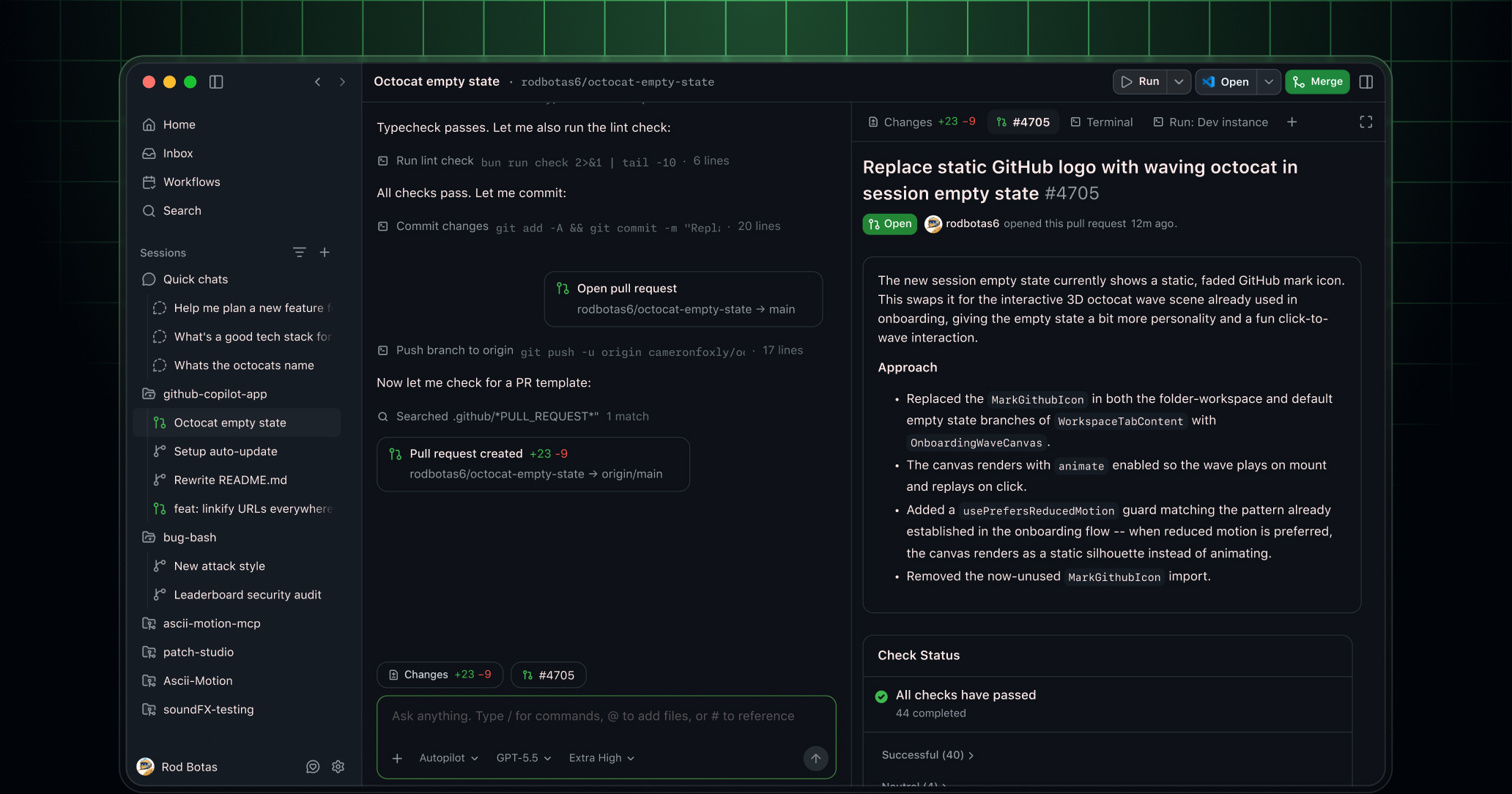
- What happened: GitHub opened a technical preview of the
GitHub Copilot app.- The app starts agent development sessions from issues, pull requests, prompts, or previous sessions, then carries the work through isolated workspaces, validation, and PR creation.
- Why it matters: Copilot is moving from autocomplete and chat toward a workspace for managing multiple coding-agent sessions.
- Same-week signal: REST APIs, JetBrains unified sessions, auto model selection, and team metrics landed around the same time.
- GitHub is aligning execution surfaces, automation entry points, model routing, and organizational measurement around agentic coding.
- Watch: This is still a technical preview, so access rules, policy controls, and perceived usage costs are not yet a stable product experience.
GitHub opened a technical preview of the GitHub Copilot app on May 14, 2026. The name makes it sound like another Copilot client. The more important move is structural. GitHub is trying to gather the lifecycle of a coding agent into GitHub's own work objects: start from an issue or pull request, work in an isolated space, review the plan and diff, validate the change, open a pull request, and keep responding to review comments or failed checks.
GitHub describes the Copilot app as a GitHub-native desktop experience. Sessions can start from issues, pull requests, prompts, or previous sessions. Each session has its own branch, files, conversation, and task state. Users can pause and resume work, keep tasks separated across one or more repositories, inspect the result, run commands, open previews, test in a browser, and then turn the work into a pull request.
The key word is not "chat." It is "session." AI coding tools have spent years being described through IDE autocomplete, chat panels, and agent modes. Real development work is organized differently. A team needs to know which issue started the work, which branch changed, which files moved, which tests ran, which reviewer objected, which check failed, and how the follow-up was handled. The GitHub Copilot app packages that lifecycle as a desktop workflow.
After autocomplete comes the workbench
Copilot's original breakthrough was inline code completion. It suggested the next line, answered questions in chat, and helped with small edits inside the IDE. In that model, the developer remains the center of gravity. The human opens files, selects context, accepts or rejects suggestions, and decides when the work is done.
Agentic development changes the unit of interaction. A developer can ask for an issue to be fixed, a migration to be applied across packages, or review comments to be addressed. The agent then reads the repository, makes a plan, edits files, runs tests, reacts to failures, and produces a diff. That is not a two-second completion. It is a task session that can run for minutes or longer. A single chat box is a weak interface for that kind of work.
GitHub's emphasis on isolation fits this shift. The agent sessions documentation says each session runs in its own isolated workspace and that users can run multiple sessions in parallel. When creating a session, the user can choose a local folder, a GitHub repository, or a clone URL, decide whether to use a new working tree or a local repository, and select the session mode, model, and reasoning effort. This is closer to assigning work than asking a question.
GitHub is not the first company to see this problem. Cursor is pushing cloud agents and team workflows. Claude Code and Codex compete around long-running work, command execution, and review loops. GitHub's advantage is the default system of record for many software teams. Repositories, issues, pull requests, Actions, checks, code review, and merge policy already live there. The Copilot app pulls coding agents outside the IDE, but it routes the final state back into GitHub collaboration objects.
The surrounding releases matter more
If you look only at the Copilot app, this is a client announcement. If you line up GitHub's May 13 and May 14 changelog entries, the picture gets larger. On May 13, GitHub introduced the Copilot cloud agent tasks REST API in public preview. Business and Enterprise customers can start cloud agent tasks programmatically and track their progress. GitHub's examples include fanning out refactors or migrations across repositories, wiring tasks into internal developer portals, and preparing weekly release notes.
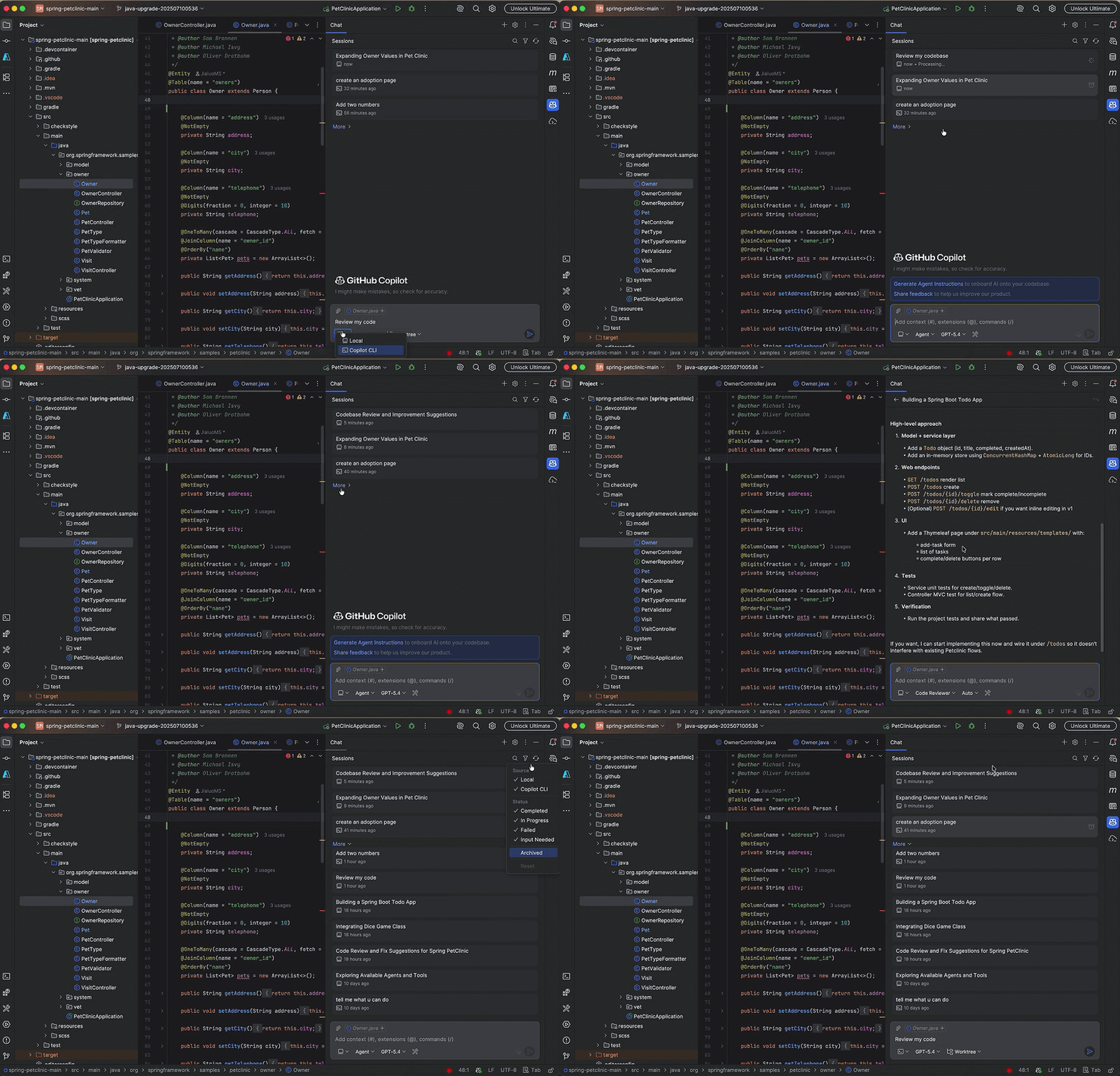
The same day, GitHub added a Copilot CLI agent and unified sessions view for JetBrains IDEs. JetBrains users can delegate work to a locally running Copilot CLI agent from the IDE, choose between worktree isolation and workspace isolation, and watch running or queued sessions with live status, tool calls, and summaries of changes. The product concept is no longer just "assistant inside the editor." It is "agent sessions that can be monitored."
On May 14, GitHub also added auto model selection for the cloud agent. If a user chooses Auto, Copilot selects a model based on system state and model performance. GitHub says Auto receives a 10% discount relative to the normal model multiplier and is not affected by weekly rate limits. That same day, the team-level Copilot usage metrics API made it possible to combine user-teams and per-user usage reports to measure active users, completions, chats, Copilot CLI activity, code review, and cloud agent activity by team.
Together, these releases show GitHub's direction. The Copilot app is the human-facing workbench. The REST API is the automation entry point. JetBrains unified sessions bring session monitoring into the IDE. Auto model selection shifts model choice and cost control toward the platform. Team metrics give organizations a measurement surface. Each item is a small changelog entry; together they form an operating layer for coding agents.
| Announcement | Surface | Practical meaning |
|---|---|---|
| Copilot app | Desktop workbench | Connects issues, PRs, sessions, validation, and Agent Merge in one flow. |
| Agent tasks REST API | Automation entry point | Creates cloud agent tasks from internal portals, scripts, and release workflows. |
| JetBrains sessions | IDE session control | Tracks local CLI agent work with IDE context and live status. |
| Team metrics API | Organizational measurement | Aggregates adoption, models, features, and cloud agent activity by team. |
GitHub's strongest leverage is review and checks
The hard part of coding agents often appears after the code has changed. An agent may produce a diff, but that is only one stage of a team workflow. The diff still has to match the team's review standards. Failing CI needs to be interpreted. Review comments need to be prioritized and handled without losing the original intent. Merge requirements need to be satisfied. GitHub already owns much of this second half.
One sentence in the Copilot app announcement stands out: the work is not finished when code changes. GitHub frames the endpoint as getting through review, test, and readiness to merge. The app therefore includes plan and diff review, an integrated terminal and browser for validation, PR creation, and Agent Merge for handling review comments and failing checks.
This is GitHub's strongest argument. Cursor, Claude Code, and Codex can all compete on coding loops. But for many teams, the final collaboration object is still a GitHub pull request. Reviewers comment in GitHub. Actions fail in GitHub. Branch protections and merge requirements live in GitHub. If GitHub binds agent sessions tightly to the PR lifecycle, Copilot can position itself as a tool for moving changes into a mergeable state, not merely a tool for writing code.
That advantage is also a boundary. It is most compelling for organizations already centered on GitHub. Teams using GitLab, Bitbucket, Gerrit, internal code hosting, external CI, or Jira and Linear as the primary work surface may experience "GitHub-native" as a form of lock-in. The important question is how naturally Copilot app sessions will connect to work context outside GitHub and how much of the agent loop remains portable.
Skills and MCP move into app settings
GitHub's customization documentation shows that the Copilot app is not just a desktop wrapper. It is also an agent configuration surface. Users can set global instructions, add agent skills, and configure MCP servers. GitHub says skills and MCP servers configured in a repository or in Copilot CLI are automatically available in the Copilot app.
This connects to the broader push around Copilot CLI plugin standardization. Enterprise-managed CLI plugins are about which skills, hooks, and MCP configurations an organization distributes. The Copilot app becomes one of the places where that configuration is actually used. In other words, GitHub is trying to align what an agent knows and which tools it can use across CLI, IDE, desktop app, and cloud agent surfaces.
For development teams, this is a practical issue. If an agent does not know the internal framework, it writes the wrong code. If it cannot read internal API documentation, it invents public APIs. If MCP servers differ by developer, one session may be able to read internal tickets while another cannot. Bringing skills and MCP into app settings is not just a convenience feature. It is about reproducibility, permissions, and the operational shape of AI-assisted development.
The tradeoff is complexity. Teams need to understand which instruction comes from the repository, which setting comes from a CLI plugin, which rule is global to the app, and which MCP server is allowed by organizational policy. As coding agents become more capable, prompt and tool configuration starts to resemble development environment configuration. It deserves versioning, review, and clear ownership in the same way as CI and editor configuration.
Scheduled workflows are the entry point for repeat workers
The Copilot app's scheduled workflows documentation points in another direction. Users can save recurring agent tasks and run them on a schedule or manually. GitHub's examples include daily issue triage and checking the review status of open pull requests each morning. When creating a workflow, the user writes a prompt, adds skills with /, and chooses interval, session mode, project, model, and reasoning effort.
This can look similar to GitHub Actions. The execution model is different. Actions are strong for deterministic scripts, CI, CD, and infrastructure workflows. Scheduled workflows are closer to natural-language agent sessions. A daily workflow that classifies new issues, asks for missing information, proposes labels, and suggests assignees is often easier to express as an agent task than as a brittle YAML automation.
The risk grows at the same point. If a recurring agent can comment on issues, create branches, draft release notes, or prepare pull requests, teams need to design the permission model and failure modes. Which workflows can open PRs automatically? Which ones should leave drafts only? Which external systems can be touched before a human approves the plan? For technical preview users, the first question should not be "what can we automate?" It should be "where is automation allowed to act without causing hard-to-reverse damage?"
Cost and measurement are already in the product
Cost is now inseparable from the Copilot agent story. The auto model selection announcement mentions a 10% discount compared with normal model multipliers and an exemption from weekly rate limits. The team-level metrics API lets organizations inspect which features, models, IDEs, languages, and cloud agent activities are used by each team. Those are technical features, but they are also the foundation of AI usage operations.
When AI coding tools were individual productivity aids, the main question was whether developers felt faster. At organization scale, the questions change. Which teams are actually using agents? Can the company distinguish IDE completions from cloud agent work? Which models drive cost? Do agent tasks improve pull-request throughput or increase review burden? If usage-based billing expands, which team's budget is most exposed?
GitHub's team metrics API is still API-only, excludes teams with fewer than five members from the user-teams report, and can double-count activity when a user belongs to multiple teams. Those limitations matter. A metric is not automatically an ROI story. Active users and completions may show adoption, but they do not prove better code or shorter review cycles. Still, organizations need this baseline instrumentation if they are going to manage coding agents seriously.
Community reaction has been sensitive to this point. In a public r/GithubCopilot thread, the discussion around the Copilot app mixed interest in the new surface with concern about product fragmentation and usage costs. From a developer's point of view, the app, CLI, cloud agent, IDE agent, usage metrics, and model multipliers are all moving at once. As features expand, the practical question becomes simple: what happens to my limits and bill when I use this?
The competition moves from IDEs to operations
Model quality and editing experience still matter. A coding agent has to produce good diffs, understand test failures, and avoid breaking large refactors. But GitHub's bundle of announcements shows that part of the competition is moving to operations. The question is no longer only who can answer best once. It is who can isolate, track, validate, measure, and automate agent sessions across a team.
Cursor is building from the editor outward with cloud agents and team workflows. Claude Code has made the terminal and long-running agent loop its center of gravity. Codex is expanding through the OpenAI ecosystem and into desktop, mobile, and browser-based automation. GitHub's differentiator is the repository and collaboration ledger. It owns the place where many software changes are reviewed, tested, approved, and merged.
The next question is whether the Copilot app can become a developer's default workbench or whether it remains one more surface in the Copilot product family. For the preview to matter, session switching has to be fast, local and remote isolation must feel reliable, and work started in an IDE or CLI needs to flow naturally into the app. Agent Merge also has to earn reviewer trust. It cannot look like a tool that merely tries random fixes until checks pass. It has to preserve intent and follow the team's quality bar.
What teams should watch now
Most teams do not need to adopt the Copilot app immediately. It is a technical preview with access constraints. The direction is still worth watching.
First, coding-agent usage should be treated as session management, not only as individual tool choice. A team should be able to answer who assigned which work to which agent, which branch and PR came out of it, and which validation steps passed.
Second, skills and MCP configuration should not remain scattered personal settings. If agents need internal rules and tools, the organization needs ownership for instructions, skills, MCP servers, and hooks.
Third, recurring automation should start with low-risk work. Issue triage, release-note drafts, and stale PR checks are better starting points than automatic migrations or auto-merge.
Fourth, usage metrics should not be read only as consumption data. If Copilot CLI, code review, and cloud agent activity become visible by team, organizations can see enablement gaps as well as cost. One team may use agents productively, another may not use them at all, and another may burn expensive models without changing its workflow.
The GitHub Copilot app technical preview is not a finished answer. It does ask a clear question. As coding agents multiply, developers do not simply need more chat windows. They need a place to assign work, watch intermediate results, validate changes, and connect the output to review and pull requests. GitHub is arguing that this workbench should live on top of GitHub itself.