Copilot App preview shows the coding agent bottleneck is the harness
GitHub Copilot App technical preview and the VS Code harness write-up show AI coding competition moving from model choice to execution loops and PR lifecycle control.
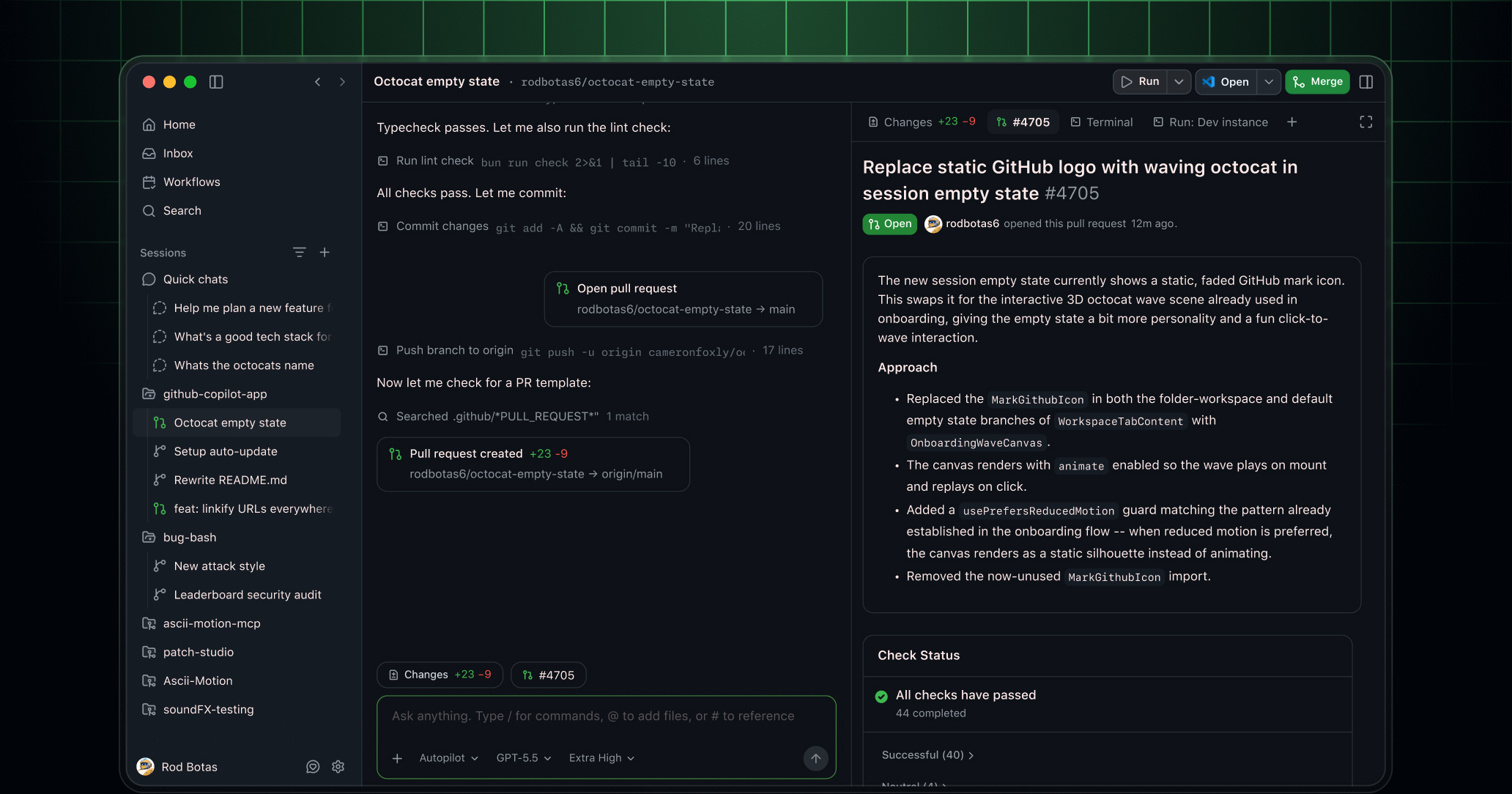
- What happened: GitHub released the Copilot App technical preview, pulling issues, sessions, validation, pull requests, and merges into one desktop app.
- Pro and Pro+ users go through a waitlist, while Business and Enterprise use depends on organization preview settings and
Copilot CLIpolicy.
- Pro and Pro+ users go through a waitlist, while Business and Enterprise use depends on organization preview settings and
- Core shift: Agent Merge points at a workflow where an agent can keep working after code generation by handling review comments and failed checks.
- Why it matters: Read alongside the VS Code team's harness article, the competitive layer is moving toward context, tool loops, evaluation, and PR lifecycle.
- The hard question is no longer only which model to pick, but which files the model sees, which tools it can use, and when it should stop.
- Watch: Community reaction is less about raw capability and more about Copilot surface-area confusion, pricing fatigue, and trust in automated merge paths.
GitHub released the GitHub Copilot App technical preview on May 14, 2026. At first glance, it looks like another AI coding app. A closer read suggests GitHub is not primarily aiming at autocomplete or a chat panel. It is aiming at the whole development lifecycle: choosing an issue, opening an isolated session, creating a branch, editing code, validating with a terminal and browser, opening a pull request, handling review comments and failed checks, and merging when the configured conditions are met.
The timing matters because the VS Code team published a closely related article the next day. In The Coding Harness Behind GitHub Copilot in VS Code, the team described the layer that turns a language model into a usable coding agent as the "coding harness." The model generates text. The harness decides how files are read, how diffs are applied, how terminal commands run, how tool failures are fed back into the model, and how the loop continues.
That makes the real story bigger than "GitHub shipped a desktop app." The more important reading is that the bottleneck for coding agents is moving from the model alone to the harness and the pull request lifecycle around it. It still matters whether GPT, Claude, Gemini, or another model is better at a given coding task. But production software teams quickly run into more operational questions. Which branch is the agent allowed to touch? What context can it see? Which tools can it call? How far should it go when tests fail? Who incorporates reviewer feedback? Who merges, and under what conditions?
What Copilot App actually bundles
GitHub describes Copilot App as a GitHub-native desktop experience. Sessions can start from an issue, a pull request, a prompt, or a previous session. Issue details, repository state, review comments, and check results are attached to the work. Users can run multiple tasks at the same time, and each session has its own branch, files, conversation, and task state.
That may sound similar to other coding agent apps until the end of the workflow. GitHub's framing is that work is not done when code changes; it is done when the change is reviewed, tested, and ready to merge. Copilot App therefore includes planning, diff review, integrated terminal and browser validation, pull request creation, links to existing review and check requirements, and Agent Merge.
Agent Merge is the most direct signal in the announcement. GitHub says the feature lets the agent address review comments, fix failed checks, and continue toward merge when the user's conditions are satisfied. That moves the agent beyond proposing a patch. It keeps the agent attached to the remaining work that usually happens after a pull request is opened.
GitHub's advantage here is not necessarily the model itself. GitHub already owns many of the objects that determine whether code enters a real codebase: issues, pull requests, branch protection rules, status checks, code review, Actions, mobile notifications, and organization policies. Copilot App rearranges those assets into an agent workspace. While tools such as Cursor and Claude Code have made strong impressions in the local development experience, GitHub can lean on the fact that many teams already treat GitHub as the place where code actually lands.
The harness behind the model
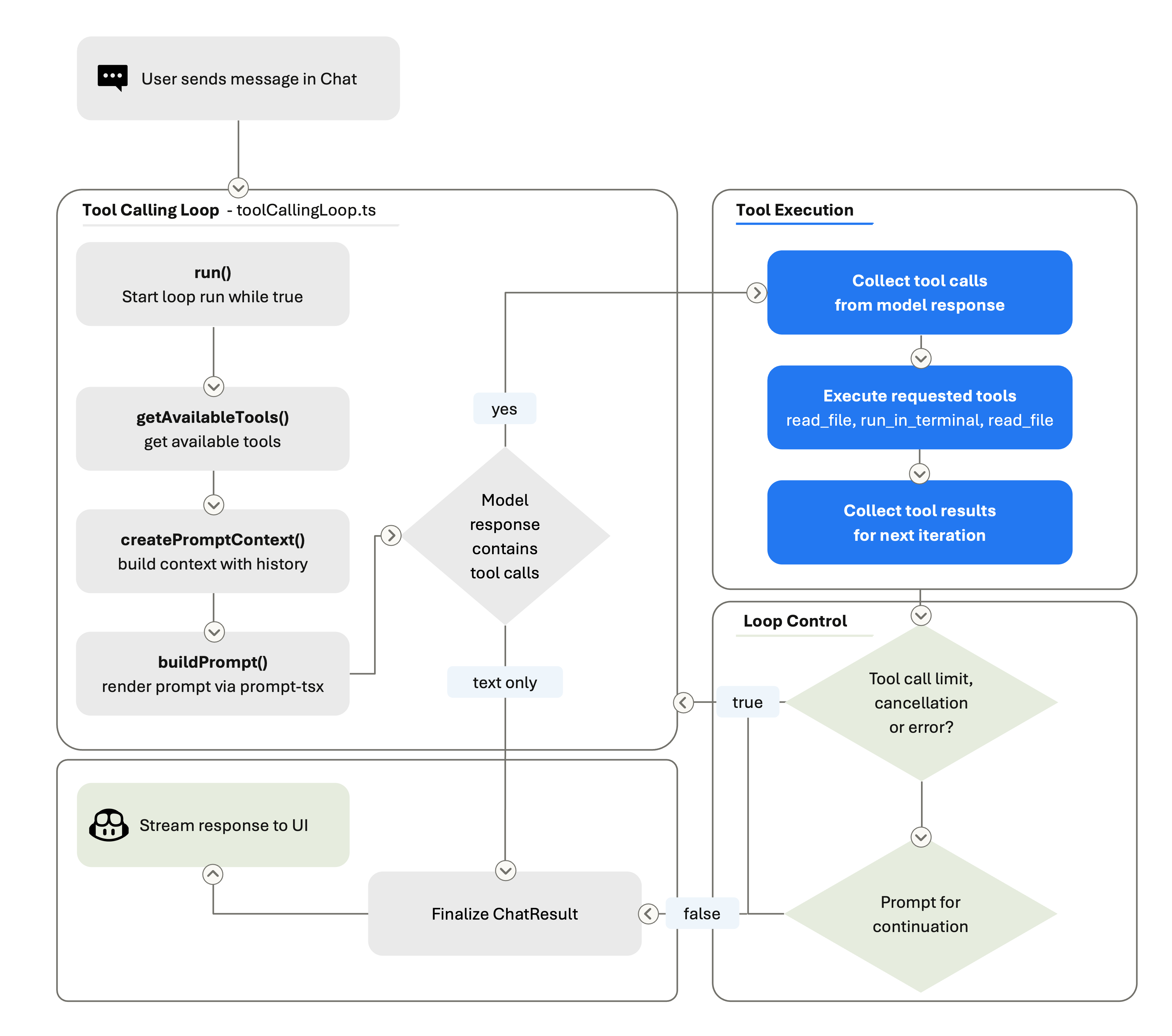
The VS Code blog gives useful technical context for reading the Copilot App announcement. It breaks the coding harness into three responsibilities: context assembly, tool exposure, and tool execution. Context assembly decides how the system prompt, user request, workspace structure, open files, conversation history, tool results, user instructions, and session memory are presented to the model.
Tool exposure defines what the model can call. File reads, code edits, terminal commands, codebase search, MCP servers, and extension-provided capabilities all live here. Tool execution is the layer that validates and performs the model's JSON-shaped request in the real environment, then returns the result. A model can emit text that says a command should run. The harness starts the process, captures stdout and stderr, interprets failure, and feeds the result back into the next iteration.
This structure directly changes the quality developers feel. The same model can behave very differently depending on which files it sees first, how tool descriptions are written, how many times it may retry a failed command, and how diffs are applied. The VS Code team even called out model-specific tool strategies: Claude models use a replace_string_in_file style edit flow, GPT models use apply_patch, and Gemini needs extra steering to call tools. That is far from a simple "swap in the best model" story.
Loop control is especially important. VS Code's agent loop can run several rounds inside one user turn. The model searches files, reads code, edits, runs tests, reads failures, and edits again. The harness manages tool-call limits, cancellation, stop hooks, and conversation summarization. When the context grows too large, summarizing earlier rounds so the agent can keep working is also part of the harness.
Copilot App looks like an attempt to extend this harness beyond the editor into a longer unit of work. The VS Code harness manages a tool-calling loop inside an editor. Copilot App manages sessions, branches, pull requests, validation, and merge progression inside a desktop app tied to GitHub's lifecycle. They may look like separate product surfaces, but technically they are productizing the same idea.
Defaults are becoming harder than model selection
GitHub Copilot's April 2026 VS Code release points in the same direction. GitHub said Copilot can use semantic search across every workspace, use githubTextSearch for grep-style search across repositories and organizations, and use /chronicle to search previous chat history. The release also added prompt caching, deferred tool loading, agentic tools, inline diffs, browser tab sharing, open terminal read and write, BYOK, and remote CLI session control.
Read as a model release note, that list looks miscellaneous. Read as harness work, it is coherent. Browser tab sharing gives a coding agent more surface area for frontend validation. Open terminal read and write lets it reuse a running REPL or dev server. Deferred tool loading avoids pushing every tool description into the prompt before the model needs it. BYOK keeps a similar harness experience while allowing the model provider to change.
The VS Code team also argued that adding a new model is not just adding one option to a picker. Providers differ in tool calling, structured output, reasoning controls, prompt caching, context limits, and error behavior. Some models are better at long planning. Some are better at short edits. Some improve with more reasoning effort; others spend more tokens without improving the result.
That is why the team built VSC-Bench. Public benchmarks such as SWE-bench and Terminal-Bench are useful, but the VS Code team argues that real editor work is broader. An editor agent must scaffold projects, refactor across files, use a terminal and browser, call MCP and extension tools, and follow multi-turn instructions. VSC-Bench runs those VS Code-specific tasks in containerized workspaces and measures not only resolution rate, but also agent effort, token efficiency, and latency.
The same lesson applies to software teams. Adopting agents does not end with choosing the strongest model. Repository structure, test cost, branch policy, secret access, external API calls, code review standards, and incident response procedures all become part of the harness. Copilot App attaching itself to GitHub's lifecycle is also GitHub offering default answers to those operational questions.
The uncomfortable question inside Agent Merge
Agent Merge is attractive, but it raises a harder question. If an agent can address review comments, fix failed checks, and merge when conditions are met, where exactly does human responsibility sit? Who defines the conditions? Do those conditions represent the organization's code quality bar? What catches a change that passes CI but has a weak design, missing security review, or thin test coverage?
GitHub has existing guardrails it can reuse. Branch protection, required reviews, required status checks, CODEOWNERS, secret scanning, and CodeQL already exist inside GitHub. But as an agent occupies more of the pull request lifecycle, the quality of those settings becomes part of the quality of the agent. In a repository with weak protection rules, Agent Merge can shift from convenience to risk amplification.
In mature repositories, the value can be real. Agents may be particularly useful for the work after the first patch: applying small review comments, fixing formatting checks, running missing tests, and cleaning up lint failures. The agent may be more reliable in this closing stage than in the first act of designing a change from scratch. Humans keep direction and judgment. The agent handles the repetitive work that keeps pull requests open longer than necessary.
That may explain why GitHub built a dedicated app. A chat panel inside an IDE is close to code writing, but far from the final state of review and merge. The web UI is close to issues and pull requests, but weaker for local files, terminals, and browser validation. A desktop app is a surface between those worlds. If it works, GitHub can keep both the starting point and the endpoint of agent work inside its own platform.
Why community reaction started with confusion
Immediate discussion on Reddit's r/GitHubCopilot leaned more toward confusion than pure excitement. Users asked why this is separate from the new Agents window in VS Code, how it differs from Copilot, Codex, Cursor, Claude Code, and OpenCode, and what the app provides that VS Code agents do not. A comment that appeared to come from someone at GitHub said the VS Code, web, CLI, and app teams are working toward a single integrated platform, but the user-facing surface area has undeniably grown.
Pricing fatigue is also part of the reaction. Recent Copilot usage-based billing and premium request multiplier discussions have left many users wary, so a new app is not received as just a feature announcement. Once a model runs longer, performs more agent work, handles review feedback, and moves toward merge automation, people naturally ask how that work is counted and billed. For long-running coding agents, pricing becomes part of product trust.
This is a product challenge for GitHub. Copilot already spans autocomplete, IDE chat, GitHub.com chat, CLI, cloud agents, mobile, Spark, Spaces, code review, and pull request summaries. It is too early to know whether Copilot App becomes the organizing center for those surfaces or simply another one.
The strategic direction is clearer. GitHub is trying to make agent work conform to GitHub's object model. Issues are work units. Branches are isolation units. Pull requests are review units. Checks are validation units. Merges are completion units. Copilot App turns those objects into the agent's native workflow language.
What development teams should watch now
For development teams, the narrow question is whether to try the technical preview. The broader question is what their coding agent harness already is. Which repositories can an agent access? Which commands can it run? How does it report failure? Which tests are trusted? Where does a reviewer intervene? What are the automatic merge conditions?
Those questions remain even if a team never uses Copilot App. Claude Code, Codex, Cursor, OpenCode, and internal agents all run into the same boundary. Models keep improving, and model rankings can flip depending on workflow. Harnesses, policies, evaluations, logs, permissions, and pull request rules are local to each organization and harder to copy.
GitHub's strong position is that it is already the system of record for many teams' development work. If an agent starts at an issue and ends at a pull request, GitHub is a natural control plane. Its weak point is surface complexity and pricing trust. When developers ask which Copilot they are supposed to use, harness advantages can get buried under brand confusion.
The Copilot App technical preview is therefore less an answer than a signpost. The next competition in coding agents will not only be about who has the better chat interface. It will be about who builds a safer, more observable, more interruptible execution loop. Once that loop reaches code review and merge, AI coding tools stop being simple development assistants and start looking like part of the development operations layer.