GitHub Copilot app turns coding agents into PR operators
The GitHub Copilot app technical preview moves coding agents from IDE assistance into issues, verification, pull requests, and merge follow-through.
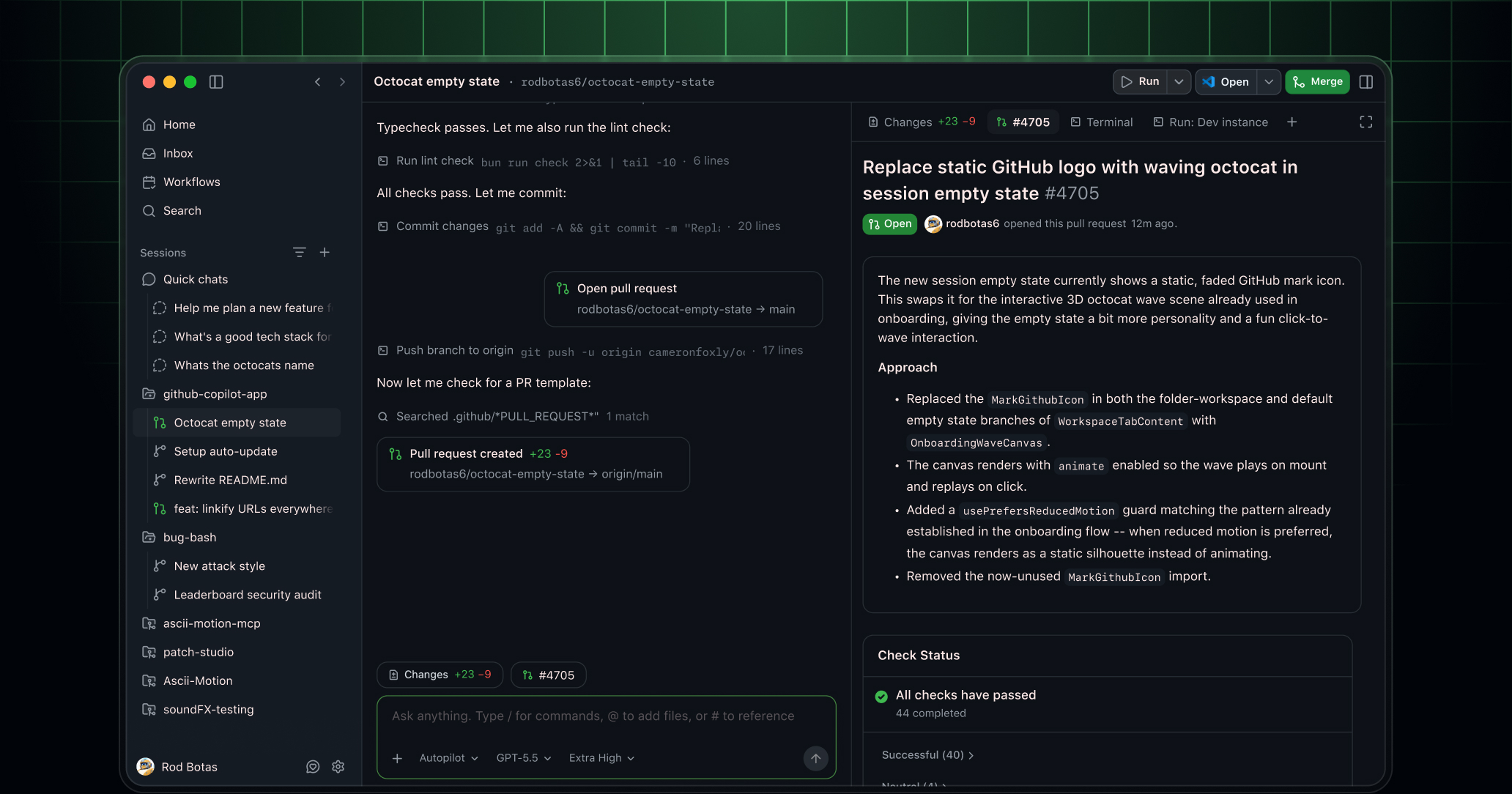
- What happened: GitHub released the
Copilot apptechnical preview, packaging agentic development into a GitHub-native desktop app.- A session can start from an issue, pull request, prompt, or previous session, and keeps its own branch, files, conversation, and task state.
- Why it matters: The competitive center is moving from "chat inside the IDE" to who owns the pull request lifecycle and merge follow-through.
- Watch: In the same week, GitHub tightened individual plan limits because agentic workflows are increasing compute demand.
- A richer agent UX also creates harder questions about long-running sessions, parallel work, token cost, and organization policy.
GitHub's May 14, 2026 technical preview of the GitHub Copilot app deserves more than a quick reading as "Copilot now has a desktop app." The more important shift is that GitHub is trying to redefine both the starting point and the endpoint of agentic coding. Until now, Copilot has mostly been understood through surfaces such as IDE chat, autocomplete, agent mode, the CLI, and code review. This app pulls a different workflow into one screen: start from an issue, create an isolated task session, separate branches and files and conversation, review diffs, validate through a terminal and browser, open a pull request, and keep working through review comments and failed checks.
That matters because coding agent competition has entered a stage where model capability alone no longer explains the product. A model writing good code is not enough. In real teams, work begins as an issue, moves through an isolated branch, passes tests and review, waits on CI status, and has to satisfy merge rules before it is actually done. GitHub knows this bottleneck better than almost anyone. The Copilot app is therefore less a "code generation app" than a workbench for pushing agent-made changes through the team's development lifecycle.
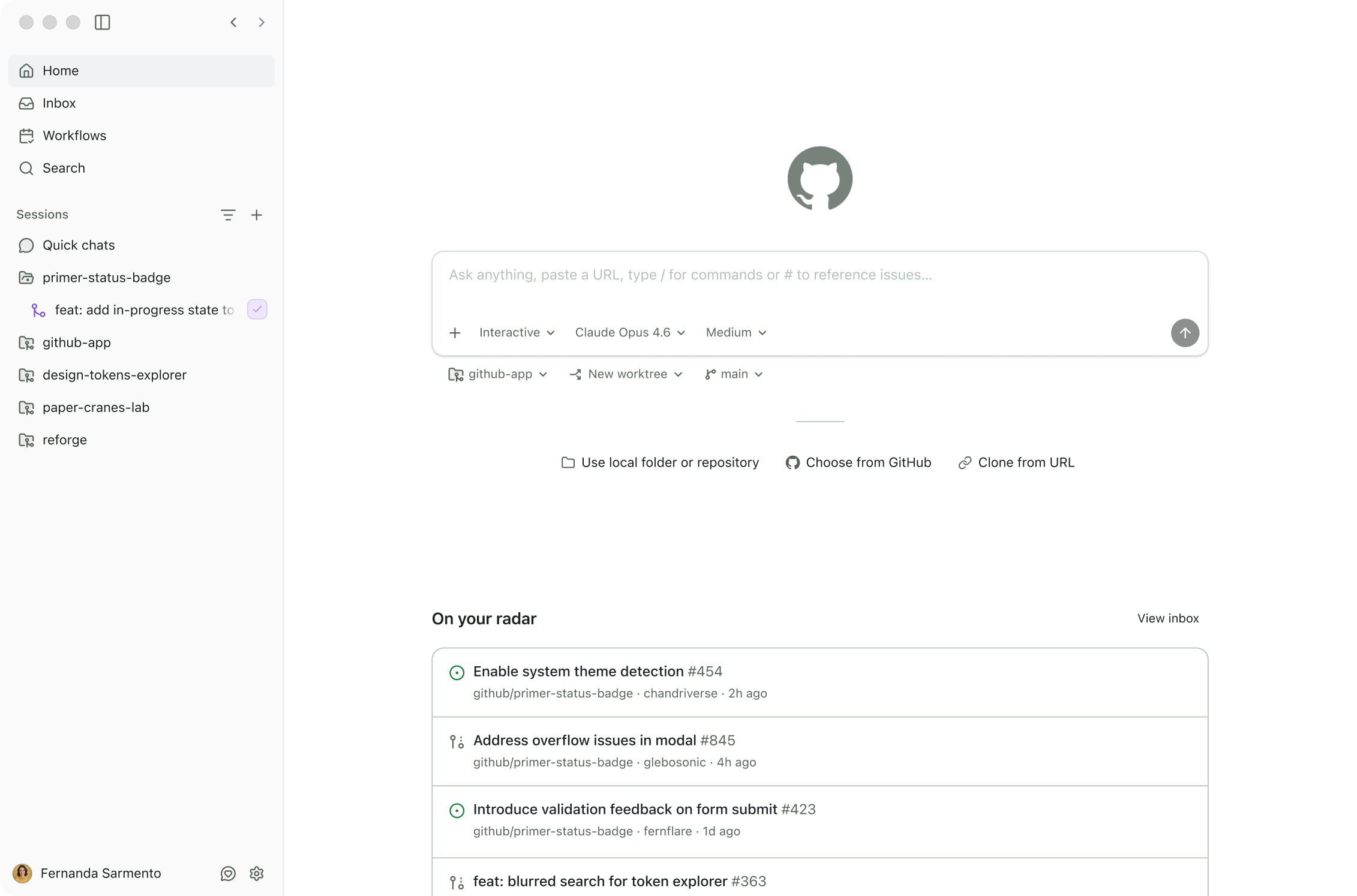
The first sentence of GitHub's official changelog is direct. GitHub describes the Copilot app as a GitHub-native desktop experience for agentic development, built to start from the work in front of you, isolate that work, steer it while it is in progress, and land it through pull request review. The notable words are not "chat" or "autocomplete." They are "isolate," "steer," and "land." The center of gravity is shifting from the moment an agent writes code to the harder work of containing, inspecting, and shipping that change.
Why leave the IDE?
The IDE is still the most natural surface for many coding agents. Developers already spend most of their day reading code, opening terminals, running tests, and checking diffs there. GitHub also announced a large set of Copilot in Visual Studio Code updates on May 6, 2026. Semantic indexing works across workspaces, the agent can search GitHub repositories and organizations in a grep-like way, and /chronicle can recall past chats and work history. Inline diffs, browser tab sharing, open terminal read and write access, and Copilot CLI remote steering were also part of that release.
So the separate desktop app is the interesting part. The reason is that an IDE is strong as the place where code is being written now, but it is not necessarily the best cockpit for supervising several parallel tasks all the way to pull requests. Imagine one developer assigning three issues to agents: a dependency update, a failing test, and a small UI bug. Each job needs its own branch, logs, conversation, diff, and validation status. Managing all of that only through editor tabs and terminal sessions gets messy quickly.
The Copilot app frames this as a session problem. GitHub says each session has its own branch, files, conversation, and task state. The priority is to keep multiple moving jobs from blending together. That mirrors the broader local multi-agent tooling trend around git worktrees and isolated sessions. The difference is that GitHub connects this isolation directly to GitHub issues, pull requests, checks, reviews, and merge conditions.
The starting point is GitHub work
One of the Copilot app's headline ideas is "Start from GitHub context." A session does not only begin from an empty chat box. It can begin from an issue, a pull request, a prompt, or a previous session. The user can see issues and pull requests from connected repositories in an inbox, bring one into a session, and keep issue details, repository state, review comments, and checks attached to the work.
This sounds like a small UX detail, but it directly affects agent quality. Many coding agent failures do not happen only because a model wrote bad code. They happen because the agent missed the real context of the task. Reproduction steps in an issue, an edge case already called out in a review, a failed CI job, the current branch state, and the team's merge rules are all part of the job. If a human has to hunt for that context and paste it into a prompt, the agent begins with an incomplete brief.
GitHub already owns much of this context. Issues, pull requests, review comments, checks, branch protection, Actions logs, and repository metadata are native GitHub data. The Copilot app turns that asset into the starting surface for the agent experience. It competes with flows such as OpenAI Codex Web, Claude Code Web, and Google Jules, which connect to GitHub repositories and work in cloud environments. But GitHub's structural advantage is that it is also the platform owner for the objects where the work is tracked and reviewed.
The endpoint is the PR
The endpoint is the more important part. GitHub's announcement says the work is not finished when code changes. In other words, an agent changing files is not the finish line. The change still has to be reviewed, tested, and made ready to merge. That is why the Copilot app places planning, diff review, validation through an integrated terminal and browser, pull request creation, and Agent Merge in one flow.
Agent Merge is the feature to watch. GitHub describes it as follow-through for review comments, failing checks, and merge once user-defined conditions are satisfied. That sentence says a lot about where the coding agent market is going. The first race was about whether an agent could write code. The next race is about how much leftover work disappears after a human reviews the first pass. Addressing review comments, fixing lint failures, rerunning flaky tests, updating a changelog, and checking merge rules all consume a lot of developer attention.
There is also real tension here. Automating the merge path is not merely a convenience feature. It is a question of trust and authority. Teams have to decide when an agent can commit again, which review comments require human judgment, how the system distinguishes a failed formatting check from a failed security scan, and who keeps final approval. Putting this inside the app is not only a UX move. It also pulls more of the organization's policy surface into Copilot.
| Stage | Existing Copilot and IDE flow | GitHub Copilot app technical preview |
|---|---|---|
| Starting work | Files, selections, chat prompts, and IDE state | Issues, pull requests, prompts, and previous sessions |
| Isolation unit | Depends on the current workspace and terminal sessions | Independent sessions with branch, files, conversation, and task state |
| Validation | Developers move between IDE, terminal, browser, and CI | Integrated terminal and browser, checks, and diff review in one flow |
| Shipping | PR creation and review follow-up often become separate steps | PR creation, review comment handling, failed check fixes, and Agent Merge |
What the public repository shows
GitHub also opened github/app as the public home for the project. Its README describes the app as a desktop application for agent-driven development that brings parallel workstreams, GitHub integration, and pull request lifecycle management into one place. It also says the app is built on top of GitHub Copilot CLI and integrates natively with GitHub repositories, branches, and CI pipelines.
The repository has a clear role. It is not where the application source code lives. It is a public home for releases, issues, discussions, and docs. At the time the Korean article was researched, the repository showed 529 stars, 18 forks, 149 issues, six releases, and the latest release was v0.2.5 on May 15, 2026. For a technical preview, collecting feedback and bug reports in a public GitHub repository fits the product itself. This is an app for developers, and it is also a product that directly consumes GitHub issues and pull requests.
Access is still limited. According to the changelog, Copilot Pro and Pro+ subscribers can join early access as the technical preview expands. Copilot Business and Enterprise subscribers get access through rollout, but organization or enterprise admins must enable previews and Copilot CLI in policy. This is closer to a preview that GitHub is gradually inserting into organization workflows than a general-purpose desktop app anyone can simply download and use.
That condition is an important signal. As coding agents move from personal productivity tools to development infrastructure, admin policy enters the product. Organizations need to control who can use the preview, whether Copilot CLI is allowed, which repositories can be accessed, which branches and checks must pass, and what kinds of agent workflow can be automated. The Copilot app is a UX product, but underneath it sits a policy surface.
The cost story in the same week
The picture becomes sharper when this launch is read alongside GitHub's other announcements. GitHub announced changes to Copilot Individual plans on April 20, 2026 and updated that post on May 14. In that article, GitHub said agentic workflows had fundamentally changed Copilot's compute demand. It paused new individual plan signups, tightened usage limits, and adjusted model availability.
GitHub's explanation was blunt. Long-running, parallelized sessions use far more resources than the old plan structure anticipated, and some requests can cost more than the plan price. Weekly limits were described as a mechanism for controlling long-trajectory requests and the total token consumption of parallel workflows. Usage limit indicators also arrived in Visual Studio Code and Copilot CLI.
That is the shadow cast by the Copilot app announcement. GitHub wants agents to sit closer to the center of more development work. But that work is expensive. An agent that reads many files, runs a terminal command, fails a test, patches again, explains a diff, and continues through pull request review is very different from a chat assistant that answers once. The "issue to merge" experience is attractive, but the more it spreads, the more compute economics becomes core product design.
Developers should read these two announcements together. One side offers a more powerful agent workbench. The other says agentic workflows are putting pressure on the cost structure. That is not really a contradiction. It is what market maturity looks like. If coding agents are toys, limits and policy matter less. If they start handling actual pull request lifecycles, usage visibility, plan limits, organization policy, model choice, and parallel job control become central product features.
Who is it competing with?
The Copilot app's competitors are not just other IDE plugins. OpenAI Codex Web, Claude Code Web, Google Jules, Cursor Background Agents, Qoder, and local multi-agent orchestrators all attack the same problem from different angles. The common question is how a developer can delegate several agent tasks, steer them in progress, validate the result, and safely land the change in a team codebase.
GitHub's strength is workflow ownership. For many teams, issues, pull requests, reviews, checks, Actions, and branch protection already live in GitHub. The Copilot app sits on top of that flow, so the integration cost can be low. Features such as Agent Merge become especially powerful when they can directly use GitHub's data and permission model.
The weaknesses are just as clear. The app is tightly coupled to GitHub-centered workflows. Teams using another forge, internal Git hosting, unusual CI/CD systems, or security policies that require local-only execution may hit limits. It also depends on Copilot subscriptions, preview policy, and Copilot CLI policy. Model choice and the transparency of the agent's internal behavior will also be compared against tools like Claude Code, Codex, Cursor, Jules, and Gemini CLI, which developers already mix by task.
The most interesting competitive axis is where supervision happens. Does the agent stay inside the IDE as a pair programmer? Does the user assign an issue on the web and receive a pull request later? Does mobile become the remote steering surface? Or does a local desktop app become the command center for multiple sessions? The GitHub Copilot app is closest to the fourth answer. Because it is GitHub-native, though, it is not just a local orchestrator. It is designed as a dedicated cockpit for the GitHub development lifecycle.
Questions for working teams
When a team evaluates an app like this, model performance should not be the first question. The first question is isolation. Does each agent session really keep branch and file state separate? How are conflicts shown when multiple tasks move at once? How does the team discard or resume a failed session? GitHub says each session has its own branch, files, conversation, and task state, but real organizations have monorepos, generated files, shared migrations, and lockfiles that collide often.
The second question is validation. An integrated terminal and browser are useful, but teams still need to know which commands require approval, how long-running tests are managed, and how well failure logs remain attached to the session. There is a difference between an agent saying tests pass and CI checks actually being green. GitHub's decision to place checks and pull request review inside the app is a response to that gap.
The third question is authority. If Agent Merge can handle review comments and failing checks, teams need clear rules about which branches it can push to, under what conditions it can merge, and how protected branches and required reviews still apply. If organization policy is weaker than the app UX, automation becomes risky. If policy is too restrictive, the agent becomes an expensive autocomplete tool that still calls a human for every meaningful step.
The fourth question is cost and usage. As GitHub's individual plan changes show, agentic workflows change the economics because of long-running sessions and parallel execution. Teams should decide not just how many agents can run at once, but which tasks are worth delegating. Dependency updates, test failure triage, release note drafts, documentation sync, and small refactors are plausible candidates because they are repetitive and verifiable. Product-heavy features, security-sensitive changes, and data migrations need much stricter approval loops.
What this means for builders
Even outside GitHub-heavy teams, the signal is relevant. Agentic coding is moving from individual productivity experiments into team workflow design. Today one person might use Claude Code in a terminal, another might use Cursor, and another might only use Copilot Chat. At that stage, results depend heavily on personal habits and prompting skill. The Copilot app asks a different question: can agent work become part of the team's standard workflow?
Recurring dependency updates, small bug reproduction, flaky E2E investigation, docs synchronization, and release note drafting are all candidates for team-level automation. The app's language around workflows and custom skills suggests that these repetitive tasks can become sessions rather than one-off chats. But the important requirement is auditability. A team needs to know who assigned work to the agent, what issue it started from, which files changed, which tests ran, and which review comments were handled.
This is where the GitHub-native approach helps. The result of the work is still a pull request, checks, and review history. But that does not automatically make the output good. As agent-made pull requests increase, reviewer load may drop, or it may rise because reviewers are flooded with shallow diffs. The goal is not more pull requests. The goal is a cleaner split between the judgment humans should keep and the repetitive work agents can safely absorb.
Coding agents become apps
The short version of this launch is that coding agents are moving from features into workbenches. Agent mode inside an IDE helps the person currently coding. A CLI lets a developer delegate quickly from the terminal. Web agents connect to a repository and run asynchronous work. The GitHub Copilot app repackages that flow into a desktop app with a session list, inbox, workflows, diff review, terminal, browser, and pull request lifecycle.
That changes the developer's job. Developers will spend less time typing every line of code and more time breaking work into good tasks, isolating agent sessions, steering intermediate results, defining validation criteria, and making the final review decision. A strong developer will not just be someone who writes long prompts. It will be someone who knows which work can be automated and which work still needs human judgment.
GitHub is dangerous in this market because it owns not only a surface where code can be written, but also the surface where code is merged. Coding agents can only create real productivity after they pass through pull requests, CI, and review. The Copilot app productizes that path. The significance of this technical preview is therefore not that GitHub added one more desktop app. It is that GitHub is pulling the last 20 percent of agentic coding, the review, validation, and merge follow-through, into the center of its product.
It is still a technical preview. Access is limited, and teams still need to see how reliably it manages multiple sessions, when Agent Merge can be trusted, and how often cost limits interrupt the experience. But the direction is clear. Coding agent competition is no longer only about who attaches the smartest model. It is becoming a contest over who can automate the long, boring, high-friction path from issue to merge without weakening the team's safety rails.