Android is becoming an AI OS, and Gemini’s real gate is the platform
Google Gemini Intelligence tries to turn Android from an app-launching OS into an intelligence system that can read context and act.
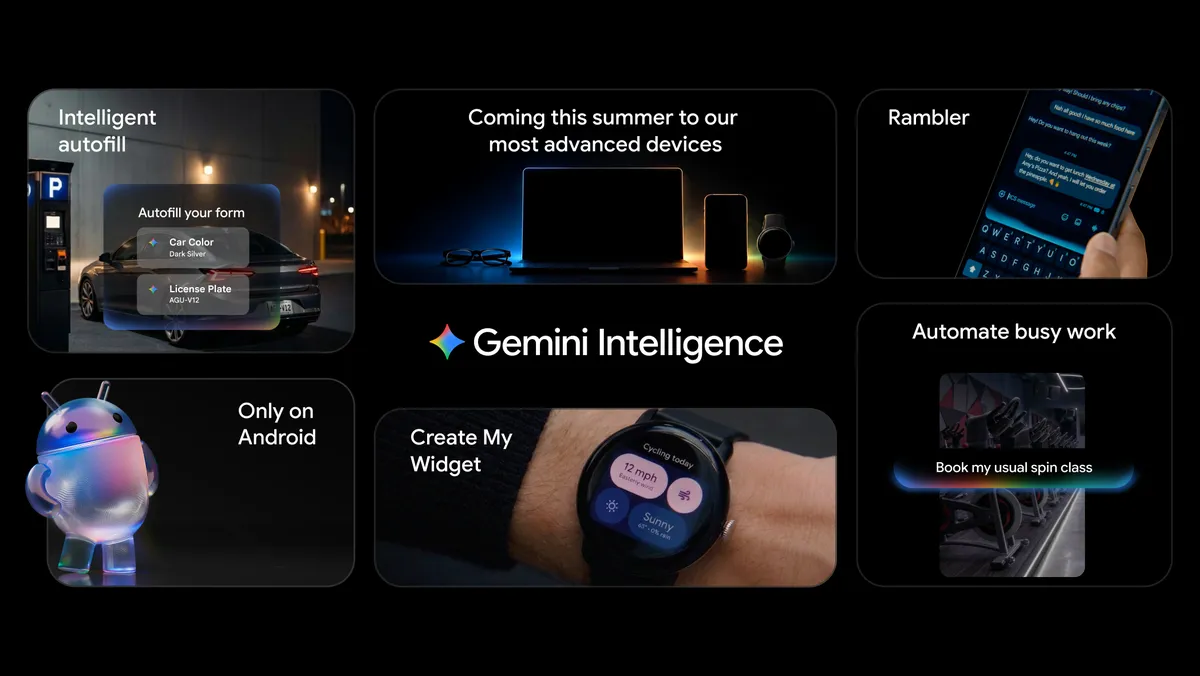
- What happened: Google reframed Android as an intelligence system with
Gemini Intelligence.- The announcement landed on May 12, 2026, with rollout starting in waves on newer Samsung Galaxy and Google Pixel phones in summer 2026.
- Core shift: Gemini is moving app automation, Chrome auto browse, smarter Autofill, Rambler, and natural-language widgets into the OS experience.
- For developers,
AppFunctionsbecomes the path for exposing app services, data, and actions to the OS-level agent.
- For developers,
- The gate: Android.com lists 12GB+ RAM, a flagship SoC, AI Core with Nano v3 or later, five OS upgrades, and six years of security updates among the requirements.
- Watch: The real story is not only the demo. It is permissions, privacy, app ecosystem readiness, and how much of Android's AI future starts on premium devices.
Google announced Gemini Intelligence on Android at Android Show: I/O Edition on May 12, 2026. The feature list sounds familiar at first. Gemini can automate apps, summarize and compare pages in Chrome, fill forms, polish voice messages, and create home-screen widgets from natural language. AI features on a phone are no longer surprising by themselves.
The news value is in a different sentence. Google says Android is moving from an operating system to an intelligence system. That can sound like marketing language, but for developers it points to a concrete platform shift. AI is no longer only a chatbot panel outside the app. It is moving down into the layer that reads screen context, calls app capabilities, and executes multi-step tasks with user approval.
That direction matches the broader AI product race of the past year. Agents have moved into browsers, IDEs, desktops, and enterprise apps. A user gives an instruction, and the AI calls tools. Gemini Intelligence asks the same question on the mobile OS. Phone apps are still designed around taps, swipes, screens, and app-specific flows. Google now wants those apps to become surfaces that an AI can inspect, navigate, fill, and hand back to the user for final confirmation.

What Gemini Intelligence actually does
The first pillar in Google's announcement is app automation. Google says it fine-tuned Gemini for multi-step automation in selected food and rideshare apps on Galaxy S26 and Pixel 10. The examples are intentionally ordinary: ordering a latte from a cafe, turning a grocery list in a notes app into a delivery cart, or using a photo of a hotel lobby travel brochure to find similar tours on Expedia. The user invokes Gemini, Gemini handles app switching and input, and the final commitment remains with the user.
That is more than converting a voice command into an app shortcut. Google talks about screen and image context together. A user can hold the power button while looking at a long grocery list and ask Gemini to turn it into a cart. The model is not only receiving a text prompt. It is interpreting the current screen and turning that context into an action. This is where mobile agents become hard. Every app has a different UI. Account states differ. Some actions, such as payment or booking, are difficult to reverse. Google describes the control model as user-initiated, stopping when the task is complete, and leaving the final confirmation to the user.
The second pillar is Chrome. Google says Gemini in Chrome will arrive on Android devices from late June 2026 to help with web research, summaries, and comparisons. It also adds Chrome auto browse. Gemini can handle repetitive web tasks such as booking flows or finding parking spots. The point is not a separate browser agent. Mobile Chrome itself becomes an agent execution surface.
The third pillar is input and forms. Autofill with Google will use Gemini Personal Intelligence to fill more small fields in apps and Chrome. Google's stated problem is complex form filling on a mobile screen. Addresses, contact details, calendar context, memberships, and travel information already live around the user's device and account. Gemini can combine that surrounding context to fill fields. That is useful, but sensitive. Product trust will depend on the boundary around what the AI knows and which information it is allowed to insert into which app.
The fourth pillar is Rambler in Gboard. It turns natural spoken rambling into a cleaner written message. Android.com says Rambler removes filler words and reshapes a stream of consciousness into more polished voice-to-text. This may look like a small feature, but it captures a realistic mobile AI use case. Many phone tasks are not long creative sessions. They are small friction removals: cleaning up speech, filling a form, creating a cart, comparing pages, or preparing a short message.
The final pillar is natural-language widget creation. A user says what information they want to see, and Gemini creates a custom widget for the home screen. It can look like a vibe-coded widget, but the larger meaning is that UI assembly moves a little away from only app developers and OS templates, and a little toward a conversation between the user and the model. Apps no longer own the whole screen. They can become pieces inside a personalized information surface made by the OS.
The important developer word is AppFunctions
On the same day, Android Developers Blog published Building for the Intelligence System on Android. This is where the developer message becomes more direct. Android is using deep hardware and software integration to anticipate user needs, while apps focus on delivering the right experience at the right moment. That sounds abstract until the practical term appears: AppFunctions.
According to Google, AppFunctions lets developers provide app services, data, and actions directly to the OS and agent. The system can discover and run tools that come with natural-language descriptions. Until now, Android apps connected to the OS through surfaces such as intents, deep links, notifications, share sheets, widgets, and shortcuts. In the Gemini Intelligence era, that surface expands into a list of tools an AI can call.
This creates two pressures for app developers. First, if the core function of an app is hidden only behind human-visible buttons and screen flows, the AI will struggle to call it reliably. Capabilities such as creating an order, changing a reservation, searching documents, adding to cart, or canceling a subscription need to be modeled as clear actions. Second, permission and validation design becomes more granular. If an AI can execute app functions, some actions should allow only preview, some should require biometric approval, and some should leave the final submit button to the human.
That is why Gemini Intelligence is more than a consumer feature bundle. It is a platform transition. Apps must show screens to humans while also describing what they can do to the OS AI layer. A well-designed app will expose a tool surface that Gemini can call precisely. A poorly designed app will fall back to screen reading and simulated clicking. Browser agents want the DOM and APIs. Mobile agents want explicit app capability surfaces.
| Category | Traditional Android apps | After Gemini Intelligence |
|---|---|---|
| Primary interface | Human-tapped screens, intents, and deep links | Screens plus AI-discoverable actions and tool surfaces |
| Automation model | Notifications, shortcuts, and app-specific workflows | Gemini handles multi-step tasks from user intent and context |
| Developer work | Good UI and stable lifecycle behavior | AppFunctions, permissions, confirmation steps, and data boundaries |
| Competitive edge | An app users open directly and stay inside | An app AI can call accurately and users can trust |
The real gate is 12GB RAM and update policy
The most practical number in this announcement is not a model benchmark. It is in the footnote on Android.com's Gemini Intelligence page. Google says Gemini Intelligence requires Android devices with "most advanced capabilities and spec requirements." The listed conditions include AI Core and Nano v3 or later on-device models, at least 12GB RAM, a qualified flagship SoC, 2026 field quality SLO, A17+ launch test, five OS upgrades, AVF, pKVM, and six years of security updates.
That requirement set has two meanings. The first is technical. Gemini Intelligence is not just a cloud chatbot wrapped in an Android app. It depends on screen context, on-device models, security isolation, long-term updates, media performance, and app automation working together. Some context handling and judgment need to happen on the device, and sensitive tasks require OS security capabilities. That is why flagship SoCs and 12GB RAM enter the picture.
The second meaning is ecosystem-level. Android's strength is its wide device range: low-cost phones, foldables, tablets, cars, TVs, XR devices, and many manufacturers. If the AI OS experience concentrates on recent flagships with long update commitments, Android AI becomes less a universal Android feature and more a premium Android differentiator. That is why community discussion summarized the requirement as a "recent and well-supported flagship device."
For Google, this can become pressure on OEMs. To support Gemini Intelligence well, manufacturers need more RAM, stronger NPUs, longer OS upgrade commitments, longer security updates, and better field quality. AI features can become a way to reduce Android fragmentation and lift long-term support expectations. For users, the same requirement becomes another premium wall that pushes phone upgrades.
AI product teams should not treat this as a footnote. On-device AI discussions often focus on model size and latency. Real deployment also depends on RAM, thermal budget, OS updates, security isolation, manufacturer driver updates, and country or language availability. Gemini Intelligence makes clear that AI features are not only shipped through app updates. They sit inside the hardware and OS lifecycle.
The AI pointer shows the next UI
On the same day, Google DeepMind published a research post on an AI-enabled pointer. It is not the exact same product as the Android announcement, but it points in the same direction. DeepMind argues that many AI tools live in separate windows, forcing users to bring their working world into that window. The AI pointer instead tries to let Gemini understand what the user means on top of the tool they are already using, combining pointer movement, voice, and visual context.
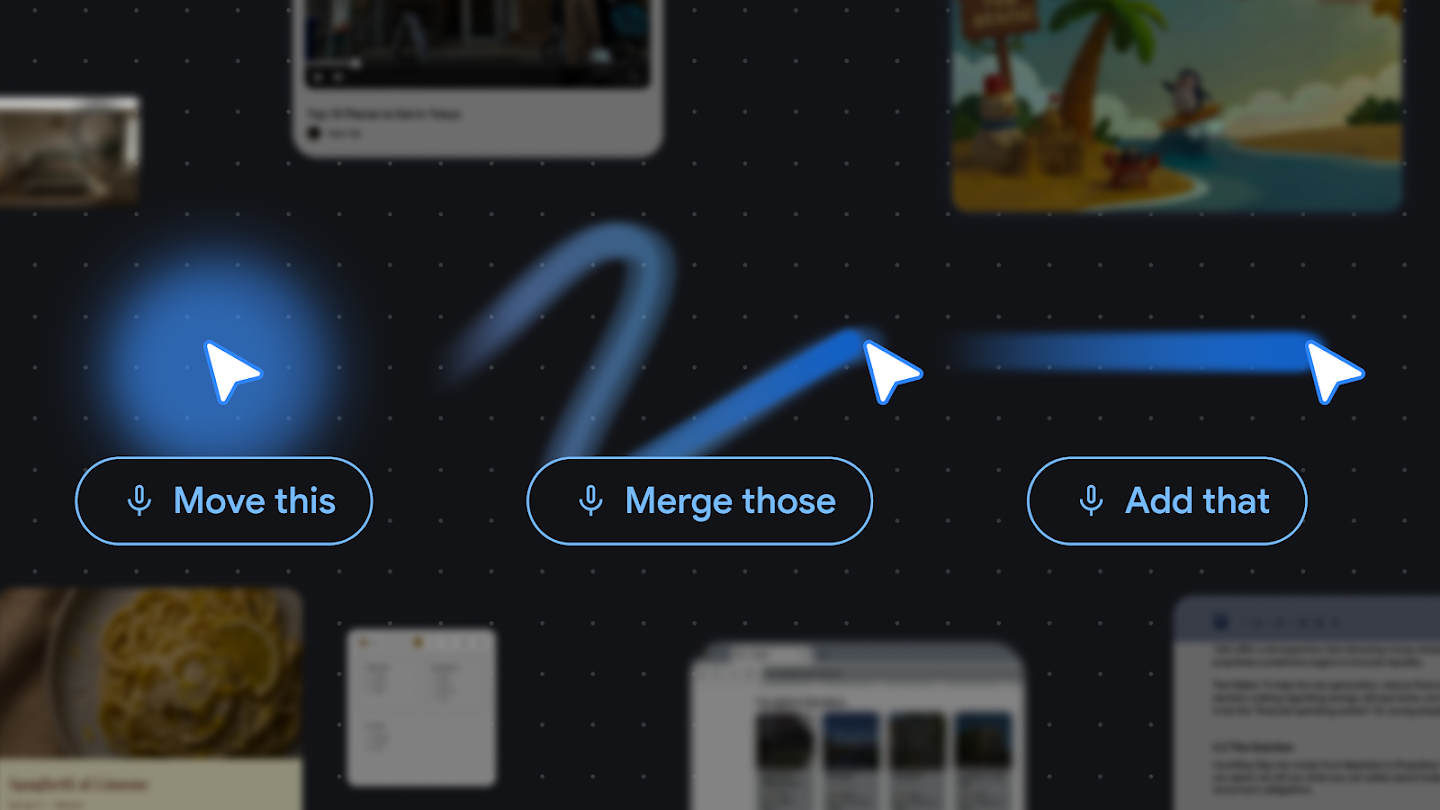
DeepMind's four principles are to maintain the flow, support show and tell, accept short references such as "this" and "that," and turn pixels into actionable entities. Those principles matter for mobile AI. Writing a long prompt on a phone is uncomfortable. Users look at the screen, point with a finger, and say short instructions: book this, compare that table, put this list in my cart. That is the natural interface.
The weight of prompt engineering shifts here. The question is less whether the user writes the perfect text prompt, and more whether the system can interpret physical and visual references correctly. What does "this" mean? Which data on the current screen is sensitive? Which button can be clicked, and which button requires confirmation? Once AI understands pointer and screen context, the UI can become more convenient, but the cost of a wrong action also rises.
Google says AI pointer is being integrated into Chrome and Googlebook experiences. Read alongside the claim that Gemini Intelligence will expand to phones, watches, cars, glasses, and laptops, Google's larger picture is clear. Gemini is not meant to stay as a single app. Google wants it to become a thin interaction layer between what users see, what they point at, and what they ask for. Whoever owns that layer owns the starting point for many AI calls.
A different fight from Apple Intelligence
The name Gemini Intelligence naturally recalls Apple Intelligence. Both companies are pulling AI into OS-level features and emphasizing personal context plus on-device processing. But Google's strengths and weaknesses are different from Apple's. Apple has a vertically integrated stack: controlled hardware, OS, App Intents, Neural Engine, and Private Cloud Compute. Google has Android's broad ecosystem, Search, Chrome, Gmail, Maps, YouTube, Android Auto, XR, and manufacturer partners such as Samsung.
Google's strategy is broader and harder. Gemini Intelligence cannot work well if only Google apps are connected. Food ordering, rideshare, travel, shopping, messaging, and workplace apps need to participate. So do manufacturer-specific SoCs, memory configurations, and update policies. That is why AppFunctions and device requirements are central. An AI OS is not only a model problem. It is an ecosystem contract.
Search and Chrome are another difference. Google can turn the web into Gemini's execution surface. If Chrome auto browse works, repetitive mobile web tasks move into AI-handled territory. That affects not only app developers but also web service operators. If Gemini summarizes, compares, and progresses through booking flows while the user is not directly reading and clicking every page, web UI, accessibility, bot policy, payment confirmation, and anti-fraud design all need to adapt.
The race will not be decided by demo videos. Users need to trust the system in ordinary failures. If AI books the wrong date, adds the wrong product to a cart, or puts sensitive data into the wrong form, convenience turns into risk. That is why Apple's privacy and on-device messaging matters. Google can use Android's openness and broad service connections as an advantage, but that same breadth raises the difficulty of verification and accountability.
Community expectations and anxiety
The Reddit r/Android megathread was skeptical of Google's phrase about moving from an operating system to an intelligence system. Some comments read the phrasing as an awkward attempt to avoid simply saying AI. Others were more interested in the possibility that Gemini could handle long-running background tasks and deeper phone control. That split reaction is reasonable. "AI OS" sounds big, while the first user experience may land somewhere between "why is this called AI?" and "this is genuinely convenient."
A post in r/google read the announcement as an intelligence layer spanning phones, laptops, browsers, cars, watches, and glasses. Community summaries can mix official claims with extrapolation, so this article treats only the Google Blog, Android Developers Blog, Android.com, and DeepMind Blog as factual sources. The central question is not every feature of a future Android release. It is where Google wants Gemini to sit in the stack.
Reaction to the device requirements was more practical. A separate r/Android discussion focused on the 12GB+ RAM, flagship chip, AI Core with Nano v3 or later, long OS support, and security update requirements. Some users assumed their current devices would be excluded. Others interpreted the requirements as a way for Google to push OEMs toward longer support.
Those reactions are not exaggerated fear so much as deployment reality. AI features do not come only from the cloud. The more a feature requires OS permissions, on-device models, security updates, and app integration, the smaller the support matrix becomes. Google says expansion to watches, cars, glasses, and laptops is planned for later in 2026, but availability will still vary by country, language, device, and partner app.
Questions developers should ask now
First, app capabilities need to be organized in a form AI can call. A mobile app's competitive strength may depend not only on polished screens but also on whether its core actions are exposed through clear, verifiable APIs or AppFunctions. For high-consequence functions such as booking, ordering, payment, schedule changes, or account settings, preview, confirmation, undo, and audit trails should be part of the design.
Second, UX needs to be reviewed under screen-context assumptions. When a user says "this" to an AI, the app has to decide which data can be exposed. This gets harder when personal information, payment details, medical records, financial data, and work data appear on the same screen. The more AI understands the screen, the more important the security classification of visible information becomes.
Third, apps may no longer be used alone. If Gemini finds a syllabus in Gmail, adds books to a shopping app, and creates calendar entries, the value of an app may be measured less by isolated session length and more by how reliably it can be called inside cross-app workflows. Just as SEO changed web page structure, AI-callability may change app structure.
Fourth, testing changes. Traditional mobile tests verify UI paths that a human taps. In an AI OS, teams also need to test agent-called actions, permission prompts, failure recovery, final confirmation, and incorrect context binding. Even a simple food order has edge cases: sold-out items, address mistakes, payment failures, coupons, allergy notes, and delivery time changes. The more AI automates, the more important exception handling becomes.
Fifth, product teams need a device support strategy. If Gemini Intelligence starts on higher-end devices, apps that make AI central to the user experience need to decide how lower-end devices and unsupported regions behave. There should be a fallback path for the same task when the AI feature is unavailable. Otherwise Android's broad user base splits into a premium AI experience and a basic experience.
Where this leaves Android
Gemini Intelligence is not merely a bundle of Android AI features. It is Google's statement that AI is moving into OS context, execution, permissions, and developer integration. App automation, Chrome auto browse, Personal Intelligence Autofill, Rambler, and natural-language widgets each look like small convenience features when viewed separately. Together, they point to a version of Android where Gemini reads user intent and screen context, then moves across apps instead of requiring the user to open and operate each one manually.
That does not mean the transition will succeed immediately. Supported devices are limited, partner app coverage will expand gradually, and the cost of bad automation is not small. If AI fills carts and advances bookings, the hard problem is not only accuracy. It is trust. Users need to see what information was used, what action was confirmed, where the system stopped, and how to reverse the result.
The signal for developers is still clear. Mobile AI is not just installing a chatbot app. It is a question of how the OS reads and calls app capabilities, how users point and speak on top of the screen, and how devices maintain on-device models and security updates. If Android becomes an AI OS, Gemini's answer quality is not the only gate. The real gate is whether apps can be safely called by AI, and whether the hardware and ecosystem are ready to support that experience.