WebMCP Origin Trial turns browser agents from click guessers into tool users
Chrome WebMCP is an Origin Trial for exposing structured tools and permission boundaries from web apps to browser agents.
- What happened: Chrome introduced
WebMCPas a Chrome 149 Origin Trial.- The experiment lets websites expose MCP servers and tool metadata directly to browser agents.
- Why it matters: Browser agents may move from guessing buttons and DOM structure to using explicit, user-approvable web app actions.
- Builder impact: Web apps may need a third interface layer: human UI, public API, and an agent-facing action surface.
- Watch: WebMCP is still an Origin Trial, and delegation, prompt injection, and browser standardization remain the hard parts.
Google's Chrome team has introduced WebMCP as a Chrome 149 Origin Trial. At first glance, it can look like another browser-adjacent extension to the Model Context Protocol ecosystem. The more important shift is architectural. Until now, most browser agents have watched the same interface humans see, inferred the meaning of buttons and forms, then clicked and typed their way through a task. WebMCP asks a different question: what if the website itself could describe the actions an agent is allowed to take?
Google also mentioned WebMCP in its May 19, 2026 I/O developer keynote recap, where it framed the feature as part of making apps more agent-friendly. That phrase is short, but it points at a real platform shift. A web app already has a human interface made of buttons, forms, menus, and links. It may also have REST, GraphQL, webhook, or OAuth APIs for software integrations. Browser agents introduce a third surface: structured actions that operate inside the user's browser context.
This story also sits next to the recent Chrome DevTools for agents 1.0 launch. DevTools for agents gives coding agents a way to inspect Lighthouse, network traffic, console output, memory, and WebMCP tools in a real Chrome environment. WebMCP's question is narrower and more consequential: not whether an agent can observe a browser, but what a web app should deliberately expose to that agent. Missing that distinction makes WebMCP sound like a better click bot. It is closer to an early proposal for how web apps explain their capabilities to AI.
The limits of agents that poke at buttons
Anyone who has tried a browser agent knows the pattern. The agent looks at a screenshot, reads the accessibility tree, searches the DOM, infers whether a button means "buy," "save," "export," or "continue," then clicks. If the result is wrong, it observes the new page state and tries again. This can look impressive in demos, but it is fragile in production web apps. Async loading, A/B tests, modals, localization, permission-specific menus, responsive layouts, and internal design systems all make the agent's interpretation less reliable.
Calling a server API directly is not always a clean replacement. A browser agent's value is that it inherits the user's live context: the current session, workspace, cart, draft document, selected dashboard, open tab, and browser-bound permissions. A pure backend integration often has to reconstruct that state from outside the browser. UI automation sees the state, but it has to infer the meaning of every action.
WebMCP targets the gap between those two approaches. The website exposes tools in the browser. The agent discovers those tools and can call them instead of blindly walking the human UI. Chrome's documentation describes WebMCP as two APIs that enable browser agents to act on behalf of a user: one for discovery and one for MCP server and tool invocation.
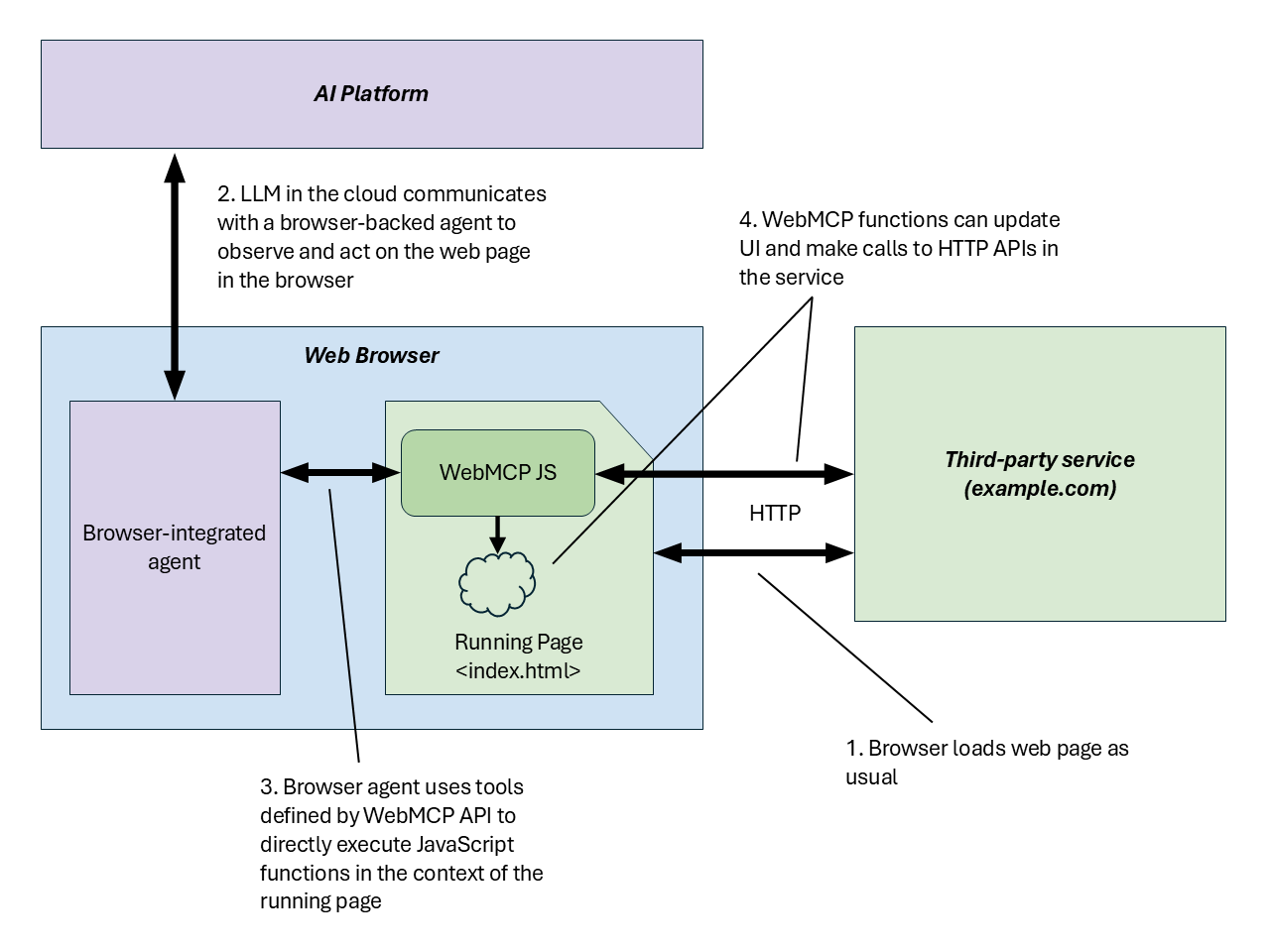
The official explainer diagram is useful because of where it places the interface. Traditional MCP connects an MCP client to an MCP server. A desktop AI app or IDE agent might connect to a GitHub, Slack, database, or filesystem MCP server. WebMCP brings that relationship into the web page. A browser agent can discover and use tools exposed by the website the user is visiting, while still operating in the context of the user's browser session.
WebMCPDiscovery and MCPServer
The documented WebMCP surface has two major pieces. The first is WebMCPDiscovery: how a page tells a browser agent which MCP servers it offers, what they are called, what metadata describes them, and how the agent can discover them. The second is MCPServer: how a site exposes tools, how an agent invokes them, and how user approval and permission boundaries fit into the browser flow.
This should feel familiar to web developers who have worked on accessibility. A good accessibility tree tells assistive technology what an element is, what state it is in, and what actions are available. WebMCP tries to provide a related kind of semantic layer for browser agents. The consequences are stronger, though. A screen reader helps a user understand and operate an interface. A browser agent with tool access can perform actions.
Imagine an accounting SaaS product. A traditional browser agent receiving "download this month's unpaid invoices as CSV" would open menus, find filters, enter dates, and click an export button. A WebMCP-style design could expose tools such as list_invoices, filter_invoices, and export_invoices. The agent would read the tool descriptions, ask for user approval when needed, and call a more explicit action.
That example is illustrative, not a claim that the Origin Trial instantly gives every web app those tools. The point is the direction. Web apps may no longer be defined only by pixels for humans and APIs for backend clients. If AI agents work inside the browser on behalf of users, product teams need to decide which actions should be exposed to those agents and under what constraints.
| Approach | What the agent sees | Strength | Risk |
|---|---|---|---|
| UI automation | DOM, accessibility tree, screenshots, coordinates | Uses the live browser state directly | Brittle meaning inference, selector drift, modal failures |
| Server API | Explicit endpoints and schemas | Stable and easy to test | Often detached from the user's current screen and session |
| WebMCP | MCP tools and metadata exposed by the website | Combines browser context with structured actions | Requires careful delegation, prompt-injection defenses, and browser support |
Agent-friendly web apps need more than API docs
Designing for AI agents is not just writing better API documentation. Agents often operate where users already are: the browser. A user may ask ChatGPT, Gemini, Claude, Copilot, Codex, or another agent to reschedule something on a site, inspect a dashboard, summarize the next actions in a CRM, or debug a failing checkout flow. Those requests involve the user's current permissions, selected account, tab state, browser session, and visible page context.
That is why WebMCP connects to product strategy, not only developer tooling. If a site exposes no agent tools, agents will keep automating the human UI. If a site exposes overly broad tools, one bad instruction or prompt-injection path can produce a high-impact action. The useful middle ground requires scoped tools, clear descriptions, user approval, audit logs, reversible operations where possible, and risk-based confirmation.
This is where accessibility and security meet. Good WebMCP tool descriptions help an agent avoid misunderstanding an action. Those same descriptions also reveal an action surface. Tools named delete_workspace, transfer_funds, or invite_admin are easier for a helpful agent to reason about, but they are also obvious targets for malicious instructions embedded in pages, emails, documents, or chat content. Hiding tool names is not a security model. Permission checks, step-up authentication, allowlists, immutable logs, idempotency, and server-side validation are the real defenses.
Chrome starting with an Origin Trial makes sense for that reason. WebMCP is not just a JavaScript convenience API. It is an experiment in where the browser should place trust boundaries between a user, a website, and an agent. A user being logged into a site should not automatically mean that every connected agent can perform every site action. At the same time, asking the user to approve every harmless read operation would erase much of the agent's value. The standard will live or fail in that balance.
Why Chrome wants this surface
In Google's I/O 2026 developer story, WebMCP is not isolated. The same keynote recap grouped it with Gemini API Managed Agents, Antigravity 2.0, Antigravity CLI and SDK, Chrome DevTools for agents, and AI Studio updates. The pattern is clear: Google is trying to connect models, agent runtimes, browser verification, and web app action surfaces into one developer path.
Chrome has leverage in that path. If an AI agent acts on the web, it eventually needs a browser. The browser renders pages, holds cookies and sessions, mediates permissions, and sees the user's current state. WebMCP beginning inside Chrome means Google is trying to answer a platform-level question: what structured signals should an agent see when it uses the web?
That also creates competitive and governance questions. MCP itself is not a Chrome-specific standard. But if WebMCP moves quickly through Chrome Origin Trial, Chrome DevTools for agents supports WebMCP inspection, and Google's agent tooling treats Chrome as the primary observation layer, web teams may optimize for a Chrome-first agent experience. How other browser vendors and standards groups respond will matter.
For builders, the pragmatic reading is cautious interest. An Origin Trial is not a production guarantee. APIs can change, support is limited, and the standards path is still open. But the design question is already practical: what should your web app officially let an agent do, and how should those actions be constrained?
Discovery and approval are the next MCP bottleneck
MCP spread quickly because it made tool use concrete. IDEs, desktop apps, cloud agents, and internal automation systems could attach MCP servers and give models access to real systems. In practice, two bottlenecks show up again and again. First, how does an agent discover which tools are available and trustworthy? Second, what approval should be required when those tools act on behalf of a user?
WebMCP brings those problems into the page. WebMCPDiscovery addresses discovery by letting the website describe its MCP servers and metadata. MCPServer leads into invocation and approval. This is more than "call a JavaScript function from the page." The user's browser, the site's permission model, the agent's intent, and the tool schema all meet in one flow.
That creates a new test surface for web teams. Existing APIs are tested with schema validation, API gateways, OAuth scopes, server logs, and integration suites. WebMCP tools may sit closer to the browser UI. QA has to answer different questions: can the agent discover the tool, does it interpret the description correctly, does a risky action trigger user approval, can the operation be undone, and can prompt injection leak into tool arguments?
Chrome DevTools for agents matters here because it provides a development loop. Google's 1.0 announcement mentions listing, invoking, and validating WebMCP Origin Trial tools. In other words, WebMCP is the runtime surface, and DevTools for agents is one way to inspect that surface during development. If a web app exposes tools to agents, developers will need to verify how those tools appear inside a real browser.
Why the community is still cautious
WebMCP is not yet a huge developer-community debate. It looks more like an early Chrome and Web Machine Learning community experiment than a widely adopted web standard. That makes restraint important. The story is not "the web has standardized agent actions." The story is "Chrome has started publicly testing how web apps might expose agent-facing actions."
The optimistic view is straightforward. If websites provide explicit actions and schemas, browser agents can become more reliable. They can stop guessing the meaning of human UI and start using supported paths. Complex SaaS products, admin consoles, low-code tools, internal business apps, and developer dashboards could benefit from that stability.
The skeptical view is also straightforward. Structured tools make agent work easier, but they also make failure more powerful. A vague user instruction, malicious prompt in page content, misunderstood tool description, or overbroad permission scope can produce unintended actions. UI automation sometimes fails because it is brittle. Structured tools may fail less often, but execute the wrong thing more reliably when the surrounding controls are weak.
Browser dependence is the other concern. The web has always had to be careful with features that work only in one browser family. Origin Trials are useful for feedback, but long-term agent interfaces need standardization and multi-browser discussion. If a site is agent-friendly only in Chrome and falls back to screenshot automation elsewhere, developer experience and user expectations will split.
What teams should check now
The first task is to classify your product's action surface. Separate read-only actions that are safe to expose, state-changing actions that require explicit approval, and high-risk actions that should not be automated casually. Whether or not you adopt WebMCP soon, this inventory is useful.
The second task is to treat tool descriptions like API contracts. An agent-facing description is not decorative help text. It influences behavior. Ambiguous names can produce bad tool calls. Overpromising descriptions can mislead users about permissions. Tool names, argument schemas, failure messages, and confirmation copy are product copy and security documentation at the same time.
The third task is to join prompt-injection defense with argument validation. Browser agents may read page content, external documents, emails, support tickets, and chat messages. Any of those surfaces can contain malicious instructions. If a website exposes WebMCP tools, server-side authorization, allowlists, rate limits, idempotency keys, and risk-based approval flows become part of the agent design.
The fourth task is to prepare a browser verification loop. Agent-facing web surfaces are not tested only with API docs. Developers need to see whether a real agent can discover the tools, how DevTools for agents displays metadata, how failed calls are diagnosed, and whether dangerous paths are blocked. This becomes a layer between UI testing and API testing.
A web app explaining itself to AI
WebMCP is not important because Chrome added another MCP-related feature. It is important because it signals a shift in how web apps may describe themselves to AI agents. Until now, websites showed screens to people and exposed APIs to software. Browser agents create pressure for a structured action surface in between.
That shift is appealing. Agents could guess less and act more clearly. Web apps could offer supported paths instead of tolerating fragile auto-clicking. Developers could inspect the surface with tools such as Chrome DevTools for agents. The same shift is risky. Structured actions can carry out bad instructions more reliably, and permission delegation has to be designed rather than assumed.
The right response is not immediate over-adoption. It is design work. What should an agent be allowed to do in your product? Which operations require explicit user approval? What should be logged? What can be undone? What should never be reachable through an agent-facing tool? Chrome 149's Origin Trial is early, but those questions are already practical. The next stage of browser agents is not simply smarter clicking. It is a contract in which web apps explain their capabilities and limits to AI.