Gemini Intelligence turns Android apps into agent tools
Google Gemini Intelligence and AppFunctions move Android apps from screen-first workflows toward local tools that agents can discover and call.
- What happened: Google announced
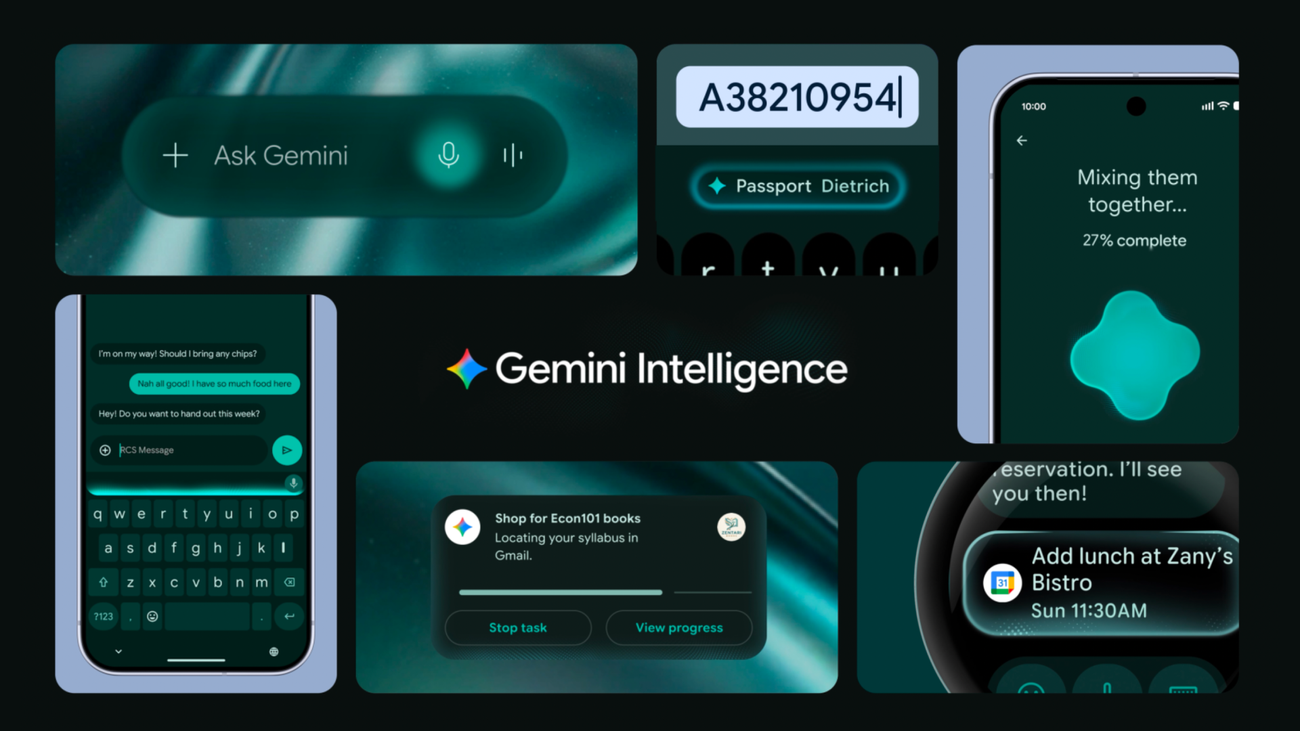
Gemini Intelligenceon May 12, framing Android as an "intelligence system" rather than only an operating system.- The rollout starts this summer on recent Samsung Galaxy and Google Pixel phones, then expands toward watches, cars, glasses, and laptops.
- Developer shift:
AppFunctionslets Android apps register typed capabilities in an OS-level registry so agents such as Gemini can discover and execute them. - Why it matters: Mobile app competition is moving from polished screens toward local tool surfaces that agents can safely call on the user's device.
- Watch: Gemini integration is still a trusted-tester private preview, and permissions, privacy, and platform lock-in remain open questions.
Google's message at The Android Show on May 12, 2026 was unusually direct. Android is no longer trying to be only the operating system that launches apps. Google wants it to become the intelligence layer that understands what users are trying to do and coordinates the apps that can help.
That can sound like familiar AI positioning. The more important developer story is more concrete: the boundary around an Android app is starting to change. Gemini is not only becoming a smarter assistant on top of apps. With AppFunctions, Android apps can expose specific capabilities as local, typed functions that the operating system can index and approved callers can execute.
Two names matter in this announcement. The consumer-facing name is Gemini Intelligence. Users can ask Gemini to order food, build shopping lists, compare web pages, help with reservations, fill mobile forms, clean up voice input, or generate a widget from natural language. The developer-facing name is AppFunctions. It is the API surface that lets app teams make selected features discoverable to agents without asking the agent to imitate taps and swipes through the UI.
That combination challenges a long-standing assumption in mobile product design. Apps have usually been built around a human opening a screen, pressing a button, filling a form, and moving to the next screen. In the future Google is describing, the user may not open the app at all. They may say, "Find the noodle recipe Lisa sent me and add the ingredients to my shopping list." The agent then needs to combine a mail search function with a shopping-list function. What app teams need to design is no longer only the visible flow. It is also the callable surface an agent can use safely.
Why this Android AI launch is developer news
Google's official Keyword post presents Gemini Intelligence as a bundle of proactive AI features for newer Android devices. Gemini can perform multistep app automation, help summarize and compare pages in Chrome, assist with complex forms, refine rambling voice input in Gboard, and create widgets from natural-language prompts. Google says the rollout begins this summer on recent Samsung Galaxy and Google Pixel phones, then expands to watches, cars, glasses, and laptops.
For consumers, the headline is simple: the phone should handle more errands. Google gives examples such as calling Gemini while viewing a long shopping list and asking it to turn that list into a delivery cart. A user can also photograph a travel brochure and ask Gemini to find a similar tour for six people on Expedia. Google says Gemini shows progress in the background, leaves final confirmation to the user, and stops when the task is done.
For developers, the important part is not just UI automation. UI automation is useful, but it is also a fragile workaround. It can break when a screen changes. It may depend on accessibility trees, text recognition, and assumptions about app state. Google is pairing that route with a more explicit API path. The Android Developers Blog says developers can start from a low-code or no-code app automation path, then move to AppFunctions when they need more direct control.
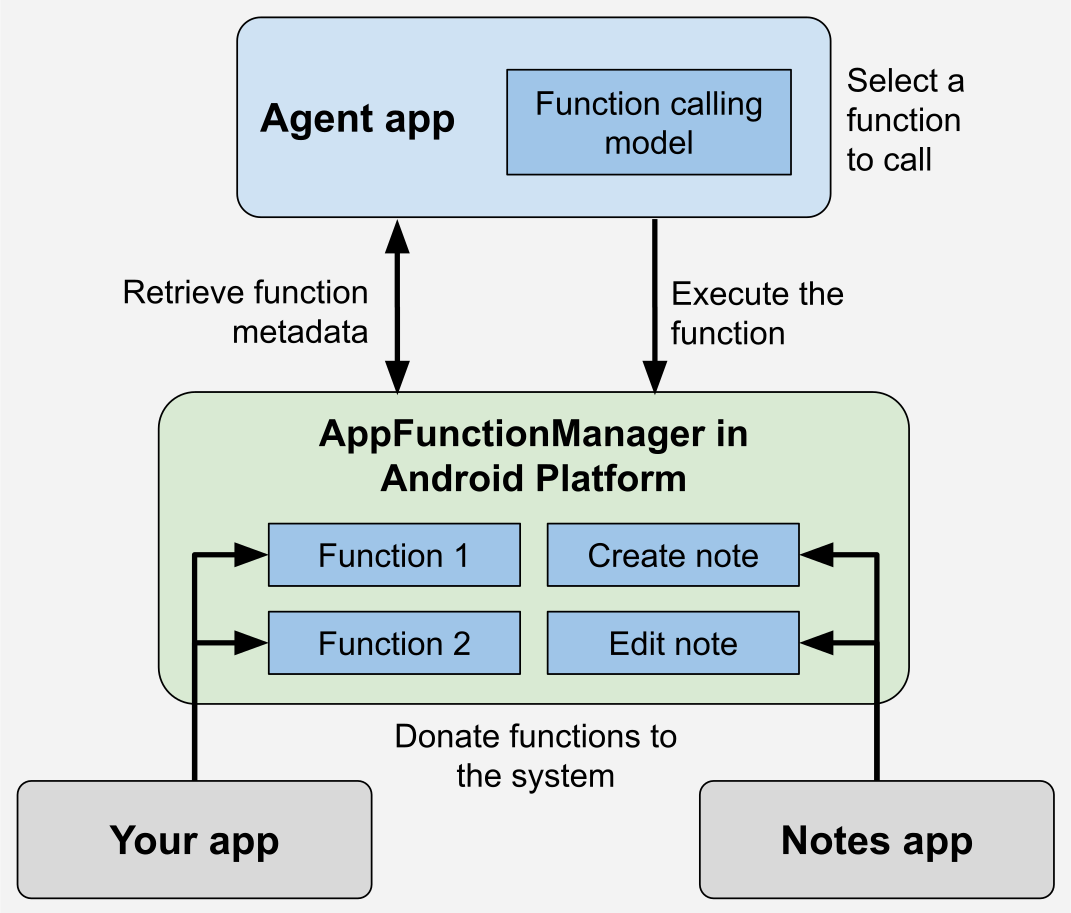
AppFunctions is the real developer API in this launch. An Android app exposes selected services, data, and actions as functions. Jetpack tooling helps generate schema files. Android indexes those schemas in an OS registry. A caller can use the user's intent and the app's metadata to choose the right function, fill parameters, and execute the action. Google's documentation describes this in a way that is close to a mobile version of MCP: server-side tools can be exposed through MCP, while on-device app tools can be exposed through AppFunctions.
AppFunctions makes mobile apps local tool servers
The most striking phrase in the AppFunctions documentation is that apps can behave like "on device MCP servers." MCP became popular because it gives agents a structured way to discover and call external tools, data sources, and services. AppFunctions brings that idea into the mobile operating system. The difference is that the tool boundary is not primarily a network server. It is the installed app, local state, Android permissions, and the OS registry.
The flow has four parts. First, an app developer declares functions such as "create note," "send message," or "create calendar event." Second, the AppFunctions Jetpack library generates an XML schema. Third, Android indexes that schema. Fourth, an agent or approved caller reads the metadata, picks a matching function for the user's request, and executes it. The function becomes a tool with natural-language descriptions and typed parameters.
Consider a productivity app. A user might say, "Create a reminder to pick up a package at the office at 5 p.m." An agent could find the app's createTask function, fill title, dueDateTime, and location, then ask for confirmation if needed. A music app could map "make a playlist from jazz albums released this year" to a createPlaylistFromQuery function. A calendar app could turn "add Mom's birthday dinner next Monday at 6" into a structured event creation call.
The important point is that this is not the same as an agent pretending to be a user. Instead of guessing button locations or typing into fields, the agent calls the functions that the app has intentionally exposed. That difference matters for reliability and permissions. UI automation mimics human behavior. AppFunctions is closer to a contract where the app developer says, "This capability can be made available to an external caller under these conditions."
Google says callers need the EXECUTE_APP_FUNCTIONS permission to discover and execute AppFunctions. The API is available on Android 16 and later, while the end-to-end Gemini integration is in a trusted-tester private preview as of May 2026. That means apps are not suddenly wide open to Gemini today. Developers can start implementing and testing the API, but the full system-agent pipeline remains limited.
The mobile MCP analogy is useful, with limits
Calling AppFunctions "mobile MCP" can flatten important differences. MCP is a platform-neutral protocol for connecting agents to tools and resources. AppFunctions is an Android platform API. MCP servers often sit across a network or process boundary. AppFunctions assumes app packages, Android permissions, OS indexing, Jetpack annotation processing, and on-device execution.
The analogy is still useful because the usage pattern changes in the same direction. The agent's way of using an app starts to separate from the human's way of using an app. On the web, building a good agent experience increasingly means thinking about APIs, MCP servers, tool schemas, authentication boundaries, and audit trails. Android is now asking similar questions inside the phone.
That matters most for apps that are not giant superapps. Not every app can build a credible AI assistant of its own. If Android's agent runtime becomes a common path for user intent, an app can stay relevant by telling Gemini what it can do. A recipe app can expose ingredient extraction and saving. A banking app can expose balance lookup or transfer preparation under strict confirmation rules. A fitness app can expose workout logging. A messaging app can expose message drafting, sending, and call initiation.
Google's KakaoTalk example is important in this context. The Android Developers Blog says private-preview testing has started with apps such as KakaoTalk for actions like sending messages and initiating voice calls. The same post says AppFunctions has already enabled local execution for 25 app use cases across device manufacturers. That is not a huge number, but it shows Google is preparing ecosystem integration rather than only a stage demo.
The competitive unit shifts from screens to intent handling
Mobile teams have spent years optimizing screen flows. They reduce onboarding friction, cut taps, speed up lists, simplify forms, and use notifications to bring users back. None of that disappears after Gemini Intelligence. But a second path to selection is forming. Instead of tapping an app icon, a user can state an outcome to Gemini, and Gemini can route that intent to the app function that is best suited to handle it.
At that point, an app's competitiveness depends partly on whether an agent can select it accurately. Function names, KDoc descriptions, parameter types, return types, enabled states, error handling, and permission UX become part of the product. In the search era, websites had to consider both people and crawlers. In the agent era, apps have to consider both people and callers.
Imagine a food delivery app preparing for Gemini Intelligence. If it exposes only a broad "place order" function, the agent may need to ask many follow-up questions. If it exposes smaller actions such as repeat recent order, create cart, suggest substitutions, check delivery windows, evaluate coupon eligibility, and summarize before payment, the agent can help the user more naturally. But if the app exposes functions that are too broad, the risk of mistakes and permission confusion rises. Function design becomes product design and security design at the same time.
Android's position is especially sensitive. Web agents operate between browsers and server APIs. Desktop coding agents operate across file systems, terminals, Git, and browsers. Android agents operate on the user's most personal device, close to contacts, messages, location, calendars, payments, photos, and app state. The productivity upside is large, but the cost of failure is also high. Google's repeated language about transparency and control is not optional. It is the minimum requirement for this kind of OS-level automation.
Google is combining three automation paths
This announcement looks complicated because Google is not describing a single feature. It is layering three automation paths.
The first path is app UI automation. Gemini receives a user request and moves across apps to complete a task. Google says it has tested multistep automation with food and rideshare partners and plans to expand that work across more verticals and form factors.
The second path is AppFunctions. Developers explicitly turn app capabilities into tools. This is more stable than UI automation and gives app teams more control. Google presents it as the path for developers who need direct control over how app actions are exposed. AppFunctions can use local app state and does not require a separate server for every capability.
The third path is system-level automation in Chrome, Autofill, Gboard, and widgets. Google says Gemini in Chrome will help Android users research, summarize, and compare web content starting in late June. Chrome auto browse is positioned for routine tasks such as booking or finding parking. Autofill with Google will connect to Gemini's Personal Intelligence to handle more complex mobile forms, with an opt-in setting the user can disable. Gboard's Rambler feature turns loose speech into cleaner text, and Create My Widget turns natural language into a generated widget.
These paths are complements, not replacements. If an app provides AppFunctions, the agent can call explicit tools. If an app is not ready, or the workflow lives on the web, Gemini can fall back to UI or browser automation. If the task is structured personal data entry, Autofill can take the lead. Google's phrase "intelligence system" is less about one chatbot feature and more about routing automation across several OS layers.
Personalization and permissions cannot be avoided
The more useful Gemini Intelligence becomes, the closer it gets to sensitive user context. Connected apps, the current screen, images, web pages, locations, calendars, email, forms, and voice input can all make an assistant more capable. They also make it more intrusive.
Google emphasizes privacy and user control. It says Gemini acts on the user's command, leaves final confirmation with the user, and stops after the task is completed. It says Rambler's voice data is used only for real-time transcription and is not stored. It says the Autofill and Gemini connection is opt-in.
Whether that is enough for users and regulators is a separate question. Community reaction is already split. Some Android users see this as the moment mobile assistants finally become useful. Others read Google's "user control" language with skepticism because the feature set requires deeper access to personal data and app actions. In regions such as the EU, privacy, competition, and platform-control concerns could slow rollout.
Developers also inherit more responsibility. AppFunctions opens app capabilities to external callers. Some functions are safe as read-only operations. Others send messages, prepare payments, create calendar events, delete data, or change settings. Teams have to decide when confirmation is required, what logs the user can inspect, and how the app recovers when an agent misunderstands the request. An agent caller should not become a shortcut around the app's existing security model.
The location of "final confirmation" is especially important. Creating a shopping cart is not the same as completing a payment. Drafting a message is not the same as sending it. Creating a calendar draft is not the same as inviting attendees. Teams designing AppFunctions should separate low-risk automation from high-risk actions and assign a risk tier to each function.
The next competition with Apple App Intents
Google's AppFunctions should not be viewed in isolation. Apple's ecosystem already has App Intents, which connect app actions to Siri, Shortcuts, Spotlight, and widgets. If Apple Intelligence evolves into a stronger personal assistant, App Intents will become even more important. Google is using AppFunctions to create a similar, but more explicitly agent-oriented, surface for the Android app ecosystem.
The difference is that Google is using the language of MCP and agentic automation more directly. The AppFunctions documentation says functions can be used as tools by agents and assistants. It also discusses remote server-side MCP tools alongside local AppFunctions. That points to a world where mobile apps participate in a combined cloud-agent and local-device tool graph.
For example, a user might ask, "Prepare my next business trip." An agent could find flight information in Gmail, add events to Calendar, estimate travel time in Maps, send an arrival note through a messaging app, and create a receipt folder in a company expense app. Some steps may use server MCP tools. Some may use Android AppFunctions. Some may use browser automation. If the platform routes those steps well, the user experiences one assistant. If it routes them poorly, the user sees a pile of permission prompts and confirmation screens.
The winner of this competition will not be decided only by model quality. It will depend on how quickly app ecosystems expose useful tool surfaces, how trustworthy the OS permission model feels, how much friction the developer tooling removes, and how often users experience successful automation. Google has Android's distribution advantage, but it also has Android's familiar fragmentation problem. The Android 16 requirement for AppFunctions will shape early adoption.
Practical questions for app teams
It is too early to say every Android app should implement AppFunctions immediately. Gemini integration is still a private preview, and the API is experimental. Google also says the API surface is being refined and may change. But the direction is clear enough: more user intent will arrive through assistants, and apps will need structured capabilities that can process that intent.
The first question for an app team is: what repetitive actions do users already perform? Good early candidates are repetitive, low-risk, and parameterized. Reminders, list additions, searches, drafts, availability checks, status lookups, favorites, and recent-order reconstruction are all plausible examples. Payments, deletion, external sharing, permission changes, and sensitive-data disclosure should sit behind stricter confirmation flows.
The second question is: can an agent discover this function accurately? Function names and descriptions are not just documentation for human developers. They are metadata that an agent uses during tool selection. Vague names, overbroad functions, and APIs that accept one unstructured string are poor tools for agents. Good AppFunctions have narrow scope, clear types, predictable return values, and specific failure reasons.
The third question is: can the user understand what happened afterward? Agent automation feels helpful when it works, but failures can blur responsibility. Apps will need logs, pending confirmations, cancellation states, and change history. In domains such as messaging, calendars, payments, files, health, and finance, auditability may matter more than raw automation.
Can Android become an agent runtime?
Google's announcement is less an AI feature drop than a redefinition of Android's role. Android has been an app launcher, permission manager, notification system, background-work coordinator, and intermediary for identity and payments. If Gemini Intelligence and AppFunctions mature, Android also becomes an agent runtime. Apps exist not only as screens, but as bundles of capabilities that the OS can discover and compose.
If this works, mobile use changes meaningfully. Users stop stitching together small tasks across apps by hand. Developers gain a new path for their app functions to appear inside broader intent flows. Google can position Gemini as the default coordinator for the Android ecosystem. If it fails, it becomes another heavy assistant layer: permissions get more complex, automation feels brittle, and users look for the off switch.
The most realistic reading is in the middle. Gemini Intelligence is not yet the finished mobile-agent era. AppFunctions is the API that prepares for it. Just as MCP has become a common language for "the tools an agent can use" on the web and in developer environments, AppFunctions asks the same question on Android: is your app only a screen a person taps, or is it also a capability an agent can safely call? For Android developers in 2026, that question is going to matter more often.