Copilot 자동화 공개, 밤마다 PR 여는 클라우드 에이전트
GitHub Copilot cloud agent automations가 공개됐습니다. 예약 실행, repository event, sandbox, AI Credits 과금을 함께 봅니다.
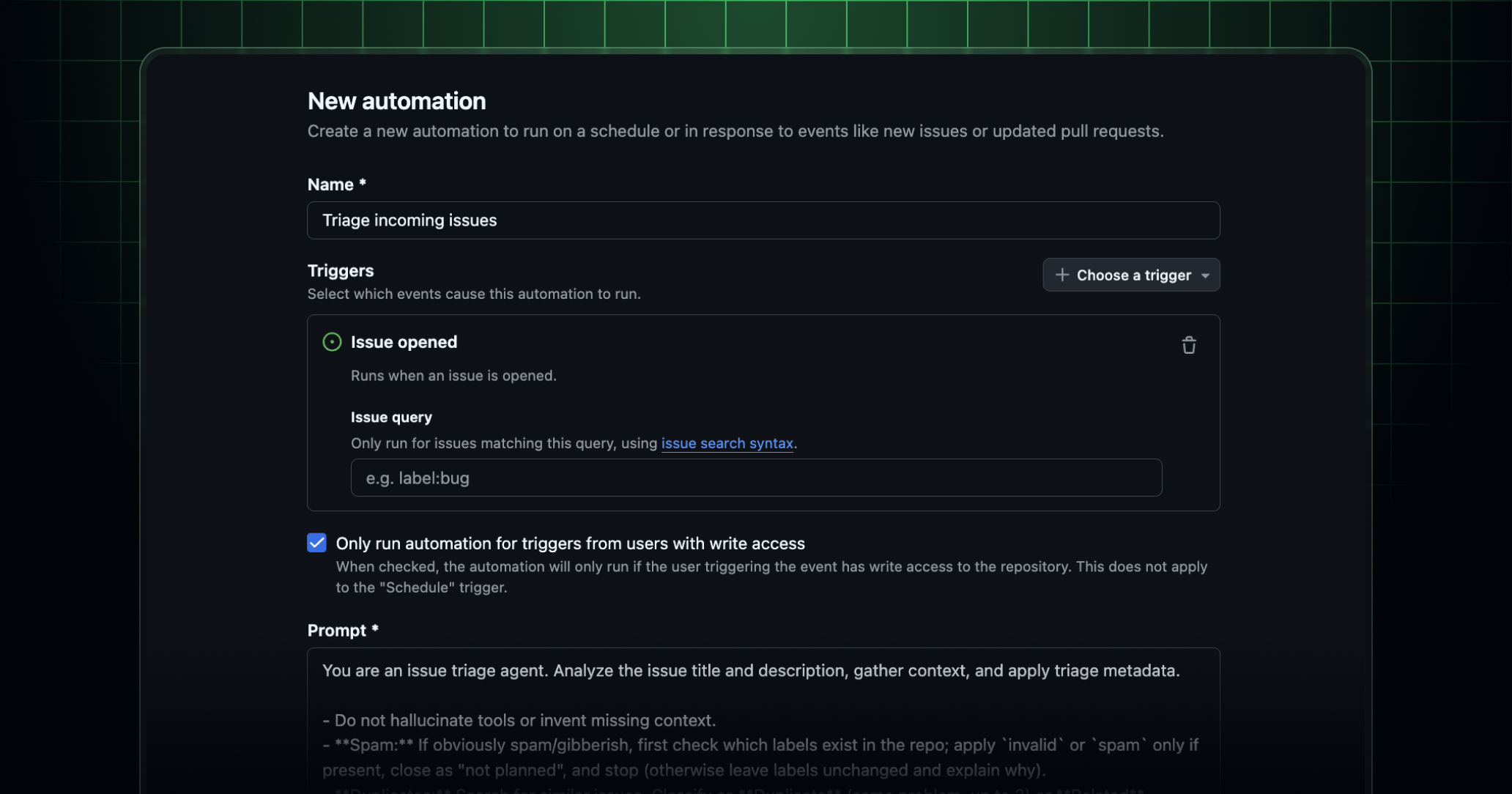
- 무슨 일: GitHub이 Copilot cloud agent
automations를 2026년 6월 2일 공개했습니다.- trigger는 hourly, daily, weekly interval과 issue, pull request event입니다.
- private/internal repository에서 먼저 지원되고 public repository 지원은 추후 제공됩니다.
- 운영 변화: Copilot은 prompt를 받을 때만 움직이는 assistant에서 repository 안의 예약 작업자가 됩니다.
- issue triage, nightly test fix, weekly release notes처럼 반복 작업을 draft PR 또는 issue update로 돌려줄 수 있습니다.
- 주의점: token usage는 automation 생성자에게 standard usage-based rates로 청구됩니다.
- Business와 Enterprise는 Copilot cloud agent policy가 켜져 있어야 하며, sandbox와 model policy를 같이 봐야 합니다.
GitHub은 2026년 6월 2일 Changelog에서 Copilot cloud agent automations를 공개했습니다. 사용자는 repository의 Agents tab 또는 GitHub Copilot app에서 automation을 만들고, prompt, trigger, tools, model을 지정합니다. agent는 설정된 시간 또는 repository event에 맞춰 실행되고, issue label을 바꾸거나 draft pull request를 열거나 release note를 작성할 수 있습니다.
이번 발표는 단일 기능 추가보다 Copilot의 제품 위치가 바뀐 사건에 가깝습니다. 기존 Copilot cloud agent는 개발자가 issue나 task를 넘겨야 움직이는 비동기 coding agent였습니다. automations는 그 호출 시점을 사람의 click에서 repository clock과 event로 옮깁니다. GitHub의 예시는 incoming issue triage, nightly failing test fix, weekly release notes입니다. 세 작업 모두 code read/write, issue update, pull request 생성 권한이 있어야 의미가 있습니다.
GitHub이 명시한 적용 범위는 좁게 시작합니다. automations는 private repository와 internal repository에서 지원되고, public repository 지원은 나중에 추가됩니다. 각 automation은 단일 repository에 scoped됩니다. agent가 여러 repository를 가로질러 임의로 움직이는 구조가 아니라, 특정 repository 안에서 정해진 prompt와 trigger, tools를 사용합니다. Business와 Enterprise 사용자는 관리자가 Copilot cloud agent policy를 켜야 합니다.
과금 문구도 기사에서 빼면 안 되는 부분입니다. GitHub은 automation 설정 항목에 model을 포함한다고 설명하면서, token usage가 automation을 만든 사용자에게 standard usage-based rates로 청구된다고 적었습니다. 하루 한 번 release note를 쓰는 작업과 매시간 failing test를 고치는 작업은 같은 "automation"이어도 token budget이 다릅니다. 2026년 6월 1일 Copilot이 AI Credits 기반 usage-based billing으로 전환된 바로 다음 날 이 기능이 나온 점도 우연으로 보기 어렵습니다.
설정에서 trigger는 interval, issue event, pull request event로 나뉩니다. 팀은 실행 빈도와 repository noise를 승인할 사람을 정해야 합니다.
tools는 pull request 생성, issue label update 같은 쓰기 권한입니다. automation 목적에 맞춰 agent 권한을 최소화해야 합니다.
model은 automation마다 선택합니다. 팀 문서에는 cost multiplier와 품질 기준을 함께 남기는 편이 낫습니다.
billing은 생성자에게 붙습니다. 퇴사자, bot 계정, shared ownership 처리를 미리 정하지 않으면 반복 작업 비용이 개인 계정에 남습니다.
이 지점에서 GitHub Actions와 비교가 자연스럽습니다. Actions는 workflow file, event, runner, permission, billing minute로 운영됩니다. Copilot automations는 YAML workflow를 직접 작성하는 대신 prompt와 tool 선택으로 agent 작업을 정의합니다. 결과물도 build artifact가 아니라 issue update와 draft pull request에 가깝습니다. 차이는 deterministic script가 아니라 model-driven agent가 실행된다는 점입니다. 같은 prompt라도 repository 상태, model, tool result, rate limit에 따라 결과가 달라질 수 있습니다.
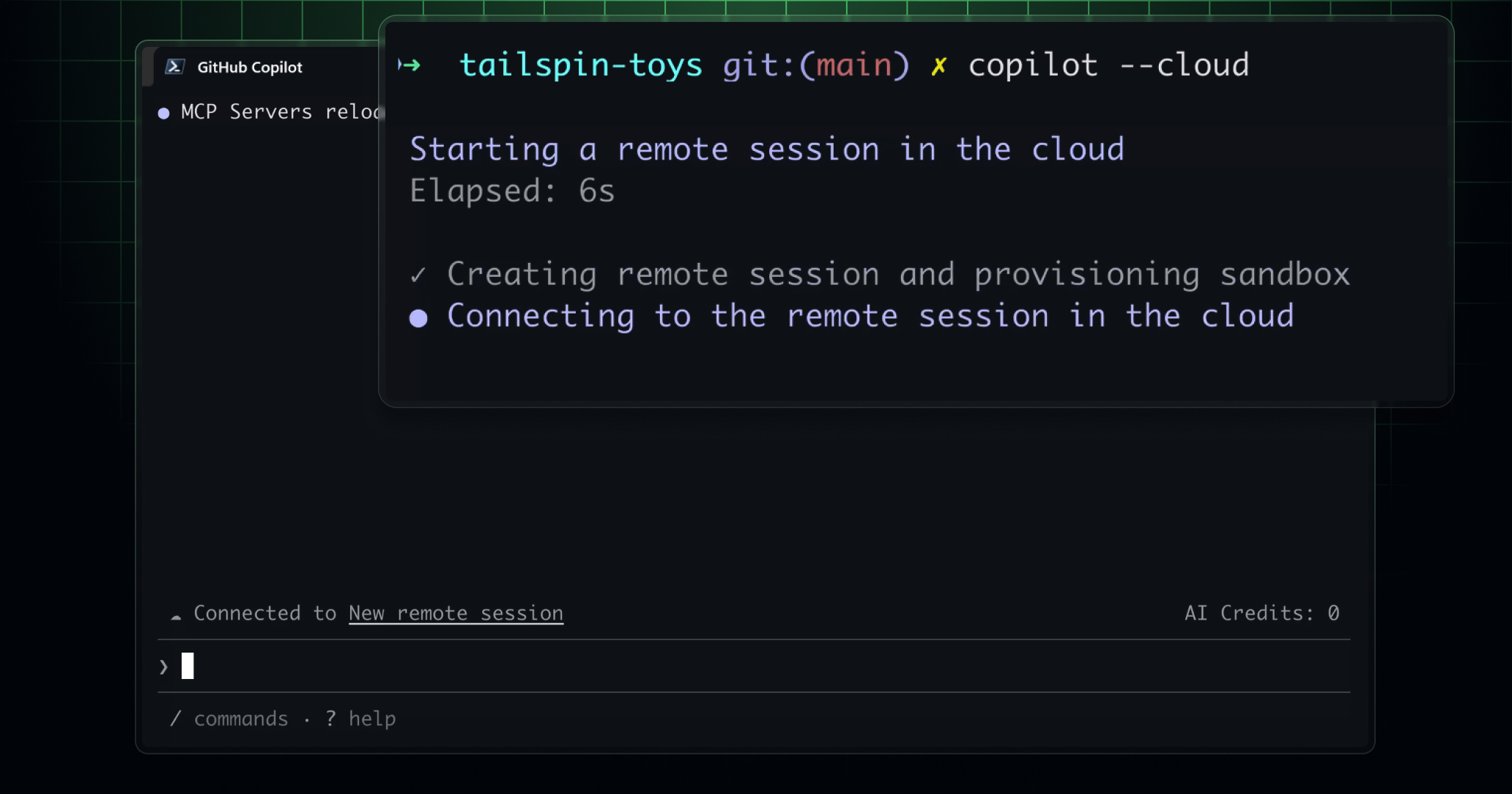
6월 2일 GitHub Changelog가 같은 날 쏟아낸 다른 발표를 보면 automations의 위치가 더 분명해집니다. sandbox 공지는 Copilot 실행 경계를 다룹니다. local session에서는 /sandbox enable로 Copilot이 시작한 shell command를 filesystem, network, system capability 제한 안에서 실행합니다. cloud session은 copilot --cloud로 GitHub이 hosted하는 ephemeral Linux sandbox를 띄웁니다.
GitHub은 local sandbox가 Microsoft MXC technology 위에 만들어졌다고 설명했습니다. 이 대목은 Microsoft Build 2026의 Windows 발표와 연결됩니다. Windows Developer Blog는 Microsoft Execution Containers가 agent-generated code를 안전하게 실행하기 위한 policy-driven boundary라고 설명했고, OpenAI와 Manus의 인용도 실었습니다. GitHub Copilot sandbox는 그 기술 방향을 Copilot CLI와 cloud agent 표면에 붙인 사례입니다.
 .
.
automation이 repository event로 실행되면 sandbox는 선택 기능이 아니라 운영 질문이 됩니다. nightly failing test fix가 shell command를 실행하고, dependency를 설치하고, test log를 읽고, patch를 만들면 agent가 실제로 무엇을 만질 수 있는지 정해야 합니다. GitHub의 local sandbox는 표준 Copilot seat에 포함됩니다. cloud sandbox는 별도 pricing 문서 확인이 필요하고, 기존 Copilot cloud agent policy를 상속한다고 발표됐습니다.
모델 선택도 같은 날 바뀌었습니다. GitHub은 MAI-Code-1-Flash를 GitHub Copilot에 rollout한다고 밝혔습니다. 이 모델은 Microsoft의 small-tier coding model이며, VS Code의 model picker에서 먼저 제한 사용자에게 제공됩니다. Copilot Free, Pro, Pro+, Max plan이 초기 대상입니다. GitHub은 이 모델을 Copilot에 맞춰 설계하고 조정한 Microsoft의 purpose-built coding model wave 첫 사례라고 표현했습니다.
또 다른 model update는 Google 쪽입니다. Gemini 3.1 Pro Preview와 Gemini 3.5 Flash가 Copilot CLI, Copilot cloud agent, GitHub Copilot app technical preview, Copilot SDK에서 사용 가능해졌습니다. Business와 Enterprise 관리자는 관련 Gemini model policy를 켜야 사용자가 볼 수 있습니다. 같은 Copilot automation이라도 선택 모델이 MAI, Gemini, OpenAI, Anthropic 계열 중 어디인지에 따라 비용, latency, coding style, 검증 방식이 달라집니다.
Copilot SDK GA도 이 묶음에서 따로 봐야 합니다. GitHub은 6월 2일 Copilot SDK generally available을 공지했습니다. SDK는 개발자가 자신의 TypeScript application에 Copilot-like agent experience를 넣는 길을 제공합니다. 즉 GitHub은 repository 안의 cloud agent뿐 아니라 외부 제품 표면으로 Copilot agent를 확장하는 API도 같이 밀고 있습니다.
Microsoft Foundry의 Build 2026 정리도 같은 방향을 말합니다. Foundry blog는 hosted agents가 2026년 7월 초 GA 예정이고, sandboxed sessions, state, filesystem access, framework flexibility를 제공한다고 적었습니다. Toolboxes는 public preview로 MCP clients, skills, enterprise data를 하나의 governed endpoint로 묶습니다. Memory in Foundry Agent Service는 procedural, user, session memory를 public preview로 확장했습니다. GitHub Copilot automations는 이 엔터프라이즈 agent stack의 개발자 repository 버전으로 읽을 수 있습니다.
개발팀 입장에서 첫 번째 점검 항목은 "누가 automation을 소유하는가"입니다. GitHub은 token usage가 automation 생성자에게 청구된다고 했습니다. 개인 계정으로 만든 automation이 팀의 nightly fix를 돌리면 비용과 권한, 퇴사자 처리 문제가 생깁니다. Business와 Enterprise는 policy를 통해 cloud agent 사용을 열고 닫을 수 있지만, automation별 owner와 prompt 변경 기록을 어디서 관리할지는 팀 운영 규칙이 필요합니다.
두 번째 점검 항목은 trigger입니다. issue가 만들어질 때마다 label을 붙이는 automation은 비교적 낮은 위험입니다. pull request update 때마다 patch를 제안하거나, 매시간 failing test를 고치려는 automation은 repository churn을 만들 수 있습니다. draft pull request가 많아지면 reviewer load가 늘고, AI Credits 사용량도 반복적으로 누적됩니다. GitHub이 예시로 든 nightly fix는 유용하지만, test가 flaky한 repository에서는 agent가 같은 실패를 매일 다른 patch로 시도할 수 있습니다.
세 번째 점검 항목은 tool scope입니다. GitHub은 automation 생성 화면에서 "create pull request"나 "update issue labels" 같은 tools를 설정한다고 설명했습니다. 이 선택은 prompt보다 강한 guardrail입니다. release note draft만 맡길 automation이 issue label update와 PR 생성까지 갖고 있으면 권한이 넓습니다. 반대로 failing test fix automation에 pull request 생성 권한이 없으면 결과를 사람이 옮겨야 합니다.
네 번째 점검 항목은 audit trail입니다. GitHub 발표는 automation이 단일 repository에 scoped된다고 설명하지만, agent가 어떤 prompt와 model로 실행됐는지, 어떤 tools를 사용했는지, 어떤 diff를 남겼는지는 운영자가 나중에 재구성할 수 있어야 합니다. incident review에서는 "누가 버튼을 눌렀는가"보다 "어떤 trigger가 agent를 깨웠고 어떤 policy가 적용됐는가"가 더 중요해집니다. Copilot cloud agent policy, automation owner, draft PR metadata를 같은 runbook에서 다루는 이유입니다.
다섯 번째 점검 항목은 human review입니다. GitHub 발표의 예시는 draft pull request를 엽니다. draft 상태는 agent 작업을 merge-ready code로 착각하지 않게 하는 최소 장치입니다. dependency patch, auth flow, payment code, security fix처럼 실패 비용이 큰 변경은 agent가 만든 diff를 conventional PR review와 test gate로 통과시켜야 합니다. automation prompt에 "open a draft pull request"를 넣는 것만으로 review 기준이 생기지는 않습니다.
커뮤니티 반응은 기능 자체보다 비용 전환 쪽에 먼저 붙었습니다. 6월 1일 Copilot usage-based billing 전환 뒤 Reddit의 Copilot 관련 게시판에는 AI Credits 소진과 bill increase를 걱정하는 글이 올라왔습니다. 이 글들은 사용자 보고라서 수치의 대표성을 확인하기 어렵습니다. 다만 GitHub 공식 발표만 놓고 봐도 automation은 반복 실행 feature이고, 반복 실행은 token usage를 자동으로 발생시킵니다. 비용 걱정은 제품 구조에서 나오는 질문입니다.
이 기능이 OpenAI Codex나 Claude Code와 다른 점은 GitHub repository object에 붙는 정도입니다. Codex와 Claude Code는 local workspace, terminal, cloud task, issue assignment 등 여러 표면에서 움직입니다. Copilot automations는 GitHub repository의 event와 issue, pull request를 직접 trigger와 output으로 씁니다. GitHub을 개발 운영의 source of truth로 쓰는 팀에게는 adoption friction이 낮습니다. 동시에 GitHub permission과 billing, audit log를 더 촘촘히 봐야 합니다.
모델 이름만 보면 MAI-Code-1-Flash 발표가 더 눈에 띌 수 있습니다. 그러나 6월 2일의 실제 운영 변화는 예약 가능한 agent, sandbox, model policy, SDK GA가 동시에 나온 데 있습니다. 작은 coding model은 Copilot의 unit cost와 latency를 낮출 수 있습니다. Gemini 추가는 vendor choice를 넓힙니다. sandbox는 실행 경계를 줍니다. automations는 이 셋을 repository clock에 연결합니다.
바로 적용하려는 팀은 네 가지 문서를 먼저 만드는 편이 낫습니다. 첫째, automation inventory입니다. repository별 automation name, owner, trigger, prompt, tools, model을 기록합니다. 둘째, cost budget입니다. hourly trigger와 daily trigger의 예상 AI Credits를 분리합니다. 셋째, sandbox policy입니다. local execution과 cloud execution의 network/file access를 나눕니다. 넷째, review rule입니다. agent가 연 draft PR을 누가, 언제, 어떤 test로 닫을지 정합니다.
GitHub Copilot은 2026년 6월 2일에 "코드를 제안하는 assistant"에서 "repository event를 기다리는 cloud worker"로 한 발 더 이동했습니다. 이 변화는 개발자가 편한 기능을 하나 더 얻었다는 이야기로 끝나지 않습니다. Copilot automation은 prompt, trigger, model, tools, billing owner를 가진 운영 단위입니다. repository마다 이 다섯 항목을 관리하지 않으면, AI agent는 생산성 도구가 아니라 조용히 PR과 비용을 만드는 background process가 됩니다.